How to Loop in JavaScript: A Practical Guide
Master loops in JavaScript with practical guidance on for, while, for...of, and array methods. This tutorial helps you choose the right pattern, write clean loops, and optimize performance.


This guide explains how to loop in javascript efficiently, covering classic for and while structures, plus modern for...of and array methods like map and reduce. You’ll learn to count, search, and transform data, and how to pick the right loop for each task. Expect practical code examples and tips to avoid common pitfalls.
Why loops matter in JavaScript
In programming, loops are the bread-and-butter for processing collections, generating sequences, and repeatedly applying logic. If you're exploring how to loop in javascript, you’ll quickly discover that loops let you apply the same operation to many values without duplicating code. In JavaScript, loops power everything from rendering lists in the DOM to transforming arrays, validating inputs, and implementing simple state machines. A solid grasp of loops also helps you write more readable, maintainable code because you can express intent with concise patterns rather than ad-hoc repetition. JavaScript’s versatility means you’ll pick different looping styles across tasks, from simple counts to complex data pipelines. The JavaScripting team notes that choosing the right loop pattern is often more important than micro-optimizations, especially early on. For beginners, start with a clear goal, then map that goal to a looping construct.
Core looping constructs: for, while, do...while
JavaScript provides several looping primitives, each with a distinct use case. The classic for loop is ideal for counting or iterating with an index. The while loop runs as long as a condition holds, and do...while guarantees at least one execution. Combining these patterns lets you handle numeric sequences, conditional runs, and repeated processing with clarity. Here are quick templates you can adapt:
// basic counting with for
for (let i = 0; i < 10; i++) {
  console.log(i)
}

// condition-based loop with while
let n = 0
while (n < 5) {
  console.log(n)
  n++
}

// do...while executes at least once
let m = 0
do {
  console.log(m)
  m++
} while (m < 3)
In practice, choose for when you know the number of iterations; choose while when you only know a condition; and choose do...while when you must run the body at least once. The JavaScripting team recommends starting with for loops for simple counters, then expanding to while or do...while as logic grows.
Iterating over arrays with forEach, map, filter
Arrays are a central data structure in JS, and loops are often used to traverse them. While a classic for loop works, modern array methods offer cleaner and more expressive options. forEach runs a function for each element, map creates a new array by transforming elements, and filter returns a subset. When mapping, prefer immutability; avoid mutating the original array inside those callbacks. This approach aligns with functional programming patterns popular in modern JavaScript development.
const nums = [1, 2, 3, 4]
nums.forEach(n => console.log(n)) // side effects only
const doubled = nums.map(n => n * 2) // [2,4,6,8]
const evens = nums.filter(n => n % 2 === 0) // [2,4]
For readability and maintainability, use map/filter when you want to produce new data, and reserve forEach for side-effect operations like logging or updating external state.
Break, continue, and control flow
Sometimes you need to exit a loop early or skip certain iterations. The break statement stops the loop completely, while continue jumps to the next iteration. These controls help you handle special cases without nesting additional conditionals, keeping logic flatter and easier to follow. Use break to stop processing once a condition is met, and use continue to skip over items that don’t meet criteria without exiting the loop entirely.
const data = [0, 1, 2, -1, 3]
for (const x of data) {
  if (x < 0) continue // skip negatives
  if (x > 2) break // stop after a threshold
  console.log(x)
}
Be mindful of where you place break/continue to avoid confusing or subtle bugs, especially in nested loops.
Common patterns: counting, searching, transforming data
Loops often serve three core patterns: counting occurrences, searching for a value, and transforming input into a new structure. Start with a clear end condition for counting, decide whether you need the index, and choose between a traditional loop or a declarative approach using array methods. For example, counting how many items meet a criterion, finding the first match, and producing a transformed array all map naturally to for loops, for...of, or map with a predicate. As you practice, you’ll recognize when a short one-liner suffices and when a loop makes code clearer.
// count how many numbers are >= 5
let count = 0
for (const n of [3,5,8,2,5]) {
  if (n >= 5) count++
}
// search for first match
function findFirst(arr, pred){
  for (let i = 0; i < arr.length; i++) {
    if (pred(arr[i])) return arr[i]
  }
  return undefined
}
// transform an array
const people = [{name:'Ada', age:23}, {name:'Lin', age:28}]
const names = people.map(p => p.name)
This section emphasizes readability and maintainability as you grow more comfortable with loops.
Performance considerations and best practices
Loops are fast enough for most tasks, but patterns matter for performance and readability. Avoid deeply nested loops on very large datasets; consider breaking data into chunks or using more targeted algorithms. When possible, prefer array methods that express intent clearly and can be more easily optimized by engines. Profile critical paths in real apps to identify bottlenecks, and cache repetitive property lookups outside the loop to reduce work per iteration. Finally, document intent: a well-chosen loop should tell a story about what it does at a glance.
// simple performance tip: cache length
for (let i = 0, len = arr.length; i < len; i++) {
  // use arr[i]
}
In most cases, readability wins; optimize later only after measuring actual slow paths.
Debugging loops: tips and pitfalls
Bugs in loops are notoriously tricky. Start by logging entry, exit, and key state changes. Watch out for off-by-one errors, which are common in classic for loops, and ensure termination conditions will indeed end. Infinite loops are particularly dangerous in browsers or servers; guard against them with explicit limits or break conditions. When debugging asynchronous logic inside loops, you’ll often need to convert to async/await patterns to avoid callback hell and ensure sequential execution.
for (let i = 0; i < arr.length; i++) {
  console.log('index', i, 'value', arr[i])
  if (arr[i] === target) console.log('found at', i)
}
A practical debugging approach is to isolate the loop logic in a small function and unit test it with various inputs before integrating into larger flows.
Real-world examples: loop scenarios
Loops appear in countless real-world tasks: rendering lists in the DOM, aggregating data, or validating inputs. A common scenario is transforming user data: collecting valid entries, normalizing formats, and producing a report. Start with a simple example, then generalize to more complex pipelines. Consider how loop choices affect error handling, performance, and maintainability. Real-world projects benefit from combining loops with modern JavaScript features like destructuring and optional chaining, which reduce boilerplate and simplify logic.
// example: build a summary report from transactions
const transactions = [ { amount: 50 }, { amount: -15 }, { amount: 120 } ]
let total = 0
for (const t of transactions) {
  if (t.amount > 0) total += t.amount
}
console.log('Total positive amount:', total)
This practical pattern demonstrates counting, filtering, and aggregation in a single loop.
Modern loop utilities: for...of with async, and generators
Asynchronous data and lazy sequences require newer patterns. Use for...of with async functions inside an async context, or for await...of when iterating over asynchronous iterables. Generators offer lazy evaluation and can produce sequences on demand, reducing memory usage for large datasets. These techniques complement traditional loops and enable advanced data pipelines while keeping code readable.
async function fetchAll(urls) {
  for (const url of urls) {
    const res = await fetch(url)
    const data = await res.json()
    console.log(data)
  }
}
Adopt these tools when dealing with IO-bound tasks or streaming data, but avoid premature complexity; start with straightforward loops and add as-needed.
Conclusion and next steps: choosing the right loop for your project
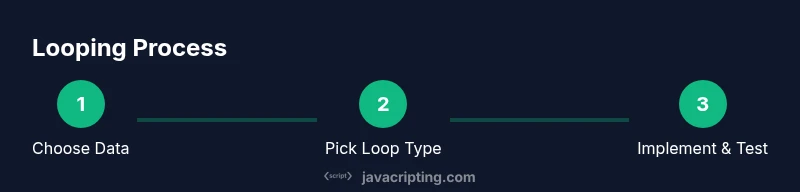
Choosing the right loop is less about one-size-fits-all performance and more about expressing intent clearly. Start with a simple for loop for known counts, switch to for...of when iteration order matters and you don’t need an index, and use map/filter/reduce for declarative transformations. Practice with diverse datasets, and gradually incorporate async patterns as your apps require asynchronous data flows. With deliberate choices, you’ll write loops that are easy to read, test, and optimize.
Tools & Materials
- Development workstation(A computer with a modern OS and internet access)
- Code editor(Examples: VS Code, Sublime Text)
- Modern browser(Chrome/Firefox/Edge for testing)
- Node.js (optional)(Run JS outside the browser when needed)
- Sample data array(An array of numbers or strings to iterate)
- Console or terminal(Used for quick feedback and debugging)
Steps
Estimated time: 25-40 minutes
- 1
Define the data and goal
Identify the dataset you will loop over and state a clear objective for the loop (count, transform, or search). This helps you pick the right loop construct from the start.
Tip: Write a short sentence describing the loop's purpose before coding. - 2
Choose the appropriate loop
Decide between for, while, or for...of based on whether you need an index, a condition-only, or clean element access.
Tip: Prefer known iteration counts with for; opt for for...of when you don’t need the index. - 3
Write a basic loop
Implement a minimal version to verify iteration works as expected. Keep the body small and focused on the primary task.
Tip: Use console.log to inspect values during initial development. - 4
Leverage array methods
When transforming arrays, replace imperative loops with map, filter, or reduce for readability and potential optimizations.
Tip: Aim for declarative code first; fall back to loops for performance-critical paths. - 5
Test edge cases
Test with empty arrays, large datasets, and data with missing fields to ensure robust behavior.
Tip: Add unit tests or small test scripts to reproduce edge cases. - 6
Refactor into helpers
Extract loop logic into reusable functions to improve maintainability and enable unit testing.
Tip: Document the function’s contract and expected inputs/outputs.
Questions & Answers
What is a loop in JavaScript?
A loop repeats a block of code while a condition holds true. JavaScript supports several looping constructs—for, while, do...while, and for...of—that let you traverse data, count items, or apply transformations.
A loop repeats code while a condition is true, using for, while, or for...of structures.
When should I use for vs while?
Use for when you know the exact number of iterations or want to manage an index. Use while when you should continue looping based on a condition not tied to a counter.
Use for with a known count, or when you need an index; use while for condition-driven loops.
How can I exit a loop early?
Use break to exit the loop immediately. Use continue to skip to the next iteration without exiting the loop entirely.
Break stops the loop; continue skips the current item and moves on.
Is for...of better than for...in for arrays?
for...of iterates values of an iterable, which is usually what you want with arrays. for...in iterates keys and can lead to unexpected results with arrays.
For arrays, prefer for...of; for...in is usually meant for objects.
Can I loop asynchronously in JavaScript?
Yes, use async/await inside a for...of loop within an async function, or use for await...of for asynchronous iterables. This ensures sequential execution when needed.
Yes, use async/await in a loop when you need sequential async operations.
Are there performance concerns when looping over large arrays?
Loops are typically fast, but avoid heavy work inside every iteration and keep the loop body lean. For huge datasets, consider streaming strategies or batching.
Performance is usually fine, but keep inner work light and batch if data is huge.
Watch Video
What to Remember
- Start with simple loops first
- Use array methods for clarity and safety
- Test edge cases and boundary conditions
- Refactor repeatable patterns into helpers