Is It Okay to Learn JavaScript First? A Practical Guide
Explore whether starting with JavaScript is a smart move for beginners. Practical roadmap, pitfalls to avoid, and a balanced plan from the JavaScripting team.


Yes. It’s perfectly fine to start your programming journey with JavaScript, especially if you want to build interactive web experiences quickly. JavaScript sits at the center of frontend development and has broad applicability on the backend as well. Pair your JS study with HTML/CSS fundamentals and progressively tackle core concepts like variables, functions, and the DOM to build a solid foundation.
Is it okay to learn JavaScript first?
Starting with JavaScript is a practical choice for many beginners who aim to work on frontend projects or full-stack roles. The language runs directly in the browser, so you get instant visual feedback from simple experiments, which helps reinforce concepts faster than drilling abstract theory. According to JavaScripting, a focused entry into JavaScript can reduce cognitive friction by letting you see the outcomes of your code immediately. That said, the best learning path often blends JS with HTML and CSS basics so you understand structure, semantics, and styling as you code. This integrated approach helps you move from writing small snippets to building real, user-facing features with confidence.
Early exposure to JavaScript also builds a mindset for problem-solving. You learn to think in terms of events, user interactions, and asynchronous flows—core patterns that recur across many modern web apps. The important part is to balance practice with fundamentals and to avoid rushing toward frameworks before you’ve grasped the basics.
Why JavaScript is a good starting language for beginners
JavaScript is ubiquitous in the web ecosystem, which makes it an excellent first language for several reasons. It runs in every major browser without special setup, so learners can experiment immediately. This instant feedback loop accelerates understanding of concepts like variables, data types, operators, and control flow. JavaScripting Analysis, 2026 notes that beginners who start with JS tend to gain confidence in debugging and problem-solving because they can observe the effects of their code directly in the browser console and DOM. Additionally, learning JS opens doors to server-side development with Node.js, enabling learners to build full-stack apps using a single language. As you progress, you’ll encounter JavaScript’s asynchronous nature (callbacks, promises, async/await), which trains you to handle real-world delays and user interactions gracefully.
What to learn first: core concepts and prerequisites
Before diving into extensive projects, focus on a core set of concepts that underpin almost every JS program:
- Syntax and basic data types (numbers, strings, booleans, null/undefined)
- Variables with let, const, and var (and why scope matters)
- Basic operators and control structures (if/else, switch, loops)
- Functions (declaration, expression, arrow functions) and scope rules
- Arrays and objects (manipulation, methods, iteration)
- The Document Object Model (DOM) basics: selecting elements, reading/writing content, handling events
- Simple debugging techniques using console.log and browser DevTools
- Introduction to asynchronous patterns (callbacks, thenables, promises)
By anchoring your learning around these topics, you’ll be prepared to tackle interactive features and gradually add complexity with confidence.
Building a practical roadmap: a step-by-step path
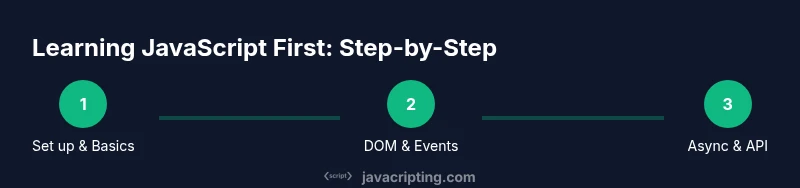
A structured plan helps transform curiosity into competence. A practical 6–9 week roadmap could look like this:
- Week 1–2: Set up your environment (editor, browser, Node.js) and learn syntax basics. Practice small scripts that log outputs and manipulate strings and numbers.
- Week 3–4: Dive into functions, scopes, arrays, and objects. Start solving small challenges like building a calculator logic or a simple to-do list manager in the console.
- Week 5–6: Explore the DOM, events, and basic interactivity. Create a weather widget or a live clock that updates without refreshing the page.
- Week 7–8: Introduce asynchronous concepts with promises and fetch. Build a tiny app that consumes a public API and displays results.
- Week 9: Review, refactor, and plan next steps (learning a framework, exploring TypeScript, or digging deeper into debugging).
Tools like Node.js and npm will help you run JavaScript outside the browser and manage tiny projects. Throughout, keep a habit tracker for daily coding and reflect on mistakes to accelerate growth. The JavaScripting team recommends pairing learning with small, real-world tasks to reinforce memory and build momentum.
Common pitfalls and how to avoid them
Many beginners stumble because they try to jump into complex frameworks before solidifying fundamentals. Others rely solely on tutorials without practicing real problems, which slows retention. Common issues include:
- Skipping HTML/CSS basics and assuming JS alone explains UI behavior
- Overusing global variables and not understanding scope
- Not using browser DevTools effectively for debugging
- Failing to break problems into smaller tasks or write modular code
- Neglecting error handling and input validation
To avoid these pitfalls, keep the initial scope small, write testable code, and gradually introduce new concepts as you master the prior ones. Daily practice isn’t about long sessions; it’s about consistent, focused work that builds a reliable foundation.
When to branch out: frameworks, TypeScript, and backend JS
Frameworks like React, Vue, or Angular are powerful, but they can overwhelm beginners if introduced too early. Once you’re comfortable with vanilla JavaScript and DOM manipulation, you’ll have a stronger intuition for why frameworks exist and how they solve common problems. TypeScript adds types that help catch mistakes early; consider learning TypeScript after you’re confident with JavaScript fundamentals. On the backend, Node.js expands possibilities, letting you build APIs and server-side logic with the same language you’ve been practicing in the browser. The path isn’t linear, but a solid JS foundation makes every next step smoother.
Staying motivated: practice habits that stick
Consistency trumps intensity. Short daily sessions (20–30 minutes) with a clear goal outperform occasional marathon coding. Mix guided exercises, small projects, and reading. Track progress with a simple journal and celebrate small wins. Pair programming or code reviews with peers can also improve understanding and accountability. Remember that learning is iterative: you’ll revisit topics with deeper understanding as you advance.
Real-world starting project ideas
- Interactive to-do list with add/remove items and local state storage
- A weather widget that fetches data from a public API and updates UI
- A responsive quiz app with scoring and feedback
Start with one project, then iterate. Each project reinforces DOM manipulation, event handling, and asynchronous flows while giving you something tangible to show potential employers or collaborators.
Resources and ongoing learning
Leverage authoritative references to solidify concepts:
- MDN Web Docs: JavaScript basics, DOM, and Web APIs
- JavaScript.info: In-depth explanations and exercises
- Eloquent JavaScript (book): Readable explanations with practical examples
For continued growth, follow curated learning paths and practice with small challenges daily. The combination of theoretical knowledge and hands-on coding is the fastest route from beginner to proficient.
Tools & Materials
- Code editor (e.g., Visual Studio Code)(Install latest stable version; includes integrated terminal and useful JS extensions)
- Web browser (Chrome/Edge/Firefox)(Keep DevTools open for debugging and DOM inspection)
- Node.js (LTS) and npm(Needed for local runtime and package management)
- MDN Web Docs and JavaScript.info access(Reference materials for syntax and APIs)
- Project starter templates (optional)(Begin with a small repo to keep code organized)
Steps
Estimated time: 6-9 weeks
- 1
Set up your development environment
Install a modern code editor, ensure a browser is available, and install Node.js. Verify installations by running simple commands in the terminal and a quick script in the browser console.
Tip: Use a single project folder to keep files organized and use version control early. - 2
Learn the core syntax and basic data types
Practice declaring variables with let/const, using data types, and writing simple expressions. Create tiny scripts to perform arithmetic, string manipulation, and array operations.
Tip: Write small notes about each concept and refer back when you’re unsure. - 3
Build functions and control flow
Implement functions (including arrow functions), explore parameters/return values, and experiment with if/else, switch, and loops. Start with pure functions and move toward side effects.
Tip: Aim for clear, testable functions with a single responsibility. - 4
Explore the DOM and events
Create a simple page, select elements, and respond to events like clicks and keyboard input. Update the UI in response to events to see the immediate impact of code changes.
Tip: Use console logs to verify element references and event payloads. - 5
Introduce asynchronous concepts
Learn about callbacks, promises, and async/await. Build a small fetch example to understand latency and error handling in real-world scenarios.
Tip: Handle rejections gracefully with try/catch in async functions. - 6
Create a small end-to-end project
Combine DOM manipulation, event handling, and a fetch request to build a tiny app (e.g., a weather widget or to-do app) that runs in the browser.
Tip: Keep the project scope small to ensure a clean, functional result.
Questions & Answers
Is it better to learn HTML and CSS before JavaScript?
HTML and CSS provide the structure and presentation that make JavaScript meaningful on the web. Learning them early helps you see how UI changes relate to code, which reduces confusion when you start manipulating the DOM with JS.
Yes. HTML and CSS form the foundation for how JavaScript interacts with a page, so learning them alongside JS is recommended.
Can I learn JavaScript first if I want to work on frontend development?
Starting with JavaScript is a solid approach for frontend work. It gives you a direct path to building interactive features and understanding browser behavior. You’ll still want to cover HTML/CSS and later, consider frameworks as a next step.
Absolutely. JavaScript is central to frontend work, and you can pair it with HTML/CSS as you learn.
Should I learn TypeScript before JavaScript?
TypeScript adds types that help catch errors early, but it’s best approached after you’re comfortable with core JavaScript concepts. Start with JS fundamentals, then gradually introduce TypeScript.
TypeScript is valuable, but it’s usually best learned after you’re solid with JavaScript basics.
What if I already know another programming language?
Your existing programming knowledge will speed up learning concepts like control flow and functions. Focus on JavaScript-specific details such as the DOM, browser APIs, and asynchronous patterns to apply your skills to web development.
If you know another language, you’ll pick up JS faster, especially around concepts like functions and loops, but don’t skip the browser-specific parts.
Are frameworks necessary to learn first?
Frameworks are important, but they aren’t required initially. They come after you understand vanilla JavaScript basics and DOM interactions. A strong JS foundation makes framework learning smoother.
Frameworks are useful, but you don’t need them at the start. Learn vanilla JS first.
How can I stay motivated while learning JS?
Set small, achievable goals, work on real projects, and track progress. Pair programming or code reviews can boost accountability. Regular practice beats long, sporadic sessions.
Keep goals small and consistent, and work on real projects to stay motivated.
Watch Video
What to Remember
- Start with JavaScript first if you want fast, visual feedback.
- Build a solid foundation in HTML/CSS alongside JS basics.
- Practice daily with small, concrete projects.
- Gradually introduce asynchronous patterns and DOM manipulation.
- Plan a roadmap that scales from fundamentals to real-world apps.