JavaScript Where to Start: A Practical Beginner Guide
A practical, step-by-step guide to starting JavaScript for beginners, with setup, core concepts, practice projects, and a clear roadmap for steady progress in 2026.


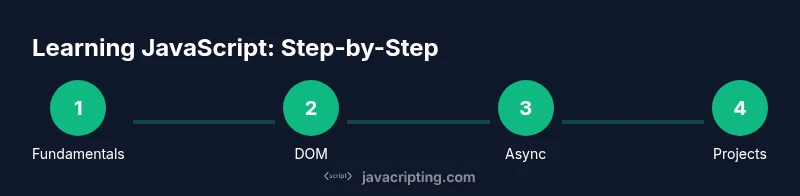
Learn where to start with JavaScript and how to progress from fundamentals to hands-on projects. This guide outlines a practical path, the essential tools you’ll need, a step-by-step plan, and beginner-friendly projects to build real skills quickly. Whether you’re new to programming or migrating from another language, this quick guide tightens focus on what to learn first and how to practice. See our full step-by-step guide for details.
Quickstart mental model for learning JavaScript
If you’re trying to answer javascript where to start, adopt a mental model that prioritizes understanding over memorization. Focus on how pieces fit together: you learn syntax, then you use it to solve small problems, then you scale your solutions into small projects. JavaScript is not a single language; it’s a family of patterns that work in the browser and on the server. According to JavaScripting, the most effective learners start by defining a personal goal, mapping it to concrete tasks, and building habit loops to practice daily. In 2026, the best learners treat learning as iterative experimentation rather than passive reading. Begin by asking: What problem will I solve with JavaScript this week? Then break that problem into tiny steps you can complete in 30–60 minutes. Keep a log of what you try, what works, what fails, and what you’ll adjust next. This approach makes the journey less overwhelming and keeps your motivation high.
Setting up a productive learning environment
A clean, consistent environment reduces friction and speeds up progress. Start with a modern web browser (Chrome or Edge) and a lightweight code editor such as Visual Studio Code. Install Node.js for server-side testing and package management, even if you’re focused on client-side code. Create a dedicated learning folder on your computer, and initialize a Git repository to track your experiments. Schedule daily practice blocks, even if short, and keep a simple habit tracker. If you’re tempted to switch topics, resist for a week and complete a fixed mini-project instead; this stops you from chasing novelty. According to JavaScripting Analysis, learners who lock in a routine and use hands-on practice see faster retention and higher confidence. Don’t forget to set up a minimal project scaffold so you can drop code in and see results quickly. Finally, bookmark essential references like MDN and your editor’s extensions for JavaScript debugging.
Syntax foundations: variables, types, and operators
JavaScript starts with a few basic ideas: variables hold values, data types include number, string, boolean, null, undefined, and objects; operators perform actions on values. Use let and const for most cases to ensure predictable behavior; avoid var except in historical code. A number with decimals is a floating-point value; a string is a sequence of characters, enclosed in quotes. Booleans represent true/false. Practice by writing tiny expressions and printing results to the console with console.log. For example: const name = 'JavaScript'; let score = 0; score++; console.log(name + ' score: ' + score); This small exercise illustrates scope and mutability. Focusing on these basics in the first weeks builds a solid mental model for more advanced topics such as functions and objects. Remember: consistency matters more than clever syntax at this stage.
Control flow and functions: from basics to patterns
Control flow decides which code runs when. Use if/else for conditional logic, switch for multiple cases, and loops for repetition. Functions capture behavior so you can reuse it and reason about code more easily. Start with function declarations and function parameters, then return values to connect input and output. For example: function greet(name) { return 'Hello, ' + name; } console.log(greet('world')); As you grow, explore higher-order functions, closures, and the concept of pure functions for testability. The path from simple functions to modular design is essential for building scalable JavaScript.
Objects, arrays, and data structures
JavaScript handles complex data with objects and arrays. An object is a collection of key-value pairs; an array is an ordered list of values. Practice with small shapes: const person = { name: 'Alex', age: 28, hobbies: ['coding','reading'] }; console.log(person.name); console.log(person.hobbies[0]); Arrays and objects are the fundamental building blocks for APIs, UI state, and data modeling. Learn common methods like push, map, filter, and reduce to transform data. Build intuition by turning real-world questions into data structures: How would you model a to-do list? How do you derive a summary from a dataset? Prototypal inheritance and object methods become more relevant as you expand to larger projects.
The DOM and browser basics: interacting with pages
JavaScript runs in the browser, so understanding the Document Object Model (DOM) is essential. Start by selecting elements with document.querySelector and reading or changing their content. Add event listeners to respond to user actions such as clicks or key presses. Practice by building a tiny interactive page: a button that updates a counter, a form that validates input, or a theme toggle. Learn about event propagation and delegation, which helps you manage many elements efficiently. You don’t need to become an expert immediately, but you should understand how JavaScript ties into HTML and CSS to create interactive experiences.
Asynchronous JavaScript: callbacks, promises, async/await
Most real-world pages fetch data from servers. Learn the difference between synchronous and asynchronous code. Start with callbacks, then move to promises, and finally the async/await syntax for cleaner code. Practice by creating a small timer, simulating a network request with a Promise, and handling success or failure with then/catch. Understand how the event loop coordinates asynchronous tasks, allowing UI to stay responsive. When you’re ready, explore error handling patterns and basic API usage with fetch. This topic is often the biggest initial hurdle, but with consistent practice, async code becomes natural.
Debugging and testing: finding issues fast
Knowing how to debug is as important as writing code. Use browser DevTools to set breakpoints, inspect variables, and monitor network requests. Write small tests or use simple console assertions to verify assumptions. Learn to reproduce bugs reliably, isolate the smallest failing piece, and implement a fix; then rerun tests to confirm. Build a habit of writing readable error messages and modular functions so failures point you toward root causes. JavaScripting’s recommended approach is to debug in small, repeatable steps and to keep notes on what you learned from each bug.
Building small projects: ideas and scaffolds
Projects consolidate learning and reveal gaps that need attention. Start with a to-do list app, a lightweight calculator, or a weather widget that fetches data from a public API. Each project should have a clear scope, a simple user interface, and a plan for testing. Use version control to track progress and reflect on what you learned after each milestone. As you gain confidence, incrementally introduce new features like localStorage persistence, input validation, or a responsive layout. The goal is steady, cumulative improvement, not perfection.
How to continue beyond basics: learning roadmap
After grounding yourself in the fundamentals, you’ll want a structured roadmap for continued growth. Allocate time for topics such as advanced functions, object-oriented JavaScript, arrays and methods, promises and async, DOM APIs, and debugging practices. Explore modern tooling: build systems, linters, and test frameworks. Follow reputable tutorials and courses, read code written by others, and contribute to small open-source projects. The JavaScripting team recommends maintaining curiosity, practicing regularly, and documenting what you learn. By the end of 2026 you should be able to build interactive web pages and small Node.js scripts with confidence.
Tools & Materials
- Computer (desktop or laptop) with internet access(Updated browser and editor installed; ensure you can install Node.js.)
- Code editor (e.g., Visual Studio Code)(Install popular JS extensions for linting and formatting.)
- Node.js runtime(Use the LTS version for stability.)
- Web browser (Chrome/Edge/Firefox)(Enable developer tools; keep browser updated.)
- Git for version control(Initialize a repository for practice projects.)
- Starter project templates(A simple HTML+JS scaffold to test ideas.)
- Optional: ESLint or code linters(Help maintain consistent style.)
- Notebook or notes app(Record insights and snippets for review.)
Steps
Estimated time: 2-4 weeks
- 1
Define your learning goal and plan
Set a specific objective (e.g., build a to-do app in two weeks). Break it into weekly milestones and write it down. This creates accountability and a clear evaluation point.
Tip: Write your goal as a milestone chain with deadlines. - 2
Install and configure development tools
Install Node.js and a code editor; set up a project folder and a Git repository. Create a simple HTML file and a linked JavaScript file to test the environment.
Tip: Open DevTools early to verify script loading. - 3
Learn basic syntax and data types
Study variables (let/const), primitive types, and basic operators. Practice with small snippets that print results and verify types.
Tip: Use console.log to inspect variables and types. - 4
Practice simple programs
Write tiny programs (e.g., a calculator, string manipulations) to reinforce syntax and control flow concepts. Repeat with increasing complexity.
Tip: Aim for readability and minimal side effects. - 5
Understand control flow
Master if/else, switch, and loop constructs. Create problems that require making decisions and repeating tasks until conditions change.
Tip: Trace through code on paper before running it. - 6
Dive into functions
Learn function declarations, parameters, return values, and scope. Create small reusable helpers and compose them into larger solutions.
Tip: Prefer pure functions when possible for easier testing. - 7
Explore objects and arrays
Model data with objects and arrays; practice common methods (map, filter, reduce, push). Build a tiny data-driven feature.
Tip: Think about data shape before you code. - 8
Interact with the DOM
Learn to select elements, read values, and update the UI in response to events. Create a simple interactive page to solidify concepts.
Tip: Use event listeners and avoid global state when possible. - 9
Tackle asynchronous patterns
Add a basic fetch example or simulate async work with Promises and async/await. Understand the event loop and non-blocking behavior.
Tip: Handle errors with try/catch in async functions. - 10
Debug and test
Regularly run small tests, use breakpoints, and inspect network activity. Write notes about bugs and fixes to reinforce learning.
Tip: Debug in small, repeatable steps to isolate issues. - 11
Build a small project end-to-end
Create a complete mini-project (to-do app, weather widget). Apply everything you learned: DOM, events, data handling, and basic persistence.
Tip: Document decisions and reflect on what you’d improve. - 12
Review and plan next steps
Reflect on progress, identify gaps, and plan advanced topics (async patterns, modules, tooling). Schedule the next learning block.
Tip: Set your next milestone within the week.
Questions & Answers
What is JavaScript and why learn it first?
JavaScript is the language of the web, enabling interactivity in browsers and servers. Learning it first gives you practical control over web pages, APIs, and frontend behavior. A solid foundation makes it easier to pick up frameworks later.
JavaScript is the language of the web and a great starting point for interactive projects; it’s essential for building modern websites and apps.
Do I need to know HTML and CSS before JavaScript?
HTML and CSS provide the structure and presentation, while JavaScript adds behavior. You can start with JavaScript by manipulating existing HTML, but understanding HTML/CSS helps you see how changes affect the page.
HTML/CSS give the structure and style; JavaScript makes it interactive. It’s fine to start with a little JS by enhancing an existing page.
Should I start with browser JavaScript or Node.js first?
Start with browser JavaScript to learn core concepts and DOM interactions. Node.js is great once you’re comfortable with basics and want to explore server-side scripting and tooling.
Begin with browser JavaScript, then explore Node.js when you’re ready to work on server-side code.
What are good beginner projects?
Good beginner projects include a to-do list, a weather widget using a public API, or a simple calculator. Projects should reinforce fundamentals like DOM manipulation, events, and basic data handling.
Try a to-do app or a calculator first; they’re simple and teach the essentials well.
How long does it take to learn the basics?
Most learners reach a solid basic proficiency in several weeks with consistent practice. Pace varies based on time invested, prior programming experience, and project complexity.
A few weeks of steady practice typically gets you comfortable with the basics.
How can I stay motivated during learning?
Set small, achievable goals and celebrate progress. Join a community, pair programming, or share your projects to maintain accountability.
Keep goals small and celebrate each win; connecting with others helps keep you motivated.
Watch Video
What to Remember
- Start with fundamentals before frameworks.
- Set a consistent practice schedule.
- Build small, practical projects for momentum.
- Use browser DevTools for debugging.
- Regularly review and refactor your code.