Difference Between JavaScript Array and Object
Explore the difference between javascript array and object, with practical examples, semantics, and best-use scenarios to sharpen frontend JavaScript skills.


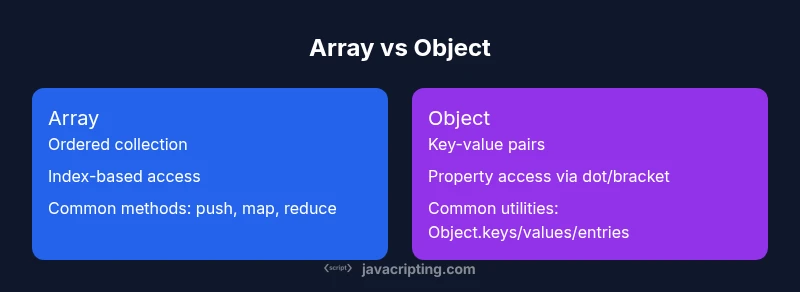
JavaScript arrays are ordered lists of elements accessed by numeric indices, while objects are unordered key-value maps accessed by property names. Arrays offer built-in methods for iteration and mutation, and expose a length property. Objects store pairs of keys and values and grow by adding properties. Choosing between them depends on data shape, access patterns, and semantics.
Fundamental Differences in Structure and Semantics
Understanding the difference between javascript array and object is foundational for clean data modeling in JavaScript. At a high level, an array is a collection designed for ordered data, accessed by numeric indices (0, 1, 2, ...). An object is a collection designed for associative data, where each value is paired with a key (usually a string). JavaScript treats arrays as a special kind of object with an internal length attribute that reflects the number of elements. That distinction—order and access method—drives how you structure and traverse data in real applications. In practice, you’ll use arrays when your data has a sequence, and objects when you need fast lookups by name or category. The phrase difference between javascript array and object highlights a core design decision: data shape matters for readability and performance.
- Arrays emphasize order and index-based access.
- Objects emphasize key-based access and flexible schemas.
- Both are mutable, and both can contain nested structures.
From a tutoring perspective, mastering this distinction reduces bugs and makes APIs clearer, especially when serializing to JSON or transferring data across network boundaries. By thinking in terms of data shapes, you can map real-world concepts—lists, records, dictionaries—into the most appropriate JavaScript structure. According to JavaScripting, the distinction is not merely academic; it directly influences code clarity and maintainability in modern frontend projects.
bold note: true
bulletPointsNoteModeStartsWithBold":false}
How JavaScript Arrays Are Implemented
JavaScript arrays are implemented as objects with additional semantics for numeric indices and a length property. In ES6+, many engines optimize dense, numeric-indexed arrays for fast access, while still treating them as objects underneath. The Array prototype provides a rich set of methods geared toward sequence operations. Common methods include push, pop, shift, unshift, splice, slice, and a suite of higher-order functions like map, filter, reduce, and forEach. Importantly, arrays can be sparse or dense; you can assign values at high indices without filling in earlier spots, which affects length and iteration behavior. A typical practical takeaway is to prefer dense arrays for predictable iteration patterns and maintainable code.
Key facts:
- Arrays have a length property that reflects the number of elements.
- They expose many built-in methods that assume a sequence, not arbitrary key-value pairs.
- Even though you can assign non-contiguous elements, doing so may degrade performance and readability.
Example:
const nums = [10, 20, 30];
console.log(nums.length); // 3
nums.push(40); // adds to the end
console.log(nums); // [10, 20, 30, 40]
For many developers, arrays are the go-to when you need ordered data and convenient iteration. They shine when you need to preserve order and perform sequential transformations, such as mapping, filtering, or reducing a collection of items.
bold: true
bullets: true
Comparison
| Feature | Array | Object |
|---|---|---|
| Data structure type | Ordered list (sequence) | Key-value map (dictionary-like) |
| Indexing/keys | Numeric indices (0,1,2,...) | String or symbol keys (e.g., 'name') |
| Length | Has a length property indicating count | No inherent length; determine with Object.keys(obj).length |
| Mutation methods | Push/Pop/Splice and many array-specific methods | Key-based mutations via assignment/deletion (obj[key] = value; delete obj[key]) |
| Common use cases | Lists, stacks, queues, sequences | Dictionaries, records, dynamic key-value stores |
| Iteration tools | for, forEach, map, filter, reduce | for...in, Object.keys/Object.entries, and prototypes |
| Serialization | JSON.stringify(array) returns JSON array | JSON.stringify(object) returns JSON object |
Benefits
- Clear intent: arrays for lists and sequences, objects for maps/dictionaries
- Rich array methods enable fluent, readable data processing
- Objects support flexible schemas and dynamic properties
- Both types are mutable and can nest other data structures
The Bad
- Using arrays as maps leads to wasted space and confusing code
- Objects can have non-deterministic property enumeration in older environments
- Overusing sparse arrays can hurt performance and readability
- Serializing complex nested structures may require careful handling of circular references
Arrays are for ordered data and numeric indexing; objects are best as maps with string keys—use both intentionally.
Favor arrays for lists and sequences, and use objects for key-based data. When you need richer key semantics, consider Map or dedicated data models to maintain clarity and performance.
Questions & Answers
What is the main difference between arrays and objects in JavaScript?
The primary distinction is that arrays are ordered lists with numeric indices, while objects are key-value maps accessed by property names. Both are dynamic, but arrays emphasize order and indices, whereas objects emphasize keys and rapid lookups.
Arrays are ordered lists; objects are keyed maps.
Can I use an array as an object and vice versa?
You can store data in an array with numeric indices or in an object with string keys, but mixing roles can reduce readability and hamper performance. Prefer the structure that matches your data shape.
You can, but it’s usually better to match the data to the right structure.
How does JSON.stringify treat arrays and objects differently?
JSON.stringify converts arrays to JSON arrays and objects to JSON objects. The resulting JSON mirrors the data’s shape, which matters when consuming APIs or storing data as text.
Arrays become JSON arrays; objects become JSON objects.
Are there performance differences between arrays and objects?
Performance depends on the engine and data usage. Indexed array access and simple object property lookups are optimized in modern engines, but using arrays as maps can incur overhead.
Performance varies by usage; stick to intended shapes for best results.
What are typical use cases for arrays vs objects?
Use arrays for lists, sequences, and ordered data. Use objects for dictionaries, records, or any data you access by named keys. For dynamic-key scenarios, Map can be a better fit.
Lists use arrays; dictionaries use objects; Map for complex keys.
Should I use Map instead of object for keys?
Map offers guaranteed insertion order, supports arbitrary key types, and provides convenient iteration. Use Map when you need richer key semantics or frequent additions/removals.
Map can be better for complex key scenarios.
What to Remember
- Choose arrays for ordered collections and numeric indexing.
- Use objects for dictionaries and key-based data access.
- Avoid using arrays as maps to prevent readability and performance issues.
- Consider Map for dynamic keys or advanced iteration needs.
- Keep data shapes explicit and consistent across APIs.