When to use JavaScript classes: a practical guide
Explore practical criteria for when to use JavaScript classes, compare with factory functions, and learn design patterns for maintainable code. A comprehensive guide by JavaScripting.


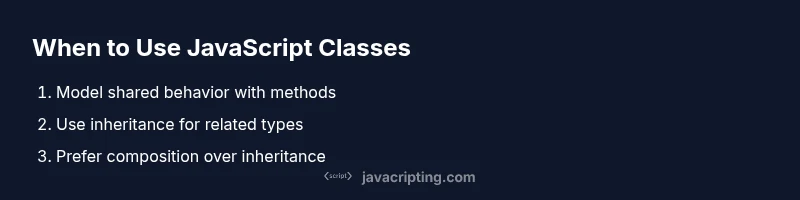
Use JavaScript classes when modeling objects with shared behavior and mutable state, needing a clear constructor, instance methods, and inheritance. For simple data containers or stateless utilities, factory functions or plain objects are often more lightweight and readable.
Why to use javascript classes: guiding principles
Understanding when to use javascript classes is essential for building maintainable frontend apps. According to JavaScripting, the decision to use a class should be driven by the presence of shared behavior across instances and the need to model state over time. When to use javascript classes becomes clearer as you map responsibilities, state lifecycle, and patterns for reuse. In practice, you want a class when multiple objects share methods and internal state that should stay together, and you want to create a stable blueprint that can be extended or replaced with minimal changes. If your goal is to express a domain model with behavior rather than a single data container, a class is often the right abstraction. Conversely, for simple data holders, static utilities, or lightweight composition, factory functions or plain objects can keep your code lean and readable. The choice is not binary; the best patterns evolve as teams iterate on the codebase. The JavaScripting team emphasizes clarity, maintainability, and predictable behavior as your north stars when deciding to use or avoid classes.
When you search for guidance on when to use javascript classes, you’ll find that the pattern shines in scenarios with lifecycle, identity, and evolving behavior. With a well-structured class, you can center related state and operations behind a single API, which reduces duplication and makes future changes safer. The keyword here is balance: use a class where you gain clarity, but don’t force object-oriented structure where a simple function or object suffices. This pragmatic approach aligns with JavaScripting’s ethos: code that communicates intent and remains easy to test.
tip
note
null
Tools & Materials
- Code editor (e.g., VS Code, WebStorm)(Enable linting and type-checking plugins for early feedback)
- Node.js (LTS, 18+)(Run and test class-based code locally)
- Modern browser with DevTools(Test class behavior in real DOM scenarios)
- TypeScript (optional)(Improve class contracts and instance types)
- Small sample project scaffold(Experiment with class-based design in a real app)
Steps
Estimated time: 30-60 minutes
- 1
Assess scope and responsibilities
Start by identifying what the class will represent and what behavior it should expose. If multiple instances share methods and state, a class could be a good fit. If the responsibilities are simple or the data carriers are immutable, consider alternatives like factory functions.
Tip: Ask: Will this object be created, mutated, and compared across many parts of the app? - 2
Create a minimal class skeleton
Define a constructor that accepts the essential data and initializes properties. Keep the constructor focused on wiring data and avoid performing heavy work inside it.
Tip: Keep initialization small; delegate heavy work to separate methods. - 3
Add instance methods
Attach behavior as prototype methods or class fields to keep related operations close to the data they act upon. Consider method names that clearly express intent and side effects.
Tip: Prefer side-effect-free methods when possible to simplify testing. - 4
Encapsulate with getters/setters
Use getters and setters to control access to internal state, enforcing invariants and hiding implementation details. Introduce private fields if you need true encapsulation.
Tip: Prefer immutable public interfaces when feasible; minimize direct mutation from outside. - 5
Plan for inheritance or composition
Decide whether the class will be extended, or if behavior will be composed from smaller units. Prefer composition over deep inheritance to avoid coupling and fragility.
Tip: Limit hierarchy depth; favor mixins or composition for flexibility. - 6
Test and iterate
Write unit tests that exercise both construction and behavior. Refactor if you find repeated patterns or fragile state transitions.
Tip: Refactor to extract common logic into helpers or base classes when duplication grows.
Questions & Answers
What is a JavaScript class and how does it differ from a function constructor?
A JavaScript class is a syntactic sugar over the existing prototype-based inheritance that centers on a constructor and methods. It provides a clearer, more familiar syntax for representing objects with shared behavior. Function constructors achieve similar results but are less explicit and can be harder to read for developers new to the language.
A class is a cleaner way to create objects with shared behavior, built on prototypes, offering constructors and methods.
Are classes required to create objects in JavaScript?
No. You can create objects with literal syntax, factory functions, or prototype-based patterns. Classes are a convenient abstraction when you want a conventional blueprint and method sharing across instances.
No, you can create objects without classes; classes are just a helpful abstraction for shared behavior.
How do I compare classes with factory functions?
Classes provide a formal blueprint with identity and inheritance. Factory functions return objects directly and can be simpler, lighter, and easier to compose. Use factories for lightweight patterns; use classes when you need a consistent interface and inheritance structure.
Factories are simpler; classes give you a consistent, extensible blueprint with inheritance.
Can I use JavaScript classes in older browsers?
Modern browsers support ES6 classes widely, but older environments may require transpilation (e.g., Babel) to emulate class syntax. If you target legacy environments, plan a compatibility strategy.
Older browsers may need transpilation to support classes.
Should I use TypeScript with classes?
TypeScript can improve class design by providing compile-time type safety, interfaces, and better tooling. It’s especially helpful for large codebases with complex inheritance and public APIs.
TypeScript adds type safety and better tooling for class-heavy codebases.
Watch Video
What to Remember
- Define clear responsibilities before coding
- Choose class-based design for shared behavior and state
- Prefer factory functions for simple data or stateless tasks
- Encapsulate state with getters/setters where appropriate
- Test early and refactor to reduce coupling