Difference Between JavaScript and HTML: A Practical Guide
Explore the difference between JavaScript and HTML to build accessible, interactive web pages. Learn roles, interactions, and best practices for modern front-end development.


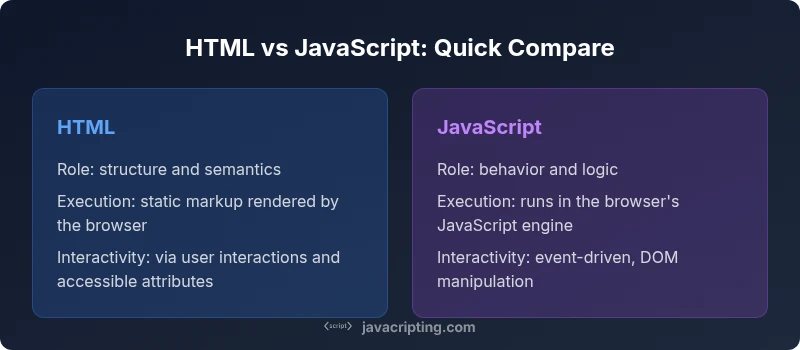
The difference between javascript and html is that HTML provides structure and semantics for content; JavaScript adds interactivity and logic to manipulate the DOM. In practice, HTML lays out elements; JavaScript responds to events and updates the page without reloading, enabling dynamic experiences. They are complementary, not interchangeable for modern web.
What Are JavaScript and HTML? Setting the Stage
In modern web development, a clear mental model of how JavaScript and HTML differ helps you build reliable interfaces. According to JavaScripting, many beginners stumble when they mix the semantics of markup with the logic of scripts. The difference between javascript and html is not just about file extensions; it’s about roles, lifecycles, and how browsers interpret and render content. HTML provides the skeleton and semantics that describe content structure, while JavaScript supplies the behavior that makes pages interactive. Understanding this distinction helps you design with progressive enhancement in mind and reduces bugs caused by conflating structure with behavior. As you proceed, you’ll see how the two languages cooperate to create dynamic experiences that are accessible, fast, and maintainable. In other words, HTML shapes what users see, while JavaScript shapes what users can do with it.
HTML: The Backbone of Web Content
HTML, or HyperText Markup Language, is the foundational language of the web. It describes the structure of a page using elements and attributes, and it communicates meaning through semantic tags such as header, nav, main, article, section, and footer. These tags help screen readers interpret content and assist search engines in indexing pages. HTML dictates the DOM structure that browsers build during the initial render. While modern HTML supports multimedia, forms, and accessibility features, its primary job is to convey the composition of content—what exists on the page and how it should be interpreted by user agents.
JavaScript: The Engine of Interaction
JavaScript is a programming language that runs in the browser (and on the server in other environments). It brings behavior to the page: respond to clicks, validate forms, fetch data, animate elements, and update the DOM dynamically. JavaScript executes after the HTML has started rendering and can modify the DOM to reflect state changes without requiring a full page reload. It is event-driven and supports asynchronous operations, making it ideal for real-time updates, form validation, and interactive UI components. Understanding the distinction from HTML helps you avoid turning static markup into a source of confusion and keeps interactivity modular and maintainable.
The Interaction Lifecycle on a Web Page
A typical page begins with HTML that describes the structure. As the browser parses HTML, it builds the DOM, loads assets, and renders content. JavaScript can intercept or augment this process by listening for events such as DOMContentLoaded, user interactions, or network responses. A well-structured page delays non-critical scripts to avoid blocking rendering and uses progressive enhancement: core content remains usable without JavaScript, while scripts unlock richer experiences. This lifecycle matters for performance and accessibility. By separating concerns—HTML for structure, CSS for presentation, and JavaScript for behavior—you reduce coupling and improve the ability to diagnose issues when things go wrong.
Common Misconceptions Explained
A frequent misconception is that JavaScript can replace HTML entirely. In reality, while JavaScript can create and manipulate DOM elements, the accessible structure defined by HTML is still essential for semantics and SEO. Another mistake is scripting directly in markup without considering performance or accessibility; inline scripts can block rendering and hinder screen readers. Finally, some developers treat JavaScript as a universal fix for layout problems. In practice, you should separate concerns and reserve HTML for content structure, CSS for visual styling, and JavaScript for dynamic behavior to maintain clarity and performance.
Distinguishing Syntax, Semantics, and Roles
HTML uses tags to declare structure, with attributes adding meaning and behavior through semantics. JavaScript uses statements, expressions, and functions to implement logic and interactivity. The syntax and mental model differ: HTML is declarative, expressing what content is; JavaScript is imperative, expressing how the page should behave. Recognizing this distinction helps you design components that remain accessible when scripts are disabled and easier to test when interactivity is present or absent. As you practice, you’ll build a mental map of when to adjust HTML versus when to write JavaScript handlers.
Real-World Scenarios: When to Use HTML vs JavaScript
Consider a form that requires validation. HTML provides the structure and basic semantics for inputs, labels, and error messaging. JavaScript adds client-side validation, dynamic feedback, and user-friendly messages without reloading the page. For a gallery, HTML lays out the grid of thumbnails, while JavaScript handles lightbox behavior and keyboard navigation. For a dashboard, HTML structures widgets, charts are drawn with JavaScript, and interactivity comes from events and API calls. The key is to rely on HTML for enduring structure and to deploy JavaScript to elevate user experience where it genuinely adds value.
Accessibility, Security, and Performance Considerations
Accessible HTML remains critical even when you introduce JavaScript. Use semantic elements, ARIA attributes when necessary, and ensure that dynamic changes are announced to assistive technologies. Security concerns include guarding against XSS when injecting or processing user input with JavaScript. Performance-wise, defer non-critical scripts and minimize DOM mutations to avoid layout thrashing. Progressive enhancement—ensuring core content works without JavaScript—improves reliability and reach. By planning with these considerations in mind, you create resilient, inclusive web experiences that perform well on a range of devices.
How the Browser Executes HTML and JavaScript
Browsers parse HTML to construct the DOM and build the render tree, laying out content before painting pixels on the screen. JavaScript runs on its own engine, executing code in response to events, data fetching, or user actions. When a script modifies the DOM, the browser may reflow and repaint, which can impact performance if not managed carefully. Understanding timing, such as when scripts execute relative to page load, helps you optimize rendering. You’ll often see best practices like placing scripts at the end of the body or using async/defer attributes to minimize render-blocking behavior.
Learning Paths and Practical Exercises
Beginners should start with solid HTML fundamentals: semantic tags, forms, accessibility attributes, and basic document structure. Once comfortable, introduce CSS to separate presentation from content. Then begin with small JavaScript tasks: event listeners, form validation, and simple DOM manipulation. Practice by building tiny projects that incrementally increase complexity—like a to-do list with persisted state, a gallery with keyboard navigation, or a weather widget that fetches data. Regular coding, debugging, and reading real-world code are the fastest routes to mastery.
Common Pitfalls and How to Avoid Them
Common pitfalls include mixing concerns (overusing scripts for layout), neglecting accessibility, and ignoring performance implications of frequent DOM updates. Avoid inline JavaScript for maintainability; prefer unobtrusive scripts loaded separately. Don’t rely solely on JavaScript for critical content; always provide meaningful HTML structure and fallback options. Finally, use modern tooling and linting to enforce consistent patterns and catch issues early.
Wrapping Up: Aligning HTML Structure with JavaScript Behavior
The effective practice is to design with a clear boundary: HTML for structure and semantics, CSS for presentation, and JavaScript for behavior. When you align these elements, you create web pages that load quickly, are accessible to a broad audience, and are easier to maintain. Over time, you’ll develop an intuition for where each language should take the lead, leading to UI that feels both robust and delightful to use.
Comparison
| Feature | HTML | JavaScript |
|---|---|---|
| Core purpose | Structure and semantics for content | Behavior, interactivity, and logic |
| Execution context | Static markup rendered by the browser | Runs in the browser's JavaScript engine at runtime |
| File types / embedding | HTML files with possible inline or linked scripts | JavaScript files (.js) or inline scripts in HTML |
| Impact on rendering | Directly shapes DOM structure and SEO | Dynamically updates DOM after load |
| Semantics & accessibility | Semantic HTML supports accessibility and SEO | JS enhances interactivity but should not replace semantics |
| Learning curve | Foundational for content; easier to grasp basics | Adds complexity; requires DOM and event concepts |
| Best use case | Content-first pages, SEO optimization, static sites | Rich interactivity, real-time updates, client-side logic |
Benefits
- Clear separation of concerns improves maintainability
- HTML provides accessible structure out of the box
- JavaScript enables rich interactivity and dynamic UI
- Growing ecosystem and tooling supports efficient development
The Bad
- Over-reliance on JS can degrade accessibility if not careful
- Inline scripts can block rendering and hurt performance
- JS can introduce security risks if inputs aren’t sanitized
- Complex interactivity increases debugging overhead
HTML and JavaScript are complementary; neither substitutes the other
Prioritize semantic HTML for structure and accessibility, then enhance with JavaScript for interactivity. Maintain progressive enhancement to ensure functionality without JavaScript and optimize for performance and security.
Questions & Answers
What is the difference between JavaScript and HTML?
HTML provides the structure and semantics of a web page, while JavaScript adds behavior and interactivity. They serve distinct roles and should be used together to create accessible, dynamic experiences.
HTML gives structure; JavaScript adds behavior. They work together to make web pages functional and interactive.
Can HTML run without JavaScript?
Yes. HTML renders content and structure even without JavaScript. JavaScript enhances interactivity, but core content remains accessible through HTML alone.
Yes. You can have a working page with HTML even if JavaScript is disabled.
Is JavaScript the same as scripting in HTML?
Not exactly. JavaScript is a standalone programming language. It can be embedded in HTML, but it runs in the browser’s JavaScript engine and interacts with the HTML DOM.
JavaScript is a separate language; you can embed it in HTML, but it runs as code, not as markup.
How do HTML and JavaScript interact?
HTML provides the DOM structure that JavaScript can manipulate in response to events, data, and user actions. JavaScript can add, remove, or modify elements to reflect state changes.
HTML gives the structure; JavaScript changes that structure in response to events.
What are common pitfalls when mixing HTML and JavaScript?
Inline scripts can block rendering, reducing performance. Overlooking accessibility can harm users who rely on assistive tech. Always separate concerns and use progressive enhancement.
Be careful with inline scripts and accessibility; separate concerns and enhance progressively.
What should beginners learn first, HTML or JavaScript?
Beginners should start with HTML to understand structure, then add JavaScript for interactivity. This order builds a solid foundation for front-end development.
HTML first to learn structure, then JavaScript for behavior.
What to Remember
- Start with semantic HTML to anchor structure
- Use JavaScript to enhance, not replace, HTML semantics
- Understand the DOM to manipulate HTML safely
- Prioritize accessibility and progressive enhancement
- Test performance and security early in development