JavaScript Date Without Time: Master Date Handling
Learn how to manage dates without time in JavaScript. This comprehensive guide covers parsing, formatting, and comparing date-only values, while avoiding timezone pitfalls. Includes practical patterns, code examples, and best practices for robust date-only logic in your apps.


Understanding Date Without Time in JavaScript
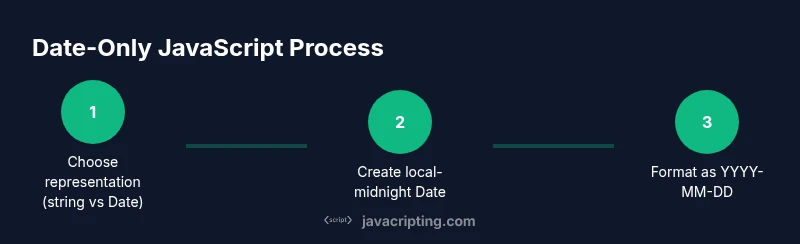
In JavaScript, a Date object always contains a time component. When you hear the phrase date without time, it usually means you want to work with a value that represents a calendar day, regardless of the time or time zone. Common approaches include storing the date as a string in the ISO-like format YYYY-MM-DD or creating a Date object set to midnight in the local time zone. This separation between the date portion and the time portion helps prevent bugs when sorting, filtering, or displaying dates in user interfaces. In this section, we establish the core concepts and set expectations for reliable date-only handling.
- Date vs time: a Date object encodes year, month, day, hour, minute, second, and millisecond.
- Date-only goals: stable formatting, deterministic comparisons, and correct display across locales.
- Baseline patterns: store as a string (YYYY-MM-DD) or create a Date at local midnight for operations that require a Date object.
Practical takeaway: decide early whether you’ll keep a date as a string for persistence or as a Date object for computations. Both approaches are valid when used consistently with clear formatting rules. See how JavaScripting analyses emphasizes clear date boundaries to reduce confusion across time zones.
Time Zone Pitfalls When Parsing ISO Dates
One of the most common sources of bugs with dates in JavaScript is time zone handling. Parsing a string like 2026-02-26 can yield different results depending on the engine, browser, or runtime environment. In many engines, ISO-like strings without a time component are interpreted as UTC or local time, which may shift the perceived date when you convert to a Date object or format for display. If you need a date-only value, you must enforce a consistent interpretation.
- Be cautious with Date.parse and new Date: their behavior can vary across environments.
- ISO date strings may shift when converted to ISO 8601 or when using toISOString, due to time zone offsets.
- Best practice: create and compare dates using a fixed representation to avoid offsets (e.g., local midnight constructed with year, month, day or using Date.UTC).
Tip: always test date parsing on multiple browsers and runtimes, especially if your app runs in both client and server environments.
Approaches to Represent Date-Only Values
There isn’t a single “must” approach for date-only values; the choice depends on how you intend to use the date. The two most common patterns are: (1) store the date as a string in YYYY-MM-DD format for persistence and display, and (2) create a Date object for internal calculations, anchored at midnight in local time. Both patterns are viable if you consistently apply rules for parsing and formatting.
- Pattern A: Date as string (YYYY-MM-DD) for storage and UI display. Easy to compare lexicographically and format consistently.
- Pattern B: Date object representing local midnight for calculations: new Date(year, month - 1, day). This ensures the time portion is 00:00:00 in local time.
- Pattern C: Use UTC when you must neutralize time zones: new Date(Date.UTC(year, month - 1, day)) to represent the same instant across zones.
Implementing consistent helpers makes cross-environment usage safer and reduces edge-case bugs.
Working with Local Midnight Dates
Creating a Date object at local midnight is a common technique when you want to perform arithmetic or comparisons on a per-day basis. The trick is to construct the date with the year, month (zero-based in JS), and day, which yields a time of 00:00:00 in the local time zone. When displayed, you can format this date without exposing the underlying time.
Code pattern:
function localMidnight(year, month, day) {
  // month is 1-12, convert to 0-11 for JS Date
  return new Date(year, month - 1, day);
}

function toDateString(d) {
  const y = d.getFullYear();
  const m = String(d.getMonth() + 1).padStart(2, '0');
  const day = String(d.getDate()).padStart(2, '0');
  return `${y}-${m}-${day}`;
}
Using localMidnight ensures that the time component does not affect daily comparisons or displays. If you later serialize to a string, you can rely on toDateString or a dedicated formatter to guarantee YYYY-MM-DD format across locales.
Formatting Dates as YYYY-MM-DD for Display
A stable display format is essential for user interfaces and data interchange. The preferred approach for date-only formatting is to assemble the components manually or use Intl.DateTimeFormat with explicit options. Manual assembly guarantees consistency across browsers that may have different default date formats, while Intl can adapt to user locales when needed.
Examples:
function formatDateYYYYMMDD(d) {
  const y = d.getFullYear();
  const m = String(d.getMonth() + 1).padStart(2, '0');
  const day = String(d.getDate()).padStart(2, '0');
  return `${y}-${m}-${day}`;
}

function formatDateLocale(d, locale = 'en-GB') {
  return d.toLocaleDateString(locale, {
    year: 'numeric', month: '2-digit', day: '2-digit'
  });
}
Note: some formats depend on locale; for date-only values, YYYY-MM-DD is often the safest canonical form for data exchange, but display should respect user expectations.
Parsing and Validating User-Input Date-Only Strings
User input can be noisy. When you accept a date string, validate the format strictly (e.g., /^in-yy-mm-dd$/ or equivalent) and verify that year, month, and day form a valid calendar date. Avoid passing arbitrary strings to new Date("userInput") without validation, as it may yield Invalid Date or unexpected results.
Strategy:
- Normalize input to YYYY-MM-DD after validation.
- If you must parse, use a strict parser that checks numeric ranges for month (1-12) and day inside the month.
- Consider converting to a local midnight Date object for internal use.
Code sketch:
const isValidDateYMD = (s) => /^\d{4}-\d{2}-\d{2}$/.test(s) && !isNaN(Date.parse(s));

function parseDateYMD(s) {
  if (!isValidDateYMD(s)) throw new Error('Invalid date format');
  const [y, m, d] = s.split('-').map(Number);
  return new Date(y, m - 1, d);
}
Practical Patterns and Helper Functions
As you work with date without time across different parts of an application, extracting common logic into utilities reduces drift and errors. Consider building a small utility module that exposes:
- toDateOnlyString(date) -> 'YYYY-MM-DD'
- fromDateOnlyString('YYYY-MM-DD') -> Date (local midnight)
- isSameDate(a, b) -> boolean (ignores time)
By centralizing the conversion and comparison logic, you ensure consistent results everywhere your app handles a date. Here are example implementations:
export function toDateOnlyString(date) {
  const y = date.getFullYear();
  const m = String(date.getMonth() + 1).padStart(2, '0');
  const d = String(date.getDate()).padStart(2, '0');
  return `${y}-${m}-${d}`;
}

export function fromDateOnlyString(s) {
  const [y, m, d] = s.split('-').map(Number);
  return new Date(y, m - 1, d);
}

export function isSameDate(a, b) {
  return a.getFullYear() === b.getFullYear() &&
         a.getMonth() === b.getMonth() &&
         a.getDate() === b.getDate();
}
Using such utilities reduces risk when your codebase scales and you need to reason about many dates.
Common Pitfalls and Browser Variations
Even well-written date logic can fail due to browser differences, server environments, or locale settings. A few patterns help you avoid pain:
- Avoid relying on Date.parse for strict date validation; prefer explicit parsing.
- Prefer local midnight for date-only calculations when you do not require UTC.
- If you need cross-timezone consistency, consider representing the date with a UTC-based Date object or, ideally, a dedicated date library.
- Always test with edge cases like leap years, end-of-month dates, and time-zone boundaries.
Real-world takeaway: design with a single source of truth for date-only values—string or Date—then implement conversions in one place.
Putting It All Together: Real-World Scenarios
Let’s walk through common scenarios you’ll face when working with javascript date without time and how to handle them safely.
- Scheduling: Store dates as YYYY-MM-DD strings in JSON, enqueue tasks by converting them to local midnights for comparison.
- Display: Show dates using toLocaleDateString with a fixed format, ensuring users see consistent day/month order across locales.
- Data exchange: When sending dates to an API, serialize YYYY-MM-DD strings to avoid time zone drift.
In each scenario, the core discipline is to keep the date’s boundary clean: either as a string or as a Date set to midnight, never leave time portions unmanaged. This discipline minimizes subtle bugs when users travel across time zones or when servers and clients are in different regions.
Final Thoughts on Date-Only Logic in JavaScript
JavaScript date handling can be tricky because time is an inseparable dimension of a Date object. By choosing a robust date-only representation, validating inputs, and using predictable formatting, you can ensure your applications display and compare dates accurately across locales and time zones. The key is consistency: pick a representation, implement a small set of helpers, and apply them everywhere. This approach reduces bugs and makes your codebase easier to maintain.