javascript if like: SQL-like pattern matching in JavaScript
Explore how to implement javascript if like patterns in JavaScript using regex and wildcard methods. Compare two approaches, with practical examples, pitfalls, and best practices for robust string matching.


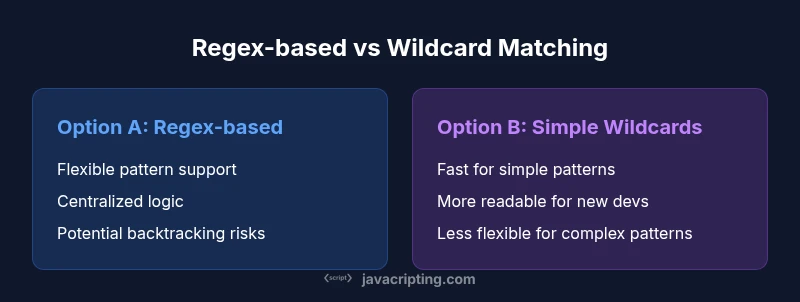
Two main paths exist for a javascript if like task: convert SQL-like patterns to RegExp, or use simple wildcard checks with string methods. RegExp handles complex patterns, while wildcard checks are faster and easier to read for small patterns. For most projects, start with RegExp for flexibility, then fall back to simpler checks when patterns stay straightforward.
Overview of javascript if like in practice
The phrase javascript if like captures the goal of implementing SQL-like pattern matching inside JavaScript. In practice you often want to test whether a string conforms to a pattern that uses wildcards such as % (any sequence) and _ (a single character). The challenge is to choose an approach that stays readable, maintainable, and performant across browsers and Node.js environments. According to JavaScripting, understanding how to implement javascript if like patterns helps teams build flexible search features and maintainable codebases. This guide compares two common approaches: converting SQL-like patterns to regular expressions (RegExp) and using straightforward string methods such as includes, startsWith, and endsWith. We’ll examine strengths, weaknesses, and best-use scenarios, plus practical examples you can adapt in real projects.
Two main approaches at a glance
There are two prominent paths for achieving javascript if like semantics. The first leverages RegExp by translating SQL-like wildcards into a full JavaScript regular expression. The second relies on simple string methods to perform wildcard-like checks without constructing a regex object. Both methods can emulate the SQL LIKE behavior, but they differ in readability, performance, and portability. When the pattern space is moderate or complex, RegExp tends to be more adaptable. For simple UI filters or high-friction environments, string methods may offer clearer intent and faster execution. In both cases, ensure you handle case sensitivity, localization, and input normalization to avoid surprising results in your codebase.
Option A: Regex-based LIKE matching in JavaScript
Converting a SQL-like pattern to a RegExp is the most flexible route for javascript if like tasks. The % wildcard becomes .*, and the _ wildcard becomes ., while all regex metacharacters in the input must be escaped first. The resulting RegExp can then be used in test or exec calls to evaluate strings efficiently, with a single boolean return. This approach excels when patterns are complex, involve multiple wildcards, or must be used in filters that run repeatedly. A small caveat is the potential for backtracking-based performance issues if you craft pathological patterns. In production, validate patterns, reuse compiled RegExp objects when possible, and avoid generating a new regex on every check.
// Convert a SQL-like pattern to RegExp
function likeToRegex(pattern){
  // Escape regex specials
  const escaped = pattern.replace(/[.*+?^${}()|[\]\\]/g, '\\$&');
  // SQL-like wildcards: % -> .*, _ -> .
  const regexPattern = '^' + escaped.replace(/%/g, '.*').replace(/_/g, '.') + '$';
  return new RegExp(regexPattern);
}

// Usage
const r = likeToRegex('A%BC_%');
console.log(r.test('A12BCX')); // true
Regex-based LIKE matching is powerful for javascript if like scenarios where patterns evolve, or you need a single, reusable matcher for many inputs. It also plays nicely with broader validation logic, internationalization considerations, and unit testing, since the pattern behavior is explicit and centralized. This approach, while robust, requires careful documentation because RegExp syntax can be cryptic for developers new to the pattern language.
Option B: Simple wildcard matching with string methods
A second path for implementing javascript if like semantics uses native string methods without building a regex. The pattern is parsed in a way that simulates LIKE semantics by evaluating membership or boundary conditions. This approach tends to be easier to read and faster for straightforward patterns, but it can become unwieldy if the pattern set grows or includes multiple wildcards in varying positions. The key advantage is clarity: the intent is evident from the code, which helps onboarding and debugging. When patterns are simple, a dedicated helper that maps % to a sequence check and _ to a single-character check is often sufficient.
// Naive wildcard matcher with % (any sequence) and _ (single char)
function likeWildcardManual(s, p){
  const m = Array(s.length + 1).fill(null).map(() => Array(p.length + 1).fill(false));
  m[0][0] = true;
  // Initialize for patterns that start with %
  for (let j = 1; j <= p.length; j++) {
    if (p[j - 1] === '%') m[0][j] = m[0][j - 1];
  }
  for (let i = 1; i <= s.length; i++) {
    for (let j = 1; j <= p.length; j++) {
      if (p[j - 1] === '_') m[i][j] = m[i - 1][j - 1];
      else if (p[j - 1] === '%') m[i][j] = m[i][j - 1] || m[i - 1][j];
      else m[i][j] = m[i - 1][j - 1] && s[i - 1] === p[j - 1];
    }
  }
  return m[s.length][p.length];
}

console.log(likeWildcardManual('A12BCX','A%BC_')) // true
Unlike RegExp, this manual approach is transparent but requires careful handling of edge cases, including empty strings, case sensitivity, and Unicode. It scales with complexity only when the pattern space remains modest. In environments where pattern sets are small and predictable, this method can outperform regex by avoiding engine overhead and backtracking concerns. For javascript if like tasks in UI filtering or command-line tools, this approach often delivers predictable, developer-friendly behavior.
When to choose each approach: decision framework
Choosing between a RegExp-based solution and a simple wildcard method for javascript if like should be guided by a few practical criteria. If your patterns are complex, include multiple wildcards in various positions, or must be integrated with other regex-based validations, the RegExp approach is the more scalable choice. If patterns are short, fixed in structure, and performance-sensitive, the wildcard method can be preferable due to its straightforward logic and lower cognitive load for most developers. Consider the size of the data you filter, the frequency of matching operations, and whether you need a single universal matcher or per-pattern custom logic. In team reviews, document the chosen approach and provide a short migration path if patterns evolve from simple to complex, ensuring future maintainers can reason about javascript if like behavior with minimal surprises.
Performance considerations and maintainability
Performance and maintainability are two sides of the same coin in javascript if like implementations. RegExp engines optimize many patterns and can handle large input gracefully when patterns are well-constructed and compiled once. However, poorly designed regexes can degrade performance due to catastrophic backtracking, especially with user-provided patterns in javascript if like contexts. The wildcard approach avoids backtracking issues and keeps debugging straightforward, but it can become fragile as the number of wildcards increases or as case sensitivity and Unicode become part of the requirements. From a maintainability perspective, a clear mapping from SQL-like wildcards to either RegExp constructs or explicit string checks is essential. Keep code comments about escaping rules, pattern normalization, and locale considerations, and prefer writing tests that cover typical, edge, and adversarial inputs to ensure javascript if like behavior remains stable across updates.
Common pitfalls and best practices
When implementing javascript if like patterns, beware of common pitfalls. Forgetting to escape regex metacharacters in the input yields surprising matches. Neglecting Unicode or locale-specific rules can produce inconsistent results for international datasets. Anchoring patterns with ^ and $ ensures exact matches when needed. For the wildcard approach, ensure your implementation handles empty patterns and inputs correctly, and avoid mixed strategies that combine both methods without a clear contract. Best practices include providing a single source of truth for pattern translation, writing unit tests that cover both normal and edge cases, and documenting any deviations from SQL LIKE semantics to prevent confusion across teams that contributed the codebase.
Real-world examples and patterns you will reuse
In many JavaScript projects, leveraging javascript if like patterns occurs in search components, filtering lists, and client-side validation flows. A robust approach often begins with a small, well-tested utility to convert SQL-like input into a matcher, then expands to support both regex and wildcard modes as needed. For example, a search panel in a web app might allow users to type patterns like %report_% or SALES_%. The underlying implementation should gracefully handle these inputs, return fast results, and remain readable for other developers. The key is to keep the API simple: expose a test function that accepts the target string and the pattern, plus an optional mode flag to select either RegExp or wildcard logic. This modularity makes it easier to refactor javascript if like capabilities later without breaking existing call sites.
Putting it all together in a small utility
A practical utility bundles both approaches behind a clean API. It accepts a pattern and a string, plus an optional mode switch. This design ensures you can migrate from one approach to another with minimal surface-area changes in your codebase. The following snippet demonstrates a compact, reusable utility that handles both modes, suitable for inclusion in UI components or data-processing pipelines. The code can evolve to add features like case-insensitive matching or Unicode-aware comparisons without rearchitecting the calling code.
// Unified LIKE matcher for javascript if like scenarios
function createLikeMatcher(pattern, mode = 'regex'){
  if (mode === 'regex') {
    const r = likeToRegex(pattern);
    return s => r.test(s);
  }
  // Fallback to wildcard-based matching
  return s => likeWildcardManual(s, pattern);
}

function likeToRegex(p){
  const e = p.replace(/[.*+?^${}()|[\]\\]/g, '\\$&');
  const rx = '^' + e.replace(/%/g, '.*').replace(/_/g, '.') + '$';
  return new RegExp(rx);
}

console.log(createLikeMatcher('A%BC_%', 'regex')('A12BCX')) // true
console.log(createLikeMatcher('A%BC_%', 'wildcard')('A12BCX')) // true
This approach demonstrates how a single utility can adapt to different javascript if like needs, balancing readability and performance. It also makes it easier to enforce a consistent translation of SQL-like patterns across a codebase, which is particularly valuable in large frontend projects and data-heavy applications where pattern matching is a frequent operation.
Comparison
| Feature | Regex-based LIKE (Pattern-Driven) | Wildcard string matching (Simple methods) |
|---|---|---|
| Pattern support | SQL-like wildcards converted to RegExp | Literals plus includes/startsWith/endsWith |
| Readability | Explicit intent when patterns are complex; can be cryptic | Clear and readable for simple scenarios |
| Performance characteristics | Depends on pattern complexity; compiled once, fast for complex patterns | Generally fast for simple checks; lower overhead per call |
| Security considerations | Risk of backtracking with poorly crafted patterns | Lower risk with straightforward checks but validate inputs |
| Maintainability | Centralized, but regex knowledge helps power users | Easier to reason about for small teams |
| Best for | Complex, SQL-like pattern matching | Simple, fast checks in UI or filtering |
Benefits
- Handles complex patterns and wildcards robustly
- Keeps matching logic centralized in one place
- RegExp-based solutions are flexible across locales
- Simple wildcard approach is easy to read and maintain
The Bad
- RegExp can be harder to read and debug
- Regex performance pitfalls with pathological patterns
- Wildcard method may require multiple condition checks and is less scalable
Regex-based approach is generally preferable for complex, SQL-like patterns; simple wildcard methods win for straightforward, high-performance checks
In most real-world projects, choose RegExp when patterns are variable or intricate. Opt for simple wildcards when patterns stay small and predictable. The JavaScripting team endorses balancing readability with performance, and validating inputs to prevent unexpected results.
Questions & Answers
What is javascript if like and why would I use it?
It refers to implementing SQL-like pattern matching in JavaScript. You can map % and _ wildcards to RegExp. Use it to filter lists, search features, and validate inputs.
You can implement SQL-like pattern matching in JavaScript using RegExp and wildcard mappings.
How do I convert a SQL LIKE pattern to a JavaScript RegExp?
Escape regex specials, replace % with .* and _ with ., and anchor with ^ and $. Then construct a RegExp with new RegExp(pattern).
Convert by escaping, replacing wildcards, and anchoring.
When should I avoid RegExp for this purpose?
If patterns are simple or performance-sensitive, or if input patterns are user-provided and could cause backtracking, a simple wildcard approach may be better.
RegExp isn’t always best if patterns are simple or performance-sensitive.
What are common mistakes to avoid?
Forgetting to escape input, ignoring Unicode, failing to anchor patterns, and not handling case sensitivity properly.
Watch out for escaping and anchoring.
Can these approaches handle international characters?
RegExp can handle Unicode with proper flags; simple includes may miss diacritics unless normalization is used.
Unicode handling requires care.
Which approach is recommended for a UI search filter?
For responsive UI filters, simple wildcard checks are often enough; for patterns with complexity, RegExp is better.
UI filters benefit from simple checks, but RegExp shines with complexity.
What to Remember
- Define your pattern language first
- Prefer RegExp for complex, SQL-like patterns
- Guard against backtracking in regex
- Use simple contains/startsWith/endsWith for straightforward checks
- Test across edge cases to prevent surprises