Split with in JavaScript: Mastering string.split
Learn how to use String.split in JavaScript for robust tokenization. This guide covers syntax, regex-based splitting, limits, edge cases, and real-world patterns for parsing CSV, lines, and tokens with confidence.


You can split a string by a delimiter using the split method: string.split(delimiter). For split with in javascript, the most common delimiters are commas, spaces, or newlines. The method returns an array of substrings. This quick guide covers exact syntax, optional limits, regex-based splitting, and practical patterns for robust, real-world parsing.
What does split do in JavaScript?
In JavaScript, the split method divides a string into an array of substrings using a separator. It is a primary tool for tokenizing data, whether you''re parsing CSV lines, user input, or text blocks. According to JavaScripting, developers rely on split for predictable parsing when you understand its edge cases. The phrase split with in javascript appears in practice as you work with tokens, lines, and records. The method signature is string.split(separator, limit). The separator can be a string or a regular expression, which unlocks powerful patterns for complex data. The output is always a new array; the original string remains untouched.
Syntax and basic usage
The basic usage is simple: call split on a string with a delimiter, and you receive an array of segments. The optional second argument, limit, constrains how many pieces are returned. If the delimiter is not found, the result is a one-element array containing the original string. When a regular expression is used as the separator, you gain powerful matching capabilities—useful for irregular or multi-character delimiters.
Splitting by plain string delimiters
Strings like "," or " " are common delimiters. For example, "a,b,c".split(",") yields ['a','b','c']. Trailing delimiters produce empty strings (e.g., "a,b,".split(",") gives ['a','b','']). To avoid empty tokens, you can filter the result or trim each piece. This section expands practical patterns for straightforward CSV-like data and line-oriented text.
Splitting with regular expressions
Regex separators cover dynamic and multi-character boundaries. Use /[, ]+/ to split on any comma, tab, or newline sequence, or /\s+/ to split on any whitespace. Remember that capturing parentheses in the regex can insert the captured tokens into the result, which is sometimes useful for preserving delimiters or fields. Always test your regex to ensure it matches your data.
Using limit and capturing groups
The limit parameter stops splitting after N pieces, which is handy for controlled parsing. If you include capturing parentheses in your regex, the captured text is included in the output array as well. For example, "a,b,c".split(/(,)/) yields ['a', ',', 'b', ',', 'c']. This can be used to preserve delimiters when needed, but it requires careful handling downstream.
Practical patterns: parsing CSV, lines, and tokens
- CSV-like data: use
split(',')and then trim each field, optionally removing surrounding quotes. - Lines: normalize newlines with
/\r?\n/to split a multi-line string into lines. - Tokens: split on multiple delimiters, then map over results to convert numeric fields or dates.
Common pitfalls and performance considerations
Be mindful of empty tokens and trailing delimiters. Large strings may create large arrays; consider streaming alternatives or processing in chunks if performance is a concern. When data formats vary, prefer regex-based splitting but test across edge cases—spaces around delimiters can produce unexpected tokens. Remember that split does not mutate the original string.
Real-world examples: tiny recipes
- CSV line parsing:
const fields = line.split(',').map(s => s.trim().replace(/^"|"$/g, ''));
- Word tokenization:
const words = sentence.trim().split(/\W+/).filter(Boolean);
- Multiple delimiters:
const items = data.split(/[,;|]+/);
- Lines from input:
const lines = text.split(/\r?\n/);
Advanced topics: performance tips and regex pitfalls
For high-volume parsing, avoid heavy regex where simple string delimiters suffice. Precompute delimiters when possible and reuse compiled regex literals. If you''re extracting specific fields, consider splitting once and then indexing into the resulting array rather than performing multiple splits. Always benchmark with realistic input data to choose between simple splits and more complex tokenizers.
],
toolsMaterials({
items
Tools & Materials
- Code editor(VS Code, WebStorm, or equivalent)
- Node.js runtime(v18+ recommended for modern syntax and performance)
- Browser with Developer Tools(Chrome, Firefox, or Edge for quick testing)
- Sample strings for testing(CSV lines, sentences, and multi-line input)
- Regex tester (optional)(Helpful for debugging complex separators)
Steps
Estimated time: 30-45 minutes
- 1
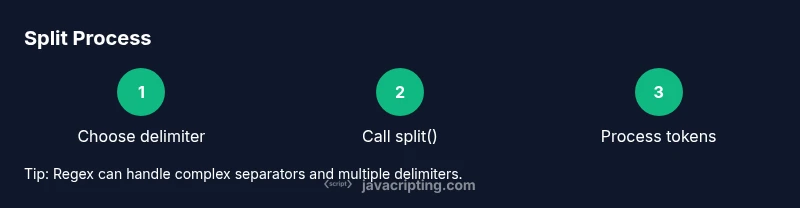
Define delimiter or regex
Identify the delimiter you will use for splitting and decide if a plain string or a regex is more appropriate. This upfront decision shapes your code and error handling.
Tip: When data varies, prefer a regex to cover all cases. - 2
Call split on your string
Write the core call: `const parts = str.split(delimiter, limit);`. Choose a limit if you anticipate only the first N tokens.
Tip: Include a meaningful limit to prevent bloated arrays. - 3
Inspect and clean results
Log the array or inspect in a debugger to verify tokens. If needed, trim whitespace or remove quotes from each part.
Tip: Use `map` to apply transforms in one pass. - 4
Handle empty tokens
Trailing delimiters or consecutive separators can yield empty strings. Decide if you want to keep or remove them.
Tip: Use `filter(Boolean)` to drop falsy tokens. - 5
Split with complex delimiters
When multiple separators exist, use a regex like `/[ ,|]+/` to unify behavior across cases.
Tip: Test with edge data like spaces around commas. - 6
Process tokens for downstream use
Convert strings to numbers, dates, or structured data as needed. Keep data normalization in a separate stage.
Tip: Avoid mutating the original array; work on a copy if needed. - 7
Test with real data and guard types
Validate inputs: ensure strings are strings and not null/undefined. Fallback gracefully if input is unexpected.
Tip: Add type checks early to prevent runtime errors.
Questions & Answers
What does the split() method return in JavaScript?
The split() method returns an array of substrings created by dividing the original string at each occurrence of the delimiter. If the delimiter is not found, the result is an array containing the original string. The optional limit restricts how many substrings are returned.
split returns an array of parts; if the delimiter isn’t found you still get a single-item array.
Can I split using multiple delimiters at once?
Yes. Use a regular expression as the separator to match multiple delimiters, for example, `/[, \s]+/` splits on commas, tabs, and spaces. This approach is powerful for messy or varied input.
Yes, a regex separator lets you split on many delimiters.
How do I ignore empty strings in the result?
You can filter out empty tokens after the split: `parts.filter(p => p.length > 0)` or use a regex that avoids capturing empty tokens. Be mindful that some patterns intentionally preserve empties for certain formats.
Filter out empty parts after splitting to clean the array.
What happens if the input is not a string?
If the input isn’t a string, JavaScript will coerce it to a string in most cases, but you should validate input types to avoid surprises. You can also convert explicitly using `String(input)` before splitting.
If not a string, convert to string before splitting to ensure consistent behavior.
Is split() efficient for very large data?
Split is convenient and readable but can be memory-intensive for very large inputs. For extremely large datasets, consider streaming processing or chunking the data before tokenization.
Split is handy, but for huge data you may want a streaming approach.
Watch Video
What to Remember
- Master string.split basics for simple delimiters
- Use regex for complex separators
- Apply limit to control output size
- Trim and map tokens for clean data
- Test with realistic inputs and edge cases