Where is JavaScript on Android: Runtimes, Engines, and Execution
Learn where is javascript on android and how it runs—from Chrome and WebView to hybrid frameworks—covering engines like V8, Hermes, and JavaScriptCore and how to optimize performance.


Where is JavaScript executed on Android? JavaScript runs inside the browser engine (Chrome/Chromium) or the WebView component in Android apps. In addition, mobile frameworks like React Native or Cordova bundle a JS engine (Hermes, V8, or JavaScriptCore) to run app logic. Different apps may isolate JavaScript in sandboxes, but most executions rely on the same underlying engines. This overview covers where to look for JS execution on Android, including engines, WebView, and native frameworks.
Where JavaScript actually runs on Android
To understand where is javascript on android, we must distinguish between execution inside a full browser, the embedded WebView, and JS runtimes in hybrid/native apps. According to JavaScripting, understanding the practical question depends on the context: whether you open a web page in Chrome, render content inside a WebView, or run JavaScript logic in a cross-platform framework. Most Android devices ship with Chrome or a Chromium-based WebView; both supply a JavaScript engine while providing different isolation and permissions. This affects performance, security, and debugging.
- In a standalone mobile browser, JavaScript runs in a process managed by the browser's engine, usually V8 (Chromium family) or JavaScriptCore in some environments.
- In Android WebView, the same engine is embedded and used by apps to render dynamic content; the WebView implementation has matured significantly since Android Lollipop and continues to improve JS performance.
- In hybrid frameworks like React Native or Cordova, the app's JavaScript is executed by an embedded engine (Hermes, V8, or JavaScriptCore) while the native UI runs separately.
This section sets the stage for how to approach performance tuning, debugging, and feature support across Android devices. The JavaScripting team found that the execution context—browser, WebView, or hybrid engine—defines performance, security, and feature support.
Engines powering Android JS: WebView, Chrome, and beyond
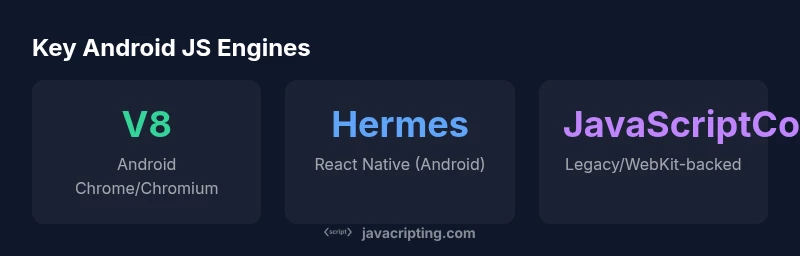
The Android ecosystem relies on a small family of high-performance JavaScript engines, each optimized for a different use case. In browsers, V8 provides speed and modern JS feature support through Just-In-Time compilation and aggressive optimization. WebView uses a Chromium-derived engine, so updates to Chrome generally improve WebView JS as well. Hermes, developed by Meta for React Native, prioritizes start-up latency and predictable memory usage for mobile apps. JavaScriptCore, inherited from WebKit, remains in some environments and offers strong compatibility with web standards. The JavaScripting Analysis, 2026, indicates these engines are not locked to a single environment but shift with app requirements. When you test on Android, verify which engine is active for your target platform and device cohort, because performance and debugging capabilities can differ substantially.
- Chrome-based environments typically run V8-inspired JS pipelines with fast amortized compilation.
- WebView consolidates engine behavior inside apps, but its version aligns with the system WebView updates Timelines.
- React Native often uses Hermes by default for Android to optimize application startup and memory usage, with options to swap engines if needed.
- JavaScriptCore remains a staple in some hybrid stacks, especially where WebKit origins persist.
Understanding engine choices helps you tune bundling, code-splitting, and feature flags for Android.
WebView vs Chrome: Key differences for developers
Developers frequently ask how WebView compares to a full-fledged Chrome browser when running JavaScript on Android. The core difference lies in process isolation, update cadence, and permission surface. Chrome is a standalone, self-updating app that ships with its own UI, network stack, and security model. WebView is a system component embedded in apps and updated via the Android OS. This means WebView can lag behind Chrome in getting the latest JS features or security fixes, although recent Android releases close this gap. For web developers, WebView parity is improving; for app developers, WebView often requires extra configuration to enable features like service workers, push notifications, and offline caching. Hermes integration in React Native changes the equation by providing a dedicated JS engine with predictable startup times, which can influence how you structure your app’s boot sequence and memory budgets.
- Browser engines emphasize compatibility and feature completeness; WebView emphasizes integration and stability within apps.
- Versioning and security implications differ: the browser is updated via app stores, whereas WebView is tied to OS updates.
- Feature support often lags in WebView but can be boosted via hybrid tooling and polyfills.
Choose the correct path based on whether your primary goal is web-like UX in a browser or native-like performance inside an app.
Hybrid and native frameworks: React Native, Cordova, and more
Hybrid and cross-platform frameworks bring JavaScript to Android in different flavors. In React Native, the JS thread runs alongside a native UI thread, communicating via a bridge. Hermes and other engines affect how quickly the app starts and responds. Cordova and Capacitor provide a WebView-based shell where your UI is written in HTML/CSS/JS, with performance influenced by the WebView’s engine and hardware. Flutter apps that render through a WebView or WebRenderer also rely on underlying JS for web-like capabilities, though Dart remains the primary runtime. The choice of engine—Hermes, V8, or JavaScriptCore—depends on your framework, target devices, and performance goals. The JavaScripting team found that a thoughtful engine choice can shave seconds off cold-start times and improve frame rates on mid-range devices.
- Hermes is tuned for React Native boot speed and memory management.
- V8 remains strong for web-heavy Hybrid apps with large codebases.
- JavaScriptCore is common in older hybrid stacks but is gradually supplanted by Hermes and V8 in new projects.
- Always test across a spectrum of devices to measure real-world performance and adjust code-splitting, lazy loading, and caching strategies.
Practical tips to optimize JavaScript on Android
Performance optimization starts with understanding where your code runs. If you target WebView, minimize the bridge latency and reduce inter-process communication by batching operations and using asynchronous patterns. For browser-based experiences, enable aggressive caching, use service workers where supported, and employ progressive enhancement to maintain graceful degradation on older WebView versions. When using hybrid frameworks, prefer Hermes for React Native to cut startup times, and consider lazy loading large modules. Profiling tools such as Chrome DevTools for remote debugging, Android Studio Profiler, and Flipper can help identify memory leaks, excessive reflows, and long-tasks. Keep bundle sizes small, optimize images, and rely on code-splitting to avoid large initial loads.
- Profile on the target devices and OS versions to capture realistic performance.
- Enable lazy loading and dynamic imports to reduce initial payloads.
- Use persistent caching and offline strategies to improve perceived performance.
- Minimize expensive DOM operations and avoid heavy synchronous work on the JS thread.
The future of JavaScript on Android: trends to watch
The Android JS landscape continues to evolve with OS updates, browser improvements, and framework advances. Expect better WebView synchronization with Chrome releases, more sophisticated JIT optimization in embedded engines, and growing adoption of Hermes across diverse frameworks. Increased focus on energy efficiency, memory management, and secure execution contexts will influence toolchains and debugging practices. Developers should stay current with Android platform changes, monitor engine release notes, and adopt progressive enhancement to maintain compatibility as engines mature. The goal is to deliver fast, secure, and consistent experiences across a wide range of devices.
Comparison of JS execution environments on Android
| Environment | Engine | Typical Use |
|---|---|---|
| Android Chrome | V8-based (Chromium) | Web browsing & dynamic pages |
| Android WebView | Chromium-based (V8) | Embedded web content in apps |
| React Native on Android | Hermes / V8 / JavaScriptCore | Cross-platform UI with JS logic |
Questions & Answers
Where does JavaScript run by default on Android devices?
JavaScript runs in the active browser engine (usually Chromium-based) or in the WebView embedded in apps. The exact engine depends on the app and OS version. In hybrid apps, an embedded engine (Hermes, V8, or JavaScriptCore) executes the logic.
On Android, JavaScript runs in the browser engine or the WebView, and in hybrid apps, an embedded engine handles the code.
Is WebView always Chromium-based on Android?
Most modern WebView implementations on Android are Chromium-based, updating as the OS updates. Some older or specialized environments may use different WebKit-derived backends.
Generally yes, but some older setups may differ.
What is Hermes and how does it affect Android apps?
Hermes is a JS engine optimized for React Native on Android. It improves startup time and memory usage, which can boost perceived performance in mobile apps.
Hermes speeds up startup and saves memory in Android React Native apps.
Can I run JavaScript outside a browser on Android?
Yes. Hybrid frameworks (React Native, Cordova, Capacitor) bundle JS to run inside a WebView or embedded engine, and some web apps can be packaged as PWAs for Android devices.
Yes, via hybrid frameworks and PWAs.
How can I optimize JavaScript performance on Android?
Profile with browser and Android tooling, minimize initial payloads, enable code-splitting, use lazy loading, and choose an engine aligned with your framework to reduce boot time and memory pressure.
Profile, optimize payloads, and pick the right engine.
Do I need to learn different engines for Android development?
Yes, especially if you work with multiple frameworks. Understanding how V8, Hermes, and JavaScriptCore behave helps you tailor performance strategies per app and device.
Yes—different engines matter for performance tuning.
“JavaScript on Android isn’t a single runtime—it’s a family of engines optimized for the target context. Measure against your environment and optimize accordingly.”
What to Remember
- Identify the execution context first: browser, WebView, or hybrid engine
- Expect different engines (V8, Hermes, JavaScriptCore) to affect startup and runtime performance
- WebView parity with Chrome is improving but may lag in updates
- Choose engine based on framework and device targets to optimize boot time and memory
- Follow engine-aware best practices to maximize Android JS performance