How to Wait for 5 Seconds in JavaScript: Techniques and Best Practices
Learn how to wait for 5 seconds in JavaScript without blocking the UI. Explore setTimeout, Promises, and async/await with practical examples and best practices.


By the end of this guide you will implement a safe, non-blocking delay of five seconds in JavaScript using modern patterns like Promise-based sleep or async/await. You will avoid blocking the UI, learn when to choose setTimeout versus a sleep utility, and see practical examples that work in both browsers and Node.js.
Why waiting matters in JavaScript
When you need a deliberate pause, such as delaying a UI update or sequencing actions, you might search for 'javascript wait for 5 seconds'. Importantly, JavaScript is single-threaded in the browser, so you can't simply block for five seconds without freezing the UI. This article walks through safe, non-blocking ways to achieve a 5-second wait using timers, promises, and async/await. This is where JavaScripting's practical guidance matters: The JavaScripting Team emphasizes patterns that keep your app responsive while preserving readability. According to JavaScripting, understanding asynchronous delays is essential for modern front-end apps. JavaScripting analysis shows that well-structured waits reduce race conditions and improve testability. In the end, choosing the right approach depends on your context: UI updates, data fetch pacing, or animation timing.
Non-blocking delay with setTimeout
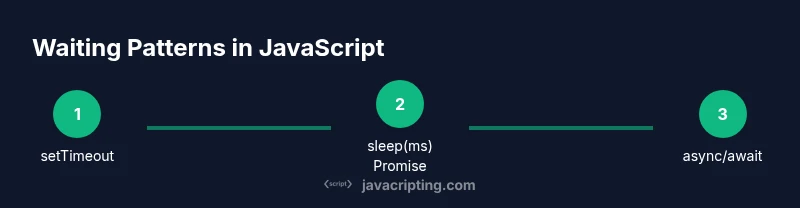
The simplest way to wait is to schedule a callback with setTimeout. This pattern is straightforward but comes with caveats: the callback runs after at least the specified delay, and the rest of your code continues immediately. To implement a 5-second wait without blocking, you wrap your logic inside the callback or convert to a Promise for better composition. Example code:
setTimeout(() => {
  console.log('5 seconds passed');
}, 5000);
This approach is perfectly fine for isolated delays, but becomes harder to compose when you need sequential waits or error handling. The benefit is minimal overhead and compatibility with older browsers. If you want to chain multiple waits, you can convert setTimeout to a Promise (see the next section).
Creating a sleep utility with Promises
Promises let you represent a delay as a value, making composition easier. A common pattern is to create a sleep(ms) function that returns new Promise(resolve => setTimeout(resolve, ms)). Then you can await sleep(5000) inside an async function. Example:
function sleep(ms) {
  return new Promise(resolve => setTimeout(resolve, ms));
}

async function run() {
  console.log('start');
  await sleep(5000);
  console.log('5 seconds elapsed');
}
This is a safe, non-blocking approach suitable for most flows. It also integrates well with error handling, timeouts, and cancellation signals. If you need to support environments that lack Promise, you’ll need a polyfill or a fallback.
Using async/await for clean sequencing
Async/await is built on top of Promises and lets you write asynchronous waits in a synchronous style. To wait exactly five seconds between steps, place awaits in a controlled sequence. Example:
async function stepSequence() {
  console.log('step 1');
  await sleep(5000);
  console.log('step 2 after 5s');
}
stepSequence();
In production, you may want to add cancellation tokens or timeouts to avoid infinite waits due to user navigation. Async/await shines when you combine multiple waits, parallel versus serial waits, and error handling with try/catch.
Common pitfalls and misuses
Blocking the event loop with a busy-wait (while loop) will freeze the UI for 5 seconds, which is unacceptable for user experience. Do not implement waits with synchronous loops. Rely on timers and Promises instead. Also be careful when mixing timers with UI animations; ensure your delay does not disrupt rendering or cause layout thrashing. If you're waiting for user interaction or data loading, consider combining a timeout with a listener rather than a hard sleep.
Real-world examples: waiting for 5 seconds
- Debouncing a search input: you might delay a call after user stops typing for 5 seconds to reduce requests.
- Sequencing animations: wait before starting the next phase to ensure assets are ready.
- Polling with pauses: pause briefly between polling intervals to reduce CPU usage.
Code samples:
async function example() {
  console.log('loading…');
  await sleep(5000);
  console.log('ready');
}
Compare with a setTimeout approach:
console.log('loading…');
setTimeout(() => { console.log('ready'); }, 5000);
Performance considerations and UI responsiveness
Wait patterns are performance-sensitive. The event loop remains free if you use non-blocking delays, but long sequences can still cause perceived lag. Keep waits under user-visible durations; favor shorter, meaningful delays with user feedback (spinners, progress bars). When testing, simulate delays with mock timers to avoid flakiness. JavaScripting analysis shows that predictable delays help with reliability and testability in front-end apps.
Debugging wait logic: tips and tools
- Use console.time and console.timeEnd to measure how long waits actually take.
- Use synthetic timers with Jest or Mocha to test asynchronous delays.
- Be mindful of time zone changes or clocks affecting time-based tests.
- Tools: browser devtools' async call stacks, breakpoints in async code.
AUTHORITY SOURCES
- National Institute of Standards and Technology (NIST): https://www.nist.gov/
- Association for Computing Machinery (ACM): https://www.acm.org/
- IEEE Xplore Digital Library: https://ieeexplore.ieee.org/
The JavaScripting Verdict
After evaluating multiple approaches, the recommended pattern for a 5-second wait in JavaScript is to use Promises with async/await. This keeps code readable, non-blocking, and easy to test. Avoid blocking the UI with busy-waits, and prefer a small, reusable sleep utility to express intent clearly. The JavaScripting Team recommends adopting this approach as a standard practice for front-end projects to ensure predictable timing and maintainability.
Tools & Materials
- Code editor(e.g., VS Code, WebStorm, or Sublime Text)
- Modern web browser(Chrome, Edge, Firefox, or Safari)
- Node.js installed(Optional for server-side or CLI demos)
- Console or terminal(For running Node scripts or quick tests)
- Sample code snippet(Include sleep and setTimeout examples)
Steps
Estimated time: 15-25 minutes
- 1
Identify where to insert a delay
Determine the exact point in your flow where a 5-second wait improves UX or sequencing without blocking UI. Clarify whether the delay is for pacing, data loading, or animation timing.
Tip: Write a small, isolated example first to validate behavior before integrating into a larger flow. - 2
Implement non-blocking delay with setTimeout
Add a setTimeout-based delay to schedule code to run after 5 seconds. Remember that code after setTimeout executes immediately; place dependent logic inside the callback or convert to Promise for better composition.
Tip: Use a named function inside setTimeout for readability. - 3
Create a sleep(ms) utility with Promises
Define sleep(ms) as return new Promise(resolve => setTimeout(resolve, ms)). This expresses intent and enables awaits in async functions.
Tip: Keep the function pure and reusable across modules. - 4
WAIT with async/await for clarity
Use await sleep(5000) inside an async function to create a linear, readable flow. Handle errors with try/catch when appropriate.
Tip: Avoid mixing awaits with non-deterministic timers without proper error handling. - 5
Compare serial vs parallel waits
For sequential steps, await each delay in order; for parallel waiting, use Promise.all with independent delays where possible.
Tip: Benchmark your waits to ensure they meet the user experience requirements. - 6
Add cancellation and timeouts
Implement a way to cancel waits using AbortController or a custom flag to prevent stale waits when the user navigates away.
Tip: Favor clean cancellation to avoid lingering async tasks. - 7
Test the wait logic
Write tests that simulate delays using fake timers to achieve deterministic results and avoid flaky tests.
Tip: Verify both the happy path and cancellation scenarios. - 8
Document the chosen pattern
Add comments or a short README note describing why a non-blocking delay was chosen and how to reuse the sleep utility.
Tip: Consistency across the codebase makes maintenance easier.
Questions & Answers
What is the best way to wait 5 seconds in JavaScript?
The recommended approach is to use a sleep utility based on Promises and await sleep(5000) inside an async function. This keeps the UI responsive and the code readable.
Use a Promise-based sleep with async/await to wait five seconds without blocking the UI.
Is setTimeout blocking the UI?
No. setTimeout schedules a callback to run after the delay but does not block the main thread. Code outside the callback continues to run immediately.
No, setTimeout schedules work and returns immediately.
How do I cancel a waiting period?
You can implement cancellation with AbortController or a dedicated flag that stops the subsequent logic if the user navigates away or a timeout occurs.
Use a cancellation flag or an abort controller to stop a pending wait.
Can I block the UI to wait for 5 seconds?
Blocking the UI with a loop or sleep is a bad idea; it freezes interactions. Always use non-blocking waits.
Blocking is a bad idea; use non-blocking waits instead.
How do I test asynchronous waits?
Test delays using fake timers in your test suite to simulate time passage without real waiting. Include both success and cancellation paths.
Test waits with fake timers and cover cancellation cases.
When should I prefer parallel waits?
If multiple independent delays are needed, use Promise.all to wait for all of them, reducing total wait time.
Use Promise.all when delays can run in parallel.
Watch Video
What to Remember
- Master non-blocking delays with Promises and async/await
- Choose sleep utilities for readable, testable code
- Avoid UI-blocking waits and busy-waits
- Measure and test delays to ensure reliability