Date Comparison in JavaScript: A Practical Guide
Learn reliable techniques to compare dates in JavaScript, including Date objects, timestamps, and ISO strings. Practical examples, pitfalls, and best practices for robust date handling.


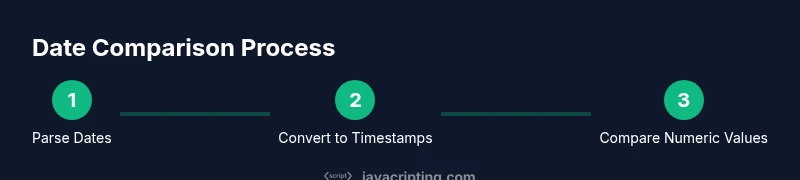
Learn how to compare dates in JavaScript accurately. You will normalize inputs to Date objects or timestamps, then compare numeric time values with getTime() or valueOf(). This guide covers common patterns, edge cases (time zones and DST), and practical examples you can adapt in your projects. By the end, you'll apply robust checks for equality, ranges, and ordering, reducing bugs in date-driven features.
Why date comparison in javascript matters
In many types of applications, you need to determine whether one date is before, after, or equal to another date. Getting this right matters for calendars, reminders, logging, and data validation. The phrase date comparison in javascript becomes central when building features like deadline checks, time-based filters, or user activity timelines. JavaScript supports several representations of dates, but the most reliable approach for comparisons is to normalize inputs to a common numeric form and compare those values. This reduces surprises related to object references or time zone differences and helps you write robust, maintainable code. In this guide, we’ll explore why date comparisons matter, common pitfalls, and practical patterns you can reuse across projects.
Date representations in JavaScript you need to understand
JavaScript provides a few related ways to represent dates, and choosing the right one affects how you compare them. The Date object stores a specific moment in time and can be created from literals, ISO strings, or timestamp numbers. You can also work with numeric timestamps (milliseconds since the Unix epoch) and compare those numbers directly. Understanding valueOf(), getTime(), and toISOString() helps you choose a strategy that minimizes errors. When you compare dates by their numeric values, you avoid the quirks of object identity and the vagaries of different time zones. For instance, two Date objects constructed from the same wall-clock time may reference different moments if one is interpreted in a different zone, but their timestamps will reveal the true ordering of moments in time. This section lays the groundwork for reliable comparisons, regardless of input format.
Core comparison techniques: timestamps, getTime, valueOf
The most robust way to compare dates is to convert them to a common numeric representation and then compare those numbers. Here are the main patterns you’ll use:
- Equality: compare getTime() values
const a = new Date('2026-03-20T12:00:00Z');
const b = new Date('2026-03-20T07:00:00-05:00');
console.log(a.getTime() === b.getTime()); // true- Ordering: subtract or use valueOf()
const d1 = new Date('2026-03-20');
const d2 = new Date('2026-03-21');
console.log(+d1 < +d2); // true- Invalid dates: check with isNaN(Date.parse(input)) or Number.isNaN(d.getTime())
const x = new Date('invalid-date');
console.log(isNaN(x.getTime())); // true
While getTime() and valueOf() are interchangeable, valueOf() is often used implicitly when you apply arithmetic operators to Date objects.
Working with date strings and ISO formats
Date strings come in many formats. The most reliable inputs for comparison are ISO 8601 strings (for example 2026-03-20T12:00:00Z) because they map directly to a single moment in time. When parsing strings, the recommended approach is new Date(dateString) or Date.parse(dateString), then convert to a timestamp with getTime() for comparisons. If you receive local date strings (e.g., 2026-03-20), consider converting to UTC by appending a Z or by using a library that normalizes to UTC before comparison. Consistency in input format drastically reduces edge-case bugs and makes unit tests clearer.
Edge cases and pitfalls
- Time zones: Two dates that look identical may represent different moments if parsed in different zones. Normalize to UTC before comparing.
- DST and leap years: These can affect string parsing; prefer timestamps or ISO strings to avoid drift.
- Invalid input: Always validate input before comparing; an invalid date can propagate errors through your logic.
- Subtle differences: Equality and range checks behave differently depending on how you construct dates, so test both scenarios.
Authority sources
- MDN Web Docs: Date object in JavaScript: https://developer.mozilla.org/en-US/docs/Web/JavaScript/Reference/Global_Objects/Date
- ECMA-262: The JavaScript language specification: https://www.ecma-international.org/publications/standards/ecma-262/
- RFC 3339: Date and time on the Internet: https://www.ietf.org/rfc/rfc3339.txt
Real-world examples: date comparison in practice
- Example: isDueDateInPast(date) to filter overdue tasks by comparing to today’s date. Then you can adjust UI states or trigger reminders.
- Example: isWithinRange(startDate, endDate, targetDate) to check if a date falls inside a window. Useful for scheduling features and analytics windows.
- Example: sortEventsByDate(events) to arrange an array of events chronologically. Demonstrates how to consistently normalize to timestamps before sorting.
Code snippets accompany each example to demonstrate patterns in real code. The examples assume input dates are parsed into Date objects or timestamps, and show how to maintain consistent time zones across environments by normalizing to UTC. This helps you implement date-based features with confidence in production.
Tools & Materials
- Code editor(VS Code or similar; enables syntax highlighting for JS date samples)
- Browser with DevTools(Chrome/Edge/Firefox to run and debug date logic)
- Node.js runtime(Version 14+ recommended for modern APIs)
- ISO 8601 date strings(Examples like 2026-03-20T12:00:00Z for consistent input)
Steps
Estimated time: 45-60 minutes
- 1
Identify dates to compare
List the two dates or date inputs you need to compare in your app. Decide whether you’re checking for equality, ordering, or a range check. Clarifying intent prevents unnecessary rework later.
Tip: Document the inputs and expected outcomes before coding. - 2
Normalize to Date objects
Convert string inputs or mixed date representations into Date objects. Use new Date(input) and verify validity with isNaN or getTime().
Tip: Prefer ISO 8601 strings to minimize timezone ambiguity. - 3
Convert to timestamps for comparison
Call getTime() or valueOf() on Date objects to obtain a numeric timestamp that can be safely compared.
Tip: Using +dateObj is a shorthand for dateObj.valueOf(). - 4
Perform the comparison
Use strict equality for exact matches and relational operators (<, <=, >, >=) for ordering. Compare numeric timestamps, not Date objects directly.
Tip: Tests should include equal moments in different formats and different time zones. - 5
Handle time zones explicitly
If inputs come from multiple sources, normalize to UTC before comparing to avoid DST or zone drift.
Tip: When in doubt, compare against a UTC reference (start of day in UTC). - 6
Validate and test edge cases
Check for invalid inputs, leap years, and DST transitions. Add unit tests that cover these scenarios.
Tip: Automated tests catch regressions as your date logic evolves.
Questions & Answers
How do I compare two Date objects in JavaScript?
Compare their numeric timestamps using getTime() or valueOf(). This avoids comparing object references and ensures you’re checking actual moments in time.
Compare the timestamps of the Date objects using getTime() to measure actual moments in time.
What is the best way to compare date strings?
Parse strings into Date objects or timestamps, then compare those numeric values. ISO 8601 strings are preferred for consistency.
Parse strings to dates and compare their numeric times.
How should time zones be handled when comparing dates?
Normalize all inputs to UTC before comparing. This prevents discrepancies caused by local time zones.
Convert all dates to UTC before comparing.
Why not compare Date objects directly with < or >?
Date objects are wrappers; use their timestamps for reliable ordering or equality checks.
Use timestamps, not Date objects, for comparisons.
How can I check if a date is within a range?
Convert all dates to timestamps and check if start <= target <= end.
Convert to timestamps and compare within the range.
What if input dates are invalid?
Validate with getTime() or isNaN checks before performing any comparison.
Always validate dates before comparing.
Watch Video
What to Remember
- Normalize inputs to a single date representation before comparison
- Compare numeric timestamps for equality and ordering
- Account for time zones by using UTC/ISO formats
- Validate inputs to avoid cascading errors
- Test edge cases like invalid dates and DST transitions