How JavaScript Differs from HTML and CSS
An analytical guide showing how JavaScript differs from HTML and CSS, outlining roles, execution environments, and best practices for building dynamic, accessible web experiences in 2026.


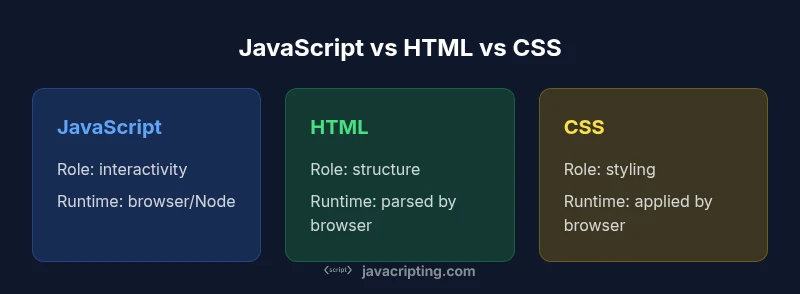
JavaScript runs in the browser to make pages interactive, while HTML provides structure and CSS handles presentation. In other words, HTML is markup, CSS is styling, and JavaScript is a programming language that manipulates the DOM to enable dynamic behavior. When you ask how is javascript different from html and css, the answer is that each language serves a distinct, complementary role in modern web apps.
Overview: Roles in the Web Stack
To answer how is javascript different from html and css, we start by clarifying each language's core purpose. HTML defines the structure of documents using elements and semantics. CSS controls styling, layout, and presentation. JavaScript adds interactivity and logic that reacts to user input and data changes. Together, they form a triad that powers modern web applications. This article, authored by the JavaScripting team, delves into the distinctions, trade-offs, and best practices for using these technologies correctly in 2026.
Key distinctions emerge when you compare content, appearance, and behavior across the stack. HTML anchors pages with meaning; CSS textures layouts and themes; JavaScript responds to events, fetches data, and updates the DOM in real time. The practical upshot is a clear division of labor: markup for structure, style for presentation, and code for behavior.
Core Roles and Paradigms
HTML, CSS, and JavaScript embody distinct paradigms. HTML is declarative markup; you describe what content is and what it means semantically. CSS is a styling language that describes how content should look and feel across devices. JavaScript is an imperative programming language that can react to user events, perform calculations, and drive dynamic updates to the page. In practice, most teams aim to keep HTML semantic, CSS modular, and JavaScript focused on behavior. This separation supports accessibility, performance, and maintainability.
Execution Environments and Lifecycles
HTML and CSS are parsed and applied by the browser as the page loads. The HTML tree forms the document; CSS is applied during render to determine layout and style. JavaScript executes in a runtime environment (the browser or Node.js) and follows the event loop model. As a page runs, scripts can manipulate the DOM after initial render, fetch data asynchronously, and respond to user input. Understanding these lifecycles helps you optimize load times and responsiveness.
Interaction with the DOM: Behavior vs Structure
A core distinction is how each language touches the page. JavaScript programs interact with the DOM to change content, attributes, and structure on the fly. HTML defines the initial DOM; CSS controls how that DOM is presented. Practical example: to update a counter on a button click, you write JavaScript that selects an element and modifies its text. You can reference the same element in HTML by id, then style its state with CSS when appropriate. This separation reduces coupling and makes maintenance easier.
Practical Scenarios and Code Snippets
Consider a form that validates user input. HTML supplies the form fields and semantics; CSS highlights invalid fields; JavaScript performs the actual validation and submits data asynchronously. Example (inline, minimal): <div id='count'>0</div><button id='btn'>Increment</button><script>document.getElementById('btn').addEventListener('click',function(){document.getElementById('count').textContent = parseInt(document.getElementById('count').textContent) + 1;});</script>
Performance and Accessibility Considerations
JavaScript adds behavior, but heavy scripts can hurt performance. Use code-splitting, debouncing, and lazy loading to minimize initial load; prefer CSS for harmless animations to reduce layout thrashing. Accessibility-wise ensure ARIA labels and keyboard navigability; avoid relying on JS-only interactions that break when scripts fail. Proper separation supports assistive technologies and improves search indexing. In 2026, the best practice is to balance speed and semantics, so that content remains usable even if JavaScript is unavailable.
Tooling, Workflows, and Dev Practices
Modern workflows involve bundlers (like Webpack or Rollup), transpilation (Babel or similar), and linting. Keep HTML semantic; use CSS modules or utilities; write JavaScript with modules, tests, and type-safety improvements (for example, TypeScript). Embrace progressive enhancement: deliver meaningful content with HTML, style progressively with CSS, and progressively enhance with JavaScript. This approach reduces risk and improves maintainability across teams.
Common Pitfalls and Best Practices
Avoid mixing structure with presentation in HTML; avoid inline styles; avoid manipulating the DOM inside tight loops; prefer event delegation; keep JavaScript focused on behavior and avoid tying logic to presentation. Practice explicit data flow: fetch data, render a stable UI, then apply styles. Document decisions and review accessibility implications as a normal part of code reviews to ensure inclusive design.
Next Steps: Building a Robust Web Skillset
Continue learning by building small projects that separate concerns: start with a static HTML page, layer CSS styling, then progressively add JavaScript features such as form validation, dynamic lists, and asynchronous data fetching. Track improvements in accessibility and performance with simple benchmarks. As you grow, explore modern patterns like component-based UI and progressive enhancement strategies.
Feature Comparison
| Feature | JavaScript | HTML | CSS |
|---|---|---|---|
| Primary role | Programming language for interactivity and logic | Markup language for content structure | Styles language for visual presentation |
| Execution environment | Runs in the browser or server (Node.js) via a runtime | Parsed and rendered by the browser as content structure | Applied by the browser during render for layout and visuals |
| Key constructs | Procedures, functions, events | Elements, tags, semantic structure | Selectors, properties, values (declarations) |
| Typical learning curve | Steep when mastering interactive patterns and tooling | Gentle for static content and semantics | Moderate as you learn styling techniques and specificity |
| Impact on performance | Logic-heavy scripts can affect responsiveness if not optimized | Markup itself has minimal runtime cost | CSS layout and paint can trigger reflows if overused |
| Best practices | Use JS for behavior with progressive enhancement | Keep HTML semantic and avoid presentational markup | Style with CSS and keep layout concerns in CSS |
| Interoperability | High; JS manipulates the DOM where HTML defines structure | Foundation of content; should remain stable | Controls appearance independent of content |
Benefits
- Clear separation of concerns improves maintainability
- Enables progressive enhancement of user interfaces
- Fosters collaboration between designers and developers
- Supports modern tooling and performance optimization
The Bad
- Can introduce cross-cutting complexity when integrating all three
- Build and tooling overhead for small projects
- Risk of overusing JavaScript for simple interactions
JavaScript complements HTML and CSS, not replaces them
JavaScript drives interactivity and logic, while HTML structures content and CSS handles presentation. Use all three purposefully to create robust, accessible web experiences.
Questions & Answers
What is the primary purpose of HTML, CSS, and JavaScript?
HTML provides structure and semantics, CSS handles styling, and JavaScript adds interactivity and logic. Together they form the web's core trio.
HTML structures content, CSS styles it, and JavaScript adds interactivity.
Can JavaScript manipulate HTML and CSS?
Yes. JavaScript can read and modify the DOM to change HTML content and attributes, and it can adjust CSS classes or styles to reflect state changes.
JavaScript can change HTML and CSS at runtime.
Do I need JavaScript to build a web page?
A web page can be built with HTML and CSS alone for structure and styling. JavaScript adds interactivity and dynamic behavior when required.
You can build pages without JavaScript, but interactivity often requires it.
What are the performance implications of using JavaScript vs CSS?
CSS tends to be more efficient for presentation, while JavaScript introduces runtime work. Use CSS for visuals and defer or optimize JavaScript to maintain responsiveness.
CSS is usually lighter on performance; use JavaScript wisely.
How should I structure code to keep HTML, CSS, and JavaScript separate?
Keep HTML for content, CSS for presentation, and JavaScript for behavior. Use semantic HTML, modular CSS, and clean JavaScript modules to minimize coupling.
Separate structure, style, and behavior for maintainability.
Is CSS part of JavaScript?
CSS is not part of JavaScript; it is a separate language for styling. JavaScript can manipulate CSS, but they remain distinct technologies.
CSS and JavaScript are different languages that work together.
What to Remember
- Know each language's core role and keep them separate
- Use HTML for semantics, CSS for styling, and JavaScript for behavior
- Favor progressive enhancement and accessible design
- Test across devices and browsers to ensure consistent experiences