How to Learn JavaScript Without HTML and CSS
Learn JavaScript without HTML or CSS using Node.js and the browser console. This practical guide covers setup, core concepts, async programming, debugging, and hands-on practice projects.


You can learn JavaScript content and logic without HTML or CSS by practicing in Node.js or the browser console. This approach focuses on core syntax, data types, control flow, functions, objects, and asynchronous patterns. You’ll skip DOM manipulation until you’re ready to apply JS in the browser, and you’ll explore practical exercises, debugging, and small CLI projects to build confidence.
Why You Can Learn JavaScript in Isolation
JavaScript is a language that can be studied independently of HTML and CSS. By focusing on core syntax, data types, control flow, and programming patterns, you can build a solid mental model of how code executes before you ever touch the browser's DOM. In practice, Node.js or the browser console provides a ready-made playground where you can write, run, and debug JavaScript without embedding it in HTML. According to JavaScripting, isolating these concepts accelerates mastery, reduces cognitive load, and helps you see results quickly. This approach is especially valuable for aspiring developers who want to gain confidence with measurable progress on day one.
Setting Up a Pure-JS Environment
To learn JavaScript without HTML and CSS, start by setting up a pure-JS environment. Install Node.js (the LTS version) so you have a reliable runtime and npm for managing packages. Choose a lightweight code editor and enable syntax highlighting and basic linting. Open your terminal, verify installation with node -v and npm -v, and experiment in the Node REPL or by creating small .js files and running them with node filename.js. If you prefer an in-browser route, you can also use the browser console to test snippets. The goal is to write executable JS that you can directly observe, without any HTML scaffolding.
Core JavaScript Concepts You Can Master
Begin with the fundamentals: variables using let and const, primitive types (number, string, boolean, null, undefined) and objects. Practice expressions, operators, and type coercion. Then study control flow with if/else, switch, and loops (for, while). Understand functions—declarations, expressions, and arrow syntax—and how scope and closures work. Learn how the call stack and event loop shape execution. As you progress, build a small mental model of asynchronous patterns, error handling, and modularity that will scale into larger projects.
Working with Data: Objects and Arrays
JavaScript handles data primarily with objects and arrays. Create objects to model real-world entities and arrays to store ordered collections. Practice accessing properties, adding methods, destructuring assignments, and iterating with for...of and array methods like map, filter, and reduce. Learn to design clean data shapes and to migrate from simple literals to more robust structures. This block also covers common data pitfalls, such as mutability concerns and shallow vs deep copying.
Functions, Scope, and Closures
Functions are the building blocks of JavaScript programs. Start with function declarations and expressions, then explore arrow functions for concise syntax. Learn about parameters, return values, and defaults. Dive into scope rules and how closures capture variables from surrounding contexts. Practice creating higher-order functions, callbacks, and practical examples that demonstrate function purity and side effects. By mastering function composition, you gain a powerful toolset for future projects.
Asynchronous JavaScript Without HTML: Promises and Async/Await
Asynchronous code is central to modern JavaScript, even when you’re not manipulating a web page. Practice creating and consuming Promises, chaining then/catch blocks, and handling errors with finally. Progress to async/await for readable, linear code. Use examples like simulated API calls with setTimeout or fetch (in Node.js you may need a polyfill or a mock). Understanding microtasks, macro tasks, and concurrency helps you write robust, scalable code that handles real-world timing and data retrieval.
Modules, Tooling, and Environments
Organize code with modules to promote reuse and readability. Learn about native ES modules (export/import) and how to run them in Node.js or in modern browsers. Explore simple tooling like npm scripts, and consider a minimal testing setup with a lightweight assertion library. This section also covers when and why you might adopt a bundler or transpiler later, and how to structure projects to scale from CLI scripts to small utilities.
Debugging and Testing Pure JS
Debugging is a critical skill. Learn to reproduce issues with reproducible steps, use console.log strategically, and leverage built-in debuggers in Node.js or browser devtools. Write small unit tests to validate functions and edge cases, and practice test-driven development on tiny projects. Adopt a consistent approach to logging, error handling, and performance profiling so you can confidently ship cleaner code.
Practical Practice Paths and Projects
Turn theory into practice with bite‑sized projects that reinforce what you’ve learned. Build a command-line calculator, a note‑taking CLI, or a file‑system utility (in Node.js) that exercises file I/O and path handling. Create a small data‑processing script that reads JSON, manipulates it, and outputs results. Each project should push a different concept: arrays, objects, functions, asynchronous logic, or module boundaries. Maintain a journal of experiments to reflect on what worked and what didn’t.
Transitioning to Web Projects Later
When you’re ready to apply your JS knowledge to the web, gradually bring in HTML and CSS. Start by wiring your JS to a simple HTML page and use the browser console for debugging. Focus on DOM manipulation only after you’re comfortable with core language features. This staged approach reduces cognitive load and helps you reuse your existing logic in a browser context, while still keeping your early studies language-first and practical.
Tools & Materials
- Node.js installed(Recommended LTS version; includes npm for package management)
- Code editor(Examples: VS Code, Sublime Text, or Atom)
- Terminal or command prompt(For running commands and scripts)
- Browser console(Optional for browser-based experimentation later)
- Online JS REPL(Helpful when you can’t install software)
Steps
Estimated time: Estimated total time: 8-12 hours
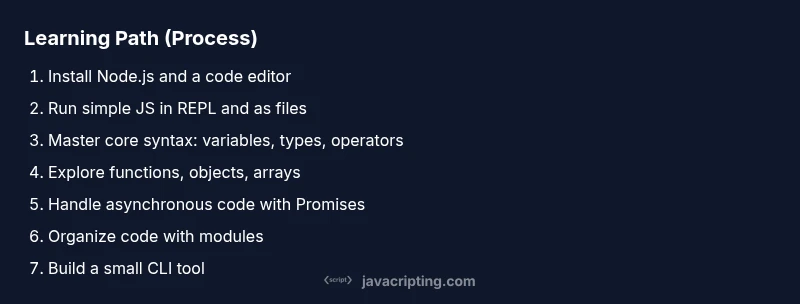
- 1
Install Node.js
Visit nodejs.org and install the latest LTS release. Confirm the installation by running node -v in your terminal. This step gives you a stable runtime and access to npm for packages.
Tip: Choose the LTS version for long-term stability. - 2
Choose and configure a code editor
Install a lightweight editor and enable essential features like syntax highlighting and linting. Set up a project folder to keep JS files organized and separate from other project types.
Tip: Install a linter (e.g., ESLint) to catch common mistakes early. - 3
Open a Node.js REPL session
Launch node in your terminal to start the interactive REPL. Type simple expressions like 2 + 2 or 'Hello' + ' world' to see immediate results.
Tip: Use .help for quick commands and .exit to quit. - 4
Create and run your first JS file
Create hello.js with a few console.log statements. Run it with node hello.js and observe the output in the terminal.
Tip: Start small: log messages, do simple arithmetic, then expand. - 5
Learn core syntax: variables, types, and operators
Study let/const, number/string/boolean/null/undefined, and common operators. Write short snippets to see how coercion affects results.
Tip: Experiment with typeof and equality checks to understand type coercion. - 6
Practice with arrays and objects
Create arrays and objects, access properties, and use loops or map/filter/reduce to transform data. Build small examples to internalize data manipulation.
Tip: Destructure objects and arrays to simplify access. - 7
Write functions and explore scope
Define named and anonymous functions, use parameters and defaults, and study how closures capture variables. Create a small utility function library.
Tip: Use pure functions where possible to avoid side effects. - 8
Add async patterns: Promises
Create and use Promises, chain .then and .catch, and handle errors. Simulate asynchronous behavior with setTimeout to understand timing.
Tip: Always attach a catch to your promises to handle errors gracefully. - 9
Move to async/await and modular code
Refactor promise-based code into async/await for readability. Start splitting code into modules using native ES modules or a simple Node structure.
Tip: Use export/import to share functions across files. - 10
Build a small CLI project
Create a command-line tool that reads input, processes it, and prints results. This reinforces control flow, I/O, and modular design without HTML.
Tip: Document usage with a simple help message and error handling.
Questions & Answers
Can I learn JavaScript without HTML?
Yes. You can focus on core language features in Node.js or the browser console before moving on to DOM and UI work.
Yes—focus on JavaScript fundamentals first before web UI work.
Is Node.js required to learn JavaScript?
Not strictly required, but Node.js provides a convenient, browser-free environment that accelerates practice.
Node isn't required, but it helps a lot for isolated JS practice.
What should I learn first in JavaScript?
Start with variables, basic data types, operators, and control flow, then move to functions, objects, and arrays.
Begin with the basics, then build up to more complex structures.
Do I need TypeScript to learn JavaScript?
No. Focus on core JavaScript concepts first; TypeScript can come later once you’re comfortable with the language.
TypeScript isn’t required at first—learn JavaScript basics first.
How do I practice without a browser?
Use Node.js, the REPL, and CLI tools to practice; you can simulate many scenarios without HTML.
Use Node.js and REPL to practice, even without a browser.
When can I start browser-based projects?
After you’ve built confidence with fundamentals, gradually introduce HTML and DOM concepts to apply your JS knowledge.
Once you’re comfortable with the language, start browser projects gradually.
Watch Video
What to Remember
- Start with Node.js for core JS concepts.
- Master fundamentals before attempting browser APIs.
- Practice with small, runnable scripts every day.
- Progressively add asynchronous patterns to your toolkit.
- Transition to web contexts later, not at the expense of fundamentals.