How to Print in JavaScript Without a New Line
A practical, step-by-step guide to output text in JavaScript without inserting a newline, covering Node.js and browser environments with code examples, best practices, and troubleshooting.


By the end of this guide, you will know how to print in JavaScript without a newline across Node.js and browser environments. You’ll learn when to use process.stdout.write in Node.js for precise control, and how to assemble strings or DOM updates in the browser to avoid automatic line breaks. This article provides practical, copy‑able examples you can reuse right away.
Why printing without a newline matters in JavaScript
Understanding how to print in javascript without new line matters because most environments automatically append a newline after each output call. In server-side Node.js scripts, precise control over line breaks matters for progress indicators, log formatting, and piping data to other programs. In the browser, rendering output without a trailing newline can be important when updating a live console-like UI or streaming text into an element. This guide starts by clarifying what 'no newline' means in JavaScript, then walks through concrete methods for Node.js and browser contexts. We’ll cover the common pitfalls, the best practice patterns, and several real-world examples that you can adapt to your project. Throughout, you’ll see how the output behavior changes with environment, how to test your results, and how to encapsulate these techniques into reusable utilities. The distinction between emitting a string and updating the DOM becomes important when you design user interfaces or CLI scripts that expect tight control over formatting.
Node.js: using process.stdout.write for precise control
In Node.js, the canonical way to print without an automatic newline is to use process.stdout.write. Unlike console.log, this method writes exactly what you pass and does not append a newline unless you include one. This is ideal for progress bars, streaming data, and composing multi-part outputs. The method takes a string or buffer and an optional encoding. A common pattern is to accumulate output in a buffer and flush it with a single call for clean, predictable results. If you do need a trailing newline later, you can append \n or use the appropriate function call. Remember to handle backpressure if you’re writing large chunks to stdout. JavaScripting analysis shows this approach is widely adopted for CLI tools that require precise formatting.
Browser environment: building output without new lines in the DOM
Browsers don’t terminate lines in the DOM the same way a console does. To render text without introducing a newline, you typically avoid inserting literal newline characters and instead append to an element’s text node or innerText. The browser’s rendering engine ignores line breaks in plain text unless you explicitly add line break elements. A common pattern is to buffer your output as a single string and assign it to an element’s textContent or innerText, or to progressively append text with appendChild(new Text("...")) without introducing <br> elements. This approach gives you control over how text appears in your UI, which is critical when building live-output widgets or dashboards.
Printing without newline in the console vs the DOM: a quick comparison
The console and the DOM are different ecosystems. In Node.js, stdout writes must be explicit about newlines, while in the DOM, you manipulate text nodes or HTML structure directly. If you’re logging data for debugging, you might still use console.log with a final manual newline, but for user-facing output, DOM updates provide more control. A simple rule of thumb is: use stdout.write for server-side, and construct a single string or text node for client-side rendering. This avoids the implicit newline behavior that often surprises developers.
Buffering strategies: joining chunks before the print
Buffering lets you assemble multiple pieces of output before sending them to the final sink. In Node.js, you can build a buffer string like let out = ''; out += 'Part1'; out += 'Part2'; process.stdout.write(out); In the browser, accumulate in a variable and assign once: let out = 'Part1Part2'; outputElement.textContent = out. Buffering reduces the risk of interleaved fragments and keeps formatting predictable, especially when outputs come from asynchronous sources or streams. Always validate that the final string contains exactly what you intend to display or log.
Practical examples you can copy-paste
Example 1 (Node.js):
// Node.js – no newline until explicitly added
process.stdout.write('Loading');
process.stdout.write('.');
process.stdout.write(' 0%');
process.stdout.write('\n');
Example 2 (Browser):
<div id="output"></div>
<script>
  const el = document.getElementById('output');
  let buffer = 'Downloading...';
  el.textContent = buffer; // no newline in the DOM by default
</script>
These patterns demonstrate how to control line breaks across environments, and you can adapt them to fit your project’s UI or CLI needs.
Windows, Unix, and cross-platform considerations
While JavaScript code itself is platform-agnostic, the environments you run in—Windows terminals, macOS/Linux shells—can influence how output appears when a newline is added. In Node.js, the newline is a function of your code, not the platform, so you control it deterministically by including or omitting \n. For DOM output in browsers, platform differences are irrelevant to newline handling, since HTML rendering is not text-based by default. Focus on consistent handling of your final string and explicit newline characters where needed to maintain cross-platform consistency.
Performance considerations and memory usage
No-newline printing is usually inexpensive, but it can become costly if you perform excessive string concatenations in hot loops. Prefer using buffers and single writes rather than repeated, tiny writes, especially for large outputs. In Node.js, avoid writing to stdout inside tight loops without buffering, as backpressure can become a bottleneck. In the browser, reflow and repaint costs can occur if large DOM updates are frequent; batching updates minimizes layout thrashing. Profiling and micro-benchmarks help you decide the right strategy for your specific workload.
Testing, debugging, and troubleshooting
Testing no-newline output means verifying that your final sink contains exactly what you expect, without trailing or missing newline characters unless intended. Use unit tests to validate buffer assembly and end-to-end tests to confirm rendered output in the DOM or terminal behavior. If you see unexpected line breaks, check for implicit newline characters in your strings, ensure you’re not accidentally using template literals that embed newlines, and confirm that you’re not mixing stdout writes with console.log in a confusing way. When debugging, log the length of the final string to confirm correct sizing and inspect the DOM node’s textContent for exact values.
Authority sources
- MDN Web Docs: Console API and printing behavior in JavaScript: https://developer.mozilla.org/en-US/docs/Web/API/Console
- Node.js Process stdout/write docs: https://nodejs.org/api/process.html#process_process_stdout_write_chunk_encoding
- MDN: Document Object Model (DOM) text and updates: https://developer.mozilla.org/en-US/docs/Web/API/Document
- W3C: HTML Living Standard for text rendering in the DOM: https://html.spec.whatwg.org/multipage/dom.html
Tools & Materials
- Node.js runtime(Install from https://nodejs.org/; version 14+ recommended)
- Modern browser(Chrome/Firefox/Edge for testing DOM output)
- Code editor(Examples: VS Code, Sublime Text)
- Terminal or DevTools console(For observing stdout or console output)
- Text buffer utility (optional)(String builder patterns or join utilities)
- Sample HTML page (optional)(For browser demonstrations)
- Reference docs(MDN, Node.js docs for quick lookup)
Steps
Estimated time: 60-90 minutes
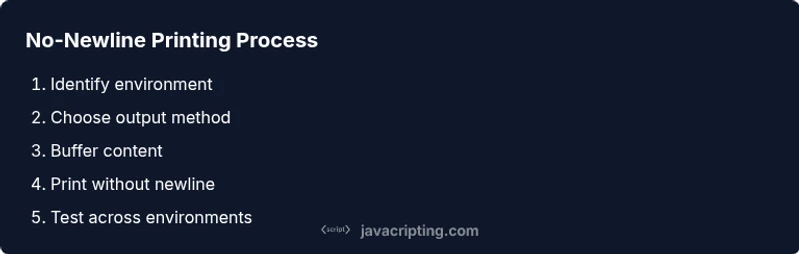
- 1
Identify the runtime environment
Determine whether you’re printing to the Node.js console or rendering content in a browser. The environment dictates which API is appropriate and whether newline handling is automatic or manual.
Tip: When in doubt, start with a simple print to stdout or a DOM update to confirm the baseline behavior. - 2
Choose the primary output method
If you need strict control over line breaks in Node.js, plan to use process.stdout.write. If you’re rendering to a webpage, prepare to update textContent/innerText or append a text node.
Tip: Avoid mixing stdout with console.log in the same flow to prevent misleading formatting. - 3
Buffer your output (best practice)
Build the final string in memory before printing to minimize interleaving and ensure predictable formatting.
Tip: For long outputs, use an array and join at the end for performance. - 4
Print without a newline in Node.js
Call process.stdout.write with the exact string you want, omitting any implicit newline. Add \n only where you want a line break.
Tip: Test with large chunks to verify backpressure handling and buffering behavior. - 5
Print without a newline in the browser
Update a DOM node’s textContent or use a single text node, avoiding literal newline characters in the string.
Tip: If you need a line break, insert an HTML element like <br> intentionally, not an implicit newline. - 6
Test cross-environment behavior
Run the Node.js script and load the HTML page in a browser to confirm consistent output formatting across environments.
Tip: Automate tests to compare the final string length and visible output. - 7
Refactor into reusable utilities
Encapsulate no-newline printing logic into small helper functions that you can reuse across projects.
Tip: Document the expected behavior (whether a trailing newline is produced) in each helper. - 8
Validate performance and memory
Profile the code to ensure buffering doesn’t introduce unnecessary memory usage or slow down rendering.
Tip: Use performance.now() or equivalent timing APIs to measure bottlenecks.
Questions & Answers
Can you print without a newline in the browser?
Yes. In the browser, avoid inserting newline characters in strings and update the DOM directly (e.g., textContent or innerText) or use a single text node. This prevents the browser from introducing line breaks automatically. Use explicit HTML if you need actual line breaks.
Yes. In the browser, update the DOM directly or build a single text node without newline characters.
Does document.write affect newline behavior?
Document.write writes to the document stream and may implicitly insert line breaks depending on how you structure the content. It's generally better for simple scripts to manipulate the DOM rather than using document.write for dynamic content.
Document.write can introduce formatting quirks; prefer DOM manipulation for dynamic content.
What about Windows CRLF vs Unix LF?
JavaScript strings control newline content via \n (LF) and \r (CR). In Node.js, you can choose to use \n or \r\n depending on the consuming program. In the browser, newline characters within strings are rendered as text unless you insert HTML line breaks.
Control newline characters with \n or \r\n in Node.js; browsers render text without implicit breaks.
Is there a universal method for no-newline printing?
There isn’t a single universal API that works identically in all contexts. The universal pattern is to buffer output and print once, choosing stdout.write for Node.js and DOM updates for browsers. This minimizes platform-specific surprises.
No single universal API, but buffering and environment-aware printing work well.
How can I test no-newline output quickly?
Create a small test harness that captures the final string or DOM content and compares it to the expected value. Verify string length, verify no trailing newline, and visually inspect the DOM output to ensure rendering matches expectations.
Build a tiny test to compare final output length and content.
What are best practices for log formatting?
Keep user-facing output free of unintended line breaks by using explicit newline characters only where desired. For logs, consider consistent line termination and structured formatting to simplify parsing when piping data to other tools.
Use explicit newlines only where you want them and keep logs predictable.
Watch Video
What to Remember
- Choose environment first to pick the right method.
- Use process.stdout.write in Node.js for no-newline output.
- In browsers, construct text in a buffer or DOM update to avoid implicit line breaks.
- Test output thoroughly across environments to ensure consistency.
- Refactor into reusable helpers for maintainable no-newline printing.