JavaScript for Beginners Course: Learn by Doing
Enroll in a practical JavaScript for Beginners Course to build fundamentals, master syntax, and create real projects. Learn through hands-on exercises, guided milestones, and a clear learning path ideal for aspiring developers and frontend enthusiasts.


By enrolling in this JavaScript for Beginners Course, you will learn how to set up your development environment, write your first scripts, and build small interactive projects. The course covers core concepts like syntax, variables, functions, loops, and debugging, with practical exercises and milestones. You’ll also learn how to test code in a browser and iterate quickly, gaining confidence as you progress.
Why a JavaScript for Beginners Course
A structured JavaScript for Beginners Course provides a clear roadmap from zero to confident coding. In this path, learners build fluency with syntax, data types, and program structure, while seeing immediate results in the browser. According to JavaScripting, a guided curriculum reduces overwhelm by breaking topics into small, achievable milestones. With hands-on labs, you’ll practice writing clean code, debugging, and refining your approach as you go. The course emphasizes practical skills you can apply immediately, such as manipulating web page content, handling user input, and testing code in real-time. As you progress, you’ll gain the problem-solving mindset that separates beginners from proficient developers.
- Structured milestones help you measure progress
- Immediate, browser-based feedback reinforces learning
- Practical exercises connect concepts to real-world tasks
By following a well-structured beginner course, you’ll avoid common stumbling blocks and build a solid foundation for more advanced topics like ES6 features, asynchronous programming, and web APIs.
Core Concepts You'll Master
This section outlines the fundamental pillars you’ll master in a JavaScript for Beginners Course. You’ll start with the language’s syntax and data types, then move into variables, operators, and control flow. Functions and scope become the building blocks for organizing code, while arrays and objects give you powerful data structures to model information. As you gain confidence, you’ll explore DOM basics to interact with web pages, and learn debugging techniques to identify and fix issues quickly. The aim is to make you fluent enough to write small, reliable programs that run in the browser or in a Node.js environment.
- Syntax, variables, data types, operators
- Functions, scope, and closures
- Arrays, objects, and basic data manipulation
- DOM basics and simple event handling
- Debugging strategies and common error patterns
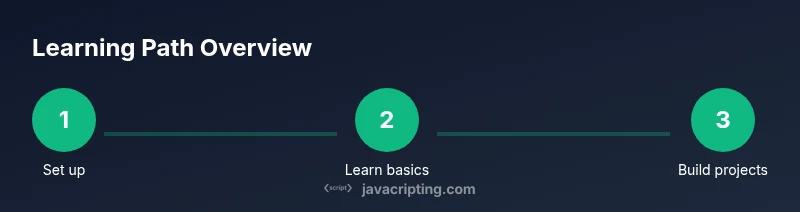
Course Structure and Learning Path
The course is designed as a practical journey with modular units, exercises, and quick checks. Each module blends short instructional content with guided practice to reinforce learning. You’ll encounter designed challenges that culminate in mini-projects you can showcase. A steady pace with defined milestones helps maintain momentum, while optional extension tasks keep you challenged as you grow more comfortable with JavaScript basics. The structure supports both self-paced learning and scheduled study sessions for consistent progress, which is essential for retaining new concepts.
- Clear module breakdown and milestones
- Hands-on labs that align with each topic
- Optional challenges to deepen understanding
- Flexible pacing to suit your schedule
Hands-on Projects You'll Build
Projects in a JavaScript for Beginners Course are designed to reinforce what you learn and demonstrate tangible outcomes. Expect small web-based apps that you can run locally, such as a to-do list that stores items, a quiz game with scoring, and a weather widget that fetches basic data. These projects introduce you to debugging, UI updates, and basic data handling. By completing these practical tasks, you’ll gain confidence in applying JavaScript to real user interactions and visible results.
- To-do list app with local state
- Interactive quiz with scoring and feedback
- Simple weather widget using mock data
- Lightweight form validation and DOM updates
Each project emphasizes readable code, incremental improvements, and user-facing results so you can show progress to peers or potential employers.
Effective Study Habits and Practice
Establishing effective study habits accelerates learning in programming. Create a consistent daily routine that focuses on one core concept at a time, followed by hands-on practice. Use small, repeatable exercises to reinforce syntax and patterns, and frequently test your code in the browser. Pair coding with lightweight notes or a personal cheatsheet to track recurring errors and solutions. Finally, schedule periodic reviews to revisit earlier topics and ensure long-term retention.
- Practice 20–30 minutes daily with a targeted topic
- Build a personal notes cheat sheet for quick reference
- Regularly run and test code in the browser console
- Schedule periodic retrospectives to reinforce knowledge
Debugging and Common Pitfalls
Debugging is a critical skill for any developer. Start by using console.log statements to inspect values, then leverage breakpoints in your browser’s dev tools to pause execution and inspect the state. Avoid common pitfalls like global variable leakage, off-by-one errors, and silent failures when asynchronous code runs. Learn to read error messages carefully, reproduce issues in isolation, and write small, testable snippets to verify behavior before integrating into larger projects.
- Use console logging and breakpoints effectively
- Isolate problems with minimal, reproducible examples
- Favor incremental changes over large rewrites
- Practice debugging daily to build intuition
Tools & Materials
- Computer with internet access(Desktop or laptop)
- Code editor (e.g., Visual Studio Code)(Install latest version)
- Web browser (Chrome/Firefox)(Keep updated for best debugging support)
- Node.js (optional for running JS locally)(Use LTS version if installed)
- Starter project scaffold (GitHub repo or template)(Optional for structured practice)
Steps
Estimated time: 6-8 hours
- 1
Set up the development environment
Install a code editor, choose a browser, and optionally install Node.js. This step creates the workspace where you’ll write and test JavaScript code. Confirm that the editor shows line numbers and syntax highlighting to help spot errors quickly.
Tip: Open a sample HTML file and ensure the console is ready to log output. - 2
Write your first JavaScript file
Create a new file named app.js and type a simple console.log statement to verify the environment works. This confirms basic familiarity with the file structure and how JavaScript runs in the browser.
Tip: Use a simple message like 'Hello, JavaScript!' to verify everything prints to the console. - 3
Learn about variables and data types
Introduce var/let/const and explore primitive types (string, number, boolean) and their differences. Practice declaring variables and using template literals to combine values.
Tip: Prefer const for values that won’t change; use let for variables that will be reassigned. - 4
Understand basic operators and control flow
Explore arithmetic, comparison, and logical operators. Implement if/else statements and switch cases to control which code runs under different conditions.
Tip: Test boundary conditions (e.g., equal vs not equal, true vs false) to prevent logical errors. - 5
Create functions and scopes
Define simple functions, pass parameters, and return values. Learn about function scope and how closures capture variables from outer scopes.
Tip: Use small, focused functions to keep code readable and reusable. - 6
Work with arrays and objects
Handle lists with arrays and store related data with objects. Practice iterating through arrays with for loops and using object properties in expressions.
Tip: Experiment with array methods like push, pop, and map in small examples. - 7
Introduction to DOM basics
Interact with a web page by selecting elements and updating content dynamically. Add event listeners to respond to user actions.
Tip: Start with a simple button that changes text content when clicked. - 8
Practice debugging on small projects
Apply debugging techniques to the projects from earlier steps. Use console.logs and browser dev tools to trace issues and verify fixes.
Tip: Document each bug and its fix to build a personal debugging journal. - 9
Plan next steps and build momentum
Outline a realistic learning plan for the next week, including new topics (loops, functions, DOM) and additional hands-on projects to reinforce knowledge.
Tip: Set daily goals and celebrate small wins to stay motivated.
Questions & Answers
Do I need prior programming experience before starting this course?
No prior programming experience is required. The course starts with fundamentals and gradually introduces concepts, enabling beginners to build a solid foundation.
No prior experience needed; the course begins with basics and builds up gradually.
Is this course focused on web development or general JavaScript use?
The course covers general JavaScript concepts applicable to both web browsers and Node.js environments, with emphasis on browser-based examples for hands-on practice.
It covers general JavaScript concepts suitable for web and general use.
What tools do I need to start?
A computer, a text editor, and a modern browser are enough to start. Node.js is optional if you want to run JavaScript outside the browser.
A computer, a text editor, and a modern browser are enough to begin.
How long will it take to become proficient?
Proficiency varies by effort, but consistent daily practice over several weeks typically yields noticeable progress in core skills.
Progress depends on practice, but steady daily effort shows clear gains.
What comes after completing the course?
After finishing, you can tackle more advanced topics like ES6 features, asynchronous JavaScript, and practical projects to build a portfolio.
Next, explore advanced topics and build projects to showcase your skills.
Watch Video
What to Remember
- Master JavaScript fundamentals with a structured plan
- Build confidence through small, runnable projects
- Develop debugging habits early for faster learning
- Establish a steady practice routine and track progress