just before ensures the DOM is ready when the script runs. Tip: Test in multiple browsers to confirm alignment with rendering behavior."},{"text":"If you must load scripts in the head, add defer to prevent blocking rendering. Deferred scripts execute after parsing, in order. Tip: Avoid relying on execution order with multiple deferred scripts; structure dependencies accordingly.","name":"Use defer for head-based scripts","position":4,"@type":"HowToStep"},{"@type":"HowToStep","position":5,"text":"Use async for scripts that do not depend on DOM or each other. They load as soon as ready, which can improve perceived performance. Tip: Do not use async if a script relies on DOM elements created later.","name":"Consider async for independent scripts"},{"name":"Ensure DOM readiness before DOM manipulation","position":6,"text":"Wrap DOM-dependent code in a listener for DOMContentLoaded, or place inside a function called after defer has run. Tip: For modern apps, consider using window.addEventListener('DOMContentLoaded', ...).","@type":"HowToStep"},{"@type":"HowToStep","name":"Test performance implications","text":"Use browser performance tools to verify render time and script execution order. Look for blocked time spent parsing or executing scripts. Tip: Compare page load with and without defer/async to quantify impact.","position":7},{"@type":"HowToStep","name":"Keep inline scripts minimal","text":"Avoid large inline blocks; inline code can block rendering and complicate caching. Reserve inline scripts for tiny initialization tasks. Tip: If you must inline, keep it under a few lines and move complex logic externally.","position":8},{"position":9,"text":"Group related functions into modules or objects; use descriptive names and comments to improve readability. Tip: Modular design scales better as projects grow.","name":"Organize your script structure","@type":"HowToStep"},{"text":"Add comments in HTML and JS explaining why defer/async is used. This helps future maintainers understand the rationale. Tip: Create a tiny README snippet in your project.","@type":"HowToStep","position":10,"name":"Document your loading strategy"},{"position":11,"text":"Test on different browsers and devices to ensure script placement behaves consistently, especially with caching and network conditions. Tip: Automated tests can help catch regressions related to loading order.","name":"Validate across environments","@type":"HowToStep"},{"position":12,"text":"Create a reusable template showing head vs body placement, defer/async usage, and a small debug section to confirm DOM readiness. Tip: Save as a reusable boilerplate for future projects.","@type":"HowToStep","name":"Finalize with a minimal starter template"}],"tool":[{"@type":"HowToTool","name":"Text editor"},{"@type":"HowToTool","name":"Web browser with developer tools"},{"@type":"HowToTool","name":"HTML file"},{"@type":"HowToTool","name":"External JavaScript file"},{"@type":"HowToTool","name":"Basic knowledge of DOM"}],"relatedLink":[{"@type":"WebPage","name":"Where to Insert JavaScript: A Practical Guide for Web Apps","url":"https://javacripting.com/javascript-dom/where-to-insert-javascript"},{"@type":"WebPage","url":"https://javacripting.com/javascript-tools/where-to-link-javascript-in-html","name":"Where to Link JavaScript in HTML: A Practical Guide"},{"name":"Should JavaScript Be in Head or Body? A Practical Guide","url":"https://javacripting.com/javascript-basics/should-javascript-be-in-head-or-body","@type":"WebPage"},{"@type":"WebPage","name":"Where to Input JavaScript: A Practical Guide","url":"https://javacripting.com/javascript-basics/where-to-input-javascript"}],"description":"Learn where to put JavaScript in HTML—from head to end of body, defer vs async attributes, and external files. Practical guidance to speed up rendering, avoid blocking, and keep code organized.","name":"Where to Put JavaScript in HTML: A Practical Guide","abstract":"To load JavaScript efficiently in HTML, keep external scripts and place them at the end of the body or in the head with defer. Use async only for independent scripts. Always ensure DOM readiness before manipulating elements.","author":{"slogan":"We help you learn","@type":"Organization","description":"Expert guides on Your practical, expert JavaScript guide—learn, build, and debug with confidence.. AI-assisted content reviewed by human editors.","@id":"https://javacripting.com/about#organization","knowsAbout":"Your practical, expert JavaScript guide—learn, build, and debug with confidence.","url":"https://javacripting.com/about","name":"JavaScripting Team"}},{"@type":"BreadcrumbList","itemListElement":[{"position":1,"item":"https://javacripting.com","@type":"ListItem","name":"Home"},{"position":2,"name":"JavaScript Basics","@type":"ListItem","item":"https://javacripting.com/javascript-basics"},{"name":"Where to Put JavaScript in HTML: A Practical Guide","@type":"ListItem","item":"https://javacripting.com/javascript-basics/where-to-put-javascript-in-html","position":3}],"@id":"https://javacripting.com/javascript-basics/where-to-put-javascript-in-html#breadcrumb"},{"@type":"FAQPage","mainEntity":[{"name":"What is the difference between defer and async?","acceptedAnswer":{"text":"Defer loads the script in parallel and executes after parsing, preserving order. Async loads as soon as available, potentially out of order. Choose defer for DOM-dependent scripts and async for independent tasks.","@type":"Answer"},"@type":"Question"},{"name":"Should I put scripts in the head or at the end of the body?","acceptedAnswer":{"text":"If you use defer, you can place scripts in the head. Otherwise, placing scripts at the end of the body minimizes render-blocking and ensures DOM elements exist when the script runs.","@type":"Answer"},"@type":"Question"},{"acceptedAnswer":{"text":"Inline JavaScript can be convenient for tiny initializations but hurts caching and maintenance. Prefer external files for larger logic and reusability.","@type":"Answer"},"@type":"Question","name":"Is it okay to inline JavaScript in HTML?"},{"name":"How can I ensure DOM elements exist before I manipulate them?","acceptedAnswer":{"text":"Use DOMContentLoaded or place initialization inside a function called after the script runs (or use defer to ensure parsing is complete before execution).","@type":"Answer"},"@type":"Question"},{"name":"How do I test script loading performance?","@type":"Question","acceptedAnswer":{"@type":"Answer","text":"Use browser DevTools Network and Performance panels to measure load times, blocking time, and script execution order across different networks."}},{"name":"What is a good starting template for script placement?","acceptedAnswer":{"@type":"Answer","text":"A practical starter includes a head with deferred script for core utilities and a body end script for DOM-dependent initialization."},"@type":"Question"}]},{"thumbnailUrl":["https://i.ytimg.com/vi/emLHW0VhzeM/maxresdefault.jpg","https://i.ytimg.com/vi/emLHW0VhzeM/sddefault.jpg","https://i.ytimg.com/vi/emLHW0VhzeM/hqdefault.jpg","https://i.ytimg.com/vi/emLHW0VhzeM/mqdefault.jpg"],"publisher":{"url":"https://www.youtube.com","name":"YouTube","logo":{"url":"https://www.youtube.com/img/desktop/yt_1200.png","height":1200,"width":1200,"@type":"ImageObject"},"@type":"Organization"},"mainEntityOfPage":{"@type":"WebPage","@id":"https://javacripting.com/javascript-basics/where-to-put-javascript-in-html"},"uploadDate":"2026-02-09","@id":"https://www.youtube.com/watch?v=emLHW0VhzeM#video","potentialAction":{"@type":"SeekToAction","target":"https://www.youtube.com/watch?v=emLHW0VhzeM&t={seek_to_second_number}","startOffset-input":"required name=seek_to_second_number"},"inLanguage":"en","duration":"PT2M21S","embedUrl":"https://www.youtube-nocookie.com/embed/emLHW0VhzeM","description":"Learn where to put JavaScript in HTML—from head to end of body, defer vs async attributes, and external files. Practical guidance to speed up rendering, avoid blocking, and keep code organized.","name":"How to Link JavaScript to HTML in Visual Studio Code 2021","contentUrl":"https://www.youtube.com/watch?v=emLHW0VhzeM","@type":"VideoObject"}]}

Where to Put JavaScript in HTML: A Practical Guide

Learn where to put JavaScript in HTML—from head to end of body, defer vs async attributes, and external files. Practical guidance to speed up rendering, avoid blocking, and keep code organized.

JavaScripting
JavaScripting Team
·5 min read
Script Placement Guide - JavaScripting
Quick AnswerSteps

When working with JavaScript in HTML, place your external scripts at the end of the body or in the head with the defer attribute. Favor external files over inline code to keep markup clean and improve caching. Use async for non-dependent scripts and ensure DOM readiness before manipulating elements. This approach minimizes render-blocking and enhances performance.

Where to put javascript in html: Core idea and why it matters

Determining where to put javascript in html is not just about where the code lives; it affects how fast your page renders and how reliably scripts can access the DOM. In practice, the common question is how to position script tags relative to the HTML they interact with. According to JavaScripting, a thoughtful placement strategy balances load performance, readability, and maintainability. You’ll want to consider the difference between placing scripts in the head versus at the end of the body, and how attributes like defer and async change execution. The goal is to ensure that scripts load without blocking the critical rendering path while still having access to DOM elements when needed. This is essential knowledge for aspiring developers and frontend professionals who want robust, fast pages.

Expanded context and impact

The browser parser stops rendering while it fetches and executes scripts unless you use non-blocking patterns. By understanding where to put javascript in html, you can prevent jank, reduce user-perceived latency, and improve accessibility by ensuring scripts don’t delay essential content. The JavaScripting team emphasizes testing across browsers and devices because loading behavior can vary slightly between environments. As you learn, keep a mental model: scripts that modify the DOM should either run after the DOM is ready or be structured to wait for the DOM. This mindset translates into cleaner code and better performance.

Key takeaway of this section

  • Script placement affects render blocking and DOM access.
  • Head with defer or end of body are common patterns.
  • Consistency in structure simplifies debugging and performance tuning.

Practical scenario: what to avoid

Avoid placing large, blocking scripts directly in the head without defer, as this stalls the initial render. Inline event handlers can muddy your HTML and complicate maintenance. Prefer external files and keep small, purposeful inline scripts only for critical initialization that must happen before the page loads. When in doubt, start with a simple layout and iterate based on measurements from your browser’s performance tools.

Authoritative guidance and practical tips

To align with best practices, review the recommended loading strategies in reputable sources and experiment with defer and async. The JS loading strategy should reflect the dependency graph of your scripts: scripts that depend on DOM elements should wait, while independent utilities can load earlier.

Example summary: a mental model you can apply

Think of your HTML as a stage. DOM manipulation scripts should only run after the stage is prepared. Externalized scripts with defer at the top of the document can be executed in order after parsing, while async scripts run as soon as they’re ready, potentially out of order. This mental model helps you plan where to put javascript in html with confidence.

Tools & Materials

  • Text editor(VS Code, Sublime Text, or your preferred editor)
  • Web browser with developer tools(Chrome/Edge/Firefox with network and performance tabs)
  • HTML file(index.html or similar entry file)
  • External JavaScript file(script.js referenced via <script src="..."></script>)
  • Basic knowledge of DOM(Examples rely on DOMContentLoaded or defer/async)

Steps

Estimated time: 15-25 minutes

  1. 1

    Identify the script dependencies

    List scripts by dependency: which scripts require DOM elements and which can run independently. This helps decide where to place each script (head vs body) and whether to use defer/async.

    Tip: Create a dependency map early to prevent ordering surprises.
  2. 2

    Create an external JavaScript file

    Move any inline code into script.js. External files improve caching and maintainability. Keep initialization code in a clearly named function.

    Tip: Name your file script.js and keep paths consistent.
  3. 3

    Place the script at the end of the body

    For scripts that manipulate DOM on load, placing <script src="script.js"></script> just before </body> ensures the DOM is ready when the script runs.

    Tip: Test in multiple browsers to confirm alignment with rendering behavior.
  4. 4

    Use defer for head-based scripts

    If you must load scripts in the head, add defer to prevent blocking rendering. Deferred scripts execute after parsing, in order.

    Tip: Avoid relying on execution order with multiple deferred scripts; structure dependencies accordingly.
  5. 5

    Consider async for independent scripts

    Use async for scripts that do not depend on DOM or each other. They load as soon as ready, which can improve perceived performance.

    Tip: Do not use async if a script relies on DOM elements created later.
  6. 6

    Ensure DOM readiness before DOM manipulation

    Wrap DOM-dependent code in a listener for DOMContentLoaded, or place inside a function called after defer has run.

    Tip: For modern apps, consider using window.addEventListener('DOMContentLoaded', ...).
  7. 7

    Test performance implications

    Use browser performance tools to verify render time and script execution order. Look for blocked time spent parsing or executing scripts.

    Tip: Compare page load with and without defer/async to quantify impact.
  8. 8

    Keep inline scripts minimal

    Avoid large inline blocks; inline code can block rendering and complicate caching. Reserve inline scripts for tiny initialization tasks.

    Tip: If you must inline, keep it under a few lines and move complex logic externally.
  9. 9

    Organize your script structure

    Group related functions into modules or objects; use descriptive names and comments to improve readability.

    Tip: Modular design scales better as projects grow.
  10. 10

    Document your loading strategy

    Add comments in HTML and JS explaining why defer/async is used. This helps future maintainers understand the rationale.

    Tip: Create a tiny README snippet in your project.
  11. 11

    Validate across environments

    Test on different browsers and devices to ensure script placement behaves consistently, especially with caching and network conditions.

    Tip: Automated tests can help catch regressions related to loading order.
  12. 12

    Finalize with a minimal starter template

    Create a reusable template showing head vs body placement, defer/async usage, and a small debug section to confirm DOM readiness.

    Tip: Save as a reusable boilerplate for future projects.
Pro Tip: Prefer external JS files with defer; it keeps HTML clean and improves caching across pages.
Warning: Blocking scripts in the head without defer can delay first paint and hurt user experience.
Note: Async scripts run in any order; if order matters, avoid async or manage dependencies explicitly.
Pro Tip: Use a single entry point for DOM initialization to simplify maintenance.
Note: Test loading strategies under low-network and high-latency conditions.

Questions & Answers

What is the difference between defer and async?

Defer loads the script in parallel and executes after parsing, preserving order. Async loads as soon as available, potentially out of order. Choose defer for DOM-dependent scripts and async for independent tasks.

Defer runs after the document is parsed and keeps order with other deferred scripts. Async runs as soon as the file is ready and may run out of order.

Should I put scripts in the head or at the end of the body?

If you use defer, you can place scripts in the head. Otherwise, placing scripts at the end of the body minimizes render-blocking and ensures DOM elements exist when the script runs.

Place scripts at the end of the body for simplicity, or in the head with defer if you need earlier loading.

Is it okay to inline JavaScript in HTML?

Inline JavaScript can be convenient for tiny initializations but hurts caching and maintenance. Prefer external files for larger logic and reusability.

Inline code is fine for small tasks, but external files are better for caching and maintainability.

How can I ensure DOM elements exist before I manipulate them?

Use DOMContentLoaded or place initialization inside a function called after the script runs (or use defer to ensure parsing is complete before execution).

Wait for the DOM to be ready with a listener, or use defer so scripts run after parsing.

What is a good starting template for script placement?

A practical starter includes a head with deferred script for core utilities and a body end script for DOM-dependent initialization.

Start with a head-deferred script for essentials and a body-end script for DOM setup.

How do I test script loading performance?

Use browser DevTools Network and Performance panels to measure load times, blocking time, and script execution order across different networks.

Check load times and execution order in DevTools to optimize script placement.

Watch Video

What to Remember

  • Place scripts to minimize render blocking.
  • Prefer external files with defer or end-of-body placement.
  • Use async only for independent, non-blocking scripts.
  • Ensure DOM is ready before manipulation.
  • Keep a clean, modular structure for maintainability.
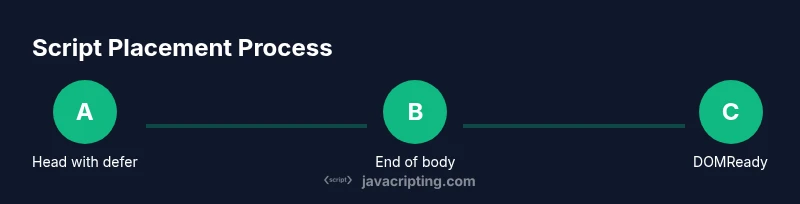
Tailwind infographic showing script placement options in HTML
Process flow for script placement in HTML

Related Articles