How to Prevent JavaScript Injection in Textbox
Learn practical client- and server-side strategies to prevent JavaScript injection in textbox inputs, including encoding, sanitization, CSP, and testing for robust defense.


By the end of this guide, you will implement a layered defense to prevent JavaScript injection in textbox inputs. Key requirements include server-side validation, output encoding, safe DOM insertion using textContent, and a restrictive Content Security Policy. You’ll also learn testing techniques to verify that user input cannot inject or execute script in your pages.
What is JavaScript injection and why it matters
JavaScript injection, commonly referred to as cross-site scripting (XSS), happens when untrusted input is incorporated into a web page in a way that allows an attacker to execute code in another user's browser. Textboxes and form fields are frequent vectors because they collect data directly from users and are often echoed back into the DOM or server responses. If the app writes user-provided content into innerHTML, attribute values, or script blocks without proper escaping, an attacker can inject script that steals cookies, impersonates users, or performs actions on behalf of the victim.
According to JavaScripting, the risk grows when inputs are stored or reflected without normalization. The three classic flavors—reflected, stored, and DOM-based XSS—explain why different parts of the stack require different defenses. Reflected XSS occurs when the payload comes from the request and is included in the immediate response. Stored XSS persists because the malicious content is saved on the server or in the database and later delivered to other users. DOM-based XSS happens entirely in the client, when script builds the page and user input ends up in the DOM without safeguards.
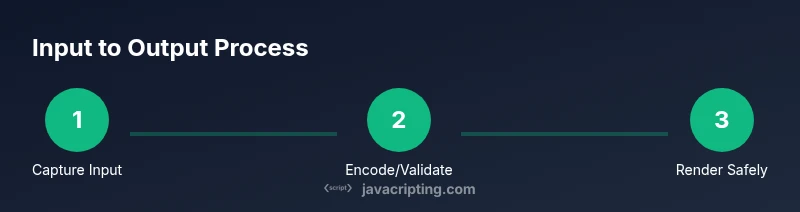
The practical implication is simple: treat every textbox input as potentially hostile. The safe path is to avoid direct insertion into HTML, encode user data before rendering, and layer server-side protections on top. While modern frameworks provide helpful defaults, relying on them alone invites risk if developers override or bypass protections. The more you understand the data flow from input to output, the better you can design defenses that survive evolving browser capabilities and attack techniques.
Common attack vectors targeting textboxes
Attackers often target textboxes by injecting payloads that end up in the DOM as HTML, attribute values, or script blocks. Common vectors include inserting scripts via innerHTML, injecting HTML attributes (like onmouseover or onclick) that execute code, and placing event handlers in user-provided content. Even seemingly harmless inputs can be dangerous if output is not encoded before rendering. Another frequent mistake is bypassing escaping when rendering templates or when populating server responses with user data. DOM-based XSS arises when the page's own scripts build or modify the DOM using unsanitized input, making client-side defenses essential but not sufficient. Be mindful that modern frameworks reduce risk when used correctly, but gaps still exist if developers disable built-in protections or misconfigure components.
Defensive strategies at the client side
Client-side defenses act as the first line of defense, but they must be complemented by server-side protections. Key practices include: escaping and encoding all user-provided content before inserting it into the DOM, preferring textContent or createTextNode over innerHTML, and using safe templating approaches that separate data from HTML. Consider implementing a strict allow-list for input (e.g., only alphanumeric and a small set of punctuation) and validating length to prevent oversized payloads. Use a sanitizer library like DOMPurify when you need to permit limited HTML, and ensure it runs on the input you actually render. Finally, enable a strong Content Security Policy (CSP) that disallows inline scripts and restricts script sources to trusted origins; CSP serves as a robust global protection against injected scripts. JavaScripting analysis shows that layered defense reduces risk considerably when combined with consistent testing and monitoring.
Defensive strategies at the server side
Servers should be the final gatekeeper. Implement server-side validation and normalization to reject disallowed characters, enforce length constraints, and reject any input that could be interpreted as executable code. Escape and encode data as it leaves your server, using your templating engine's built-in escaping features by default. When returning HTML, let the template engine handle escaping, or deliberately escape values before insertion. For JSON endpoints, ensure strings are properly escaped and do not allow embedded scripts to execute. Use security-focused middleware (e.g., input validators, sanitizers) and keep dependencies up to date. Logging suspicious inputs helps you monitor for new attack patterns and adapt your defenses over time.
Practical implementation: step-by-step examples in JavaScript
Below are practical examples to illustrate safe patterns. They assume a simple page with a textbox and a display area.
// Example 1: Safely render user input using textContent
const input = document.getElementById('userBox').value;
const display = document.getElementById('output');
display.textContent = input; // prevents HTML interpretation// Example 2: Encode output manually (when you must build HTML)
function escapeHtml(str) {
return str
.replace(/&/g, '&')
.replace(/</g, '<')
.replace(/>/g, '>')
.replace(/"/g, '"')
.replace(/'/g, ''');
}
const safe = escapeHtml(document.getElementById('userBox').value);
document.getElementById('output').innerHTML = '<span>' + safe + '</span>';// Example 3: Use a sanitizer for allowed HTML (when you need formatting)
// If you must allow some HTML, sanitize on the client or server
// DOMPurify is a commonly used library
const dirty = document.getElementById('userBox').value;
const clean = DOMPurify.sanitize(dirty, {ALLOWED_TAGS: ['b','i','em','strong']});
document.getElementById('output').innerHTML = clean;// Example 4: Safer DOM insertion without innerHTML
const value = document.getElementById('userBox').value;
const p = document.createElement('p');
p.textContent = value;
document.getElementById('output').appendChild(p);Additional tips: never rely solely on client-side checks; always validate and encode on the server, and test with automated tools.
Testing and verification: ensure your inputs are safe
Testing for XSS should cover both client-side and server-side paths. Use automated scanners, known payloads, and manual checks to verify that textboxes cannot inject executable scripts. Include tests that exercise stored and reflected XSS vectors, and ensure the UI never renders untrusted content as HTML. The CSP should be verified by checking response headers in every route that echoes user input. Regularly run security tests against your staging environment and incorporate findings into your development cycle. JavaScripting analysis shows that continuous verification helps catch new attack patterns as browsers evolve.
Quick implementation checklist
- Identify every textbox and input point in the UI.
- Render user input with safe DOM APIs (textContent/createTextNode).
- Apply server-side validation and output encoding at the source of data.
- If HTML is permitted, sanitize with a strict policy.
- Enforce a robust CSP and test end-to-end.
Tools & Materials
- Code editor(IDE or editor with syntax highlighting)
- Browser with DevTools(Chrome/Firefox for testing)
- Server-side framework with escaping(e.g., Node.js/Express with templates)
- DOMPurify or equivalent sanitizer(for HTML sanitization)
- Content Security Policy configuration(server headers or meta tag)
- Automated security testing tool(e.g., OWASP ZAP)
Steps
Estimated time: 60-90 minutes
- 1
Identify input points
Inventory all user input fields (textbox, textarea, selects) and determine how their values flow to the DOM or server. This helps you scope defenses and avoid gaps.
Tip: Map data paths from input to output to prevent blind spots. - 2
Validate on the server side
Enforce strict validation rules on the backend, rejecting disallowed characters and excessively long input. Server validation is essential because client controls can be bypassed.
Tip: Define a whitelist where possible to minimize surprises. - 3
Encode before rendering
Escape all user input when you output it to HTML. Prefer templating engines that escape by default.
Tip: Prefer textContent over innerHTML for untrusted content. - 4
Use a sanitizer when HTML is needed
If you must allow some HTML, apply a strict sanitizer that removes dangerous constructs while preserving safe formatting.
Tip: Configure allowed tags and attributes carefully. - 5
Apply a strong CSP
Set a Content Security Policy that disallows inline scripts and restricts script sources to trusted origins.
Tip: Test CSP headers across all routes that render user input. - 6
Test and monitor
Run automated security tests and manual checks for XSS, including stored and reflected vectors. Monitor logs for suspicious inputs.
Tip: Automate recurring tests and update payloads as browsers evolve.
Questions & Answers
What is JavaScript injection?
JavaScript injection, or XSS, occurs when untrusted input is rendered in a page in a way that lets attackers execute scripts. It often happens through unsafe DOM manipulation or HTML rendering.
XSS is when user input can run scripts in a page. Safe rendering prevents this.
Why isn't client-side validation enough?
Because client-side checks can be bypassed by an attacker, server-side validation and escaping are essential for real security.
Client validation can be bypassed; server-side checks are required.
Is DOMPurify safe to use?
DOMPurify is a widely used sanitizer that helps remove dangerous HTML while preserving allowed markup. Use it for inputs that require limited formatting, but still enforce server-side checks.
Yes, DOMPurify helps sanitize user HTML with a safe configuration.
What is the difference between escaping and sanitization?
Escaping encodes characters to prevent interpretation as code. Sanitization removes disallowed content. Both are important but serve different purposes.
Escaping turns dangerous characters into safe text; sanitization removes harmful code.
How does CSP help prevent XSS?
A Content Security Policy restricts where scripts can run and where they can be loaded from, reducing the impact of injection attempts.
CSP blocks most inline scripts and limits trusted script sources.
What if an attacker bypasses protections?
If bypasses occur, review logs, update allow-lists, and tighten server-side validation and CSP. Ongoing testing helps catch new attack patterns.
If something slips through, fortify defenses and re-test.
Watch Video
What to Remember
- Encode or escape user input before rendering.
- Use safe DOM methods like textContent for untrusted content.
- Validate and sanitize on the server side too.
- Enforce a strong CSP to block inline scripts.
- Test thoroughly with automated and manual checks.