How to Prevent JavaScript Injection: A Practical Guide
Learn defense-in-depth tactics to prevent javascript injection (XSS) with input validation, encoding, CSP, and secure rendering patterns. Practical steps for frontend and backend.


By the end of this guide, you will implement practical defense-in-depth strategies to prevent javascript injection across your front-end and back-end. Expect actionable patterns for input validation, safe rendering, CSP configuration, and testing. Start with understanding common injection surfaces and escalate to secure coding practices that cover both client and server.
What is JavaScript Injection and Why It Matters
According to JavaScripting, JavaScript injection, commonly known as XSS, is a pervasive web vulnerability that arises when untrusted data is processed by a web page in a way that allows an attacker to execute script in a victim's browser. The result can range from annoying popups to serious data theft or session hijacking. The JavaScripting team found that even small oversights—like echoing user input into a page without encoding or sanitization—can create exploitable openings. Understanding how to prevent javascript injection begins with recognizing the typical paths attackers use to inject code: reflected, stored, and DOM-based XSS. Reflected XSS happens when malicious input is reflected off a web server in an error message or response; stored XSS stores the payload in a database, a comment, or a user profile; and DOM-based XSS occurs entirely on the client when the DOM is manipulated using unsanitized inputs. All three types leverage the same weakness: untrusted data reaching the browser without proper controls. By adopting a defense-in-depth mindset, you reduce the surface area and make it harder for attackers to succeed. This section lays the groundwork for the rest of the guide and explains why prevention is not a single feature, but a discipline woven into every layer of your application.
Injection Surfaces in Modern Web Apps
Injection opportunities exist wherever data flows from user input to DOM or script execution. Common surfaces include:
- DOM manipulation via innerHTML, outerHTML, document.write, or element.innerHTML assignments.
- Template strings and string concatenation used to build HTML or scripts.
- Form inputs, URL query parameters, cookies, and local storage used in rendering decisions.
- Third-party scripts or widgets that inject untrusted content.
Unsafe example:
// unsafe: injecting user content directly into the DOM
element.innerHTML = getInput();
Safe alternative:
element.textContent = getInput(); // escapes as textContext-aware rendering is critical: never trust untrusted data, and prefer APIs that separate content from structure. Remember that third-party scripts can amplify risk if not vetted.
Resetting the mental model to consider both client and server boundaries is essential for continuous protection throughout development.
Defense-in-Depth: The Core Strategy
Defense-in-depth for javascript injection means layering protections across all parts of the stack. According to JavaScripting, combining input validation, output encoding, safe DOM APIs, and a strong Content Security Policy (CSP) creates multiple barriers so even if one layer fails, others still protect the user. A practical approach is:
- Apply strict input validation and normalization on the server and client.
- Encode outputs according to the rendering context (HTML, attribute, URL, JavaScript, etc.).
- Prefer safe DOM APIs (textContent, setAttribute with sanitized values) over dangerous sinks.
- Implement a robust CSP with nonces or hashes for inline scripts and restrict external sources.
- Use framework-provided protections and security libraries that reduce manual risk.
This layered strategy reduces attack surface and aligns with real-world threat models, helping teams move from reactive patching to proactive prevention.
Input Validation: What to Validate and How
Validation should be more than a cosmetic check. Implement allowlists for inputs wherever possible, and reject anything outside the expected format. Use strict type validation, length limits, and canonicalization to prevent bypasses. Normalize inputs early, then pass them through encoding routines before rendering. In practice, validate at both client and server edges to catch malformed data before it ever reaches sinks.
Important patterns include:
- Define explicit schemas for each input type (text, number, email, URL).
- Use length bounds and pattern checks that match business rules.
- Normalize whitespace and Unicode forms to a canonical representation.
- Treat missing fields as invalid rather than trying to coerce data.
These steps reduce injection chances substantially and make downstream encoding more predictable.
Output Encoding and Safe Rendering Patterns
Encoding outputs according to the destination context is the most reliable shield against injection. Neatly, avoid innerHTML when inserting untrusted content. Prefer textContent or appropriate DOM methods that escape by default. When HTML is truly needed, sanitize inputs with a trusted library before insertion and apply context-aware encoding for attributes, URLs, and JavaScript contexts. For example, when writing to an HTML attribute, encode quotes and angle brackets; when constructing a URL, escape URL components; for JavaScript contexts, ensure data is safely quoted or serialized.
Recommended practices:
- Use a reputable sanitizer (e.g., DOMPurify) for HTML fragments.
- Always escape data before injecting into scripts or styles.
- Separate content from structure using templating systems that enforce safe bindings.
- Avoid eval-like patterns and dynamic code generation.
These measures dramatically reduce the risk of script injection in dynamic pages.
Server-Side Protections and Content Security Policy
Client-side measures are essential, but server controls are non-negotiable. Validate and sanitize on the server; never rely solely on client-side checks. Implement a strict Content Security Policy (CSP) with nonces/hashes for scripts and a narrow set of trusted sources. Report and audit CSP violations to refine rules. Use secure headers (X-Content-Type-Options, X-Frame-Options) and ensure cookies with HttpOnly and Secure flags. Server-side rendering should never echo raw user input into HTML or script contexts.
A practical CSP approach:
- Default-src 'self'; script-src 'self' 'nonce-<random>' https://trusted.cdn.example;
- Object-src 'none'; frame-ancestors 'none';
- Report-URI to monitor violations without silently breaking functionality.
These measures create a robust boundary against injection and help catch misconfigurations early.
Testing, Monitoring, and Tooling
Regular testing complements preventive coding. Integrate security checks into CI pipelines with unit tests that verify safe rendering and escaping in all contexts. Use static analysis tools to catch unsafe bindings, and run dynamic tests to simulate injection attempts. Automated scanners can identify DOM-based risks and misconfigurations in CSP. Continuous monitoring and periodic audits keep your protections aligned with evolving threats.
Key activities:
- Add unit tests for HTML escaping in all rendering paths.
- Run DAST/DAST-like tests against the deployed environment.
- Review third-party scripts and review their security posture regularly.
- Maintain a security backlog and address issues iteratively.
With disciplined testing, you can close gaps before they become real-world exploits.
Authority Sources and Practical Checklist
To deepen understanding and stay current, consult established resources:
- https://www.cisa.gov/ (CISA) for security best practices and guidance.
- https://owasp.org/www-project-top-ten/ (OWASP Top Ten) for a baseline of common web risks, including injection.
- https://cwe.mitre.org/ (MITRE CWE) for taxonomy and examples of weakness patterns related to input handling.
Practical checklist:
- Implement a documented input-validation policy and enforce it in both frontend and backend.
- Enforce context-aware escaping and sanitize HTML fragments.
- Deploy a strict CSP with nonces/hashes and report violations.
- Use safe DOM APIs and avoid dangerous sinks like innerHTML unless necessary and sanitized.
- Establish a security-testing cadence and monitor CSP reports to refine rules.
Quick-Answer Finale: Quick Recap for Developers
In short, prevent javascript injection by validating input against strict allowlists, encoding outputs for each context, using safe DOM APIs, and enforcing a solid CSP. Combine client-side checks with server-side validation, and back them with automated tests and ongoing monitoring to maintain a secure frontend and backend stack.
Tools & Materials
- OWASP Cheat Sheet Series(Keep up with current input handling and escaping best practices)
- Code editor with security plugins(Examples: VS Code with eslint-plugin-security)
- Modern browser with DevTools(Used for testing DOM APIs and CSP behavior)
- Web server/framework with CSP support(Nginx/Express or similar; configure CSP headers)
- DOMPurify or equivalent sanitizer(Sanitize HTML fragments before insertion)
- Security testing tools (DAST/SAST)(Helps identify DOM-based and injection risks)
Steps
Estimated time: 90-120 minutes
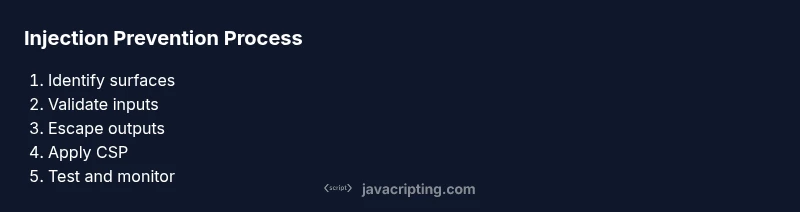
- 1
Identify injection surfaces
Survey all data entry points and rendering paths to locate where untrusted data could reach dangerous sinks. Map data flow from input to output. The aim is to uncover all places data interacts with the DOM or script contexts.
Tip: Create a simple data-flow diagram for critical pages. - 2
Validate and normalize inputs
Apply strict validation on both client and server sides. Use explicit schemas and allowlists; canonicalize input to a stable form before further processing. Reject anything that falls outside the defined rules.
Tip: Treat missing or malformed data as invalid inputs. - 3
Escape outputs by rendering context
Escape or sanitize data before inserting into HTML, attributes, URLs, or JavaScript contexts. Prefer textContent over innerHTML when displaying user data. Use a trusted sanitizer for HTML fragments when necessary.
Tip: Context-aware escaping dramatically reduces risk. - 4
Use safe DOM APIs
Prefer DOM APIs that automatically handle escaping, such as textContent, createTextNode, or setAttribute with sanitized values. Avoid innerHTML when possible, and never concatenate strings to form HTML.
Tip: Avoid string-based HTML construction whenever feasible. - 5
Implement a robust CSP
Configure CSP to restrict script sources, disallow inline scripts, and require nonces or hashes for allowed inline scripts. CSP helps prevent the execution of injected scripts even if an attacker bypasses other layers.
Tip: Start with a strict policy and gradually relax only where necessary. - 6
Enforce server-side validation and sanitization
Never trust client-side checks alone. Validate, sanitize, and encode on the server before rendering or storing data. This creates a strong last line of defense.
Tip: Double-verify critical inputs at the server boundary. - 7
Adopt secure frameworks and templating
Utilize frameworks that provide safe defaults for rendering and escaping. Prefer template bindings that separate data from markup and automatically escape content.
Tip: Keep dependencies up to date with security patches. - 8
Test, monitor, and iterate
Integrate security testing into CI, run both SAST and DAST tools, and monitor CSP reports. Iterate on fixes as threats evolve and coverage improves.
Tip: Create a security backlog and prioritize high-risk gaps.
Questions & Answers
What is JavaScript injection?
JavaScript injection (XSS) is when untrusted data is allowed to execute scripts in a user's browser. It can occur via reflection, storage, or DOM-based vectors. Preventing it requires context-aware encoding, validation, and secure rendering practices.
JavaScript injection, or XSS, happens when untrusted data runs in a user’s browser. It can be stopped by proper encoding and validation, across both client and server.
Does CSP fully prevent injection?
CSP helps by preventing inline scripts and restricting sources, but it is not a standalone solution. It should be used alongside input validation, encoding, and safe DOM practices for comprehensive protection.
CSP helps, but it isn’t enough by itself. Combine CSP with encoding and validation for robust protection.
Is client-side validation enough to stop XSS?
No. Client-side validation can be bypassed. Always validate and sanitize on the server, and use encoding during rendering to guard against injection from any source.
No, you must validate on the server as well and thoroughly encode outputs.
What are safe rendering patterns?
Use textContent for user data, sanitize HTML when needed, and avoid building HTML via string concatenation. Prefer templating engines that automatically escape content.
Prefer textContent and sanitized HTML; avoid constructing HTML with concatenated strings.
Which libraries help sanitize output?
Libraries like DOMPurify help sanitize HTML fragments. Always vet libraries for security updates and ensure they are kept current.
DOMPurify is a commonly used sanitizer. Keep it updated and configure it correctly.
How do I start testing for injection vulnerability?
Incorporate both static and dynamic testing. Add unit tests for escaping paths, run DAST tools against staging, and review CSP reports for misconfigurations.
Add unit tests for escaping, run dynamic scanners, and monitor CSP reports.
Watch Video
What to Remember
- Validate inputs with strict allowlists.
- Escape outputs according to rendering context.
- Adopt defense-in-depth across frontend and backend.
- Enforce a robust Content Security Policy.