JavaScript Call a Function: A Practical Guide
Learn how to call a function in JavaScript with confidence. This guide covers direct invocation, argument handling, return values, and advanced patterns like call, apply, and bind—complete with examples and best practices.


What calling a function means in JavaScript
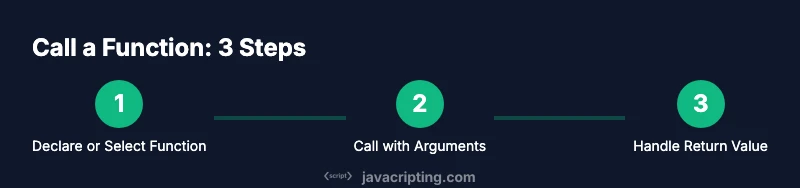
In JavaScript, calling a function means requesting the runtime to execute the code defined inside that function body. When you call it, control moves from your current scope into the function, then returns with a value that you can use elsewhere. If you’re learning to javascript call a function, start with the basics: the function name, optional arguments, and parentheses. According to JavaScripting, function invocation is the foundation of dynamic behavior in web apps, from responding to a click to computing a value in a loop. In this section, you’ll see simple examples you can run in your browser console to observe how a function call behaves under different scenarios. This is the introductory anchor that grounds deeper exploration and practical practice.
Basic direct invocation and function declarations
Direct invocation is the simplest form: you define a function and then call it by its name followed by parentheses. This pattern is universal across all JavaScript environments. Example:
function greet(name) {
  return "Hello, " + name + "!";
}
console.log(greet("Alex"));
The console prints: Hello, Alex! Direct calls are straightforward but they rely on a function being hoisted if you’re using function declarations. If you declare a function with the function keyword, it is hoisted, meaning you can call it before its declaration in the code flow. When you run the snippet, you observe a clean, predictable result and a foundation for more complex invocation patterns.
Function expressions and hoisting
A function expression assigns a function to a variable. Unlike a function declaration, a function expression is not hoisted in the same way, so you cannot call it before the assignment. This distinction affects how you structure your code for readability and reliability. Example:
const sayHi = function(n) {
  return "Hi, " + n;
};
console.log(sayHi("Mira"));
If you try to call sayHi before the assignment, you’ll get a TypeError: sayHi is not a function. Arrow functions add another flavor: they capture the lexical this, which becomes important in object methods and callbacks. Understanding when to use declarations, expressions, or arrows helps you write clearer and more maintainable code.
Passing arguments by value vs by reference
In JavaScript, primitives (numbers, strings, booleans, null, undefined) are passed by value, while objects are passed by reference. This distinction influences how a function can mutate its inputs. Example:
function modify(num, obj) {
  num = num + 1;
  obj.value = obj.value + 1;
}
let a = 5;
let b = { value: 10 };
modify(a, b);
console.log(a); // 5 (unchanged)
console.log(b.value); // 11 (mutated)
Be mindful that reassigning the object parameter inside the function won’t affect the original reference unless you mutate the object’s properties. This understanding is crucial when designing APIs and callbacks that manipulate data.
The this keyword and function context
This is where many beginners stumble. The value of this depends on how the function is called, not where it’s defined. In a plain function call, this defaults to the global object (window in browsers) or undefined in strict mode. In methods, this points to the host object. When using call or apply, you explicitly set this. Example:
const obj = { x: 1 };
function showX() { console.log(this.x); }
showX(); // undefined in strict mode or window.x in sloppy mode
showX.call(obj); // 1
Arrow functions do not have their own this; they capture it lexically from their enclosing scope. This makes them ideal for callbacks inside methods, but not for object methods that rely on their own this. Grasping this context is essential for predictable function behavior.
Function types: declarations, expressions, and arrow functions
JavaScript supports multiple ways to define functions. Function declarations are hoisted and easy to read, but less flexible for dynamic assignments. Function expressions provide flexibility and enable pattern tricks like immediately invoked function expressions (IIFEs). Arrow functions offer concise syntax and lexical this, which affects how they’re used in constructors and methods. Examples:
// Declaration
function add(a, b) { return a + b; }
// Expression
const sum = function(a, b) { return a + b; };
// Arrow
const multiply = (a, b) => a * b;
Choosing the right form affects readability, scoping, and performance in real applications. When used thoughtfully, these forms make code easier to reason about and test.
Advanced invocation: call, apply, and bind
For dynamic contexts, you can adjust the function’s this value and arguments using call, apply, or bind. call invokes immediately with a specified this value and a list of arguments. apply is similar but accepts an array-like object for arguments. bind returns a new function with a bound this and optional preset arguments. Example:
function greet(greeting, punctuation) {
  return greeting + ", " + this.name + punctuation;
}
const person = { name: "Lee" };
console.log(greet.call(person, "Hello", "!")); // Hello, Lee!
console.log(greet.apply(person, ["Hi", "."])); // Hi, Lee.
const bound = greet.bind(person, "Hey");
console.log(bound("!")); // Hey Lee!
These techniques are powerful for function reuse, event handlers, and APIs that require explicit context binding.
Functions as first-class citizens: storing, passing, returning functions
In JavaScript, functions are first-class citizens. You can assign them to variables, pass them as arguments, and return them from other functions. This enables patterns like higher-order functions, currying, and functional pipelines. Example:
function makeAdder(x) {
  return function(y) {
    return x + y;
  };
}
const addFive = makeAdder(5);
console.log(addFive(3)); // 8
By treating functions as values, you can compose richer abstractions, implement flexible APIs, and create a library of reusable utilities.
Real-world examples: events, callbacks, and async patterns
Invoking functions in real-world apps often happens in response to events or as callbacks. Event listeners on DOM elements, promise handlers, and timer-based callbacks all rely on function invocation in context. Example with an event:
<button id="btn">Click me</button>
<script>
  document.getElementById("btn").addEventListener("click", function(e) {
    console.log("Button clicked!", e.type);
  });
</script>
Asynchronous patterns frequently involve callbacks, promises, and async/await. Understanding how to call a function in a then-chain ensures errors are caught and flows remain readable. Practice with common APIs, and you’ll build robust, predictable interfaces.
Best practices and common pitfalls
To write reliable function calls, keep these practices in mind: validate inputs and guard against undefined functions, prefer meaningful names, and avoid mutating external state inside callbacks unless intentional. Be wary of this binding mistakes, especially in class methods and event handlers. Prefer arrow functions when you need lexical this, but avoid them in constructors or methods designed to be used with new. Finally, profile for performance in hot paths—unnecessary function calls, excessive nesting, or frequent allocations can degrade UI responsiveness.