Difference Between JavaScript and Node.js: A Practical Guide
Explore the difference between javascript and node.js, including definitions, runtimes, use cases, and practical guidance for frontend and backend developers.


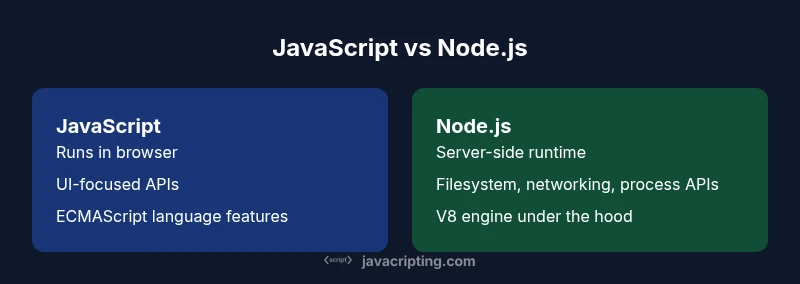
The difference between javascript and node.js is that javascript is a programming language designed for browser environments, while node.js is a server-side runtime that lets you run JavaScript outside the browser. In practice, JavaScript defines how code behaves in the browser; Node.js provides the runtime and APIs to build back-end services with JavaScript. The difference matters for where and how you develop apps.
What JavaScript Is and Where It Lives
JavaScript is a scripting language standardized by ECMAScript and primarily used to add interactivity to web pages. In practice, most developers think of JavaScript as the client-side language that runs in a browser, manipulating the DOM, handling events, and driving rich user interfaces. The central premise of the difference between javascript and node.js is that JavaScript itself is not tied to a single environment; it is portable, with engines like V8 and SpiderMonkey executing code. When you write JavaScript for the browser, you rely on the browser's APIs (such as the DOM, Fetch, Web Storage, and Web Animations). This environment shapes programming patterns around UI responsiveness and security sandboxing. Understanding this distinction helps you plan where logic should reside—on the client for UI interactions or on the server for data access, processing, and backend workflows. The phrase difference between javascript and node.js recurs in discussions about scope, capability, and deployment strategy.
How Node.js Extends JavaScript into a Runtime
Node.js is a server-side runtime that enables JavaScript to run outside the browser. Built on the V8 engine, Node.js exposes a rich set of APIs for filesystem access, networking, streaming, and process management. This runtime unlocks back-end development with JavaScript, allowing developers to write servers, CLIs, tooling, and automation scripts using a familiar language. Node.js also introduces a robust module ecosystem, primarily managed through npm, which accelerates project setup and dependency management. Importantly, Node.js emphasizes non-blocking, asynchronous I/O to scale applications under concurrent loads. However, unlike browsers, Node.js does not expose DOM APIs by default, so server-side rendering and data processing rely on different libraries and approaches. The upshot of the difference between javascript and node.js is that Node.js provides the runtime and environment, not the language itself.
The Environment: Browser vs Server
The browser environment shapes what you can do with JavaScript. It offers rich UI APIs, a document object model (DOM) for rendering, and security constraints that sandbox access to the local filesystem and network. This environment is optimized for interactivity, smooth rendering, and user experience, but it limits certain operations for safety. In contrast, Node.js runs on servers or developers’ desktops, with access to the filesystem, network sockets, and OS-level resources. This difference affects coding patterns, error handling, and deployment models. When evaluating the difference between javascript and node.js, you should consider where code executes and what it can access. Browser code powers the interface; Node.js code powers servers, tooling, and automation.
Core APIs and Modules: Web APIs vs Node Core Modules
JavaScript in the browser relies on Web APIs such as the DOM, Fetch, Web Storage, and Web Workers. These interfaces let you manipulate UI, perform network requests, and persist state locally. Node.js, by contrast, provides a collection of core modules for server-side tasks—fs for filesystem operations, http or https for servers, path for path handling, and process for runtime information. Node.js also enables you to load modules using CommonJS (require) or ES Modules (import/export), depending on your configuration. The difference between javascript and node.js becomes apparent in how you access capabilities: browsers offer built-in Web APIs; Node.js supplies a broad system API layer that transcends the browser.
Module Systems and Loading: ES Modules, CommonJS, and More
Historically, browsers relied on script tags and global scope, but modern JavaScript supports ES Modules (import/export). Node.js originally standardized around CommonJS (require/module.exports) while gradually embracing ES Modules for interoperability. This mix affects how you structure code, resolve paths, and share libraries. In Node.js, you may need to configure package.json with type: module to enable ESM, while browsers rely on native module support or bundlers. Understanding these module systems is essential to avoid mismatches between client and server code and to ensure consistent behavior across environments. The difference between javascript and node.js here is not just syntax—it’s about how you organize, load, and execute code in distinct runtimes.
Performance and Concurrency: Async I/O, Event Loop
Both JavaScript engines and Node.js use asynchronous programming concepts to improve responsiveness, but the environments shape how concurrency is achieved. In the browser, the event loop handles user interactions and UI updates, with Web APIs offloading work to background threads where possible. In Node.js, the event loop, powered by libuv, manages I/O-heavy tasks, including file access, networking, and database calls, often leveraging a thread pool for CPU-bound work. The difference between javascript and node.js becomes critical when sizing applications for CPU-bound vs I/O-bound tasks. JavaScript’s single-threaded nature means you structure work to avoid blocking the UI; Node.js exposes patterns like promises, async/await, and worker threads for heavy processing.
Use Cases by Context: Frontend, Backend, Tooling
On the frontend, JavaScript governs user interfaces, client-side validation, and dynamic content. On the backend, Node.js handles APIs, authentication, data processing, and task automation. The two environments can also overlap in server-side rendering, build tooling, and testing pipelines. The difference between javascript and node.js helps teams decide where logic belongs: keep interactive UI in the browser, offload heavy data handling to the server, and use Node.js tooling to streamline development. Understanding these roles clarifies architecture decisions and guides technology choices across full-stack projects.
Learning Path and Skill Transfer
A practical approach is to learn core JavaScript fundamentals first—syntax, data types, control flow, and functions—then explore browser APIs for frontend work. For backend work, introduce Node.js step by step: learn the runtime, file I/O, HTTP servers, and common libraries like Express. The difference between javascript and node.js here is that you can leverage a single language across both sides of the stack, but you must learn the distinct runtime APIs and tooling for each environment. Practice building small apps that start in the browser and move to Node.js to see how the same language behaves differently under each runtime.
Common Pitfalls and Misconceptions
A frequent misconception is that JavaScript can do anything in the browser or on the server without considering environment constraints. Remember that DOM operations work only in the browser, while server-side logic cannot manipulate the DOM directly. Another pitfall is assuming the same API works everywhere; node core modules differ from Web APIs, and module systems can differ across environments. Finally, developers often underestimate the learning curve of server-side concepts such as asynchronous error handling, streams, and deployment pipelines. Recognizing these differences helps you design robust, maintainable code across both domains.
Tooling, Ecosystem, and Deployment Considerations
The JavaScript ecosystem is enormous in both client and server spaces. On the browser, you commonly use bundlers, transpilers, and polyfills to support diverse environments. On Node.js, you rely on npm or Yarn to manage dependencies, and you may deploy to containers, serverless platforms, or traditional servers. The difference between javascript and node.js here is not only about code footprint but also about deployment models, runtime environments, and security practices. Choose tooling that aligns with your target environment, streamlines updates, and supports consistent testing across client and server code.
Real-World Scenarios: Decision Framework
When deciding between JavaScript-focused frontend work and Node.js-powered backend work, start with the task at hand. If you need a responsive UI with client-side validation, use JavaScript in the browser. If you must expose APIs, manage data, or automate server-side workflows, use Node.js. The difference between javascript and node.js is a practical guide to allocate resources, teams, and timelines. This framework helps teams minimize duplication, reduce context-switching, and align architecture with deployment realities.
Practical Takeaways and Next Steps
Summarizing the distinction: JavaScript is the language; Node.js is the server-side runtime that enables JavaScript on the server. Start with the basics of JavaScript, then progressively add Node.js fundamentals, module systems, and common server-side patterns. Build a small project that runs in both environments to experience the differences firsthand. Use the knowledge of the difference between javascript and node.js to design clean, robust architectures, and to select the right tools for frontend and backend development.
Comparison
| Feature | JavaScript (Browser) | Node.js (Server) |
|---|---|---|
| Primary function | Language specification (ECMAScript) | Server-side runtime for JavaScript |
| Typical environment | Web browser | Server/CLI environments |
| Core APIs | Web APIs (DOM, Fetch, WebCrypto) | Node.js core modules (fs, http, path, process) |
| Module system | ES Modules and script-based usage | CommonJS and ES Modules |
| Typical use case | UI interactivity, client logic | Back-end services, tooling, scripting |
| Performance focus | UI responsiveness, rendering |
Benefits
- Clear separation of client and server responsibilities
- Rich ecosystem and tooling for both environments
- Skills transfer between frontend and backend development
- Rapid iterations and a large talent pool
- Strong community support and ongoing improvements
The Bad
- Context switching between client and server codebases
- Browser sandbox constraints can limit capabilities
- Node.js is single-threaded by default, requiring careful async design
- Learning multiple runtimes and module systems can be complex
JavaScript and Node.js serve different roles; use JavaScript for client-side work and Node.js for server-side development.
The distinction helps teams assign tasks correctly and plan architecture. JavaScript powers the UI in the browser, while Node.js enables robust back-end services with JavaScript.
Questions & Answers
Is Node.js a framework or a runtime?
Node.js is a runtime, not a framework. It provides the environment and core modules to execute JavaScript on servers.
Node.js is a runtime, not a framework; it gives you the environment to run JavaScript on servers.
Can JavaScript run outside the browser without Node.js?
Yes, via other runtimes like Deno or specialized environments. Node.js is the most common option today.
Yes, you can run JavaScript outside the browser with other runtimes such as Deno.
What is the relationship between ECMAScript and Node.js?
ECMAScript defines the language standard; Node.js implements that language with a runtime and a rich set of APIs.
ECMAScript is the language standard; Node.js is the runtime that implements it with APIs.
Do I need to learn Node.js to build real front-end apps?
Not strictly, but knowledge of Node.js helps with tooling, build processes, and server-side rendering tasks.
You don’t have to, but Node.js helps with build tools and server-side work.
What are common misconceptions about JavaScript and Node.js?
Many assume JavaScript only runs in browsers; Node.js enables server-side use and beyond.
A common misconception is that JavaScript only runs in browsers; Node.js lets you run JS on servers.
Is performance identical in browser and Node.js?
Performance depends on the task. Browsers optimize UI tasks; Node.js excels at I/O and concurrency, but CPU-bound work varies.
Performance varies by task; browsers favor UI, Node.js handles I/O well.
What to Remember
- JavaScript runs in the browser; Node.js runs on the server
- Node.js provides core server APIs like fs and http
- Use the right runtime for the task to optimize deployment and performance
- Learn the common module systems (ESM/CommonJS) to avoid friction
- Strengthen your JS skills across both client and server for flexibility