JavaScript and jQuery: Jon Duckett's Practical Guide
A thorough, analytical comparison of vanilla JavaScript and jQuery, inspired by Jon Duckett's accessible style, with practical guidance for building modern web apps.


TL;DR: When building new apps, vanilla JavaScript is typically faster and leaner, while jQuery offers concise utilities for DOM tasks and quick UI prototyping in older codebases. If you’re starting fresh, prioritize modern JavaScript patterns; if you must support legacy browsers or move quickly, jQuery remains viable. This comparison reflects practical, Jon Duckett–style guidance for real-world projects.
Core Differences: javascript and jquery jon duckett and modern web patterns
According to JavaScripting, the distinction between native JavaScript and the jQuery library remains a practical compass for developers navigating real-world projects. In the context of javascript and jquery jon duckett, this section lays out the core differences that influence maintainability, performance, and team skills. Vanilla JavaScript is the language itself; jQuery is a library that simplifies cross-browser tasks with a concise API. The Duckett approach emphasizes clarity, consistent patterns, and readable code, so this comparison focuses on the practical implications rather than dogmatic choices. Expect differences in how you select DOM elements, handle events, and structure code. While jQuery offered a unified API when browsers varied in quirks, modern browsers have reduced those gaps, narrowing the maintenance gap between the two approaches. As you read, think about your project’s age, audience, and the team’s familiarity with JavaScript fundamentals. This nuanced view helps you decide when to lean on vanilla code or lean on jQuery’s ergonomics.
When to Use Vanilla JavaScript vs jQuery
The decision hinges on context, not a universal rule. For new projects, vanilla JavaScript—utilizing modern language features like let/const, arrow functions, modules, and async/await—offers a cleaner, more scalable path. It reduces dependencies and aligns with contemporary tooling such as webpack, Vite, and tree-shaking. Conversely, jQuery shines in scenarios where quick DOM manipulation is the primary goal, or when a legacy codebase already relies on its API and plugins. In such cases, a gradual integration strategy or a targeted rewrite can minimize risk while preserving user experience. This section emphasizes practical decision criteria: project age, browser support requirements, team familiarity, and long-term maintenance plans. For teams comfortable with ES6+ concepts, vanilla JS is the natural default. If deadlines are tight and the app must run on older browsers, a measured jQuery fallback may make sense.
Historical Context: Why jQuery Was Popular
Understanding the historical motivation behind jQuery clarifies its enduring relevance for certain projects. In the early-to-mid 2010s, browsers exhibited inconsistent DOM APIs, which made cross‑browser scripting painful. jQuery offered a unified, compact API for selectors, events, and animations, dramatically boosting developer productivity. Jon Duckett's books popularized a readable, example-driven approach to explaining these concepts, which helped many learners see patterns quickly. Today, most modern browsers converge on a stable DOM standard, and native APIs have closed much of the gap that jQuery once filled. Yet, in large, mature apps with years of jQuery code, a wholesale rewrite is rarely feasible. The pragmatic path remains to modernize gradually, reaping the benefits of vanilla JavaScript while containing risk with careful maintenance.
Practical Examples: Small Snippets in Vanilla JS and jQuery
Practical code can illuminate differences between the two approaches. For example, adding a click handler to multiple buttons:
// Vanilla JS
document.querySelectorAll('.btn').forEach(btn => btn.addEventListener('click', handleClick));

// jQuery
$('.btn').on('click', handleClick);
"Another common task is updating the DOM text content in a user-friendly way. The vanilla approach keeps you close to the DOM, while jQuery offers concise helpers:
// Vanilla JS
const msg = document.querySelector('#msg');
msg.textContent = 'Updated by Vanilla JS';

// jQuery
$('#msg').text('Updated by jQuery');
Performance and Compatibility Considerations
In modern web apps, avoiding unnecessary dependencies can reduce bundle size and HTTP requests, improving startup times and perceived performance. Vanilla JavaScript eliminates the library overhead, aligning with contemporary tooling like ES modules and tree-shaking. However, for certain projects—especially those that must run in constrained environments or rely on a large suite of legacy plugins—jQuery can still offer predictable behavior with a lower learning curve for teams familiar with its API. JavaScripting Analysis, 2026 notes that the move toward native APIs generally improves long‑term maintainability, but transitional projects may still justify selective jQuery use during migration.
Migration Considerations: From jQuery to Vanilla JS (and vice versa)
Migrating away from jQuery is a deliberate, multi‑step process. Start by cataloging all jQuery usage, then identify the native equivalents for selectors, events, animations, and utilities. Modernizing should proceed in small, testable increments, with a focus on preserving user experience and accessibility. For teams maintaining legacies, a hybrid approach—keeping critical plugins in place while refactoring core modules to vanilla JS—offers a safer path than a full rewrite. This section outlines concrete steps: create a migration plan, establish code review rules for new vanilla patterns, and adopt a rolling refresh of UI components.
Best Practices for JavaScript and jQuery Projects
Adopt consistent coding standards and clear module boundaries. For vanilla JS, favor ES6+ features, semantic DOM APIs, and async/await patterns. When using jQuery, keep it scoped to legacy sections and maintain a minimal, well-documented plugin usage. Establish linting rules to catch deprecated APIs, and set up automated tests that verify UI behavior across browsers. Documentation matters: explain why you chose vanilla or jQuery in each module, so future developers understand the trade-offs. Finally, balance performance with maintainability by profiling critical paths and reducing unnecessary DOM interactions.
Tooling and Build Setup
Modern web development emphasizes fast feedback loops. Use a bundler like Vite or Webpack with proper tree-shaking to minimize payloads. For vanilla JS projects, configure Babel or a modern compiler to take advantage of ES2020+ features while maintaining broad compatibility. If you must integrate jQuery, load it via a dedicated entry point and limit its scope to specific modules to avoid polluting global scope. Test across your target browsers, and document any edge cases related to DOM behavior or event handling.
Case Study: Legacy App Refactor
Consider a mid‑sized enterprise app with years of jQuery code. Start by rewriting a low-risk UI module in vanilla JS to establish a baseline for performance and UX. Incrementally migrate other modules, validating accessibility and keyboard navigation at each step. Track metrics such as bundle size, time-to-interaction, and defect rates. The goal is not a wholesale rewrite but a structured transformation that preserves features while adopting modern JavaScript practices.
Common Pitfalls and How to Avoid Them
Avoid underestimating the risk of large-scale DOM reflows caused by naive vanilla JS implementations. Don’t assume jQuery plugins will port directly to vanilla code—some plugins rely on its event model or selector engine. Keep a clear deprecation plan, maintain comprehensive tests, and communicate decisions to stakeholders. Finally, beware the temptation to mix paradigms without clear guidelines; consistency improves readability and long-term maintainability.
Authority Sources
To deepen your understanding, consult authoritative resources:
- MDN Web Docs: JavaScript (https://developer.mozilla.org/en-US/docs/Web/JavaScript)
- jQuery Official Site (https://jquery.com/)
- W3C Web Standards (https://www.w3.org/) These sources provide detailed explanations of core APIs, browser behaviors, and best practices for modern web development.
Comparison
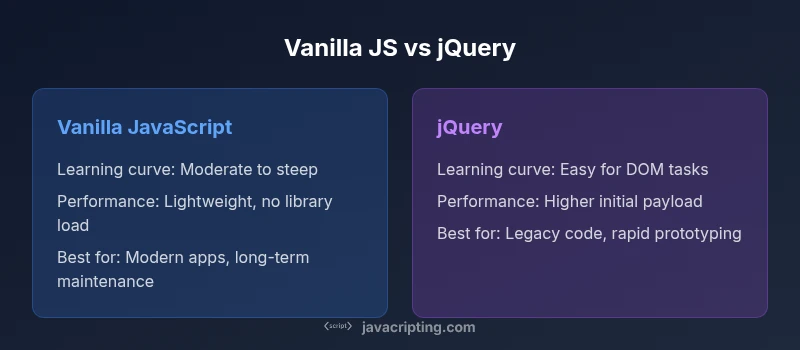
| Feature | Vanilla JavaScript | jQuery |
|---|---|---|
| Learning curve | Steeper for DOM-centric tasks without library helpers | Easier for basic DOM tasks due to concise methods |
| Syntax and APIs | Native APIs; ES6+ features; modular patterns | Abstraction layer with a rich set of shortcuts |
| Performance footprint | No library overhead; lean runtime | Library adds overhead but offers quick wins |
| DOM manipulation approach | Direct DOM access via standard APIs | Chained methods and selectors via $() |
| Browser compatibility | Relies on native standards; modern browsers compatible | Historically addressed quirks; best with mature environments |
| Maintenance & ecosystem | Depends on tooling and modern practices; broad future-proofing | Rich plugin ecosystem; proven for legacy UI tasks |
| Best for | New projects prioritizing maintainability and performance | Legacy projects needing quick DOM tasks or plugins |
Benefits
- Cleaner, more maintainable code with vanilla JS in modern environments
- Fewer dependencies and smaller bundle sizes
- Access to modern language features (ES6+) and better tooling
- Better performance and faster startup in modern stacks
- Unified standard across teams and browsers
The Bad
- Requires more boilerplate for DOM tasks than jQuery
- Steeper learning curve for beginners in DOM manipulation
- Fewer plug-and-play plugins compared to jQuery's ecosystem
Vanilla JavaScript generally wins for new projects; use jQuery for legacy code when needed
The JavaScripting team recommends a pragmatic, hybrid approach: favor vanilla JavaScript for new features, but keep jQuery for legacy code where it still adds value. Prioritize long-term maintainability and gradual migration to native APIs.
Questions & Answers
Is jQuery obsolete in 2026, or is there still a use case?
JQuery is not obsolete, but its role has narrowed. It remains useful for legacy projects, rapid UI tasks, or environments with limited browser support. For new code, native JavaScript is typically preferred to minimize dependencies and leverage modern tooling.
JQuery isn’t obsolete, but it’s less common for new projects. Use it for legacy code or quick UI tasks, and favor vanilla JavaScript for new features.
When should I learn jQuery, if at all?
Learning jQuery can still help if you maintain older projects that rely on its API or plugins. For most beginners, focus on modern JavaScript first, then add jQuery only if you encounter legacy code or specific plugin requirements.
Learn vanilla JavaScript first; pick up jQuery if you work with older codebases or plugins that depend on it.
How does ES6+ affect the jQuery use case?
ES6+ features reduce the need for many jQuery utilities by providing native equivalents. Modern APIs offer cleaner syntax and better performance, diminishing the long-term need for a library that primarily addressed older browser inconsistencies.
ES6+ makes native code more capable, which often reduces reliance on jQuery for new projects.
Can I migrate a codebase gradually from jQuery to vanilla JS?
Yes. Start with low-risk modules, replace DOM interactions with native APIs, and maintain tests to verify functionality. A phased approach minimizes risk and keeps user experience steady during the transition.
Yes—migrate in small steps, test often, and keep legacy code running until replacements are ready.
What are practical indicators to choose vanilla over jQuery?
If you’re starting a new feature set with modern JS tooling, go vanilla for performance and future-proofing. If you need rapid UI work on a legacy app with plugins, jQuery might save time and reduce risk.
Choose vanilla for new features; use jQuery for legacy UI tasks when it’s the fastest path.
Do modern browsers still require polyfills when using vanilla JS?
Some modern features may require polyfills for very old browsers, but most contemporary environments need minimal polyfills. Plan your browser support matrix early to determine if polyfills are necessary.
Most current browsers don’t need many polyfills, but check your browser targets.
What to Remember
- Prioritize vanilla JavaScript for new projects
- Reserve jQuery for legacy codebases and rapid prototyping
- Plan gradual migrations to modern APIs
- Keep tooling and tests aligned with your chosen path
- Balance performance gains with maintainability