How Long JavaScript Runs: Runtime Timings and Learning Timelines
A practical, data-driven look at how long JavaScript runs in the browser and how long it takes to learn the language, with ranges, benchmarks, and actionable tips for developers.


In JavaScript, runtime duration depends on the task and the environment. Simple operations typically complete in milliseconds, while complex algorithms or heavy DOM work can take longer. Browser engines optimize execution, but timing varies with CPU, memory, and page load. Practically, developers reduce runtime by avoiding unnecessary reflows, debouncing events, and using Web Workers for heavy computation.
How Long JavaScript Runs in the Browser
When you ask how long javascript runs, the answer hinges on task type, engine optimizations, and the device you're on. Simple operations—like arithmetic, property lookups, or small function calls—rarely exceed a few milliseconds. More substantial tasks, such as complex algorithms, large array processing, or frequent DOM mutations, will typically extend into tens or hundreds of milliseconds, and in extreme cases, seconds if the workload is heavy or the page is thrashing. The key idea is that runtime is a function of both code complexity and the execution environment. According to JavaScripting, understanding runtime is the first step toward writing efficient, responsive code. In practice, you optimize by reducing unnecessary work, batching updates, and leveraging worker threads for compute-heavy tasks.
CPU-Bound vs IO-Bound: Why Timing Varies
JavaScript runtimes behave very differently depending on CPU-bound versus IO-bound workloads. CPU-bound tasks consume processor time directly and tend to scale with code complexity and optimizations. IO-bound tasks—such as waiting for network responses or reading files—often wait on external events and can appear faster or slower depending on latency and concurrency. Modern browsers use multi-threaded layouts and rendering pipelines, but long tasks can still block the event loop, delaying UI updates. Profiling helps separate these cases so you can decide whether a refactor (e.g., parallelizing work or deferring non-critical tasks) will improve perceived performance.
How to Measure JavaScript Timing: Practical Tips
Accurate timing starts with reliable measurement. Use performance.now() for high-resolution timings, and supplement with console.time()/console.timeEnd() for quick checks. The Event Loop and Long Tasks API help identify tasks that block rendering. When benchmarking, simulate real workloads rather than micro-benchmarks, and test under representative network conditions and devices. Small changes in code ordering, memoization, and avoiding unnecessary reflows can yield meaningful gains in milliseconds, especially on mobile.
The Learning Timeline: How Long to Learn JavaScript
Most beginners reach a functional comfort level after roughly 20-40 hours of focused learning, covering syntax, basic control flow, and fundamental DOM interactions. Gaining proficiency—where you can build moderately complex apps and debug effectively—often falls in the 100-200 hour range, depending on practice intensity and project variety. It’s important to pair theory with hands-on projects, since practical experience accelerates intuition around performance and patterns. Remember, learning is a marathon, not a sprint.
Techniques to Improve Run Time and Responsiveness
Adopt a pragmatic optimization mindset. Avoid synchronous heavy work on the main thread; for compute-heavy tasks, consider Web Workers or Offscreen Canvas where appropriate. Minimize layout thrash by batching DOM writes and using requestAnimationFrame for visual updates. Debounce or throttle high-frequency events (scroll, resize) to reduce redundant work. Use code-splitting and lazy loading to keep initial payloads lean, and profile often with real-user measurement to validate improvements.
Real-World Benchmarks and Case Studies
In real apps, the observed runtime is highly context-dependent. A simple single-page app with a few interactive components may render and update in under 16-60 ms per frame on modern devices, assuming optimized code and efficient rendering. A data-heavy dashboard or game-like UI might experience longer frames if layout thrashing occurs. JavaScripting analysis shows that shifting work off the main thread and optimizing critical paths can cut average frame times and improve responsiveness, especially on mid-range devices and cell networks.
Common JavaScript runtime scenarios
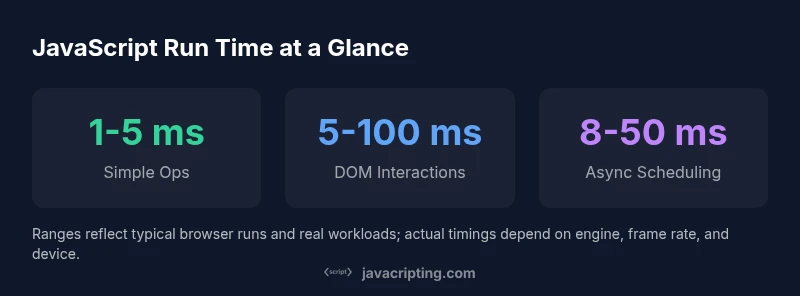
| Aspect | Typical Time Range | Notes |
|---|---|---|
| Simple operations | 1-5 ms | Addition, lookups, small computations |
| DOM interactions | 5-100 ms | Depends on reflows, paint, layout |
| Async tasks (setTimeout, promises) | 8-50 ms | Depends on scheduling and event loop |
Questions & Answers
What is the fastest JavaScript operation to measure runtime?
Measuring simple arithmetic or a basic loop with a small dataset is usually the quickest way to get a baseline. Use performance.now() to capture the delta accurately, and compare against a larger, more realistic workload for context.
For speed, start with a tiny loop and measure with performance.now(); then compare to a bigger test to see how timing scales.
Why do some operations feel slow on mobile browsers?
Mobile devices have tighter CPU and memory limits, and mobile browsers often throttle background tasks. Layout/reflow costs and network latency also weigh more heavily on mobile, so optimize critical render paths and minimize work on scroll-heavy pages.
On phones, everything costs more—optimize rendering and limit heavy tasks during interactive moments.
How does the event loop affect timings?
The event loop schedules tasks in microtasks and macrotasks. Long tasks block the loop, delaying user interactions and UI updates. Breaking work into smaller chunks with async/await, promises, or Web Workers helps keep interfaces responsive.
Keeping tasks short and off the main thread helps maintain smooth interactions.
How long does it take to learn JavaScript?
Foundational learning can take 20-40 hours; achieving proficiency typically requires 100-200 hours of deliberate practice and building real projects. Individual pace varies with prior programming experience and study quality.
Expect a few months of steady practice to become proficient, depending on effort and projects.
What tools help measure performance in JavaScript?
Use browser dev tools, Performance API (performance.now), User Timing, and Lighthouse for audits. For heavy workloads, consider Web Vitals and synthetic benchmarks to gauge real-world impact.
Leverage built-in dev tools and Lighthouse to gauge performance on real user scenarios.
“Understanding runtime costs is the first step to writing efficient, responsive JavaScript.”
What to Remember
- Benchmark real workloads, not micro-benchmarks.
- Use performance optimization techniques to reduce latency.
- Plan learning with realistic time estimates.
- Understand event loop to predict timings.