How to Run Pure JavaScript Code
Learn how to run pure JavaScript code in browser and Node.js with clear, practical steps. This guide covers console tests, file-based scripts, debugging, and safe execution—perfect for beginners and seasoned developers alike.


With this guide you will learn how to run pure javascript code in both browser and Node.js environments. You’ll run code directly in the browser console and via the Node.js runtime, without any frameworks. You’ll confirm results quickly, using simple snippets and safe execution practices. This quick-start assumes you have a modern browser and Node.js installed. JavaScripting insights also guide best practices.
How JavaScript Execution Works in Practice
Understanding how JavaScript runs is the first step in learning how to run pure javascript code. JavaScript is a high-level, single-threaded language that uses an event loop to manage tasks and asynchronous operations. In a browser, you load scripts either inline, via a script tag, or from an external file, and the browser allocates memory, executes code, and handles events like clicks and network responses. In Node.js, the runtime provides a similar execution model but without a DOM, focusing on I/O, modules, and asynchronous APIs. According to JavaScripting, having a mental model of the event loop helps you write cleaner, non-blocking code from the start. Practically, you can test small snippets in the console or a file, observe results, and incrementally build confidence in pure JavaScript execution. This section lays the groundwork so you can reason about what happens when your code runs, without relying on any libraries or frameworks.
How to run JavaScript in the browser console
The browser console is a powerful, no-setup environment for running pure JavaScript code. Here’s the fastest path to start:
- Open Developer Tools (F12 or Ctrl/Cmd+Shift+I) and switch to the Console tab.
- Type a simple expression like 2 + 2 and press Enter to see the result.
- Try a declaration: let x = 10; console.log(x * 3).
- Use console methods (log, warn, error) to inspect variables, objects, and errors.
- For persistence, you can save snippets in the Sources or Snippets tab depending on the browser.
Why this works: the console executes code in the page’s global scope or a dedicated sandbox, giving you immediate feedback. Practice repeatedly with small blocks of code to internalize syntax and behavior. JavaScripting analysis, 2026, notes browser-based execution remains a common starting point for learning pure JavaScript.
How to run JavaScript with Node.js
Node.js provides a server-side JavaScript runtime that lets you execute code outside the browser. Start with a quick check:
- Install Node.js from nodejs.org (latest LTS) and verify with node -v and npm -v in your terminal.
- Run a one-liner: node -e "console.log('Hello from Node')" to confirm the interpreter works.
- Create a script file, e.g., hello.js, with console.log('Hello JS file'); then run node hello.js.
- Use the REPL: simply run node and enter JavaScript expressions to see results immediately.
- For module-based projects, organize code with export/import and run with node. This workflow avoids browser APIs and focuses purely on JavaScript semantics.
Safe execution environments for experimentation
When learning how to run pure javascript code, isolation matters. Use sandboxed environments to avoid affecting real data or accessing sensitive resources. Simple browser consoles are already isolated from your machine, and Node.js runs in a controlled runtime. For longer experiments:
- Save snippets in separate files and run with node <filename>.js to keep experiments reproducible.
- Use version control to track changes and roll back if something breaks.
- Avoid executing untrusted or user-provided code via eval and new Function; these can bypass safety checks and access the hosting environment.
- Consider lightweight sandboxes like isolated VM instances or containerized tasks for more complex testing when you need closer-to-production behavior.
Basic syntax you can try right away
Start with the essentials to build intuition for how to run pure javascript code. Try these:
- Arithmetic: console.log(7 + 3 * 2) // 13
- Variables: let a = 5; const b = a * 2; console.log(b)
- Functions: function sum(x, y) { return x + y } console.log(sum(4, 6))
- Arrays and objects: let arr = [1,2,3]; console.log(arr.map(n => n * 2))
- Control flow: for (let i = 0; i < 3; i++) { console.log(i) }
These snippets demonstrate how to write and run pure javascript code without any libraries. Reproduce them in the browser console or in a Node.js file, and observe the outputs to reinforce learning.
Debugging strategies for pure JavaScript
Debugging is part of running pure javascript code effectively. Adopt a systematic approach:
- Use console.log liberally to inspect variable values at different points in your code.
- Break complex logic into smaller functions and test each function independently.
- Check for common pitfalls: scoping rules, asynchronous patterns, and typos in identifiers.
- Leverage browser DevTools' Sources panel to set breakpoints and inspect call stacks.
- In Node.js, run with --inspect to attach debugging tools if needed.
A disciplined debugging workflow helps you locate issues quickly and reinforces correct execution behavior.
Performance considerations for small scripts
Even small scripts have performance implications if written poorly. Focus on clarity first, then optimize:
- Prefer simple, readable loops over heavy functional wrappers when performance matters.
- Cache repeated property access (e.g., const len = arr.length) inside loops to avoid repeated lookups.
- Avoid unnecessary allocations inside hot paths; reuse objects where possible.
- Use asynchronous patterns (Promises, async/await) to prevent blocking in long-running tasks.
- Profile using browser performance tools or Node.js profiler to identify bottlenecks.
For learning purposes, aim for readable, maintainable code rather than micro-optimizations.
When to move from pure JS to modules or libraries
Pure JavaScript code is great for fundamental learning, but real projects often require modularity and richer ecosystems. Consider:
- Splitting code into modules (using ES6 export/import) for maintainability.
- Gradually introducing lightweight utilities rather than large frameworks.
- Keeping a lean dependency footprint to preserve performance and security.
- Gradual enhancements: start with vanilla code, then adopt small, well-scoped libraries only where necessary.
This approach keeps your core concepts intact while enabling scalable, production-ready code later.
Reproducibility: sharing code snippets
Sharing reproducible JavaScript snippets is essential for collaboration and learning. Consider:
- Saving examples in plain text or Markdown files with clear inputs and outputs.
- Using GitHub Gists or Markdown notebooks to accompany explanations.
- Providing a minimal HTML file if browser context is needed, while keeping the JavaScript portion pure.
- Including a short description of what the code does and expected results to aid others in reproducing the behavior.
By emphasizing reproducibility, you help others learn how to run pure javascript code with confidence and clarity.
Tools & Materials
- A modern web browser (Chrome/Edge/Firefox)(Open Developer Tools (F12) and use the Console for quick tests.)
- Node.js runtime (latest LTS)(Install from nodejs.org; verify with node -v and npm -v.)
- Code editor or IDE(VSCode or any editor you prefer; useful for saving scripts.)
- Terminal or command prompt(Needed to run node commands and manage files.)
- Optional: lightweight online playground(Good for quick tests when you can’t install Node locally.)
Steps
Estimated time: 45-60 minutes
- 1
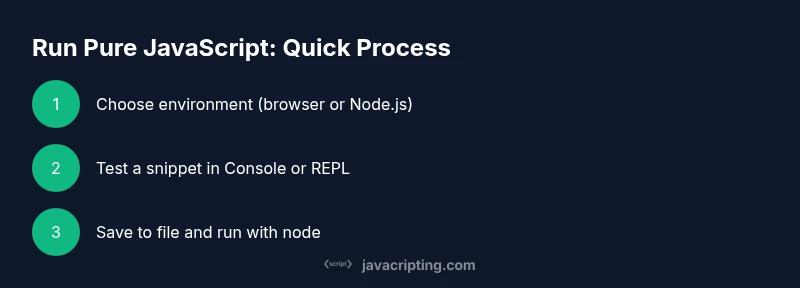
Choose execution environment
Decide if you’ll run code in the browser console or in Node.js. Browsers are great for quick experiments and DOM interaction, while Node.js is ideal for server-side scripts and tooling.
Tip: Starting with the browser console can be faster for beginners. - 2
Open your test environment
In a browser, open Developer Tools and switch to the Console. In Node.js, open a terminal to access the REPL or run script files.
Tip: If you’re in a shared computer, save your work in files to avoid loss. - 3
Run a simple snippet
Enter a basic expression like 3 + 4 or let x = 5; console.log(x * 2) and observe the output instantly.
Tip: Keep snippets short to isolate behavior and avoid confusion. - 4
Save a snippet to a file
Create a file, e.g., snippet.js, containing the code you want to test and run it with node snippet.js.
Tip: Use meaningful file names and comments to document intent. - 5
Test functions and scope
Define a function and call it, then test variable scoping with let/const vs. var to see how each behaves.
Tip: Prefer let/const for clearer scoping rules. - 6
Use console for debugging
Add console.log statements at key points to inspect values and flow. For asynchronous code, log before/after awaits.
Tip: Combine console.log with console.trace() to understand call stacks. - 7
Run in both environments
If learning, run the same snippet in browser and Node.js to observe how APIs differ and what remains constant.
Tip: Identify which parts rely on DOM or Node-specific features. - 8
Organize and reuse
Refactor repeated logic into functions or modules and save as .js files for reuse.
Tip: Small, well-tested modules scale better than ad-hoc snippets. - 9
Document outcomes
Record expected results and actual outputs to build a reliable reference for future runs.
Tip: A quick README per project speeds up sharing and collaboration.
Questions & Answers
Do I need to install Node.js to run JavaScript outside a browser?
No, not always. For browser-based testing you can use the browser console, but Node.js is required for server-side execution or running scripts from the command line. If you plan to run code outside a browser frequently, installing Node.js is beneficial.
You can use the browser console for quick tests, but install Node.js if you want to run JavaScript on your computer without a browser.
Can I run JavaScript without any browser or Node?
Pure JavaScript can be executed in environments like JavaScript shells or embedded runtimes, but practical learning and development usually rely on a browser or Node.js. For most learners, browser console or Node.js covers this need.
Most people start with a browser or Node.js; other runtimes exist but are less common for beginners.
What is the difference between pure JavaScript and libraries?
Pure JavaScript refers to the language itself without added libraries or frameworks. Libraries provide pre-built utilities and abstractions; using them is optional, and you can implement most features with vanilla JavaScript.
Pure JavaScript is the language—libraries add ready-made tools. You can build fundamentals without them.
Why is my console output undefined sometimes?
If a function doesn’t return a value, JavaScript returns undefined. Ensure you return values where needed and separate expressions from side effects to keep logs meaningful.
Undefined appears when a function lacks a return value or when you log an expression that doesn’t produce a value.
Is TypeScript required to run modern JavaScript code?
No. You can run plain JavaScript without TypeScript. TypeScript adds static types, which can help catch errors earlier, but it’s optional and requires a build step.
TypeScript isn’t required; it’s an option that adds typing and compilation steps.
Watch Video
What to Remember
- Run JavaScript in the browser console for quick tests.
- Node.js lets you execute pure JavaScript outside the browser.
- Use console and small files to test behavior safely.
- Debug with breakpoints, logs, and careful scope checks.
- Progress from vanilla scripts to modular code as you advance.