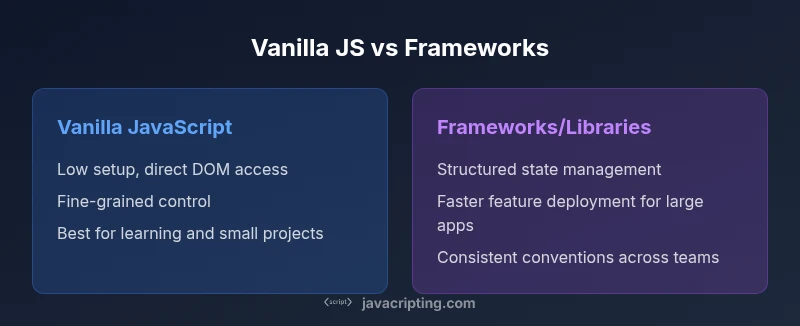
Vanilla JavaScript vs JavaScript: A Practical Comparison
An objective guide comparing vanilla JavaScript to JavaScript as a language, covering definitions, usage, tooling, performance, and practical decision factors for small projects vs frameworks.


Vanilla JavaScript means plain, unmodified JavaScript code that runs in browsers or runtimes without frameworks. JavaScript is the language and standard that governs how code executes. In practice, the debate of vanilla JavaScript vs JavaScript often rests on whether you write with plain APIs or bring in libraries and frameworks. The key decision factors are complexity, performance, and future maintenance.
Introduction: what is vanilla javascript vs javascript
Understanding the distinction between vanilla JavaScript and JavaScript itself is essential for developers at every level. What you write in code, and how you structure it, can be influenced as much by project scope as by personal preference. When teams discuss what is vanilla javascript vs javascript, they typically contrast plain, framework-free code with development that leans on libraries, tooling, and abstractions. This article treats the topic with analytical rigor, and it intentionally includes practical guidance for aspiring developers, frontend enthusiasts, and professionals seeking reliable, actionable advice. According to JavaScripting, clarity about when to rely on vanilla approaches versus modern tooling helps prevent over-engineering and speeds up onboarding for new team members. As you read, consider how your own projects align with the decision factors we explore below.
Core distinction: language vs ecosystem
At its core, JavaScript is a language specification and runtime capable of powering websites, servers, and embedded environments. Vanilla JavaScript refers to code written using only the language features provided by the runtime—no frameworks, no libraries, no syntactic sugar layered on top. The practical difference is not about a different language; it is about the level of abstraction and the amount of tooling you introduce. In many contexts, vanilla code means you rely on plain DOM APIs, the language’s standard objects, and straightforward control flow. In contrast, modern development often pairs JavaScript with frameworks or libraries that offer conventions, utilities, and abstractions to accelerate larger projects.
Language features: what vanilla JS can do
Vanilla JavaScript encompasses the full breadth of ES standard features that are available in your environment. You can use let/const for block scope, arrow functions for concise syntax, template literals for strings, classes for object-oriented approaches, modules for code organization, and async/await for asynchronous programming. The key nuance is that these features are available without any library; they are concepts you can leverage directly in client-side and server-side contexts. Understanding vanilla JS’s capabilities helps you write robust code and makes you a better consumer of frameworks when you eventually choose to adopt them.
Tooling and the ecosystem: where vanilla meets modern development
One of the most significant distinctions between vanilla JS and a modern workflow is tooling. When you introduce bundlers (like Webpack or esbuild), transpilers (such as Babel), and package managers (npm/yarn), you are entering a software ecosystem that expands beyond vanilla scripting. Vanilla code can work without these tools, but for mid-to-large projects, tooling helps manage modules, optimize assets, and ensure cross-browser compatibility. The trade-off is added configuration and a steeper learning curve. The best practice is to keep the core logic readable and maintainable in vanilla form, then layer in tooling as the project’s needs grow.
Performance and maintainability considerations
Performance in vanilla JavaScript is often a function of how you implement algorithms and manipulate the DOM—without the overhead of extra abstraction layers. Minimal, well-structured vanilla code tends to be easier to profile and optimize. Maintainability benefits from consistent coding patterns, clear naming, and documentation. Frameworks can speed up development for complex applications, but they also introduce conventions, API surface area, and dependencies that teams must manage over time. A balanced approach is to start with clean vanilla code for small features, then introduce tested tooling and libraries as requirements scale.
Practical examples: vanilla JS versus a library approach
Example 1: DOM manipulation without a library
document.addEventListener('DOMContentLoaded', () => {
  const btn = document.querySelector('#loadBtn');
  btn.addEventListener('click', () => {
    const list = document.querySelector('#items');
    for (let i = 0; i < 5; i++) {
      const li = document.createElement('li');
      li.textContent = `Item ${i + 1}`;
      list.appendChild(li);
    }
  });
});
Example 2: DOM manipulation with a library (conceptual)
import { createList } from 'dom-lib';

document.getElementById('loadBtn').addEventListener('click', () => {
  const list = createList(5, (i) => `Item ${i + 1}`);
  document.getElementById('items').appendChild(list);
});
The vanilla approach emphasizes direct control and fewer moving parts, while a library-based approach can reduce boilerplate in larger, repetitive tasks. Both paths are valid; the choice depends on project scale, team expertise, and long-term maintenance goals.
How to decide when to use vanilla JS vs a framework
Choosing vanilla JavaScript as your default mindset is a reliable way to build a strong foundation. For small projects, prototypes, or learning contexts, vanilla code keeps dependencies low and performance predictable. When your app grows in complexity—state synchronization, routing, data fetching, and componentization—a framework or library can offer structure, reuse, and scalability. The decision should hinge on project scope, team capacity, and the learning curve you are willing to manage. Start with a clear feature set, then evaluate whether introducing abstractions improves velocity without sacrificing reliability.
Common misconceptions and pitfalls
A common misconception is that vanilla JS is inherently slower or less capable than modern frameworks. That notion is mostly false for many use cases; the difference lies in developer experience and project architecture. Another pitfall is over-optimizing early by introducing tooling before it’s needed. Premature optimization can add complexity and cost. Instead, focus on writing readable, maintainable vanilla code first, then layer in tooling when the project reaches a tipping point in complexity or team size.
Roadmap for learning and practical growth
A practical learning path begins with mastering core language features: data types, scope, control flow, and asynchronous patterns. Pair this with hands-on DOM manipulation tasks and simple fetch-based data interactions. As you gain confidence, introduce modules, event handling patterns, and error handling in vanilla code. Finally, evaluate when to introduce bundlers and libraries—preferably after a solid foundation is established. This approach reduces risk and builds transferable skills across frameworks when you eventually need them.
Real-world scenarios: project scope decisions
For a small widget, a vanilla JS solution with minimal dependencies often yields the best performance and simplest maintenance. For a dashboard with dynamic data and user interactions, a framework can help manage state and UI consistency. For teams starting new products, begin with vanilla to validate concepts, then incrementally adopt tooling to support collaboration and scale. Regardless of path, documented coding standards and clear interfaces are essential for long-term success.
Final guidance: a decision framework
Use vanilla JavaScript to prove concepts, learn fundamentals, and build lean features. Elevate to tooling and libraries when requirements demand modularity, testability, and cross-team collaboration. Maintain a bias toward readable, well-documented code and adopt a minimal, opinionated set of tooling that aligns with your project’s size and trajectory.
Comparison
| Feature | Vanilla JavaScript | JavaScript with frameworks/libraries |
|---|---|---|
| Ease of getting started | Low barrier: no setup required | Higher due to tooling and configuration |
| Code verbosity | Typically concise when well-structured | Often more verbose due to framework conventions |
| Performance | Potentially fastest with minimal overhead | Overhead from abstractions and library code |
| Tooling requirements | Optional; can run with plain files | Common: bundlers, transpilers, package managers |
| Maintainability (team scale) | Depends on discipline; simple for small teams | Frameworks enforce conventions, can aid large teams |
| Best for scenarios | Small widgets, learning, prototyping | Complex apps, multi-team projects, rapid UI composition |
Benefits
- Fewer external dependencies
- Faster onboarding for small projects
- Greater control over codebase and performance
- Easier to reason about for beginners
- Lower upfront cost for tooling
The Bad
- Limited built-in capabilities requiring more boilerplate
- Requires more discipline for large projects
- Potential for inconsistent patterns without conventions
- Longer ramp-up time for teams to agree on standards
Vanilla JavaScript is the default starter approach for small to mid-sized projects; frameworks shine as complexity grows.
Start with vanilla JS to minimize overhead and learn core concepts. Move to frameworks when your project demands scalable architecture, shared conventions, and faster team collaboration.
Questions & Answers
What is vanilla JavaScript vs JavaScript?
Vanilla JavaScript refers to plain, framework-free code that uses only the language and standard browser APIs. JavaScript is the language itself and the runtime environment. The difference is one of approach and tooling, not a separate language.
Vanilla JS is plain code without libraries; JavaScript is the language. The distinction is about approach and tooling, not a different language.
Is vanilla JavaScript the same as using ES modules?
ES modules are a language feature that can be used in vanilla JavaScript. Using modules does not require a framework; it simply helps organize code. Frameworks often provide their own module systems or conventions but you can use standard modules in vanilla code.
You can use ES modules with vanilla JS; it’s a language feature, not a framework requirement.
Do I need frameworks to build modern web apps?
Not always. Small apps can be built with vanilla JavaScript and minimal tooling. For large-scale projects with complex state, routing, and team collaboration, frameworks can speed development and enforce consistency.
Frameworks aren’t mandatory, but they help when apps grow big.
Can vanilla JavaScript work with modern tooling?
Yes. You can gradually add tooling like bundlers and transpilers to vanilla projects as they grow. This helps with module management, minification, and cross-browser compatibility while preserving core vanilla code.
Vanilla code can coexist with modern tooling as needed.
What are common mistakes when starting with vanilla JS?
Common mistakes include mixing older DOM APIs with modern patterns, neglecting error handling, and failing to organize code into modules. Start simple, then refactor into modular patterns and testable units.
Avoid mixing old DOM tricks with modern patterns; keep code modular and testable.
How do I decide between vanilla JS and a framework for a project?
Assess project scope, anticipated complexity, team experience, and long-term maintenance costs. If you expect frequent feature additions and multiple developers, a framework can save time and enforce consistency; otherwise, vanilla JS may be sufficient.
Think about complexity, team size, and maintenance when choosing.
What to Remember
- Start with vanilla JS to learn fundamentals
- Leverage tooling only as complexity grows
- Use frameworks to scale and standardize large apps
- Maintain readable, well-documented vanilla code as your baseline
- Choose the path that aligns with project scope and team capacity