How to Protect JavaScript Code from Theft
Learn practical layered defenses to protect JavaScript code from theft. Understand the limits of client-side protection, then apply minification, obfuscation, CSP, secure deployment, and server-side logic to reduce exposure.


JavaScript code running in a browser cannot be made completely immune to theft, but you can raise the barrier with a layered approach. This guide covers practical techniques—minification, obfuscation, code splitting, secure deployment, and server-side logic—so you reduce exposure while preserving performance and user experience. You’ll learn what works, what doesn’t, and how to avoid common pitfalls.
Why protecting JavaScript code matters
According to JavaScripting, protecting client-side JavaScript is a practical tension between accessibility and exposure. The browser must execute code for a responsive experience, which means determined users can view, copy, and reuse portions of it. The goal isn’t impenetrable fortress-building; it’s a layered defense that raises the cost and friction of theft while preserving usability. Real-world protection starts with architectural choices that limit where sensitive logic runs and how data flows between client and server. By understanding the limits of client-side protection, you can set realistic expectations with stakeholders and prioritize techniques that deliver meaningful risk reduction without slowing your app.
Common myths about protection
Many developers assume that minification or obfuscation will hide all logic or prevent code theft. In reality, these techniques primarily deter casual snooping and reduce readability. They do not stop a determined attacker who can inspect network traffic, reverse-engineer bundled code, or replicate features from public APIs. A key misconception is thinking that protecting assets in the browser means securing the entire application; in practice, you must protect the boundaries between the client and the server, and place truly sensitive operations on the server where control is stronger.
JavaScripting analysis shows that combining tooling with secure deployment and backend strategies yields stronger protection than any single technique. This layered approach is essential for modern web apps that rely on dynamic, interactive experiences.
Layered defense strategy: what to implement first
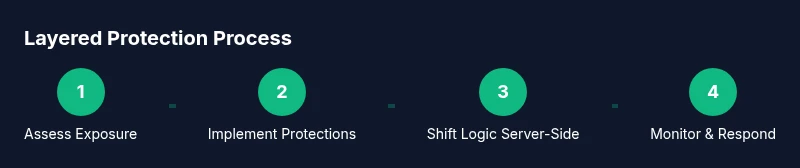
Start with the fundamentals: never trust the client with secrets, and design APIs to enforce authorization server-side. Next, enable build-time protections like minification and, where appropriate, obfuscation. Pair these with security headers and integrity checks to reduce risk from delivery tampering. Finally, ensure that sensitive logic is kept on the server, using API boundaries to validate all critical operations. By layering controls, you create multiple hurdles for would-be thieves and make unauthorized use significantly harder.
Build and deployment considerations
Your build pipeline should produce production-ready bundles with minified and, optionally, obfuscated code. Do not ship raw source maps to end users in production, as they can reveal original code structure. Use a Content Security Policy (CSP) to constrain where scripts can be loaded from and a strict Subresource Integrity (SRI) policy for any third-party assets. When feasible, serve scripts from a trusted, versioned CDN and pin exact asset versions to prevent tampering. Remember: security headers are part of the defense, but they must be complemented by solid backend controls.
Architectural patterns to reduce client-side exposure
Adopt API-first design and server-side rendering for critical logic. Move authentication, authorization checks, and business rules to serverless functions or microservices exposed through secure APIs. Use edge computing to handle non-sensitive, latency-critical tasks, keeping the user interface fluid while minimizing exposed code responsibilities in the browser. Code-splitting and lazy loading also help by loading only what’s necessary for a given page, reducing the amount of executable code a user can inspect at any moment.
Protecting assets and dependencies
Always enable Subresource Integrity (SRI) for any script or style loaded from a CDN. Implement a robust Content Security Policy (CSP) to restrict sources and inline scripts, and avoid inline JavaScript whenever possible. Use secure, versioned dependencies and lockfile mechanisms to prevent supply-chain changes. For third-party libraries, prefer reputable sources and monitor for security advisories, updating promptly when needed.
Secrets, keys, and environment variables
Never embed secrets, API keys, or credentials in client-side code. Use server-stored secrets, and retrieve tokens or credentials through secure authentication flows. Consider a secrets management system or cloud KMS to rotate keys regularly. Use short-lived tokens with proper scopes, and implement server-side checks to validate every request. This approach minimizes the risk that a leaked client-side artifact can compromise sensitive data.
What to monitor and how to respond
Implement monitoring to detect unusual patterns that might indicate code leakage or tampering. Keep an audit trail of deploys and API usage, and set up alerts for anomalies. Regular security testing—static analysis, dynamic testing, and dependency scanning—helps catch issues before they become problems. If you detect leakage, respond with a plan that includes revoking tokens, revising API permissions, and informing stakeholders.
Practical checklist for developers
- Design architecture to minimize sensitive client-side logic
- Enable production minification and consider obfuscation where appropriate
- Disable source maps in production and configure CSP/SRI correctly
- Move sensitive operations to secure server-side components
- Employ token-based authentication and rotate secrets regularly
- Implement rigorous monitoring, logging, and regular security testing
Tools & Materials
- Code editor (e.g., Visual Studio Code)(Essential for implementing protection edits and refactors)
- Build tool (Webpack/Vite/Parcel)(Configure minification, bundling, and source maps)
- Obfuscation/minification tool (e.g., Terser)(Compress and optionally obfuscate client code)
- Content Security Policy tester(Validate CSP headers across environments)
- SRI and asset integrity tooling(Ensure integrity attributes for CDN assets)
- Secrets management setup (vault/KMS)(Store and rotate server-side credentials securely)
- Security testing tools (static/dynamic analysis)(Identify vulnerabilities in code and configuration)
Steps
Estimated time: 6-8 hours
- 1
Assess current exposure
Review the existing frontend architecture to identify where sensitive logic or data is exposed in the client. Map data flows from UI components to APIs and note any secrets or hard-coded values.
Tip: Document every instance where dynamic client code interacts with protected resources. - 2
Enable production minification and optional obfuscation
Configure your build to minify assets in production. If appropriate, enable obfuscation but test thoroughly to avoid impacting debugging and performance.
Tip: Keep a separate, non-production build for debugging during development. - 3
Remove or hide source maps in production
Disable source maps in production to prevent exposing original source code structure. Keep them in development environments for debugging only.
Tip: If you must ship source maps, restrict access with authentication and short-lived tokens. - 4
Implement CSP and SRI for assets
Add a strict Content Security Policy and use Subresource Integrity for all external assets to prevent tampering and reduce attack surface.
Tip: Test CSP with various user agents to ensure legitimate functionality remains intact. - 5
Move sensitive logic to server-side
Audit the app to identify confidential logic that should run on the server. Refactor API endpoints to enforce server-side validation and authorization.
Tip: Prefer stateless APIs and short-lived tokens to limit exposure if a token is compromised. - 6
Adopt secure deployment practices
Use versioned assets from a trusted CDN, pin dependencies, and implement automated security testing as part of CI/CD.
Tip: Review deployment logs for unusual edits or unexpected changes. - 7
Implement secrets management
Store all secrets server-side and fetch them securely at runtime. Avoid embedding credentials in client code.
Tip: Rotate keys on a defined schedule and after any suspected breach. - 8
Set up monitoring and incident response
Instrument monitoring for anomalies, keep an incident response playbook, and rehearse it with the team.
Tip: Automate alerts to the on-call engineer and document lessons learned after incidents.
Questions & Answers
Can JavaScript be truly protected from theft?
No, JavaScript executed in the browser cannot be fully protected. The goal is to raise barriers and reduce exposure by combining server-side logic with defensive client-side measures.
No, you can't fully protect client-side JavaScript, but layering defenses helps reduce risk.
Is minification or obfuscation enough for security?
These techniques deter casual readers but do not stop a determined attacker. Treat them as part of a layered defense, not a sole security control.
Minification and obfuscation help, but they don't provide complete security.
Should I disable source maps in production?
Yes. Disable production source maps to avoid exposing original source structure. Use them only in development for debugging.
Yes, disable source maps in production to protect your code details.
Where should sensitive logic live?
Sensitive logic and secrets should reside on the server or in secure backend services, accessed via authenticated APIs.
Keep secrets on the server; expose only what’s necessary through secure APIs.
What about legal protections like licenses?
Licensing and terms help establish ownership and usage rules, but technical protections rely on architecture and deployment practices.
Licensing helps legally, but you still need solid security practices.
What are best practices for deploying securely?
Use a strict CSP, SRI for external assets, versioned deployments, and automated security tests as part of CI/CD.
Apply CSP, SRI, and secure deployment in your pipeline.
Watch Video
What to Remember
- Assess what is exposed on the client and where sensitive logic belongs
- Layer protections (minification, CSP, SRI) are stronger together than alone
- Move critical logic to the server whenever possible