How to Repair JavaScript Errors: A Practical Guide
Learn a practical, step-by-step method to diagnose and fix common JavaScript errors with examples, best practices, and testing tips to keep your code robust.


In this guide you will learn how to repair javascript errors across client-side and server environments by diagnosing causes, reproducing with minimal cases, isolating root causes, applying fixes, and validating them with tests. You will need a modern browser with DevTools, a capable code editor, and Node.js for local testing.
Why JavaScript errors happen and how to diagnose
JavaScript errors arise for many reasons—from simple syntax mistakes to complex timing issues in asynchronous code. They can occur in browsers or on servers, and often the root cause isn’t the line where the error is reported but a sequence of events that leaves the program in an invalid state. According to JavaScripting, the smartest debugging starts with a clear plan and a reliable workflow: observe, reproduce, isolate, fix, and verify. Begin by noting the exact error message and the stack trace; these clues point you toward the responsible module and function. Then reproduce the issue in a controlled environment to separate it from unrelated code. In the browser, your first stop is the console and the Network tab; on the server, rely on logs and the runtime error object. A disciplined approach reduces noise and speeds up resolution.
Common error types and what they mean
JavaScript provides a handful of error types that signal different problems. A SyntaxError means the code can’t be parsed, often due to a missing bracket, comma, or malformed string. A ReferenceError indicates a variable or function isn’t defined in the scope where it’s used. TypeError happens when an operation is performed on an incompatible value, such as calling a non-function or reading a property of undefined. RangeError signals an out-of-bounds value, like an invalid array length. Understanding these categories helps you triage quickly and target the right fix. JavaScript environments also surface warnings and DeprecationWarnings that can forewarn about future breaks.
Setting up your debugging environment
Efficient debugging starts with the right tools. In a browser, enable DevTools and learn to use the Console, Sources, and Network panels to trace errors and inspect requests. On the server, configure logging to capture stack traces and recent inputs. Keep Node.js up to date to ensure modern error messages and stack traces aid diagnosis. Create a dedicated workspace for fixes so you can compare before/after states easily. If you work with frameworks, ensure source maps are enabled so compiled code maps back to the original source. A consistent environment reduces fuzziness and makes debugging faster over time.
Step-by-step approach to repair errors
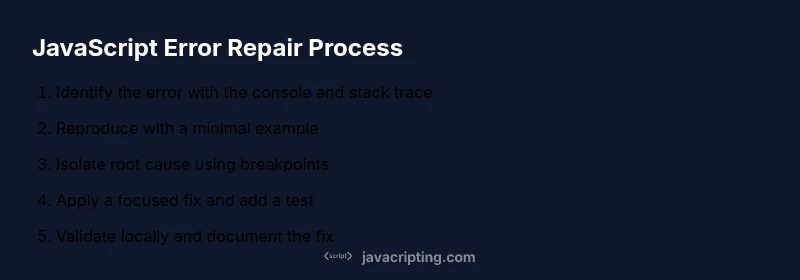
Adopt a structured workflow to repair javascript errors efficiently. Start by reproducing the error with a minimal example, then isolate the responsible block of code. Check data types, variable scope, and timing around asynchronous calls. Implement a focused fix and add a small, targeted test to prevent regressions. Re-run the scenario locally and in a test environment before merging changes. Finally, document the root cause and the fix in a changelog or PR description to aid future maintenance.
Tools and utilities that speed fixes
Leverage tooling to catch errors early and enforce consistency. ESLint or a similar linter helps catch common mistakes before runtime, while Prettier keeps formatting predictable. Source maps enable meaningful stack traces for compiled code. For testing, use minimal unit tests that isolate the bug, plus integration tests for end-to-end confidence. A simple console-based debugger and well-placed breakpoints can dramatically reduce time spent chasing down elusive bugs. Remember to keep tooling up to date and aligned with your project’s needs.
Best practices to prevent errors in the future
Preventing errors is cheaper than debugging them. Embrace strict mode and type-safe patterns where possible, adopt a robust testing strategy, and integrate linting into your CI pipeline. Practice defensive programming by validating inputs at boundaries, using default values, and avoiding implicit type coercion. Maintain clear, single-responsibility functions and good documentation so future contributors understand intent. Regularly review dependencies and API changes to avert breaking changes that surface as runtime errors.
Case studies: typical debugging scenarios
Scenario A: A ternary operator sometimes returns undefined, causing downstream failures. Isolate by creating a minimal snippet that reproduces the unexpected value, then add a guard clause and unit test. Scenario B: A promise chain occasionally fails due to a rejected promise without a catch. Reproduce in isolation and add explicit error handling with .catch or try/catch within an async function. Scenario C: A UI component crashes when a prop is missing. Validate inputs at the component boundary and provide sensible defaults. Each scenario reinforces the discipline of minimal reproductions and focused fixes.
Performance considerations when patching errors
When patching, verify that fixes don’t introduce performance regressions. Avoid adding synchronous delays in hot paths, minimize re-renders in UI code, and ensure that error-handling logic doesn’t execute on every frame unless necessary. Profile the updated code with representative workloads to confirm that latency and CPU usage stay within acceptable ranges. Consider lazy-loading or debouncing heavy operations where applicable to maintain smooth user experiences.
Testing and validating fixes before deployment
Validation should occur across multiple layers: unit tests for the smallest units, integration tests for interactions between modules, and end-to-end tests for user flows. Ensure flaky tests are stabilized, and add regression tests for the exact bug you fixed. Run tests in a clean environment, and use a code review checklist to verify that the root cause is captured and the fix is robust. Finally, document the results and watch for any new issues during initial production rollouts.
Tools & Materials
- Browser with DevTools(Chrome, Edge, or Firefox; use Console, Sources, and Network tabs)
- Code editor(VS Code or equivalent; enable syntax highlighting and linting)
- Node.js runtime(Install for local testing of scripts outside the browser)
- Minimal reproducible test files(Small, isolated snippets that trigger the error)
- Linting/formatting tools(ESLint, Prettier, or similar to enforce consistency)
- Testing framework(Jest, Mocha, or equivalent for automated checks)
Steps
Estimated time: 60-90 minutes
- 1
Identify the error clearly
Open the console, read the exact error message, and note the stack trace. Record the conditions under which the error occurs to reproduce it later.
Tip: Take a screenshot of the error and stack to reference during fixes. - 2
Reproduce with a minimal example
Create a tiny snippet that triggers the error without extra dependencies. This makes it easier to confirm the fix later.
Tip: If the error is asynchronous, isolate the failing promise or callback in a small test case. - 3
Isolate the root cause
Trace through the code path and inspect variable values, call sites, and types. Use breakpoints to pause execution at critical moments.
Tip: Check for undefined, null, or incorrect data shapes that commonly cause failures. - 4
Apply a focused fix
Make a single, well-scoped change that addresses only the root cause. Avoid large rewrites in a single patch.
Tip: Add a targeted unit test that would fail before the fix and pass after. - 5
Enhance tests and coverage
Update or add tests to prevent regressions. Verify edge cases and race conditions where relevant.
Tip: Run tests with --watch to quickly detect unintended changes. - 6
Run local validation
Execute the minimal repro and full test suite locally. Confirm the error is resolved and no new issues appear.
Tip: Use a clean environment or container to avoid local state interference. - 7
Document the fix
Add notes to your changelog or PR description summarizing the root cause and the rationale for the fix.
Tip: Include the exact error message and the test that validates the fix. - 8
Prepare for production
Review impact, ensure code reviews pass, and coordinate deployment with QA. Monitor after release for anomalies.
Tip: Enable lightweight monitoring to catch any unforeseen edge cases after rollout.
Questions & Answers
What is the first thing I should do when I see a JavaScript error?
Open the browser console to read the error message and stack trace, then capture the conditions that reproduce the error.
Open the console to read the error message and stack trace, then note the situation that reproduces it.
How can I reproduce an error reliably?
Create a minimal, isolated example that triggers the error, removing any unrelated code that could obscure the cause.
Make a tiny, repeatable example that shows the error clearly.
What is the difference between SyntaxError and TypeError?
SyntaxError means the code cannot be parsed due to formatting issues. TypeError means an operation was attempted on a value of an inappropriate type.
SyntaxError is a parsing issue; TypeError means an operation used the wrong type.
Should I use try/catch for debugging?
Try/catch can help isolate runtime errors in critical blocks, but you should still fix the root cause and not rely on catching everything.
You can catch errors to diagnose, but fix the root cause for durability.
What tools can help fix errors faster?
Browser DevTools, ESLint, and unit tests help catch and fix errors early, reducing debugging time.
DevTools, ESLint, and tests speed up fixes.
How can I prevent errors in the future?
Adopt strict mode, add type checks where feasible, implement automated tests, and enforce code reviews.
Use strict checks, tests, and reviews to prevent errors.
Watch Video
What to Remember
- Identify the error before patching.
- Create a minimal reproducible example.
- Test fixes thoroughly with unit/integration tests.
- Adopt linting and type checks to prevent errors.
- Document fixes for future reference and learning.