javascript and css: A Practical Side-by-Side Comparison
A rigorous, analytical comparison of javascript and css in modern UIs. Learn when to lean on CSS for styling and transitions, and when JavaScript is essential for interactivity, with actionable guidance for robust, accessible front-end development.


In the realm of frontend engineering, javascript and css are complementary tools rather than competing forces. A well-balanced approach uses css for presentation, transitions, and layout, while JavaScript drives interactivity and state. When used together thoughtfully, they deliver fast, accessible experiences. This comparison helps you decide where to lean on each technology for responsive, maintainable UI development. javascript and css should be integrated with progressive enhancement at the core of your strategy.
The Core Relationship Between JavaScript and CSS
In modern web development, the phrases javascript and css are often used together, yet they refer to distinct layers of the browser rendering stack. JavaScript governs behavior, interactivity, and data-driven changes to the Document Object Model (DOM), while CSS defines the visual language—layout, colors, typography, and motion. When you pair javascript and css effectively, you separate concerns: use CSS to describe how things look and JavaScript to describe how things behave. This separation not only clarifies code organization but also improves performance and accessibility. In this discussion, we explore how javascript and css interact, where each excels, and how to balance them for robust front-end experiences. For audiences focused on frontend development, this topic maps directly onto real-world practices such as progressive enhancement and design systems, which rely on both technologies working in harmony. The keyword javascript and css recurs as you consider styling decisions alongside interactivity, ensuring responsive, accessible outcomes for users of diverse devices.
Behavior vs Presentation: Distinguishing concerns in the browser rendering pipeline
A core principle in frontend engineering is the distinction between behavior and presentation. CSS controls how content looks, while JavaScript controls how content changes in response to events, data, or user input. Rendering starts with CSSOM and DOM construction; JavaScript can mutate the DOM and CSSOM, which must then trigger style recalculation, layout, and repaint. Misplacing behavior in CSS can limit interactivity, while relying solely on JavaScript for visuals can bloat code and complicate maintenance. The practical takeaway is to treat style as a design contract and behavior as a functional contract. When javascript and css work together within a solid architecture, you gain predictable performance, easier testing, and better accessibility through thoughtful focus management and semantic structure.
CSS-Driven Interactions: Transitions, Animations, and responsive tweaks
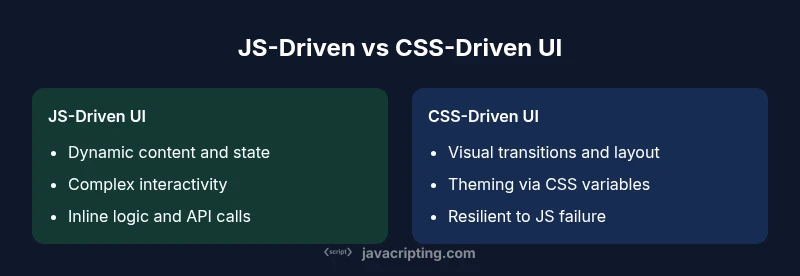
CSS shines in how it expresses transient UI states through transitions and animations. For interactions that can be described with state changes—hover, focus, active, or responsive breakpoints—CSS offers smooth, hardware-accelerated results with minimal scripting. CSS variables enable scalable theming and conditional styling without extra JavaScript. Responsive design benefits from media queries that adapt layout, typography, and spacing based on viewport size. The democratization of styles through tokens, scales, and design systems makes CSS a powerful tool for consistent experiences across components. In javascript and css terms, rely on CSS for the bulk of presentation logic and reserve JavaScript for when style needs to react to non-visual data or irreversible state changes.
JavaScript-Driven Interactions: Dynamic content and state management
JavaScript provides the engine for dynamic behavior. When content must update in response to user actions, network data, or complex UI state, JavaScript is indispensable. It enables conditional rendering, form validation, drag-and-drop, real-time collaboration, and client-side routing. The key is to minimize DOM churn and avoid leaking behavior into presentation rules. Techniques such as event delegation, state machines, and debounced or throttled handlers keep interactivity responsive without overwhelming the rendering pipeline. In practice, javascript and css blend best when JavaScript handles the logic and data flow, while CSS handles how results appear and move.
Rendering and Performance: How JS and CSS affect paint, layout, and composition
Performance in the browser hinges on how quickly the critical rendering path executes. CSS often contributes to faster first paint because modern engines optimize CSS transitions, compositing, and GPU acceleration. JavaScript can slow down rendering if it causes frequent reflows, layout thrash, or heavy scripting on the main thread. To optimize, separate read/write DOM operations, batch mutations, and use requestAnimationFrame for visual updates. CSS containment, will-change hints, and performance-friendly selectors help reduce layout costs. The core message is to profile early, measure with real user conditions, and optimize both sides of the equation—keep CSS lightweight and leverage JavaScript only when interactivity demands it. This balance improves perceived performance in javascript and css-driven interfaces.
Accessibility and Semantics: Ensuring inclusive design when mixing JS and CSS
Accessibility should guide all decisions about javascript and css. ARIA roles and semantic HTML provide reliable semantics even when scripts dynamically modify content. When you animate or reveal elements with JavaScript, ensure focus is managed, and that changes are announced by assistive technologies. Prefer CSS for default visual states and transitions, but do not rely on them to convey essential information. Keyboard operability, proper focus order, and accessible labels remain critical regardless of the tech you choose. A well-structured approach increases the reach and usability of your UI across devices and abilities.
Maintainability, Design Systems, and Tooling
Maintaining a codebase that uses both javascript and css requires disciplined architecture. Design systems define tokens, scales, and component boundaries, making it easier for designers and developers to collaborate. A predictable pattern is to couple JavaScript-driven state changes with CSS class toggling, rather than inline style mutations, to preserve styling rules in CSS and facilitate theming. Linting, type systems, and component libraries help enforce consistent interfaces. Testing should cover interactive flows (JavaScript) and styling invariants (CSS), with visual regression tests where feasible. Clear documentation and stable APIs for components reduce coupling and improve long-term maintainability.
Patterns That Blend JavaScript and CSS: Practical techniques for robust UI
There are several practical patterns that blend javascript and css effectively. Use CSS custom properties (variables) to expose theming controls that JavaScript can update at runtime, enabling dynamic but predictable styling without DOM-level hacks. Leverage class-based state changes instead of inline styles to preserve CSS rules and keep animations declarative. When animations require state-driven changes, consider CSS transitions for smoothness and JavaScript to trigger timeline events. For advanced, consider CSS Houdini for exposing animation worklets or paint worklets to extend CSS without heavy scripting. These patterns maximize cohesion between javascript and css and support scalable UI development.
Decision Framework: When to favor CSS, when to lean on JavaScript
Choosing between CSS and JavaScript should begin with goals: if you need fast visual feedback with minimal logic, lean on CSS. If you must render data-driven content or respond to complex user input, introduce JavaScript. A practical framework is progressive enhancement: deliver a functional, accessible baseline with CSS; layer JavaScript for interactivity and state as needed. Always measure impact on performance, accessibility, and maintainability before expanding the interactivity. The best approach balances both technologies to deliver robust, scalable interfaces.
Implementation Scenarios: Case studies and steps
Consider a modal dialog as a representative scenario. Start with a CSS-focused baseline: define the modal structure, overlay, and transitions using CSS. Add a small amount of JavaScript to manage focus trapping, opening/closing actions, and escape-key dismissal. For a data-driven tab interface, CSS handles the tab visuals and responsive behavior while JavaScript manages the active tab index and asynchronous content loading. In both cases, prefer classes, CSS variables for theming, and minimal DOM manipulation to keep the user experience snappy and accessible. These practical steps illustrate how javascript and css can complement each other rather than compete for control.
Pitfalls and Debugging Tips
Common pitfalls include coupling logic to presentation, causing brittle styles when components change, or overusing JavaScript to drive visuals that could be CSS-driven. Debugging requires a methodical approach: isolate styling concerns in CSS, isolate interactivity in JavaScript, and use browser dev tools to inspect layout, paint timings, and event propagation. Use performance profiling to identify layout thrashing, and apply targeted optimizations such as debouncing input handlers or deferring non-critical work. Document decisions about when to implement behavior in JS versus styling in CSS to reduce ambiguity for future teammates.
Comparison
| Feature | JS-Driven UI | CSS-Driven UI |
|---|---|---|
| Control model | JavaScript-driven (stateful, dynamic) | CSS-driven (stateless, presentational) |
| Interactivity complexity | High flexibility, but more code | Moderate; relies on CSS for visual states |
| Animation capabilities | Requires JS or CSS transitions/animations | Strong for transitions/animations with pure CSS |
| Performance impact | Potential layout thrash if misused | Often leaner for simple transitions |
| Implementation time | Longer setup for complex interactivity | Quicker for styling changes and tweaks |
| Best for | Rich, data-driven UIs and real-time updates | Styling shifts, responsive tweaks, hover/focus effects |
| Maintainability | Can become complex without architecture | Cleaner when using design tokens and constraints |
| Tooling & debugging | Deep JS debugging; API surface grows | CSS tooling and visual debugging are efficient |
Benefits
- Enables dynamic, data-driven UI with real-time updates
- JS provides precise control over user interactions
- CSS offers lean styling and smooth transitions
- CSS-only patterns improve resilience when JS is unavailable
- Clear separation of concerns improves collaboration between designers and developers
The Bad
- Excessive DOM manipulation can cause reflows and jank
- Overreliance on JavaScript for visuals can slow performance
- CSS complexity can escalate with advanced selectors or Houdini
- JS-driven UI can complicate accessibility if not implemented carefully
Adopt a blended approach: favor CSS for styling and transitions, and reserve JavaScript for interactivity and state.
In modern frontend practice, the best outcomes arise when you use CSS to express visuals and transitions and JavaScript to manage data, user input, and state. This balance improves performance, accessibility, and maintainability while remaining flexible for future UI changes.
Questions & Answers
What is the main difference between javascript and css in frontend development?
JavaScript handles behavior, data, and state changes, while CSS governs presentation and layout. The two work best when you separate concerns and progressively enhance the UI rather than embedding behavior into styles. This separation improves maintainability and performance.
JS controls behavior and data, while CSS handles visuals. Separate concerns for better maintainability and performance.
How can I determine when to prefer CSS over JavaScript for interactions?
Start with CSS for interactions that can be expressed as state changes and transitions. If user input or data-driven decisions require logic, introduce JavaScript. Use progressive enhancement to ensure a functional baseline with CSS, then layer interactivity as needed.
Begin with CSS for visuals and only add JavaScript when necessary for interactivity.
Can CSS variables be updated with JavaScript?
Yes. JavaScript can read and update CSS custom properties, enabling dynamic theming and responsive styling without mutating inline styles. This pattern keeps styling centralized in CSS while allowing runtime changes.
Yes, you can update CSS variables from JavaScript to change themes or styles on the fly.
Does relying on JavaScript slow down page loads?
Not inherently. JavaScript can impact load performance if it blocks rendering or causes heavy DOM work. Use code-splitting, lazy loading, and careful batching of DOM updates to minimize impact.
JS can slow loads if not managed well, but you can mitigate with efficient coding and lazy loading.
How do I ensure accessibility when modifying styles with JS?
Maintain semantic HTML and proper ARIA attributes, manage focus when content changes, and ensure that essential information is available without relying on visuals alone. Avoid hiding important content purely through CSS or JS without signaling to assistive tech.
Keep accessibility in mind: manage focus, use semantic markup, and don’t rely solely on visuals for meaning.
What tools help debug JS and CSS performance issues?
Use browser DevTools for performance profiling, timeline analysis, and event tracing. Tools like Lighthouse and WebPageTest provide insights into render, paint, and interaction timing, helping identify bottlenecks in javascript and css usage.
DevTools, Lighthouse, and performance panels help you spot JS/CSS issues and optimize.
What to Remember
- Start with CSS for visuals and layout; add JS only for interactivity
- Prefer CSS transitions/animations to keep UI smooth
- Use JavaScript for state and data handling, not styling
- Bridge with CSS variables updated from JS for clean theming
- Test performance and accessibility early; avoid unnecessary JS for visuals