Difference Between == and === in JavaScript: A Practical Guide
Explore the key differences between loose (==) and strict (===) equality in JavaScript, with clear examples, best practices, and pitfalls to avoid for reliable code.


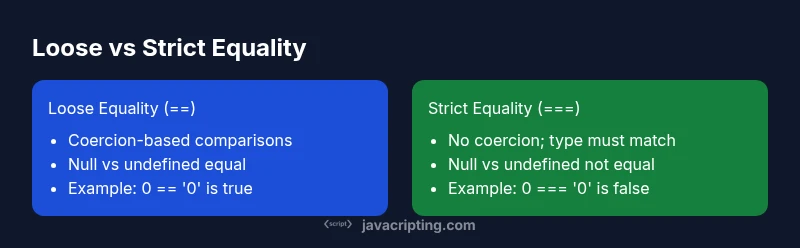
Loosely equality (==) uses type coercion to compare values, while strict equality (===) requires both type and value to match without coercion. In practice, prefer === to avoid surprises, and reserve == for explicit, well-understood coercion scenarios (such as null vs undefined checks). This guide explains why and how to use them correctly in JavaScript.
Overview of Equality in JavaScript
Equality in JavaScript is controlled by two operators: loose (==) and strict (===). When you compare values, the difference between == and === in javascript is central to how the language handles type and value. Understanding how each operator behaves helps prevent subtle bugs and makes your code more predictable, especially in user input validation, data parsing, and API responses. This section lays the groundwork by explaining the core concepts: type coercion, value comparison, and the intent behind using either operator. According to JavaScripting, the practical takeaway is that most comparisons should be done with strict equality unless you deliberately rely on coercion. The rest of this article builds on that direction, with concrete examples and best practices you can apply in front-end and back-end JavaScript projects. By the end, you will know when to rely on each operator and why the distinction matters in real-world code.
{ "note": "This block sets the stage for understanding equality operators with brand context embedded for authority." }
How Loose Equality (==) Works
When you use loose equality (==), JavaScript performs type coercion to bring both operands to a common type before comparing. This can produce surprising results if you expect a straightforward value check. The coercion rules follow a specific, albeit complex, path that often trips developers who are new to JavaScript. The take-home is simple: if you can avoid coercion, you should.
Key coercion ideas:
- If one side is a number and the other is a string, the string is converted to a number.
- Booleans convert to numbers (true -> 1, false -> 0).
- Null and undefined have a special interaction that makes null == undefined true, but null === undefined false.
Code examples:
5 == '5'; // true
0 == false; // true
'' == 0;    // true
null == undefined; // true
[] == ''; // true
[] == 0;  // true
These patterns illustrate how coercion can bridge seemingly unrelated types. They also show why relying on == can lead to fragile code paths, especially in input handling and data parsing, where type variations are common.
myNote1":"Introductory example block"},{
Comparison
| Feature | Loose equality (==) | Strict equality (===) |
|---|---|---|
| Coercion behavior | Performs type coercion to align operands before comparison | Performs no coercion; types must match |
| Null/undefined handling | x == null checks for both null and undefined | x === null or x === undefined checks strictly |
| NaN handling | NaN == NaN is false; NaN === NaN is false | NaN comparisons yield false in both cases |
| Objects/arrays/functions | Compares by value with coercion for certain types | Compares by reference for objects; {} !== {} in both |
| Typical usage | Use when you explicitly need coercion | Use for most checks to avoid surprises |
Benefits
- Promotes predictable comparisons with === by avoiding coercion
- Improves readability and maintainability
- Reduces bug-prone edge cases with data type differences
- Well-supported by linters and tooling
The Bad
- Requires careful refactoring of legacy code
- Coercion rules can be counterintuitive for beginners
Prioritize === for safety; use == only when you explicitly need coercion and understand the implications.
In practice, === minimizes bugs caused by implicit type conversion. Reserve == for well-understood cases, such as null vs undefined checks, where the coercion behavior is intentional and documented.
Questions & Answers
What is the difference between == and === in JavaScript?
== performs type coercion before comparing values, while === checks for both type and value with no coercion. This distinction affects how numbers, strings, booleans, and objects are matched.
== uses coercion; === uses exact match. This matters for data validation and bug prevention.
When should I use loose equality (==) in JavaScript?
Only when you intentionally want type coercion, such as checking for null or undefined in a concise way (x == null). In most cases, prefer strict equality to avoid surprises.
Only for intentional coercion cases, like null/undefined checks.
How do null and undefined behave with == and ===?
null == undefined returns true, but null === undefined is false. This is a special case of coercion rules and is a common pitfall when validating inputs.
null and undefined are equal with loose equality, but not with strict equality.
Do objects compare by value or by reference with == and ===?
Both operators compare objects by reference, meaning two different object literals are not equal even if their contents are identical.
Objects compare by reference, not by value.
Is there a recommended approach for input validation with equality?
Validate inputs with strict checks (===) and explicit type checks, converting only when necessary and controlled. For null-safe checks, prefer explicit null/undefined handling rather than generic coercion.
Stick to strict checks and explicit conversion when needed.
What to Remember
- Prefer strict equality (===) for most comparisons
- Understand null/undefined behavior with == (true) vs === (false)
- Objects compare by reference, not by value
- Use ESLint rules to enforce === over ==