How hard is JavaScript compared to HTML and CSS
A practical comparison of learning curves for JavaScript versus HTML and CSS, with actionable guidance on concepts, tooling, and workflows for aspiring developers.


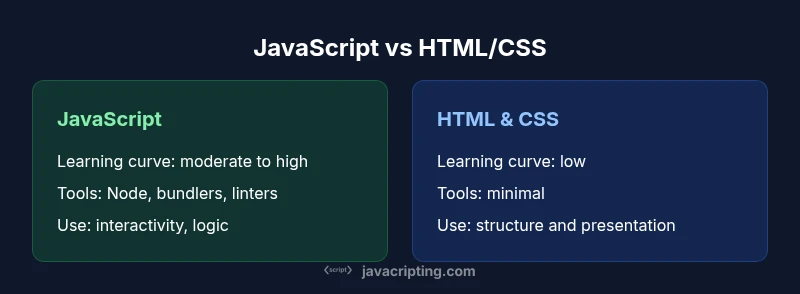
Short answer: JavaScript is typically harder to learn than HTML and CSS because it adds programming concepts, control flow, and asynchronous behavior, while HTML and CSS are declarative and primarily focus on structure and presentation. The biggest leap is learning how to manage state, events, and complex UI updates rather than just writing markup. With practice, the gap narrows as patterns emerge.
The core difference: declarative vs imperative programming and learning curves
The question how hard is javascript compared to html and css often comes down to the core difference between markup languages and programming languages. HTML and CSS are declarative: you describe the structure and appearance of a page, and the browser renders it accordingly. JavaScript, by contrast, introduces an imperative programming model: you write sequences of instructions, manage state, respond to events, and control when and how UI updates occur. That shift from describing what to describing how is the main source of difficulty for many learners. In practical terms, HTML/CSS demand pattern recognition and styling decisions, while JavaScript asks you to reason about logic, data flow, and asynchronous behavior. For beginners, translating a static page into a dynamic interface requires building new mental models: variables, functions, scope, and the event loop. This block also previews the rest of the article, where we map difficulty to real-world tasks and provide actionable steps that slow learners can implement today. how hard is javascript compared to html and css
The learning curves: HTML and CSS as declarative basics
HTML and CSS offer a gentle entry point. A typical first task is marking up content and applying styles. The cognitive load is concentrated on syntax rules, selectors, and box model concepts. The feedback loop is immediate: you save, refresh, and instantly see changes. Once you build small pages, you gain confidence in layout strategies, typography, color, and responsive design. The phrase how hard is javascript compared to html and css tends to be asked by newcomers who want to gauge what comes next. In this section we establish the baseline: how HTML structures content, how CSS controls presentation, and where typical friction arises (like vendor prefixes and layout quirks). Mastery here creates a solid foundation for the more complex, stateful work that comes with JavaScript.
JavaScript's learning curve: core concepts that raise the bar
JavaScript introduces a set of core concepts that require deliberate practice. Variables and types give way to functions, closures, and object-oriented patterns. Scopes and hoisting puzzle newcomers, while prototypes and the modern class syntax demand a broader mental model of inheritance. As you begin to use arrays, higher-order functions, and asynchronous APIs, you’ll notice the cognitive load increases. For many readers the question how hard is javascript compared to html and css becomes clearer when you recognize the programming mindset: you model behavior, manage side effects, and design robust interfaces rather than just declare things. Regular coding practice helps convert rules into patterns you can reliably reproduce.
The browser as your runtime: what changes with JavaScript
A browser is not just a rendering engine for HTML and CSS; it becomes a dynamic runtime for JavaScript. You learn to manipulate the DOM, listen for events, and orchestrate UI updates with state changes. Performance concerns—like layout thrashing and reflows—enter the picture, and debugging becomes more involved when code executes over time. This shift from static styles to interactive behavior adds layers of complexity, including API surfaces, asynchronous handling, and error management. Understanding the browser event loop and how microtasks queue work gives you a solid edge in writing responsive apps. how hard is javascript compared to html and css remains a guiding question as you connect UI rendering with logic.
Tooling, environments, and the cost of entry
Getting started with JavaScript typically requires additional tooling beyond a simple text editor. You’ll encounter Node.js, npm or yarn for dependency management, and possibly bundlers like Webpack or Vite. Transpilers such as TypeScript add another layer of learning, increasing upfront complexity but enabling safer code as projects scale. Debugging tools, browser dev tools, and linters help, but they also demand familiarity. The cost of entry is higher than for HTML/CSS alone, yet these tools unlock real-world development workflows, testing, and collaboration. How hard is javascript compared to html and css is partly about whether you’re ready to adopt an ecosystem that supports scalable, maintainable code.
Debugging and error handling: how troubleshooting differs
Debugging JavaScript requires tracing runtime behavior, asynchronous flows, and potential race conditions. Unlike HTML/CSS where issues are often layout-based, JavaScript problems may stem from logic errors, incorrect state, or failed network calls. Learning to read stack traces, use breakpoints, and interpret console output is essential. You’ll also encounter errors related to types, scope, and versions of libraries. As you gain confidence, you’ll learn to reproduce bugs systematically, isolate root causes, and apply fixes with minimal side effects. This shift in debugging approach is a core part of the learning curve for how hard is javascript compared to html and css.
Asynchronous programming and event-driven flows
One of the most challenging aspects of JavaScript is asynchronous programming. Callbacks, Promises, and async/await patterns require a new way of thinking about timing and coordination. The event-driven model means your UI can remain responsive while background tasks complete, but it also introduces potential pitfalls like unhandled rejections and race conditions. This section covers practical patterns for sequencing tasks, handling errors, and avoiding callback hell. Mastery here significantly lowers perceived difficulty because the rest of the language starts to click when you can reliably manage time-based logic. how hard is javascript compared to html and css
State management and scale: from tiny demos to apps
As projects grow, maintaining state becomes a central concern. JavaScript apps require thinking about where data lives, how it changes, and how UI components react to state updates. You’ll explore patterns such as modularization, state containers, and component-based architectures. HTML/CSS remains declarative in its scope, but scale introduces architectural decisions that determine maintainability. The difficulty isn’t just syntax; it’s designing data flows, component boundaries, and performance-aware rendering. Expect a steeper learning curve when moving from prototype-level interactions to production-grade applications. how hard is javascript compared to html and css
Practical strategies to learn faster
A structured learning path helps reduce friction. Start with small projects that couple HTML/CSS pages to a sprinkle of JavaScript interactivity, then incrementally introduce concepts like events, DOM manipulation, and basic data handling. Use deliberate practice: implement one pattern at a time, refactor for readability, and review real-world code. Pair programming, code reviews, and reading well-structured tutorials accelerate progress. By chunking the material and aligning tasks with user-facing outcomes, you’ll move from markup-only pages toward interactive experiences much faster. how hard is javascript compared to html and css
Common myths about difficulty and perceived hurdles
Some learners assume JavaScript is the only hard part of the web stack; others think HTML/CSS will always stay simple. In reality, each area has its own challenges, and the perceived difficulty shifts with goals. If your aim is static pages, HTML/CSS can be straightforward; if you want dynamic interfaces, JavaScript becomes essential and its complexity grows with scope. Keeping expectations realistic, identifying milestones, and practicing with progressively harder tasks are powerful antidotes to myth-based frustration. how hard is javascript compared to html and css
The role of practice projects and learning paths
Projects consolidate learning by forcing you to apply concepts to real problems. A well-chosen sequence—from a dynamic form to a small single-page app—helps you scaffold knowledge and track progress. Complementary resources, tutorials, and documentation reinforce what you learn. The learning path should balance HTML/CSS fundamentals with core JavaScript skills, then gradually introduce tooling, framework concepts, and deployment considerations. A thoughtful project roadmap makes the journey less intimidating and clarifies how hard javascript compared to html and css becomes a gradual, manageable ascent.
Making the transition: roadmaps and milestones
A practical transition plan starts with establishing a baseline of HTML/CSS comfort, then adds JavaScript basics, DOM manipulation, and simple interactivity. Milestones can include creating a dynamic form, building a small to-do app, then integrating a tiny API fetch workflow. Tracking progress with defined goals, code reviews, and weekly practice sessions sustains momentum. By treating the journey as a sequence of achievable steps, the perceived difficulty remains steady and gains in confidence become tangible.
Conclusion and next steps
Comparison
| Feature | JavaScript | HTML/CSS | |
|---|---|---|---|
| Learning Curve | Moderate to high (programming concepts, async logic, state) | Low (markup and styling, visual feedback) | |
| Runtime/Execution | Runs in browser or server environments; dynamic behavior | Mostly declarative rendering; styling and structure | |
| Tooling required | Moderate to heavy (node, npm, bundlers, linters, TS optional) | Minimal (text editor, browser dev tools) | |
| Debugging effort | Higher due to runtime errors and asynchronous code | Lower; issues often relate to layout or styling | |
| Use cases | Dynamic apps, interactivity, data handling | Static content layout and presentation | |
| Performance considerations | JS performance impacts interactivity and UX; optimization needed | Rendering and styling performance; typically less complex |
Benefits
- JavaScript enables rich interactivity and dynamic UI
- Learning JS builds transferable programming skills
- HTML/CSS are quick to start and visually immediate
- JS tooling supports scalable development
- Interoperability between HTML/CSS and JS is powerful
The Bad
- JavaScript has a steeper initial learning curve
- Asynchronous code can be confusing for beginners
- Tooling complexity can slow early progress
- Over-architecting a simple page is a risk
JavaScript offers greater capabilities but a higher initial hurdle; HTML/CSS remain easier to start, with JS becoming essential for interactivity.
Begin with solid HTML/CSS basics, then add JavaScript incrementally. Use small, focused projects to build intuition before tackling full-scale applications.
Questions & Answers
Is JavaScript harder to learn than HTML and CSS?
Yes, for most beginners JavaScript introduces programming concepts, runtime behavior, and asynchronous logic that HTML/CSS do not require. The learning curve is steeper, but progress accelerates with iterative practice and real projects.
Yes, JavaScript tends to be harder at first, but you’ll get better as you build real projects.
Do I need to master HTML and CSS before starting JavaScript?
Having HTML and CSS fundamentals is highly beneficial before diving deep into JavaScript. It helps you understand the DOM, styling, and how UI responds to logic, leading to faster and clearer progress.
It's helpful to know HTML and CSS before jumping into JavaScript.
What makes JavaScript challenging in practice?
Key challenges include mastering asynchronous patterns (promises, async/await), understanding scope and closures, and designing clean data flows for interactive UIs. These concepts are central to building robust web apps.
Asynchronous code and closures are common stumbling blocks in JS.
How long does it take to feel proficient in JavaScript?
Proficiency varies, but consistent, project-based practice over a few months typically yields noticeable competence in core JavaScript concepts and browser APIs. Deeper expertise grows with ongoing work on larger apps and tooling.
With steady practice, you’ll feel proficient in a few months.
What tools help reduce the learning curve?
Start with a modern editor, browser dev tools, and a beginner-friendly tutorial path. Gradually add a package manager, a bundler, and optional TypeScript to improve reliability as you scale.
Use a good editor and browser tools; add bundlers later as you scale.
What to Remember
- Start with HTML/CSS basics to establish a foundation
- Gradually introduce JavaScript concepts and asynchronous patterns
- Embrace small projects to solidify new skills
- Use tooling to enable scalable, maintainable code
- Understand the browser runtime and event loop early