Is JavaScript Harder Than React? A Practical Comparison
An analytical comparison of JavaScript versus React, focusing on learning curves, tooling, and real-world use cases to guide your study path.


Is javascript harder than react? The quick answer is nuanced: JavaScript is the language, while React is a library that adds patterns, JSX, and tooling. For absolute beginners, learning plain JavaScript basics is usually easier to start; mastering React’s component model, hooks, and ecosystem adds a distinct layer of complexity. According to JavaScripting, the difficulty largely depends on your goals and prior experience.
Framing the question: is javascript harder than react?
Is javascript harder than react? The framing matters because you are not comparing two equal entities: JavaScript is a language that powers the web, while React is a library that sits atop JavaScript to build user interfaces. According to JavaScripting, the most productive way to approach this question is to separate core language mastery from library-specific patterns. In practice, most learners begin with JavaScript fundamentals, then layer in React concepts as soon as they can apply them in real projects. The difficulty you experience will depend on your prior programming exposure, emphasis on UI development, and willingness to learn tooling, state management, and debugging strategies. When you hear the question is javascript harder than react, remember that the answer is not about one being universally harder; it’s about where you want to land and what problems you want to solve. This framing sets expectations: start with fundamentals, then expand into UI-focused patterns if that aligns with your goals.
Distinctions in scope: language vs library
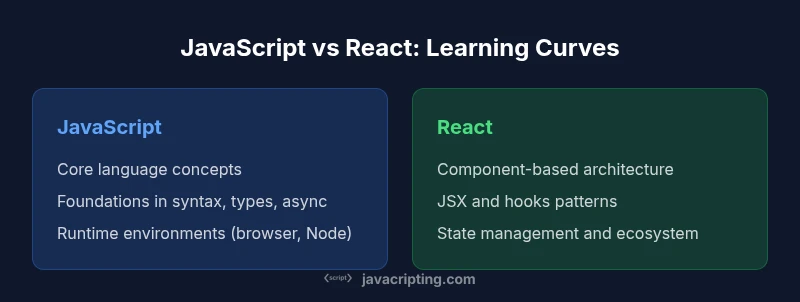
JavaScript is a versatile, general-purpose language that runs in browsers and on servers via Node.js. React, by contrast, is a library that uses JavaScript to create dynamic UIs with a component model, JSX syntax, and explicit state management. The key consequence is that you are not simply learning syntax; you are adopting a design approach. JavaScript concepts such as closures, prototypal inheritance, and asynchronous programming form the bedrock; React adds patterns like components, props, state, and hooks. The two coexist, but the learning path shifts from language fluency to UI architecture. Tooling—bundlers, transpilers, and linters—also expands as you move into React, and that expansion influences perceived difficulty.
Learning curve drivers: syntax, concepts, and tooling
Several factors shape the relative difficulty: syntax depth, conceptual load, and the breadth of tooling. JavaScript fundamentals cover variables, data types, functions, objects, arrays, and asynchronous patterns like promises and async/await. React introduces JSX, component trees, hooks, context, and a declarative approach to UI state. The tooling never stops growing: package managers, bundlers, linting configurations, test frameworks, and dev servers become daily considerations. React’s ecosystem evolves quickly, with patterns like concurrent features and server components appearing over time. The practical takeaway: there is a core category of concepts you must know for both, and a set of library-specific patterns that you’ll acquire as you work on real projects. Start small to avoid cognitive overload and scale your learning gradually.
Ecosystem and tooling: impact on perceived difficulty
A strong ecosystem can flatten some learning curves while introducing new complexities. JavaScript has a broad runtime landscape (browsers, Node), plus language features that demand ongoing attention. React adds a layer of conventions—component hierarchies, props drilling, state lifecycles, and rendering optimizations. When you first set up a React project, you encounter scaffolding tools like Vite or Create React App, along with component libraries and testing strategies. These tools accelerate development but require familiarity with JSX compilation, Babel configurations, and debugging across a component tree. The result is an up-front effort to learn tooling, followed by smoother daily development as you gain experience. JavaScripting analysis shows that learners who adopt a structured tool-aware approach tend to progress more steadily.
Practical learning paths for different goals
If your goal is general JavaScript proficiency, begin with core language concepts: variables, control flow, functions, objects, arrays, and asynchronous patterns. Build small projects that manipulate the DOM, fetch data, and respond to user input. Progress to TypeScript to improve maintainability and safety. If UI development is your aim, start with React fundamentals: components, props, state, and basic hooks. Then advance to contexts, reducers, performance optimization, and testing. Throughout, work on end-to-end projects—think dashboards, to-do apps, or small e-commerce flows—to integrate both JavaScript and React skills. A balanced mix of reading, coding, and debugging activities yields durable understanding and practical competence.
Real-world scenarios and decision guidelines
In professional settings, project scope, team expertise, and timelines dictate the path. For rapid prototyping of a static front end, vanilla JavaScript may suffice. For scalable, interactive UIs, React is typically the better choice because it structures UI logic and enables reusability. When teams already possess back-end JavaScript experience, React can align with existing workflows and CI/CD pipelines, while non-JS specialists may benefit from focusing on core UI concepts first. For self-directed learners, sequence matters: treat JavaScript as the foundation and React as an addition. Use small projects to practice both, then gradually layer in more advanced tooling and patterns as confidence grows.
Common misconceptions and how to approach them
A common misconception is that React replaces JavaScript; in reality, React is built on JavaScript and relies on its language features. Another misconception is that learning React is uniformly harder because it feels more complex; in many cases, the library actually clarifies UI problems by providing clear abstractions. A third misunderstanding concerns performance: while rendering can incur overhead, appropriate patterns and memoization keep apps responsive. Finally, learners often believe they must master every tool in the React ecosystem before building anything; the practical approach is to learn the basics, then add tooling incrementally as needs arise.
Metacognitive strategies for learning both effectively
Adopt a deliberate practice approach: set small, measurable goals; track progress; and reflect weekly. Use spaced repetition to reinforce JavaScript fundamentals and React patterns. Build real projects that require both sides; pair programming and code reviews accelerate growth. Create a learning roadmap with milestones and monitor results to adjust. Apply what you learn by contributing to open projects or building portfolio pieces that demonstrate both strong JavaScript grounding and practical React UI skills. This dual focus reduces perceived difficulty over time and improves retention.
Comparison
| Feature | JavaScript | React |
|---|---|---|
| Learning Curve | Gradual: syntax and fundamentals build a solid base | Moderate: introduces JSX, components, hooks, and state management |
| Code Structure & Abstraction | Unopinionated language with flexible patterns | Opinionated UI architecture with component hierarchy |
| Tooling & Ecosystem | Broad runtime (browsers, Node), core tooling | Rich UI tooling (builds, dev servers, testing, component libraries) |
| Performance Considerations | Engine optimizations apply to vanilla code | Rendering overhead can be mitigated via patterns and memoization |
| Use Cases & Roles | General scripting, automation, web features | UI-focused SPA development with complex state |
| Prerequisites & Prereq Depth | Core programming concepts and DOM knowledge | JS fundamentals plus JSX, hooks, and UI patterns |
| Time to Proficiency | Faster to reach language competency | Longer path to mastery of architecture and ecosystem |
Benefits
- Provides a clear framework to compare language versus library
- Helps learners set realistic expectations and plan steps
- Encourages goal-aligned study paths and project-based practice
- Highlights when to invest time in tooling and architecture
The Bad
- Risk of oversimplification if treated as a strict hierarchy
- Can mislead beginners into underestimating React’s complexity or JS’s depth
- Learning paths may vary by project type and team practices
Learn JavaScript fundamentals first; then add React for UI-focused projects.
JavaScript provides the foundation for web development, while React introduces UI architecture. A staged approach—core JS skills followed by React concepts, tooling, and practical projects—yields the best long-term results, according to the JavaScripting team.
Questions & Answers
Is JavaScript harder to learn than React?
Not a simple yes or no. JavaScript is the language foundation; React is a UI library built on JavaScript. The perceived difficulty depends on your goals and prior experience.
Think of JavaScript as the language you speak, and React as the conversation you have built with it. Your path depends on what you want to build.
What makes React harder than plain JavaScript for beginners?
React adds JSX, component-based architecture, hooks, and a more complex state model. The tooling and ecosystem can also feel overwhelming when starting out.
React introduces new patterns like components and hooks that can be challenging at first, especially with tooling.
Should a new learner start with vanilla JavaScript before React?
Yes. Building a solid foundation in JavaScript makes React concepts easier to absorb later. You’ll understand language features, asynchronous patterns, and DOM interactions more clearly.
Yes—start with JavaScript basics, then move to React when you’re comfortable with the language.
How long does it take to become proficient in JavaScript vs React?
Proficiency varies by effort and project. Fundamentals in JavaScript can come relatively quickly, while React mastery depends on understanding UI patterns, state management, and ecosystem tooling.
There's no fixed timeline; practice and real projects determine how quickly you improve.
What skills overlap between JavaScript and React?
Core JavaScript knowledge, ES6+ features, debugging, and problem-solving carry into React. React adds architecture concepts and UI-specific patterns on top.
You’ll reuse a lot of JavaScript basics when building React apps.
Is React still relevant in 2026?
Yes. React remains widely used for modern web apps, with robust tooling and a large ecosystem. Knowing React can boost employability, especially for UI-centric roles.
Yes, React is still a mainstay for many front-end teams.
What to Remember
- Prioritize solid JavaScript basics before React.
- Expect React to introduce JSX, components, and state management.
- Balance language practice with UI-focused projects.
- Invest in tooling knowledge to smooth development.
- Align your learning path with career goals.