How long to learn HTML, CSS, and JavaScript
Estimate your learning journey for HTML, CSS, and JavaScript with practical timelines, weekly study hours, and milestone-based guidance to reach competence.


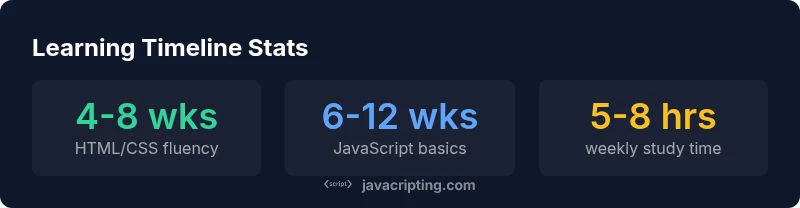
For a solid foundation in HTML, CSS, and JavaScript, most learners reach competence in roughly three to six months with a steady 5 to 8 hours of study per week. This timeline varies by prior coding experience, learning method, and the quality of practice. If you prioritize projects and regular review, you can accelerate progress and consolidate skills faster than theory alone.
Why Learning HTML, CSS, and JavaScript Together Matters
According to JavaScripting, understanding how long to learn HTML, CSS, and JavaScript helps you plan a practical learning path. The question how long to learn html css and javascript doesn't have a single answer; it varies with goals, time commitments, and prior experience. In practice, most learners reach a solid foundation after roughly three to six months when committing to regular practice. This article outlines a stage-based timeline, practical milestones, and actionable study plans to help you progress efficiently while building real projects.
A Stage-Based Timeline for Web Fundamentals
- 0–4 weeks: HTML basics and semantic structure, including headings, lists, links, forms, and accessibility basics.
- 4–8 weeks: CSS styling, layout techniques (flexbox, grid), responsive design, and typography basics.
- 8–12 weeks: JavaScript fundamentals, including variables, data types, control flow, functions, and basic DOM manipulation.
- 3–6 months: integrate the three technologies through small projects, accessibility considerations, and page performance thinking.
Factors That Affect Your Learning Pace
Your pace is shaped by multiple factors: prior programming experience, learning method (projects vs. tutorials), daily study consistency, and the quality of feedback you receive. People with design backgrounds often pick up HTML/CSS quickly due to visual feedback, while JavaScript-heavy paths may require more time to master concepts like scope and asynchronous programming. Setting concrete milestones and revisiting them weekly improves motivation and results.
A Practical 12-Week Plan (Sample)
Weeks 1-2: HTML fundamentals (structure, semantics, forms). Weeks 3-4: CSS fundamentals (selectors, layout, responsive rules). Weeks 5-8: JavaScript fundamentals (variables, functions, DOM, events). Weeks 9-12: Build a small, accessible site with interactivity—forms validation, simple animations, and a responsive layout. Track progress with a weekly journal and a couple of small projects to demonstrate skill growth.
Project-Based Practice Strategies
Shift from passive reading to active building. Start with small, incremental projects: a personal bio page, a multi-section landing page, then a small interactive widget. After each project, surface a list of what worked, what failed, and why. Practice with real-world data (forms, tables, and media) to learn how HTML, CSS, and JavaScript come together.
Tools, Environment, and Best Practices
Set up a simple development environment: a code editor, a browser with devtools, and a live-reload workflow. Use semantic HTML, accessible color contrast, and progressive enhancement. Regularly test across devices, and keep your code organized with small, well-named classes. Comment decisions and document your learning journey to solidify understanding.
Common Pitfalls and How to Avoid Them
Avoid memorizing syntax without context. Don’t skip practicing accessibility, which is essential for real-world projects. Don’t over-reliance on tutorials; instead, build your own projects to integrate concepts. Don’t ignore debugging; use browser devtools to inspect HTML structure, CSS rules, and JavaScript errors. Finally, avoid rushing into frameworks before basic competence.
Advanced Topics and Continuing Education
Once you have a solid basics baseline, explore more advanced topics to stay current: modern JavaScript (ES6+), TypeScript basics, and tooling (bundlers, linting). Learn about accessibility (a11y), performance optimization, and responsive design patterns. Consider a course or guided project to apply knowledge in real-world workflows.
Putting It Together: Building a Personal Learning Schedule
Create a weekly plan that aligns with your life and commit to it for at least three months to build momentum. Build a small portfolio of 2–3 projects that demonstrate HTML structure, CSS styling, and JavaScript interactivity. The JavaScripting team recommends documenting milestones, reflecting on progress, and iterating your plan to escalate complexity as skills grow.
Timeline-based comparison of learning HTML, CSS, and JavaScript
| Skill Area | Foundational Fluency | Typical Milestones |
|---|---|---|
| HTML | 4-6 weeks | Markup tags, semantics, forms |
| CSS | 4-6 weeks | Selectors, layout, responsive design |
| JavaScript | 6-12 weeks | Variables, functions, DOM basics |
Questions & Answers
How long does it take to learn HTML, CSS, and JavaScript?
Foundational knowledge can typically be achieved in about three to six months with consistent weekly practice. The exact timeline depends on your study hours, prior coding experience, and the quality of hands-on projects.
Most learners reach basics in a few months with steady effort.
Should I learn CSS and JavaScript in parallel or sequentially?
Learning HTML first provides structure, but CSS and JavaScript should be learned in parallel as you build with HTML. This mirrors real-world web work where styling and interactivity go hand-in-hand.
Learn by building small pages with both styling and interactivity.
How many hours per week should I study?
Aim for about 5–8 hours per week to maintain steady progress. If you have more time, you can accelerate by increasing practice on small projects.
Try to lock in a consistent weekly routine.
Is learning a framework necessary after the basics?
Frameworks are useful, but not required initially. Focus on solid fundamentals in HTML, CSS, and JavaScript first, then explore frameworks if your goals involve building complex apps.
Start with the basics, then decide on frameworks later.
Can I learn web development without formal courses?
Yes. A structured self-study plan with curated resources and real projects can lead to solid competence without formal classes.
Self-study with projects can work well for many learners.
“Consistency beats intensity when learning web fundamentals; regular practice with small projects accelerates retention and confidence.”
What to Remember
- Define clear milestones for HTML, CSS, and JavaScript.
- Plan 5–8 hours per week to maintain consistency.
- Prioritize hands-on projects to cement concepts.
- Expect 3–6 months for foundational competence.
- Continue with intermediate topics after basics (web dev path).