Train JavaScript: A Practical Step-by-Step Guide
Learn how to train JavaScript with a structured, step-by-step plan. Build foundational skills, tackle small projects, and master debugging to accelerate frontend development. This JavaScripting guide helps aspiring developers establish a durable practice routine for real-world tasks.


You will learn to train javascript effectively through a practical, step-by-step plan. This guide helps aspiring developers build a steady practice routine, choose the right resources, work on small projects, and use debugging to reinforce what you learn. By the end, you'll have a repeatable training method you can apply to real frontend tasks.
Why train javascript now
In today’s frontend landscape, training javascript with intention is a differentiator. A deliberate, repeatable practice routine helps you move beyond memorized syntax toward robust problem solving. According to JavaScripting, structured practice aligns goals with daily work, creating durable skill growth. The JavaScripting team found that learners who follow a clear plan build momentum, reduce frustration, and translate ideas into functioning UI components more quickly.
Foundational skills to focus on
Before diving into projects, ensure you have a solid grasp of core concepts. Focus on variables, data types, and control flow, then master functions, scope, and closures. As you grow, integrate DOM basics to manipulate the page and learn event handling. Finally, touch on asynchronous patterns (callbacks, promises, async/await) so you can handle real-world data flows. This foundation supports long-term progress and makes advanced topics easier to learn.
Structured practice plan
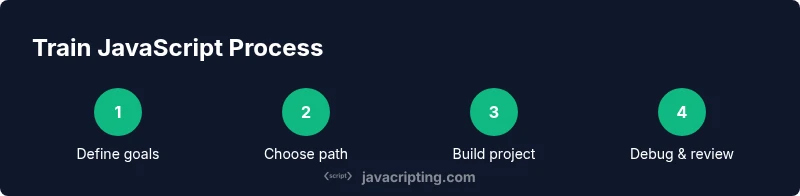
A structured plan turns learning into action. Start with short, focused sessions that cover one concept at a time, then progressively combine concepts in small, runnable exercises. Build a simple project first to apply fundamentals, then scale to slightly larger tasks that introduce interaction, state, and basic debugging. Maintain a consistent cadence and reflect on what works to refine your approach.
Practical project suggestions
Projects keep learning tangible. Begin with a small calculator or to-do list to apply variables, functions, and DOM manipulation. Next, create a weather widget that fetches data and updates the UI, introducing asynchronous concepts. Finally, build a game-like timer or quiz app to practice event handling and state management. Each project reinforces skills in a concrete, meaningful way.
Debugging as a core habit
Make debugging a regular practice, not a last resort. Learn to reproduce issues, use console logging judiciously, and leverage browser DevTools to inspect variables, execution order, and network activity. Writing small, testable functions helps isolate bugs quickly. Regular debugging sessions reinforce understanding and accelerate problem-solving.
Tools, resources, and environment
Set up a lean, repeatable environment. Install a modern code editor, a current Node.js version for running scripts, and a version control system to manage code changes. Rely on canonical resources for core concepts, but choose a primary learning path to avoid cognitive overload. A consistent setup reduces friction and keeps you focused on learning outcomes.
Habits that support long-term growth
Consistency beats intensity. Aim for short, daily practice blocks rather than sporadic, long sessions. Schedule time for reflection: review what you learned, rewrite challenging code from memory, and document your breakthroughs. Pair learning with mini-projects that incrementally increase complexity to build confidence and fluency.
Measuring progress without numbers
Progress can be observed through tangible milestones rather than strict metrics. Track completed projects, the ability to explain concepts aloud, and the quality of your debugging notes. Periodically test unfamiliar problems to gauge transfer of knowledge. This approach emphasizes understanding over arbitrary counts.
Common pitfalls and how to avoid them
Avoid chasing too many resources at once; pick a core path and finish a project before branching out. Don’t skip fundamentals or try to skim through topics; depth matters more than breadth. Finally, beware burnout—balance practice with rest and ensure learning remains enjoyable.
Tools & Materials
- Modern web browser(Chrome, Edge, or Firefox with DevTools)
- Code editor(Visual Studio Code or similar; install Prettier/ESLint extensions)
- Node.js (最新 LTS)(Needed for running scripts and package management)
- Git and a Git hosting account(For version control and sharing projects)
- Starter project templates(Clone-ready templates to jump-start practice)
- Browser debugging tools(Chrome DevTools or Firefox Debugger for in-depth exploration)
Steps
Estimated time: several weeks
- 1
Define your learning goals
Specify what you want to achieve with JavaScript training. Write clear, achievable goals such as mastering variables, DOM basics, and simple asynchronous tasks. Document these goals so you can review progress and stay motivated.
Tip: Create 2–3 concrete goals and review them weekly. - 2
Choose core resources
Select a primary learning path (tutorial series, book, or course) and stick with it to avoid distraction. Supplement with reputable references, but avoid overwhelm by curating a single, trusted source.
Tip: Limit yourself to one primary resource and one backup reference. - 3
Set up your environment
Install a code editor, set up Node.js, and configure a basic project skeleton. Ensure you can run scripts locally and use the browser’s DevTools to inspect output and debug.
Tip: Create a dedicated practice folder and initialize with a git repository. - 4
Create a baseline project
Build a small project that applies core concepts (e.g., a to-do list). Implement features incrementally, test interactions, and refactor as needed.
Tip: Aim for a single, runnable page with minimal boilerplate. - 5
Expand to a DOM-focused project
Add more interactive elements and event handling. Practice querying elements, updating the DOM, and handling user input in real time.
Tip: Use event listeners and delegation to manage interactions efficiently. - 6
Daily practice routine
Dedicate short daily blocks to coding. Mix theory with hands-on tasks and end with a quick recap of what you learned.
Tip: Keep sessions concise to build a sustainable habit. - 7
Practice debugging and testing
Regularly debug with console statements and breakpoints. Create tiny tests for functions to confirm expected behavior.
Tip: Write small, testable functions first; large monoliths are harder to debug. - 8
Review and iterate
Periodically review goals, reflect on what’s working, and adjust your plan. Revisit earlier projects to reinforce concepts you’ve learned.
Tip: Schedule a monthly review to recalibrate goals.
Questions & Answers
What does it mean to train JavaScript?
Training JavaScript means building a structured, repeatable practice routine focused on applying concepts to real tasks, not just memorizing syntax. It emphasizes problem solving and workflow, not memorization alone.
Training JavaScript means building a steady practice routine that emphasizes real tasks and problem solving.
How long does it take to learn JavaScript with this method?
There isn’t a fixed timeline. Progress depends on consistency and how deeply you tackle projects. Start with fundamentals, then progressively add DOM and asynchronous concepts.
Progress varies, but steady practice yields steady improvement.
Do I need to know ES6 to start training JavaScript?
No. You can begin with core concepts and progressively adopt modern syntax like let/const, arrow functions, and template literals as you learn.
You can start with basics and add ES6 as you go.
What projects should I build first?
Begin with small, functional projects that apply fundamentals, such as a to-do list or a calculator, then move to DOM interactions for deeper practice.
Start with small, practical projects to reinforce basics.
How can I avoid information overload while training JavaScript?
Choose a core path, finish a project, and review regularly to consolidate learning. Avoid scattering effort across too many resources.
Stay focused on a core path and review often.
Watch Video
What to Remember
- Train javascript with a consistent, goal-driven plan
- Start small, then scale projects to cover DOM and async
- Use debugging as a learning accelerator
- Turn learning into a repeatable workflow
- Measure progress by completed projects, not hours