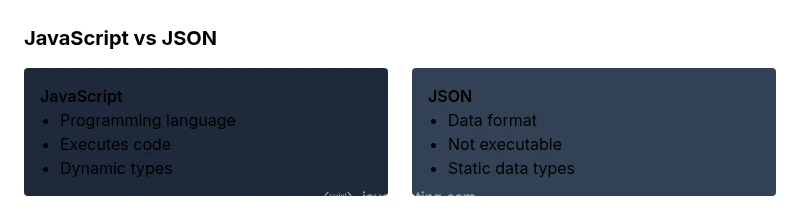
JavaScript vs JSON: Core Differences for Developers
Explore the core differences between JavaScript and JSON, covering purpose, syntax, data types, and common use cases. Learn when to use each and how they interact in modern web apps for robust, scalable development.


The quick answer is that JavaScript is a programming language used to write code that runs in browsers or on servers, while JSON is a lightweight data interchange format used to serialize and transmit data. The difference between javascript and json is foundational: you run code with JavaScript, and you pass data as JSON. In practice, you parse JSON with JavaScript objects to make it usable in your programs, and you stringify objects to send data over the network.
Understanding the difference between javascript and json
According to JavaScripting, the difference between javascript and json is fundamental for modern web development. JavaScript is a full programming language designed to implement logic, respond to user input, and manipulate the Document Object Model (DOM). JSON, by contrast, is a lightweight, text-based data interchange format that conveys structured data. While both share curly braces and a familiar object-like syntax, JSON data is not executable code and has a strictly defined grammar. This distinction matters when you design APIs, store configuration, or exchange information between systems. The JavaScripting team found that many developers conflate these two concepts early in their learning journey. A clear mental model—code versus data—reduces errors when wiring frontend logic to backend services and improves long-term maintainability. The practical implication is simple: use JavaScript to implement behavior, and JSON to transfer data. This article uses concrete examples to illuminate the line between the two and to show how they fit together in real projects.
Core concepts: JavaScript as a language vs JSON as a data format
At a high level, JavaScript is a dynamic language that enables expressions, functions, and control flow. JSON is a universal data format that serializes structured information in a human-readable text form. JavaScript can manipulate JSON seamlessly once converted to native objects, while JSON cannot perform logic on its own. Understanding this distinction helps you design APIs that return JSON payloads to be consumed by JavaScript on the client or server side. JavaScripting emphasizes that the two concepts occupy different layers: language versus data representation, yet they are often used in tandem in modern web applications.
Syntax and structure: objects, arrays, and literals
JSON uses a subset of JavaScript object notation with strict rules: keys must be strings, strings require quotes, and only data types like numbers, booleans, null, strings, arrays, and objects are allowed. JavaScript, however, supports identifiers, functions, classes, prototypes, and executable expressions. This difference impacts parsing and validation: JSON requires a parser, while JavaScript executes code directly. For developers, that means JSON is ideal for data transport, whereas JavaScript is the tool for implementing behavior, algorithms, and UI logic. Remember that the same curly brace structure does not imply equivalence: JSON conveys data; JavaScript executes instructions.
Data types and evaluation: dynamic code vs static data
JavaScript provides dynamic types and runtime evaluation, enabling flexible modeling but also introducing potential runtime errors. JSON is strictly data-oriented, with a fixed set of primitive and composite types. This separation matters for security and reliability: never execute or eval JSON, and be mindful of how JavaScript converts JSON strings into objects. The JSON data format prioritizes stability and interoperability across languages and runtimes, while JavaScript prioritizes expressive power and responsiveness in browsers and servers. When you stringify from JavaScript to JSON, you serialize the data structure; when you parse JSON back, you reconstruct the data without code execution.
How JSON interacts with JavaScript
Interoperability between JSON and JavaScript is a foundational pattern in web development. In practice, servers often respond with JSON, which client-side JavaScript parses into objects using JSON.parse. Conversely, JavaScript objects are serialized into JSON via JSON.stringify before sending them to APIs or storage. This interaction is efficient and language-agnostic, ensuring that systems written in different languages can share data. JavaScripting highlights that the handshake between JSON and JavaScript is a data-to-object translation, not a conversion of code to data or vice versa. Mistakes typically involve assuming JSON can contain functions or relying on implicit type coercion during parsing.
Practical usage: common workflows and examples
A typical workflow starts with a server issuing a JSON payload. Client-side JavaScript then uses JSON.parse to turn that payload into a usable object, accesses its properties, and renders UI. When sending data back, developers often collect form data into a JavaScript object and convert it with JSON.stringify before posting it to an API. This pattern works consistently across frameworks and platforms, which is why JSON remains the lingua franca of data interchange. JavaScript code can also generate and manipulate JSON for configuration files, REST payloads, and graph data structures. In real-world projects, you will repeatedly switch between the two: JavaScript for logic, JSON for structured data transport.
Pitfalls and common mistakes
Common errors include attempting to execute JSON data as JavaScript code, forgetting to quote keys or strings in JSON, and forgetting to handle JSON parsing errors gracefully. Another frequent pitfall is assuming that JSON supports functions or undefined values; JSON is strictly data-only. Developers also underestimate the importance of schema and validation when consuming JSON from external sources, which can lead to runtime surprises. To avoid these issues, validate JSON with a schema, use try/catch around JSON.parse, and clearly separate runtime code from data definitions. Practically, treat JSON as a contract: a reliable, language-agnostic representation of data that JavaScript consumes and produces.
Performance and security considerations
Parsing JSON is generally fast enough for typical web apps, but large payloads can still incur performance costs. You should consider streaming JSON parsing for huge data sets and avoid unnecessary parsing on insecure or untrusted data. Security wise, JSON data should be treated as data only; never execute it, never eval it, and always validate it against a schema before using it to drive UI or logic. In addition, use secure transport (HTTPS) and consider data minimization to limit exposure in transit. JavaScripting analyses indicate that most performance and security issues stem from improper handling rather than JSON itself.
Real-world decision guides: when to choose each
When to choose JavaScript: when you need to implement behavior, interactive features, or complex calculations within a web page or service. When to choose JSON: when you need a lightweight, interoperable data format for APIs, configuration, or data interchange between systems. In practice, many applications require both: JavaScript to process data and JSON to transport it. A practical rule of thumb is to separate concerns clearly: treat JSON as the data contract and JavaScript as the logic engine, then assemble them with well-defined interfaces and strict parsing. This separation reduces bugs and improves maintainability.
Quick reference cheat sheet: key takeaways
- JavaScript is a programming language; JSON is a data format.
- JSON is text-based, language-agnostic, and data-only.
- JavaScript can parse and stringify JSON to move between code and data.
- Do not execute JSON data; validate it before use.
- Use JSON for API payloads and configuration; use JavaScript for logic and UI updates.
Comparison
| Feature | JavaScript | JSON |
|---|---|---|
| Nature | Programming language with executable code | Data interchange format (text) |
| Primary Use | Build logic, behavior, UI interactivity | Transmit and store structured data |
| Syntax/Format | Rich syntax: functions, prototypes, operators | Strict JSON syntax: strings in quotes, keys in quotes, no trailing commas |
| Data Types | Supports numbers, strings, booleans, objects, arrays, functions | Supports strings, numbers, booleans, null, arrays, objects |
| Parsing/Execution | Runs as code in JS engine | Parsed by JSON parser; no execution |
| Mutability | Mutable, supports side effects | Immutable by default (data-only) when transmitted |
| Common Use Cases | Web apps, servers, scripting, DOM manipulation | APIs, configuration files, data payloads |
| Best Practices | Encapsulate logic in modules; avoid executing JSON | Validate and schema-validate JSON; separate concerns |
Benefits
- JSON is lightweight and language-agnostic, making APIs and configuration easy to share
- JavaScript enables rich data manipulation, interactivity, and complex logic
- Clear separation between code and data improves maintainability
- Widely supported across ecosystems and tooling
The Bad
- JSON requires strict syntax (quotes, no functions) and parsing steps
- JavaScript can run harmful code if misused; security best practices matter
- Learning both concepts adds upfront cognitive load
JavaScript remains the code engine; JSON remains the data format.
JavaScript powers behavior and interactivity, while JSON provides a portable data representation. Treat JSON as data, and JavaScript as the tool to process that data. The two complement each other, especially in API-driven web apps.
Questions & Answers
What is JSON?
JSON (JavaScript Object Notation) is a lightweight, text-based data interchange format. It represents structured data using a simple syntax and is designed for easy parsing by programs written in any language.
JSON is a lightweight data format used to transfer structured data; it’s not executable code.
What is JavaScript?
JavaScript is a programming language that runs in web browsers and on servers. It enables dynamic behavior, event handling, and complex logic for interactive applications.
JavaScript is a programming language for adding interactivity and logic to apps.
Can JSON be executed as code?
No. JSON is data only and cannot run as code. It must be parsed into language-native objects to be used.
JSON is data, not code, so it cannot be executed directly.
How do you convert JSON to a JavaScript object?
Use JSON.parse to convert a JSON string into a JavaScript object, and JSON.stringify to convert an object back to JSON.
Use JSON.parse to turn JSON into a JS object, and JSON.stringify to go back to JSON.
Is JavaScript syntax the same as JSON syntax?
No. They share some structural similarities, but JSON has strict data-only grammar and cannot include executable code.
They share braces and quotes in places, but JSON is strictly data, not code.
What are common JSON mistakes in JS projects?
Common issues include forgetting quotes around keys/strings, trailing commas, and assuming JSON can include functions or undefined values.
Watch out for trailing commas and trying to run JSON as code.
What to Remember
- Define code versus data roles clearly
- Use JSON for transport, not execution
- Parse and stringify JSON with care
- Validate JSON against schemas
- Treat JSON as interoperable data across languages