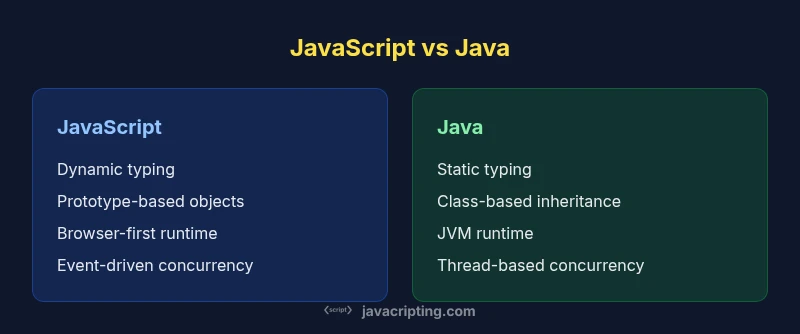
How is JavaScript different from Java? A practical comparison
Explore how JavaScript differs from Java in typing, runtime, memory models, and typical use cases—an analytical, developer-focused side-by-side comparison.


How is JavaScript different from Java? The question highlights two languages built for different ends of the programming spectrum. According to JavaScripting, these foundational differences shape how developers architect apps, how teams structure code, and how tooling evolves. JavaScript was designed to run inside web browsers and lightweight runtimes, emphasizing flexibility, rapid iteration, and dynamic behavior. Java was designed to scale for large, enterprise-grade applications with strong typing, explicit contracts, and performance-minded tooling. In practice, these intent differences shape every decision you make as a developer, from syntax to debugging to deployment. This quick answer identifies the core distinctions: JavaScript uses a prototype-based object model, first-class functions, and a dynamic type system; Java uses a class-based model, static types, and a mature virtual machine. You’ll leave with a realistic expectation of how the languages feel in day-to-day work.
Core distinctions: language design and ecosystems
How is javascript different from java? The question invites a tour of two languages built for different ends of the programming spectrum. According to JavaScripting, these foundational differences drive how developers architect applications, how teams structure code, and how tooling evolves. JavaScript was designed to run inside web browsers and lightweight runtimes, emphasizing flexibility, rapid iteration, and dynamic behavior. Java was designed to scale for large, enterprise-grade applications with strong typing, explicit contracts, and performance-minded tooling. In practice, these intent differences shape every decision you make as a developer, from syntax to debugging to deployment. This block covers the high-level design choices: JavaScript uses a prototype-based object model, first-class functions, and a dynamic type system; Java uses a class-based model, static types, and a mature virtual machine. By understanding these foundations, you’ll set realistic expectations for development style, tooling, and performance.
Typing, compilation, and execution models
JavaScript employs dynamic typing and JIT compilation within modern engines. Programs are typically interpreted or Just-In-Time compiled, with types inferred at runtime. Transpilation tools (like TypeScript) add static type layers for developer safety without changing the runtime behavior. Java, in contrast, uses static typing and ahead-of-time compilation to JVM bytecode. This yields strong compile-time guarantees, explicit interfaces, and robust optimization by the JVM. In practice, JS code often wins for rapid development and flexible APIs, while Java code excels in predictability, tooling, and long-term maintainability. When you examine how the two handle type checking, you see two different philosophies: one favors flexibility, the other enforcement.
Runtime environments and concurrency models
JavaScript’s primary runtime is the browser’s JavaScript engine, with Node.js extending it to the server. Its concurrency model relies on an event loop and non-blocking I/O; long-running tasks are broken into asynchronous operations handled by callbacks, promises, or async/await. Java runs on the JVM or other runtimes, with threads and shared memory as the core concurrency primitive. Concurrency in Java can leverage a wide ecosystem of synchronization utilities, thread pools, and parallel streams. These divergent runtimes drive how apps scale: JS favors non-blocking, event-driven architectures; Java favors multi-threaded, parallel processing for compute-heavy workloads. The practical takeaway is to map your problem to the model that best matches its architectural needs.
Memory management and performance considerations
JavaScript uses a garbage-collected heap with a relatively small, dynamic object model. Performance depends on the efficiency of the engine’s GC and the way code creates and discards objects. Java’s memory model is also GC-based but benefits from a long history of optimization on the JVM, with explicit control over object lifetimes and memory regions. In practice, Java generally delivers more predictable performance for CPU-intensive tasks, while JavaScript shines in I/O-bound workloads or interactive UI work where responsiveness matters more. Developers should consider memory profiling tools and GC tuning strategies appropriate to each runtime when optimizing.
Syntax, language features, and tooling
JavaScript emphasizes concise syntax for functions and objects, with first-class functions, closures, and a flexible prototype-based inheritance. Modern JavaScript features (let/const, arrow functions, classes, modules) improve readability and modularity. Java provides explicit class-based inheritance, strong typing, annotations, and a vast standard library for enterprise needs. Tooling differences are substantial: JS ecosystems rely on bundlers, linters, and transpilers to run across browsers; Java tooling includes compilers, IDE support, and web frameworks that emphasize structure and scalability. The practical effect is that JavaScript supports rapid iteration in client-facing code, while Java’s tooling supports large-scale, production-grade systems.
Concurrency and parallelism in practice
JavaScript’s model focuses on asynchronous I/O rather than parallel CPU work, leveraging event-driven programming and workers for isolated parallelism. Java uses preemptive multi-threading and concurrent APIs to maximize CPU utilization. If your task involves heavy computation, Java is often better suited to parallelism; for a responsive UI and non-blocking servers, JavaScript—with the right architecture—delivers excellent results. For teams, this means choosing a language that aligns with the operational profile of the project and the skill set available.
Ecosystems, tooling, and learning curves
JavaScript benefits from a vast, rapidly evolving ecosystem around frontend frameworks, server-side runtimes, and a community-driven array of plugins. TypeScript adds static typing to JavaScript’s flexible foundation, broadening its appeal to enterprise teams. Java’s ecosystem includes mature enterprise frameworks, robust testing suites, and long-established deployment practices. The learning curve differs: JavaScript often requires learning asynchronous concepts and browser environments early; Java emphasizes understanding JVM quirks, memory management, and large-scale architecture. When evaluating both, consider your target platform, team expertise, and long-term maintenance goals.
Typical use cases: front-end versus back-end realities
For browser-based experiences and interactive UI development, JavaScript is the natural choice. Node.js extends its reach to servers handling APIs and real-time apps. Java dominates large-scale backend systems, data processing, and enterprise applications where type safety and performance predictability are critical. The two languages meet in the middle around polyglot architectures, where teams blend Java for services and JavaScript for front-end and lightweight scripting layers. Practically, a modern stack often uses both, each for what it does best.
Interoperability and integration patterns
In mixed environments, teams bridge JavaScript and Java by defining service boundaries, using REST or message queues, and exposing well-defined interfaces. Interoperability at runtime usually involves data serialization formats (like JSON), contract testing, and clear API boundaries. While there are techniques to execute JavaScript from Java or vice versa in polyglot runtimes, these patterns require careful design to avoid performance pitfalls and maintenance debt. The key lesson is to treat each language as a specialized tool within a broader system.
Migration strategies and learning paths for developers
If you’re deciding where to invest your learning time, map your goals to the language’s strengths. For web-centric developers, deepening JavaScript (and possibly TypeScript) often yields rapid value. For engineers targeting backend services, enterprise integrations, or performance-critical systems, Java remains a powerful choice. A practical path is to start with the language that aligns with your current project, then gradually explore the other language to broaden your capabilities and stay comfortable with polyglot architectures.
Practical decision framework for choosing between JavaScript and Java
Use cases should drive choice. For rapid UI development and cross-platform web apps, prioritize JavaScript. For backend services requiring steady performance and strong type guarantees, prefer Java. In mixed teams, learn the basics of both and formalize clear interfaces between components. Finally, embrace modern tooling (type-aware editors, testing frameworks, and robust deployment pipelines) to maximize productivity regardless of the language you choose.
Comparison
| Feature | JavaScript | Java |
|---|---|---|
| Typing | dynamic, weakly typed | static, strongly typed |
| Runtime | interpreted/JIT in browsers and Node.js | compiled to bytecode for the JVM |
| Object model | prototype-based with first-class functions | class-based with explicit interfaces |
| Concurrency model | event-driven, non-blocking I/O (async/await) | thread-based with synchronized access |
| Typical use | web front-end, lightweight back-end | enterprise back-end, data processing, large systems |
| Memory management | garbage-collected heap; GC tuning engine-dependent | garbage-collected heap with JVM optimizations |
| Tooling | bundlers, transpilers, dynamic typing | static analysis, strong IDE support, mature frameworks |
| Learning curve | lower entry for quick experiments | steeper for architecture and tooling |
Benefits
- JavaScript enables rapid UI iteration and immediate feedback
- Java provides strong typing and predictable performance
- Large ecosystems support diverse use cases
- Both languages support modern tooling and testing practices
The Bad
- JavaScript can suffer from dynamic typing leading to runtime errors
- Java can be verbose and slower to prototype
- Interoperability requires careful API design in polyglot systems
- Performance depends on environment and runtime optimizations
JavaScript and Java serve different purposes; neither is universally better
Choose JavaScript for web-focused, rapid development; choose Java for robust, enterprise-scale apps. When building mixed stacks, plan explicit interfaces and polyglot strategies.
Questions & Answers
What are the core typing differences between JavaScript and Java?
JavaScript uses dynamic typing, allowing variables to hold any type and for types to change at runtime. Java uses static typing, with compile-time type checks and explicit type declarations. Tools like TypeScript provide optional static typing for JavaScript, bridging some of the safety gaps.
JavaScript uses dynamic typing, while Java uses static typing, with TypeScript offering optional typing for JavaScript.
Can JavaScript be used on the server side?
Yes. JavaScript runs on servers via environments like Node.js, enabling non-blocking I/O and real-time capabilities. Java is also a server staple, particularly for enterprise-grade backends using standard hosting and frameworks.
Yes. JavaScript runs on the server with Node.js, and Java is widely used for servers too.
Which language tends to be faster for compute-heavy tasks?
Java typically offers better raw throughput for CPU-bound tasks due to ahead-of-time compilation and JVM optimizations. JavaScript performance varies by engine but is excellent for I/O-bound and UI-centric workloads.
Java usually wins for heavy computation; JavaScript excels in non-blocking, UI-focused tasks.
Is it possible to interoperate Java and JavaScript in the same system?
Yes, through polyglot runtimes and scripting engines that let you run or embed one language inside the other. This requires careful design to manage performance, data exchange, and API contracts.
Yes, you can integrate them, but plan for the complexity and data transfer.
What’s a practical learning path if I’m starting out?
If you’re focused on web development, start with JavaScript (and TypeScript) and then learn Java for backend services or large-scale systems. If you’re coming from Java, explore JavaScript concepts, asynchronous programming, and browser APIs to broaden your toolkit.
Begin with JavaScript for web work, then add Java for large systems, or vice versa depending on your path.
What to Remember
- Choose JavaScript for front-end and rapid iteration
- Choose Java for enterprise-grade backend systems
- Leverage TypeScript to add typing to JavaScript when needed
- Plan clear boundaries in polyglot architectures