Is JavaScript or Python faster? A Practical Performance Comparison
An analytical, evidence-based comparison of execution speed between JavaScript and Python, outlining workload-driven outcomes, optimization techniques, and real-world guidance for developers.


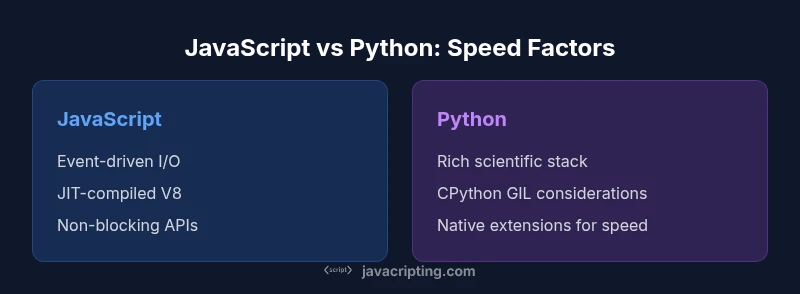
Is JavaScript or Python faster? In practice, JavaScript tends to deliver higher throughput for I/O-heavy workloads on modern runtimes (like V8) due to JIT optimizations and non-blocking I/O. Python, by contrast, often trails in raw compute speed unless you lean on native extensions (NumPy, SciPy) or compiled modules. The answer depends on workload, libraries, and deployment context.
Why speed matters in modern development
Speed is a central concern for user experience, cost efficiency, and scalability. In practice, teams evaluate latency, throughput, and resource usage to decide where to invest engineering effort. The pressing question often heard in teams is the exact phrasing is javascript or python faster; the honest answer is nuanced and workload-dependent. This section introduces the core ideas you’ll need to reason about performance without chasing misleading benchmarks. For many applications, the right choice isn’t a single number but a mapping from workload type to runtime characteristics and available libraries.
In 2026, the JavaScripting team observed that performance is rarely a property of the language alone; it emerges from how you structure I/O, concurrency, and numeric workloads, plus the maturity of the ecosystem you lean on.
Core factors that influence speed
Performance hinges on multiple interacting factors rather than a single metric. Key considerations include the runtime environment (JavaScript engines like V8 vs CPython), compilation and optimization strategies (JIT vs interpreter), memory management, and the availability of fast native extensions. Concurrency models (event-driven vs multi-threaded) and the quality of libraries (pure Python vs C-extensions) can swing results dramatically. Finally, project-specific characteristics—data size, I/O patterns, and CPU-bound tasks—often determine the apparent winner in practice. When you ask is javascript or python faster, you’re really asking which stack wins under a given workload with a given toolset.
JavaScript performance characteristics
JavaScript runtimes like V8 employ aggressive JIT compilation, inline caching, and sophisticated optimization pipelines. For non-blocking, I/O-heavy applications—such as web servers or real-time services—Node.js excels because its event loop can handle many concurrent operations without spawning heavy OS threads. The combination of a mature just-in-time compiler and asynchronous APIs typically yields high throughput on I/O-bound tasks. Context-switching is minimized, and memory management is tuned for long-running services. In many real-world scenarios, these traits translate to faster end-to-end latency for typical web workloads when compared to straightforward Python equivalents, especially if you avoid Python’s GIL-bound pitfalls in CPU-bound sections.
Python performance characteristics
CPython, the standard Python implementation, emphasizes simplicity and readability but carries the GIL, which can limit true parallel CPU execution in multi-threaded code. For numeric or data-heavy workloads, Python often relies on highly optimized native libraries (NumPy, SciPy, pandas) that perform computations in C/Fortran, effectively bypassing Python’s interpreter overhead for the critical math paths. When you design a system around heavy scientific computing or data processing, Python’s ecosystem can deliver impressive performance even if pure Python code runs slower. PyPy provides a JIT alternative that can close some gaps, though compatibility and ecosystem coverage can influence your choice.
Benchmarks and how to read them
Benchmarks are a useful guide, but they’re easy to misread. Microbenchmarks capture tiny slices of behavior that don’t reflect end-to-end systems. Real workloads include I/O, memory bandwidth, serialization, and network latency—factors that can rewrite performance conclusions. JavaScripting analysis shows that results vary widely across benchmark suites, languages versions, and hardware. When evaluating is javascript or python faster, favor benchmarks that reproduce your production patterns and include libraries you actually use. Always profile your own code on representative data scales.
When speed matters: mapping workloads to language
Not every problem requires raw speed. For I/O-bound services, JavaScript with non-blocking I/O often delivers better throughput and lower latency under load. For compute-bound tasks, especially with reproducible numeric operations, Python with native extensions (NumPy, SciPy) or PyPy can outperform plain Python. Decisions should be guided by workload typology—web APIs, data pipelines, machine learning preprocessing, or script-driven automation—and by the availability of battle-tested libraries. In short: pick the tool that aligns with your workload’s bottlenecks.
Optimization strategies for JavaScript
To maximize speed in JavaScript, focus on architecture first: prefer asynchronous APIs, minimize synchronous blocks, and avoid heavy CPU-bound work on the main thread. When CPU-bound tasks arise, consider worker threads or offloading to native addons. Use profiling to identify hot paths and optimize hot functions; utilize modern language features that compilers exploit. Bundle and minify where appropriate, but beware of excessive indirection that hurts readability and long-term maintainability. Caching strategies and efficient data structures can unlock performance gains without changing languages.
Optimization strategies for Python
Python optimization often starts with choosing the right tool for the task: NumPy/SciPy for heavy numerical work, pandas for data processing, and PyPy for JIT-accelerated workloads when compatibility allows. For CPU-bound code, move computation to C extensions or use multiprocessing to bypass the GIL. Reduce global state, leverage compiled extensions, and profile aggressively with dedicated tools to discover bottlenecks. Memory management and data layout matter; organizing data to improve cache locality can produce noticeable speedups even when language-level changes aren’t feasible.
Real-world case studies: when speed decisions mattered
Consider a web API that needs to scale to thousands of requests per second. A Node.js-based service with asynchronous I/O can outperform a pure Python approach on similar hardware thanks to its event-driven model and V8 optimizations. In contrast, a data analytics pipeline performing heavy linear algebra on large matrices often relies on Python with NumPy, where most of the heavy lifting happens in native code and the Python layer mostly orchestrates data flow. The key takeaway is that performance gains usually come from aligning workload patterns with the strengths of the runtime and libraries, not from relying on language fundamentals alone.
Pitfalls in measuring performance
Measurement bias is common. Using bare bones benchmarks, ignoring warm-up, or leaving out system noise can mislead conclusions about is javascript or python faster. Ensure your tests cover realistic data volumes, realistic response times, and representative network and I/O behavior. Cache warm-up, memory pressure, and startup costs should be accounted for. Benchmarking in a vacuum can misrepresent production reality.
Profiling and tooling recommendations
Effective profiling requires the right tools. For JavaScript, Chrome DevTools, Node.js built-in profiler, and flame graphs help pinpoint hot paths. For Python, tools like cProfile, Py-Spy, and memory profilers reveal bottlenecks and memory leaks. Pair profiling with synthetic and real-user traffic tests to observe how latency, throughput, and CPU/GPU usage evolve under load. The goal is to identify and optimize the actual bottlenecks that constrain speed in your specific environment.
Decision framework: choosing for speed vs other concerns
A practical framework begins with workload categorization, followed by baseline measurements, then iterative optimization. Define success in terms of latency, throughput, and resource usage for your typical payloads. If speed dominates, choose the stack that aligns with your bottlenecks, and if development velocity, ecosystem maturity, or maintainability matters more, factor those in. Finally, document and reproduce performance improvements to ensure sustainable gains over time.
Comparison
| Feature | JavaScript (Node.js) | Python (CPython) |
|---|---|---|
| Execution model | JIT-compiled with V8 optimizing compiler | Interpreted CPython with GIL |
| Concurrency model | Event-driven, single-threaded with async I/O | Multi-threaded with GIL; multiprocessing or C extensions for parallelism |
| Startup time | Typically fast startup for small services | Can have slower startup due to interpreter initialization |
| Libraries/ecosystem for the task | Web/server ecosystem; native async support | Rich data science and numeric libraries; strong scientific computing |
| Compute performance (raw path with pure code vs native paths) | Often strong for I/O-bound and event-driven tasks | CPU-bound code can be slower unless using native extensions |
| Memory usage patterns | Memory managed by optimized VM with GC tuned for web workloads | Memory usage varies; Python objects can be heavier, GC behavior matters |
| Best for | I/O-heavy web services, real-time apps, serverless workloads | Data science, machine learning preprocessing, scripting, rapid prototyping |
| Deployment considerations | Wide OS support; easy containerization and server environments | Cross-platform, with strong packaging via pip and virtual environments |
Benefits
- Strong ecosystem for web services and real-time apps
- Excellent asynchronous I/O and event-driven models
- V8/JIT offers high throughput for many workloads
- Wide cross-platform deployment and tooling
The Bad
- Python often slower for raw CPU-bound tasks without native libraries
- GIL can limit multi-threaded CPU-bound performance in CPython
- Profiling and micro-benchmarks can be misleading without real-world workloads
Neither language is universally faster; choose based on workload and library support.
JavaScript generally excels in I/O-bound scenarios typical of web services, while Python shines when numeric libraries are leveraged. For compute-heavy tasks, Python with native extensions can close the gap. The best choice depends on workload characteristics and available tooling.
Questions & Answers
Which language is faster overall, JavaScript or Python?
There is no universal winner. JavaScript often achieves higher throughput for I/O-heavy work, while Python can be faster for compute-heavy tasks when using optimized native libraries. The best choice depends on your workload and libraries.
There isn’t a single faster language; JavaScript tends to win on I/O-heavy tasks, and Python can win on compute tasks with the right libraries.
How does the GIL affect Python performance?
The GIL can limit true parallel CPU execution in CPython, especially for multi-threaded code. You can mitigate this with multiprocessing or by using libraries that run native code outside the interpreter.
The GIL can restrict parallel CPU work in CPython, so consider multiprocessing or native extensions for heavy CPU tasks.
Can NumPy erase Python's Python speed disadvantage?
Yes. NumPy and similar libraries execute heavy math operations in compiled native code, which can dramatically boost performance for numeric workloads compared to pure Python.
NumPy moves heavy work into fast native code, often making Python competitive for numbers-heavy tasks.
Is Node.js slower at CPU-bound tasks?
Node.js excels at I/O, but CPU-bound tasks can block the event loop unless you use worker threads or native addons. Carefully design CPU-intensive paths or offload them.
CPU-heavy work can block Node's event loop; use worker threads or native modules to speed things up.
What about startup time and memory usage?
Startup time and memory depend on the runtime and dependencies. Node.js apps often start quickly; Python apps can have heavier startup if many libraries are loaded.
Startup and memory vary; both runtimes have trade-offs based on what you load and run.
How should I measure performance effectively?
Use realistic benchmarks that mirror your production workload, profile critical paths, and measure end-to-end latency. Avoid overreliance on microbenchmarks.
Benchmark with real workloads and profile bottlenecks in context for meaningful results.
What to Remember
- Benchmark with real workloads, not microbenchmarks
- Choose Python with NumPy/SciPy for numeric tasks
- Leverage asynchronous patterns in JavaScript for I/O-bound apps
- Profile and optimize based on actual bottlenecks
- Consider library quality and runtime environment