JavaScript vs Java: Are They the Same Language? A Practical Comparison
Clarify how JavaScript and Java differ in history, typing, runtimes, and typical use cases to guide your learning path for web, server, and application development.


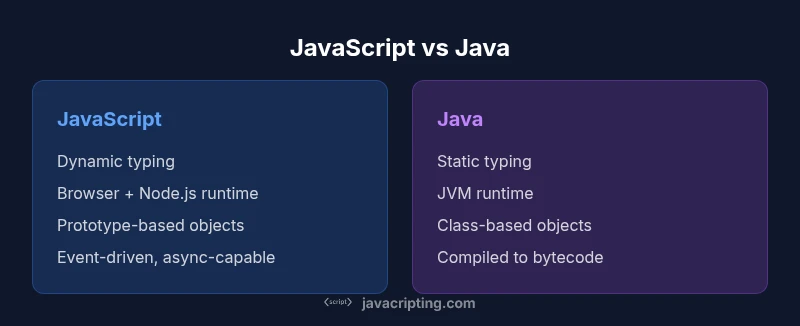
Are javascript and java the same? No. JavaScript and Java are different languages with separate runtimes, typing, and ecosystems. JavaScript runs primarily in browsers or on Node.js, while Java compiles to bytecode for the Java Virtual Machine. They share broad programming concepts, but their design goals, syntax, and typical use cases diverge significantly.
Are JavaScript and Java the same language? Not even close in goals, ecosystem, or syntax. If you wonder are javascript and java the same, the answer is no. JavaScript is a dynamic, multi-paradigm language designed for the web; it runs in browsers and on server runtimes like Node.js. Java is a statically typed, class-based language compiled to bytecode that executes on the Java Virtual Machine. These operational realities alone create two distinct worlds of development, tools, and best practices. In this block we establish the fundamental distinction, outline the historical paths that led to today’s diverged ecosystems, and set up a framework for comparing them on concrete criteria such as typing, runtime, and typical use cases. By the end you should be able to map a project’s needs to one language or the other, without conflating their strengths.
Historical Context and Language Families
JavaScript originated in 1995 as part of Netscape's attempt to bring scripting to web pages; originally named Mocha/LiveScript, it was later renamed JavaScript. The language stabilized through the ECMA International standards process (ECMAScript). Java, developed in the early 1990s at Sun Microsystems, evolved into a language designed for the Java Virtual Machine and wide enterprise use. Although both languages bear names that echo large ecosystems, the historical paths, primary domains, and community ecosystems diverged early on. Understanding this history helps explain why syntax, tooling, and runtime choices look so different today. The compare-and-contrast framework we build here hinges on typing, compilation, runtime environments, and typical deployment contexts.
Design Goals and Runtime Environments
JavaScript was designed for flexibility and rapid web development, prioritizing interoperability with the browser DOM, event-driven programming, and a forgiving syntax that lowers barriers to entry. It runs in engines such as V8, SpiderMonkey, and JavaScriptCore, often with just-in-time (JIT) compilation and sophisticated garbage collection. Java, by contrast, emphasizes portability, performance predictability, and strong typing; it compiles to bytecode and runs on the Java Virtual Machine (JVM), which itself provides a mature ecosystem of optimizations, libraries, and cross-language tools. The practical upshot: JavaScript excels in client-side interactivity and light server work; Java targets large-scale, long-lived applications with strict APIs and extensive tooling.
Syntax, Typing, and Semantics
JavaScript uses dynamic typing, first-class functions, and a prototype-based object system (with class syntax as sugar in modern versions). Java uses static typing, a class-based object model, and explicit access modifiers, which support compile-time checks and clearer API contracts. The differences show up in common operations, error handling, and idioms: you’ll see duck typing and flexible objects in JavaScript, versus typed generics and strict interfaces in Java. Understanding these distinctions is essential for writing robust code and for selecting the right language for a given problem domain.
Execution Model, Concurrency, and Performance
JavaScript engines often rely on event-driven, single-threaded models with async APIs, using the event loop to manage concurrency. Node.js extends the model to server-side usage. Java uses multi-threading, concurrent libraries, and garbage collection tuned for consistent throughput under heavy load. Performance considerations are context-dependent: Java generally delivers stable, long-running performance suitable for backend services, while JavaScript prioritizes responsiveness in user interfaces and rapid iteration cycles on the web. Both languages benefit from awareness of memory models, toolchains, and profiling strategies.
Use Cases and Code Examples
Web Frontend and Lightweight Backend: JavaScript powers dynamic pages, client-side validation, and REST-oriented frontends. Server-side with Node.js, it can handle APIs, real-time features, and tooling pipelines. Java shines in large-scale enterprise systems, backend services, Android app tooling (historically), and performance-critical computations. Example snippets illustrate the contrast: JavaScript prints to console easily, while Java requires a class and a main method. The following shows Hello World in both:```javascript console.log("Hello, World!");
```java
public class Hello {
  public static void main(String[] args) {
    System.out.println("Hello, World!");
  }
}
Common Misconceptions and How to Think About Similarities
A common misconception is that a similar syntax implies identical capabilities. In reality, the languages share broad programming concepts—variables, loops, conditionals, and basic control flow—but diverge in memory management, typing discipline, object models, and runtime semantics. People also assume Java and JavaScript are interchangeable tools for the same problems; instead, treat them as separate tools each with a distinct domain: browser interactivity and scripting versus compiled, statically typed application development. A careful mental model helps: map features to the problems they’re best suited to solve, and avoid conflating performance, security, or scalability expectations across languages.
Practical Guidance for Developers
Start with your goal: if you want web interactivity and quick, visible results, begin with JavaScript and related tooling (bundlers, transpilers, and the browser devtools). If you’re building large-scale systems, enterprise backends, or Android-app-style tooling, Java provides a strong foundation and a wealth of libraries. Learning both is common and beneficial, but the learning curve and toolchains differ. Plan a learning path that emphasizes core programming concepts, then add language-specific idioms, tooling ecosystems, and best practices. Practical steps include building small projects in each language, exploring official documentation, and using modern IDEs that reveal type information and refactor opportunities.
Authority Sources and Further Reading
To deepen your understanding, consult widely respected sources: MDN Web Docs for JavaScript concepts and browser APIs (https://developer.mozilla.org/en-US/docs/Web/JavaScript); Oracle Java Documentation for Java language specifics and API references (https://docs.oracle.com/javase/); and ECMA-262 specifications for ECMAScript language standards (https://tc39.es/ecma262/). These resources reflect current best practices and official guidance from major publishers and standards bodies.
Bridge to Next Steps
If you are just starting, pick a path aligned with your goals and unlock practical projects quickly. For web developers, JavaScript is essential; for software engineers focusing on scalability and backend systems, Java remains a core option. As you grow, you can cross-train to gain the advantages of both ecosystems, understanding when each language delivers the best value for a given problem.
Comparison
| Feature | JavaScript | Java |
|---|---|---|
| Typing | dynamic | static |
| Runtime | Browsers/Node.js | JVM |
| Primary paradigm | multi-paradigm (functional, imperative) | object-oriented, class-based |
| Compilation/Execution | JIT/interpreted via engines | bytecode, JIT on the JVM |
| Common use cases | Web frontend, server scripting with Node.js | Enterprise backend, Android tooling, large-scale apps |
| Learning curve | Rapid entry for beginners | Steeper due to breadth and strict APIs |
Benefits
- Clear separation of language ecosystems
- Guides appropriate learning paths
- Highlights runtime and tooling differences
- Encourages precise project planning
The Bad
- Can reinforce an either/or mindset in nuanced scenarios
- Overemphasizes differences without acknowledging transferable concepts
JavaScript and Java are distinct languages with different roles; neither is a substitute for the other's core uses.
Each language serves different problem domains. JavaScript excels in web interactivity and flexible tooling, while Java targets scalable backend systems and strong typing. Learning both broadens career options, but approach them as separate tools with complementary strengths.
Questions & Answers
Are JavaScript and Java the same language?
No. They are distinct languages with different runtimes, typing, and ecosystems. They were designed for different purposes, and their toolchains reflect those goals.
No—JavaScript and Java are different languages with separate runtimes and ecosystems.
Is JavaScript statically typed?
JavaScript is dynamically typed, meaning types are resolved at runtime. You can add static typing via TypeScript to catch errors earlier in development.
JavaScript is dynamically typed; you can add typing with TypeScript.
Can JavaScript run on the server?
Yes. Node.js allows JavaScript to run on servers, enabling back-end services, tooling, and API endpoints.
Yes, via Node.js for server-side development.
Which language is easier to learn first?
It depends on goals. Many beginners start with JavaScript for quick web results, while Java’s strict typing can teach strong fundamentals.
If you want quick browser results, start with JavaScript; for strong fundamentals, try Java.
Do both languages share similar syntax?
They share basic programming concepts, but their syntax, type systems, and object models differ substantially.
They share concepts, but look and work differently.
Should I learn both languages?
Learning both is common and valuable; start with the language that aligns with your immediate goals, then expand to the other over time.
Yes, many developers learn both; start with your goals and add the other later.
What to Remember
- Define the project's context before choosing the language
- Expect different runtimes and ecosystems
- Learn transferable programming concepts across languages
- Avoid assuming one language covers the other's domain