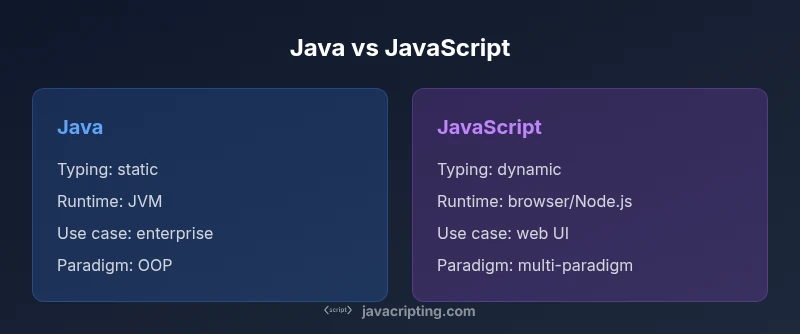
Difference Between Java and JavaScript: A Practical Guide for Devs
An objective, in-depth comparison of Java and JavaScript—runtimes, typing, ecosystems, use cases, performance, and learning paths for developers exploring both languages.


Java and JavaScript are not interchangeable. Java is a statically typed, compiled language used for backend, Android, and enterprise systems, while JavaScript is a dynamic, interpreted language primarily for web development and lightweight backends. The name similarity is historical, not functional, and understanding their distinct runtimes and ecosystems avoids common mistakes.
Context and Core Differences
Java and JavaScript are two distinct programming languages with different design goals and ecosystems. Java is a general-purpose, class-based, statically typed language that compiles to bytecode executed by the Java Virtual Machine (JVM). JavaScript is a high-level, dynamic, prototype-based language that primarily runs in web browsers and in environments like Node.js. The name similarity is historical rather than functional, and many newcomers assume they are interchangeable; this can lead to errors in architecture, tooling, and safety checks. According to JavaScripting, a practical rule of thumb is to treat Java as a platform for large, stable applications and JavaScript as a tool for interactive experiences and lightweight backends. The JavaScripting team found that developers often confuse features such as memory management, concurrency models, and module systems because each language evolved in its own ecosystem. This section lays the groundwork for a deeper dive into runtimes, compilation, typing, and runtime semantics.
Runtimes, Compilation, and Execution Models
Java compiles source code to bytecode that runs on the Java Virtual Machine (JVM), a platform designed for portability and performance across many environments. The JVM uses Just-In-Time (JIT) compilation and sophisticated optimization to convert bytecode to machine code at runtime. JavaScript, by contrast, is typically interpreted or Just-In-Time compiled by browser engines such as V8 or SpiderMonkey, and increasingly by server environments like Node.js. This distinction affects startup times, performance characteristics, and how developers reason about concurrency. Java relies on threads and explicit synchronization, while JavaScript relies on an event loop and asynchronous primitives. Understanding these models helps teams select appropriate architectural patterns and tooling for each language.
Typing, APIs, and Language Features
Java offers strong static typing, expressive generics, and a rich standard library aimed at reliable, scalable software engineering. JavaScript uses dynamic typing, first-class functions, and a flexible object model based on prototypes, which enables rapid iteration but can lead to subtle runtime errors if not guarded by tests. Type systems like TypeScript can add optional static typing to JavaScript, bridging some gaps without changing the core runtime. API design also diverges: Java provides mature, long-standing APIs for enterprise tasks, while JavaScript packages emphasis on web APIs, asynchronous patterns, and modular ecosystems. The evolution of both languages reflects different priorities: stability and tooling in Java, agility and UI richness in JavaScript.
Syntax and Core Paradigms
Java is class-based, with explicit class definitions, modifiers, and a long-standing emphasis on object-oriented design. JavaScript is prototype-based, with dynamic objects and a more permissive syntax, though modern class syntax can resemble Java’s structure. The two languages share some familiar concepts (variables, functions, objects), but their semantics diverge: static vs dynamic typing, compile-time checks vs runtime checks, and the existence of a module system tailored to each ecosystem. Code organization, error handling, and tooling reflect these core differences, shaping how developers approach architecture and reuse.
Ecosystems, Tooling, and Learning Curve
Java’s ecosystem centers on JVM languages, enterprise frameworks, build tools like Maven and Gradle, and robust IDE support. JavaScript’s ecosystem is web-centric, featuring npm, Babel, Webpack, and a vibrant front-end community, along with serverside capabilities via Node.js. The learning curve depends on goals: mastering Java’s language features and ecosystem patterns can be more demanding initially, while JavaScript often offers quicker feedback loops for web tasks. For teams, the decision to invest in one language or both hinges on project scope, performance needs, and platform targets. The JavaScripting team emphasizes pragmatic tool selection and incremental learning paths that align with real-world goals.
Use Cases Across Domains
Java is widely used for large-scale backend services, Android applications, and desktop software that demands strong typing and performance guarantees. JavaScript dominates client-side web development and is increasingly used on the server, mobile apps, and desktop platforms via cross-platform frameworks. Many organizations run Java for core business logic while leveraging JavaScript for user interfaces and lightweight services. Cross-cutting concerns like security, maintainability, and deployment strategies differ across ecosystems, so teams should align language choices with architectural goals and operational constraints.
Performance, Security, and Maintenance
Performance in Java typically benefits from mature runtime optimizations and predictable memory management on the JVM, particularly for long-running processes. JavaScript performance hinges on engine optimizations, JIT compilation, and non-blocking I/O patterns, which can vary by runtime. Security considerations differ as well: Java’s sandboxing, class loading, and permission models contrast with the browser sandbox and Node.js security practices in JavaScript. Maintainability often depends on typing discipline, tooling maturity, and ecosystem conventions. Teams should monitor dependencies, enforce testing, and plan for growth with scalable patterns suitable to each language.
Comparison
| Feature | Java | JavaScript |
|---|---|---|
| Typing | static | dynamic |
| Compilation | compiled to bytecode | interpreted/JIT-compiled by engines |
| Runtime Environment | JVM on multiple platforms | Browser + Node.js |
| Primary Use Cases | Enterprise/Android apps | Web UI and lightweight backends |
| Typical Syntax Style | verbose, explicit | concise, flexible |
| Learning Curve | Steep at first due to ecosystem depth | Moderate, web-focused |
| Tooling Maturity | Very mature for large systems | Rapidly evolving with frontend tooling |
| Security Focus | Strong typing reduces certain errors | Client/server risks require different guards |
Benefits
- Clear separation of concerns helps focus on language-specific strengths
- Strong typing in Java reduces certain categories of errors early
- Mature ecosystems support enterprise-grade development
- JavaScript enables rapid UI development and flexible backends
The Bad
- Java's verbosity can slow development and boilerplate growth
- JavaScript's dynamic typing can lead to runtime surprises without tests
- Cross-ecosystem integration requires careful tooling decisions
- Java's startup time and memory footprint can be non-trivial
Java remains the proven choice for enterprise-scale systems; JavaScript excels in web-focused development and rapid UI iterations
Choose Java for stability and scale; choose JavaScript for agility and user-facing experiences. If your project spans both worlds, plan a pragmatic, hybrid approach with clear boundaries.
Questions & Answers
What is the fundamental difference between Java and JavaScript?
Java is a statically typed, compiled language designed for robust backend and Android development. JavaScript is a dynamic, interpreted language used for web interactivity and lightweight backends. They operate in different runtimes and have distinct ecosystems.
Java is a statically typed language that compiles to bytecode, while JavaScript is dynamic and runs in browsers or on Node.js. They serve different roles in modern software.
Can JavaScript be used for backend development?
Yes. Node.js enables server-side JavaScript, allowing full-stack development with the same language across client and server layers. However, performance and concurrency patterns differ from Java.
Yes, via Node.js you can build backends with JavaScript, though you should weigh different models and tooling.
Is JavaScript related to Java aside from the name?
The languages are unrelated beyond historical naming. They evolved independently with different runtimes, typing disciplines, and use cases.
No, the names are similar by coincidence; they are separate languages with separate histories.
Which language should a beginner learn first?
If your goal is web development, start with JavaScript to learn client-side concepts and web APIs. For backend or Android app development, Java provides a strong foundation and scalable patterns.
If you want web skills first, start with JavaScript; for back-end or Android work, Java is a great starting point.
Should I use TypeScript with JavaScript to gain typing advantages?
TypeScript adds static typing to JavaScript, improving maintainability and catching errors early. It is a common, recommended path for large JavaScript projects.
Yes, TypeScript helps manage complexity in large JS projects by adding types.
How do I choose which language to learn for a project with both frontend and backend needs?
For frontend web work, JavaScript (with optional TypeScript) is essential. For backend systems or Android apps, Java provides mature patterns and tooling. Many teams use both in different layers of the stack.
Use JavaScript for the front end and Java for the back end when possible to leverage each ecosystem.
What to Remember
- Know the runtimes: JVM vs browser/Node.js
- Leverage typing where it matters for reliability
- Use the right tooling for each ecosystem
- Choose language based on project goals, not name similarities