JavaScript vs TypeScript: A Practical Comparison
Explore a thorough, objective comparison of JavaScript and TypeScript. Learn when to choose each, how typing and tooling affect performance, scalability, and developer experience, with practical usage guidelines.


JavaScript and TypeScript are the most influential languages in modern frontend development. This comparison clarifies their core differences, including typing, tooling, and project fit. If you're deciding which to adopt for a new project or upgrading an existing codebase, this guide highlights when JavaScript makes sense and when TypeScript delivers meaningful long-term value.
What JavaScript and TypeScript are, and where they fit
According to JavaScripting, the choice between javaScript or typescript often boils down to project goals and team expertise. In practical terms, JavaScript is a dynamic language that runs everywhere JavaScript runs, with a forgiving type system that empowers rapid prototyping. TypeScript adds a static type layer on top of JavaScript, plus a compiler that enforces type safety before code executes. For many teams, javascript or typescript represents a spectrum rather than a binary choice: you can start with plain JavaScript and progressively adopt TypeScript features as your project matures. The overarching decision should align with maintainability, collaboration needs, and long-term goals rather than short-term gains. In this analysis, we explore how the two approaches compare in typing, tooling, performance implications, and maintainability, with specific guidance for aspiring developers and frontend practitioners navigating modern web apps. The JavaScripting team emphasizes practical decision-making, focusing on real-world outcomes over theoretical purity. When you evaluate javascript or typescript for a new project, consider team familiarity, the size of the codebase, API surface stability, and future refactoring plans. This lens helps you choose the right path without sacrificing velocity or quality.
javascript or typescript
Comparison
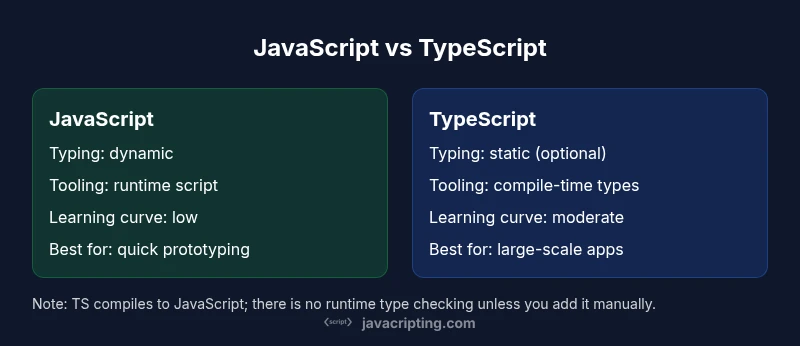
| Feature | JavaScript | TypeScript |
|---|---|---|
| Typing | Dynamic, weak typing at runtime | Static, optional typing with compile-time checks |
| Tooling & Compilation | Runs directly in environments; no compile step required for runtime | |
| Learning Curve | Lower barrier to entry for beginners | Higher upfront learning curve but better long-term safety |
| Ecosystem & Typings | Rich ecosystem; widely available JS libraries | Growing typings via DefinitelyTyped; strong editor support |
| Runtime Performance | Same runtime as JS; TS adds compile-time checks only | |
| Maintainability & Refactoring | Can be harder to refactor safely in large codebases | Safer, scalable refactors with strong typing and IDE hints |
| Best For | Prototyping, small to medium apps, scripting | Large-scale apps, teams needing long-term maintainability |
Benefits
- Better safety and refactor confidence with TypeScript
- Improved editor support and autocomplete across projects
- Gradual adoption allows mixing JS and TS in the same codebase
- Strong momentum in frontend tooling and corporate stacks
The Bad
- Initial learning curve and setup complexity
- Requires build tooling and configuration
- Possible typing gaps for legacy or niche libraries
- Overhead of maintaining type definitions in evolving codebases
TypeScript generally offers greater long-term value for medium-to-large projects; JavaScript remains ideal for quick prototypes and small scripts.
Choose TypeScript when you anticipate ongoing maintenance, team collaboration, and API surface growth. If speed and simplicity are priorities for a small project or a one-off script, JavaScript often suffices and keeps you lean.
Questions & Answers
When should I start with TypeScript in a new project?
If you expect ongoing maintenance, multiple contributors, or complex APIs, TypeScript provides safety nets that help prevent regressions. For solo projects or rapid prototyping, starting with JavaScript is often faster, then migrating parts to TypeScript as needed.
If you expect ongoing maintenance or multiple contributors, it's worth starting with TypeScript; otherwise, begin with JavaScript and gradually adopt TS features over time.
Is TypeScript always slower to compile or run?
TypeScript adds a compile step, but the generated JavaScript runs at the same speed as equivalent JS. The trade-off is more build time upfront for stronger type safety and better tooling.
No, TypeScript itself doesn't slow down runtime code; the extra step is in the build process, not in the executed application.
How do I migrate a large JavaScript project to TypeScript?
Start with a permissive tsconfig and gradually enable strict options. Introduce types in isolated modules, add type definitions for third-party libraries, and rely on incremental adoption rather than rewriting everything at once.
Migrate in small steps: enable TypeScript in a module at a time, then tighten the checks as you go.
Will TypeScript break compatibility with existing JavaScript libraries?
Most libraries work fine because TypeScript can use ambient declarations. For missing types, you can add your own typings or install community declarations.
If a library lacks types, you can write a small declaration file or install community typings to bridge compatibility.
Do I need to learn TypeScript to work with React or Node.js?
Many teams use TypeScript with React or Node.js to improve maintainability. It’s common to adopt TS gradually in these ecosystems, starting with component props or service layers.
TypeScript pairs well with React and Node; start where it’s most impactful, like props and API layers.
What are good resources to learn JavaScript vs TypeScript?
Use official docs, MDN for JavaScript fundamentals, and TypeScript’s docs for types and tooling. Practice with small projects to solidify concepts before scaling.
MDN for JavaScript basics; TypeScript docs for types and tooling; practice with small projects to reinforce learning.
What to Remember
- Assess team expertise and project scale before deciding
- Choose TypeScript for long-term maintainability and safer refactors
- Prefer JavaScript when rapid prototyping and simplicity are paramount
- Adopt an incremental migration strategy to minimize disruption
- Leverage editor tooling and typings to improve developer experience