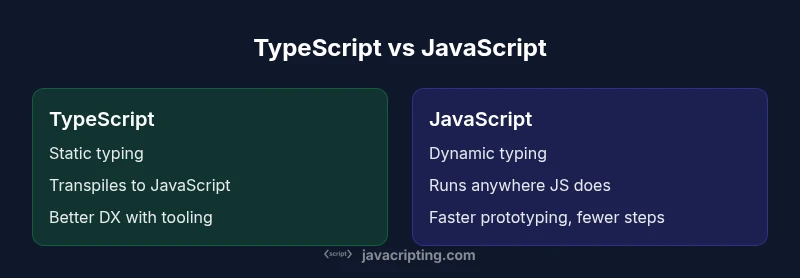
typescript versus javascript: A Practical Side-by-Side Guide
An in-depth, analytical comparison of typescript versus javascript, covering typing, tooling, migration strategies, ecosystem, and best practices for scalable web apps in 2026.


When weighing typescript versus javascript, TypeScript adds static typing and tooling to JavaScript, while plain JavaScript remains flexible and ubiquitous. For medium-to-large projects, TypeScript improves maintainability and refactoring safety; for rapid prototyping, JavaScript is often faster to start. Use the project's scale and team skills to decide. This quick answer sets the stage for deeper exploration of typing, tooling, and migration paths.
What typescript versus javascript means for developers
At the core, typescript versus javascript decisions determine how you model data, enforce contracts, and ship features. For developers starting with frontend and backend work, the shift from JavaScript to TypeScript is both a tooling upgrade and a mindset change. According to JavaScripting, TypeScript’s static types catch many class of errors before run time, which helps when codebases grow beyond a few hundred lines. The JavaScripting team found that teams adopting TypeScript report fewer regression bugs and improved refactoring confidence, especially when multiple developers contribute to shared modules. Practically, TypeScript models interfaces, function signatures, and generic types, then compiles to plain JavaScript. Your runtime remains JavaScript, but your development experience becomes more principled. For teams, this often translates into better onboarding, clearer APIs, and more reliable collaboration on features like UI components, data fetching, and state management.
Quick reference of core concepts
- TypeScript introduces static types and type inference on top of JavaScript.
- It compiles to plain JavaScript, so runtime behavior remains the same in supported environments.
- Editor tooling (auto-complete, type checks, refactoring) improves with TypeScript.
- Adoption can be gradual, starting from small modules and expanding across a codebase.
The role of typing in large codebases
In large teams, typing helps enforce contracts between modules, reduces subtle runtime errors, and makes onboarding faster. Type definitions act as a self-documenting API, enabling safer refactors. The learning curve exists, but the payoff compounds as the codebase grows. JavaScripting’s findings indicate teams deploying TypeScript for UI libraries, data models, and service interfaces tend to experience fewer regression cycles after releases and more consistent API design.
Tooling and compiler options
TypeScript benefits from strong editor integration, IDE support, and a robust compiler. The tsconfig.json file lets you configure strictness, module resolution, and target environments. Build tools like webpack, Rollup, or esbuild can work in concert with ts-loader or esbuild’s TypeScript support. Babel can also strip types for environments where you only need transpilation. The result is a development workflow that catches errors early without sacrificing runtime compatibility.
Common language features that TypeScript adds to JavaScript
Some standout features include interfaces for structural typing, enums (with compile-time checks), generics for reusable abstractions, and powerful type inference that reduces boilerplate. TypeScript also enriches function signatures, enabling safer defaults, rest parameters, and advanced type guards. While these features sound theoretical, they translate into tangible benefits when implementing domain models, form validation schemas, and API clients across frontend and Node.js projects.
Balancing types with practicality
Teams often balance strictness with pragmatism by turning on strict mode gradually. You can begin with partial typing for critical modules and progressively expand types elsewhere. A pragmatic approach is to start with a single library or service, introduce interfaces for its public surface, and then extend typing to consumers. This strategy minimizes friction while delivering long-term maintenance benefits. Remember, the goal is safer code without slowing velocity.
Interoperability with existing JavaScript code
One of the strongest aspects of TypeScript is compatibility with existing JS. You can incrementally migrate files, adding type annotations as you go. When consuming third-party libraries, use DefinitelyTyped or write your own ambient declarations. The dynamic nature of plain JavaScript remains available, so you won’t lock yourself out of JavaScript ecosystems; you simply gain the option to add typing where it matters most.
Real-world guidance for teams deciding between both approaches
Start with a pilot project or a gateway module to test the water. Evaluate your team’s comfort with types, the complexity of data structures, and the frequency of refactors. Consider your CI/CD workflow, the overhead of type-checking in your pipeline, and the availability of type definitions for your stack. The bottom line is to align the choice with your project’s growth trajectory and developer ergonomics.
Comparison
| Feature | TypeScript | JavaScript |
|---|---|---|
| Typing | Static typing with type inference | Dynamic typing (no static types) |
| Compilation | Transpiles to JavaScript (tsc/esbuild) | Runs as-is in runtimes that support JS |
| Tooling | Excellent editor support, strict refactoring | Good tooling, less strict at compile-time |
| Learning curve | Steeper initial learning curve, gradual onboarding | No learning curve beyond JS basics |
| Ecosystem maturity | Growing rapidly in frontend and backend (Node/Cloud) | Very mature and ubiquitous in web/dev tooling |
| Runtime impact | No runtime overhead; only emitted JS runs | No inherent runtime overhead beyond JavaScript itself |
Benefits
- Improved code quality and maintainability
- Better editor support and safe refactoring
- Gradual adoption path within existing codebases
- Strong community, extensive typing definitions
- Clear APIs and reduced onboarding time for new teammates
The Bad
- Requires a build step and tooling setup
- Learning curve for beginners and new teams
- Typing boilerplate can feel verbose in simple modules
- Some type definitions may lag behind library updates
TypeScript is typically the better choice for scalable projects; JavaScript remains ideal for quick prototyping.
If you’re building large apps with multiple teams, TypeScript reduces bugs and accelerates refactoring. For small, time-critical scripts, JavaScript’s simplicity offers speed and flexibility.
Questions & Answers
What is TypeScript and how does it relate to JavaScript?
TypeScript is a typed superset of JavaScript that compiles to plain JavaScript. It adds static types and tooling without changing runtime behavior, making it easier to catch errors before they happen. JavaScript remains the execution language for all environments that run JS.
TypeScript adds types on top of JavaScript and then compiles to plain JavaScript, so your code runs exactly where JavaScript runs.
Is TypeScript necessary for modern frontend development?
Not strictly necessary, but it's highly beneficial for medium to large projects, teams, and long-term maintenance. If your app spans multiple modules or teams, TypeScript can reduce bugs and speed up feature delivery. For small, throwaway scripts, JavaScript may be more efficient.
It's not required, but it helps a lot for bigger projects and teams.
Can an existing JavaScript project migrate to TypeScript gradually?
Yes. You can migrate file-by-file, adding .ts or .tsx extensions and gradually introducing types. Start with a few critical modules, enable isolatedModules, and use allowJs to interoperate with existing JS code. This approach minimizes risk while extracting long-term benefits.
You can migrate a little at a time and keep existing JS working during the transition.
Do I need to learn TypeScript to use React or Node.js effectively?
No, you can use React and Node.js with plain JavaScript. However, many teams adopt TypeScript for larger React codebases or server-side code to improve reliability and refactor safety. Familiarity with TS concepts can pay off quickly when you scale.
You don’t have to, but it helps as your project grows.
What are common pitfalls when migrating to TypeScript?
A few common issues include overtyping early on, relying on any, incomplete type definitions for third-party libs, and misconfiguring tsconfig options. Address these by starting with stricter settings slowly, isolating third-party types with ambient declarations, and using TypeScript’s utility types to model behavior accurately.
Watch out for overtyping and missing types in dependencies.
Which projects benefit most from TypeScript?
Projects with multiple contributors, long-term maintenance, complex data models, or APIs that require stable contracts tend to benefit most. Startups and solo projects may still leverage TypeScript, but the payoff is most evident as scale and team size grow.
Larger apps with teams gain the most from TS.
What to Remember
- Assess project size and team capability before choosing
- Prefer TypeScript for maintainability in larger apps
- Adopt a gradual migration strategy to minimize risk
- Invest in type definitions and robust tooling
- Balance typing rigor with practical development velocity