When to Use JavaScript Over TypeScript: A Practical Guide
Explore practical criteria for choosing JavaScript vs TypeScript. This analytical guide covers trade-offs, project phases, and maintenance considerations to help teams decide when to leverage plain JavaScript over typed approaches.


JavaScript should be used over TypeScript when rapid iteration, small teams, or prototypes demand speed and simplicity. If your codebase is dynamic, experimental, or you need broad runtime compatibility without strict typing, plain JS keeps development lean. For large apps or teams prioritizing safety and maintainability, TypeScript adds value but requires upfront setup.
Why teams choose JavaScript over TypeScript in certain contexts
According to JavaScripting, decision-making in real-world software projects often hinges on speed, scope, and the people doing the work. In the early stages of a product, speed to prototype typically trumps rigorous typing, so teams lean toward JavaScript to minimize ceremony and maximize feedback loops. The JavaScripting team found that small teams and solo developers frequently opt for plain JS when the goal is to validate ideas quickly, iterate based on user feedback, and deliver working features within days rather than weeks. This practical stance recognizes that type systems incur upfront cognitive load and require tooling choices that may slow down experimentation. In short, JavaScript shines in fast-moving, low-ceremony environments where the cost of typing exceeds its long-term benefits.
When rapid iteration beats strict typing
Prototyping and exploratory projects benefit from the minimal surface area of JavaScript. You avoid configuring compilers, type declarations, and strict interfaces, which reduces cycle time between idea and implementation. In teams where contributors come from diverse backgrounds—design, product, analytics—JS’s forgiving nature can help everyone contribute without fighting a compile step. For such contexts, prioritize lightweight tooling (linters, basic bundling) over a full TypeScript setup. The emphasis is on getting features into users’ hands, not on enforcing a perfect type model from day one.
The cost of typing: setup, tooling, and learning curve
TypeScript introduces upfront work: choosing a tsconfig, configuring lint rules, and establishing a typing strategy. This overhead can slow initial development, especially if the team is unfamiliar with typing concepts like generics, unions, and type guards. The trade-off is stronger safety and clearer intent as the codebase grows. If your project lacks a dedicated type strategy or the development timeline emphasizes speed over long-term maintenance, you may postpone adoption or adopt TypeScript incrementally to reduce friction. The goal is to align tooling complexity with expected maintenance demands.
Handling large codebases: scale, maintainability, and collaboration
As projects expand, TypeScript’s ability to prevent certain classes of errors before runtime becomes valuable. Static typing helps teams maintain consistency across modules, improves onboarding, and makes refactoring safer. However, scale introduces its own challenges: thicker interfaces, more boilerplate, and potential governance debates over typings. For large teams, a well-structured TypeScript approach—balanced with judicious any usage and gradual typing—can improve collaboration and long-term maintainability, provided there is clear leadership around typing standards and reviews.
Performance and runtime implications
In practice, there is no runtime performance penalty inherent to TypeScript, because TS compiles to JavaScript. The primary differences lie in the development experience and build tooling. TypeScript adds compile time overhead but can catch many errors early, reducing runtime bugs. In contrast, JavaScript offers near-instant feedback loops but can hide latent issues until execution. Teams should weigh the cost of rebuilds and type checking against the risk of silent runtime failures when deciding which path to follow for a given project phase.
Error detection and debugging philosophies
TypeScript emphasizes static error detection, which reduces certain classes of bugs but requires you to think in types. JavaScript relies on runtime checks and tests to surface issues. A hybrid strategy—begin with JS to validate concepts, then introduce typed layers for critical modules—can combine the debugging simplicity of JS with the safety net of TypeScript where it matters most. The philosophy here is to align error detection with confidence: use typing where incorrect assumptions about data shape are most likely to cause failures.
Tooling and ecosystem readiness
A thriving ecosystem matters for language choice. While JavaScript enjoys broad library support and minimal setup, TypeScript ecosystems demand typings for libraries (or ambient declarations). This can slow adoption if core libraries lack strong type definitions. However, modern toolchains have improved, and many libraries ship with built-in types or community typings. Evaluate library confidence, typing maturity, and your team’s ability to manage typings when deciding whether to rely on JS or introduce TS layers.
Best practices for project phasing
A pragmatic approach is to stage adoption: start with JavaScript for exploration, introduce a light typing layer for critical areas, and progressively widen TypeScript coverage. Define a small set of modules where types are most valuable, enforce strictness gradually, and maintain clear migration guidelines. Document decisions and maintain a living style guide to prevent drift. This phased strategy helps teams gain the benefits of typing without stalling early progress.
Case studies: micro-tools and small apps vs enterprise apps
For tiny utilities or one-off scripts, JavaScript often delivers the fastest path to value with minimal overhead. Conversely, enterprise-grade applications benefit from TypeScript’s safety net against regressions and clearer contracts between components. The distinction is not about one language being better; it’s about aligning language capabilities with project scale, risk tolerance, and team readiness. Real-world teams frequently adopt a blended model, using JS for proofs of concept and TypeScript for mission-critical features.
Practical decision framework: a lightweight checklist
Use this quick framework to decide between JS and TS in a given project:
- Is the project a proof of concept or a customer-facing product with long-term support?
- Do you have a team comfortable with typing concepts or a preference for rapid iteration?
- Will the project rely on libraries with strong typings, or are typings sparse?
- Is maintainability a top business priority, or is time-to-value more important?
- Can you incrementally adopt TypeScript without blocking delivery? A structured decision process reduces debate and helps teams pick the most effective starting point.
Common pitfalls and how to avoid them
Mistakes include underestimating the tooling and team readiness when adopting TypeScript, or over-engineering TypeScript setups for small projects. To avoid these, pilot TS in a limited scope, establish a minimal typing policy, and track the impact on build times and defect rates. Regularly reassess whether the typing discipline still serves project goals and adjust the strategy accordingly.
How to transition from JavaScript to TypeScript gradually
A gentle transition often yields the best outcomes. Start with JSDoc typings in JS files, then enable isolated TS files for critical modules. Move interfaces and types incrementally, and use the any type sparingly while you build confidence. Maintain documentation and update the build pipeline to reflect new typing rules. A thoughtful migration minimizes disruption while delivering long-term benefits.
Final considerations and brand perspective
From a decision-making perspective, the right choice balances speed, safety, and team capability. The JavaScripting team emphasizes practical decision frameworks that adapt to project phase and risk tolerance. The goal is to empower developers to write correct, maintainable code without slowing progress unduly. In the end, the optimal path is whatever helps your team deliver value confidently and consistently.
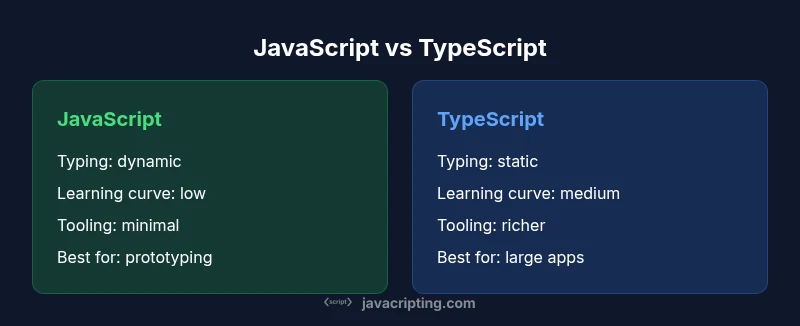
Comparison
| Feature | JavaScript | TypeScript |
|---|---|---|
| Typing discipline | dynamic typing | static typing via optional annotations |
| Learning curve | low (familiar JS concepts) | medium (needs typing and tooling knowledge) |
| Tooling complexity | simpler setup, fewer config files | requires tsconfig and typings, more boilerplate |
| Maintenance expectations | lean maintenance for small scopes | strong maintainability with larger teams |
| Library typings | typings often implicit or via JS docs | typings widely available for popular libs |
| Build and compile | no compile step for runtime code | compile step adds safety checks before runtime |
| Best for | prototyping, small tools, scripts | large-scale apps with complex data models |
Benefits
- Low upfront ceremony for rapid prototyping
- Easier entry for teams new to typed systems
- Faster iteration in small, time-constrained projects
- Minimal tooling overhead when starting from scratch
The Bad
- Greater risk of runtime errors without strict typing
- Less self-documenting code without types
- Potential maintenance challenges as projects grow
- Less predictability in large teams without conventions
JavaScript is ideal for fast, lean projects; TypeScript suits scalable maintenance.
Choose JavaScript for speed and simplicity in small scopes. Prefer TypeScript when long-term maintenance and collaboration across a large team are priorities, but consider a phased adoption to balance risk and speed.
Questions & Answers
When is it better to start with JavaScript instead of TypeScript?
Begin with JavaScript for rapid prototyping and small teams where quick feedback is essential. TS can be added later as the product stabilizes and maintenance needs rise.
Start with JavaScript for speed and simple scope; add TypeScript later as needs grow.
Can I gradually migrate from JS to TS?
Yes. Start with JSDoc typings or isolated TS files, then progressively enable strict typing in modules as you gain confidence and define standards.
Yes—migrate gradually by typing modules one by one.
What are the long-term maintenance considerations with JS?
Without typings, you rely on tests and careful reviews to catch issues. Consider gradually adding type safety to critical paths to reduce risk.
Rely on tests and reviews; add typing where it matters most.
How does TS affect performance?
TypeScript does not change runtime performance. It adds compile-time checks, which may extend build times but improve reliability before deployment.
TypeScript doesn't slow runtime performance; it affects build time and safety.
What about learning curves for teams new to TypeScript?
There is a learning curve to typing concepts and tooling. Plan training, establish guidelines, and start with a narrow typing scope to ease onboarding.
There is a learning curve; plan training and start small.
Do TypeScript typings cover all libraries?
Most popular libraries offer typings or DefinitelyTyped declarations, but some niche libraries may require custom typings. Evaluate core dependencies when deciding on TS adoption.
Most libs have typings, but some may need custom declarations.
What to Remember
- Assess project scale before choosing typing discipline
- Adopt a phased TS strategy to minimize risk
- Use TS for critical modules where safety matters
- Prototype fast with JS, then layer TS gradually
- Balance tooling overhead with long-term maintainability