JavaScript vs Java: A Practical Side-by-Side Comparison
An analytical, JavaScripting-guided comparison of JavaScript and Java, covering syntax, use cases, performance, tooling, and learning paths to help you choose the right language.


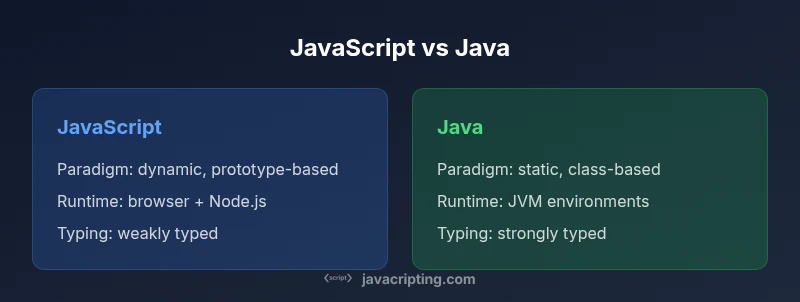
JavaScript and Java are distinct languages designed for different purposes. JavaScript thrives in the browser and on servers with dynamic, event-driven code, while Java runs on the JVM for stable, enterprise-grade applications and Android. This comparison highlights core differences in syntax, typing, runtimes, tooling, and typical use cases to help you decide which language aligns with your goals and team skills.
Context and Relevance of JavaScript versus Java
In modern software development, the choice between JavaScript and Java often maps to where the code runs and what problems it solves. JavaScript started as the language of the web, enabling interactive UI and web apps, and evolved into a versatile language across servers, desktops, and mobile via frameworks. Java, by contrast, established a reputation for reliability, performance, and scalability on the JVM, underpinning large enterprises, Android apps, and middleware. Understanding javascript versus java means recognizing that each language occupies a different niche: one emphasizes rapid, client-facing development with a rich ecosystem; the other emphasizes structured, long-term maintainability with proven performance. According to JavaScripting, the key is to map language choice to the target domain, team expertise, and long-term maintenance requirements.
Core Language Differences
The two languages differ in many foundational aspects. JavaScript is a prototype-based, dynamically typed language with first-class functions and flexible object models. Java is a statically typed, class-based language with explicit generics and a large standard library. Memory management in Java is handled by the JVM’s garbage collector, while JavaScript relies on its engine-based GC. These differences shape how you approach code organization, error handling, and performance tuning. In practical terms, javascript versus java means you’ll write more flexible, concise code in JavaScript for rapid iteration, and more explicit, verbose structures in Java for robust, scalable systems. The JavaScripting team notes that learning curves reflect these design choices: Java’s type system provides safety at compile time, while JavaScript trades some safety for speed of experimentation.
Use Case Profiles: Web, Enterprise, Mobile
JavaScript shines in front-end development, single-page applications, and cross-platform tooling. Node.js opens server-side capabilities, enabling a unified language across the stack. Java dominates enterprise backends, big-data pipelines, Android app development, and high-uptime services where predictable performance matters. When evaluating javascript versus java for a project, consider the dominant use cases: web UI and lightweight services with JavaScript, or mission-critical back-end services and Android apps with Java. JavaScripting analysis shows these domains remain strong anchors for each language, guiding decisions about which language to teach first, which ecosystem to invest in, and how to structure your team’s skill set.
Syntax, Typing, and Developer Experience
JavaScript favors a permissive syntax, dynamic typing, and expressive functions, with modern features like async/await and modules easing asynchronous programming. Java enforces static typing, explicit class structures, and compile-time checks that catch many errors before runtime. This impacts debugging strategies, tooling, and code readability. For many learners, javascript versus java shapes a perception: JavaScript lowers barriers to entry and accelerates prototyping, while Java’s typing discipline supports maintainability in large codebases. In production, teams often adopt TypeScript or Kotlin respectively to blend familiar ergonomics with stronger type guarantees.
Performance and Runtime Nuances
Performance considerations differ across runtimes. JavaScript performance depends on the engine (V8, SpiderMonkey, etc.) and runtime (browser vs Node.js), with JIT optimizations greatly influencing throughput. Java performance stems from the JVM, well-optimized garbage collection, and mature just-in-time compilation across a wide range of hardware and workloads. For compute-heavy tasks, Java typically offers predictable performance due to its mature runtime, while JavaScript can be highly optimized for I/O-bound web workloads. When evaluating costs and benefits in js versus java, consider workload patterns, latency requirements, and how each language’s runtime choices influence latency, throughput, and scalability.
Ecosystem, Tooling, and Libraries
The JavaScript ecosystem is vast, with npm and a plethora of frameworks for the browser, server, and mobile. Tooling is rapid and accessible: hot-reload development servers, rich browser devtools, and extensive debugging support. Java benefits from a mature ecosystem of enterprise libraries, frameworks, and JVM-based tooling that supports large teams, distributed systems, and Android development. Against javascript versus java, this ecosystem depth often translates to faster onboarding for web teams and stronger architectural patterns for enterprise-grade systems. JavaScripting highlights that ecosystem alignment matters as much as language features when choosing which path to invest in.
Learning Curve and Career Implications
JavaScript offers a gentle entry point for beginners and a short feedback loop, which accelerates learning, experimentation, and portfolio building. Java’s learning curve is steeper, but it pays off in the long run with strong type safety, explicit design patterns, and broad enterprise opportunities. For career planning, assess whether you want to pursue frontend development, full-stack roles, or enterprise back-end and Android work. The javascript versus java landscape rewards versatility, but the most successful learners tailor their path to preferred domains, project types, and the team’s needs. JavaScripting suggests building a targeted plan that combines theory, hands-on projects, and real-world collaboration.
Interoperability and Cross-Platform Considerations
Cross-platform capabilities influence how you leverage both languages. Java can run on any device with a JVM, which includes Android devices, servers, and desktops, while JavaScript can run in browsers or via platforms like Node.js and Electron. Frameworks exist to bridge the two worlds, enabling hybrid stacks where front-end UI is JavaScript and back-end services or batch processing leverage Java. When mapping javascript versus java to a project, consider how teams will interface the two languages, data interchange formats, and integration points between services. The JavaScripting team emphasizes clear API boundaries and consistent data contracts to minimize friction between language boundaries.
Real-World Scenarios and a Decision Checklist
In practice, teams regularly choose JavaScript for user-facing features and Java for back-end processing or Android development. A practical decision checklist helps: identify runtime targets, confirm performance requirements, evaluate team strengths, and review maintenance expectations. If your priority is rapid UI iteration and cross-platform reach, JavaScript is often the best starting point. If you need scalable back-end systems, strong type safety, and mobile native capabilities, Java tends to be a better long-term bet. JavaScripting recommends mapping requirements to language strengths and validating with small pilot projects.
Common Pitfalls and Best Practices
Common pitfalls in javascript versus java include underestimating runtime variability in JavaScript, overloading a project with Java boilerplate, and mismanaging type safety across boundaries. Best practices involve modular design, explicit interface boundaries, and consistent testing strategies tailored to each language. For JavaScript, embrace strong typing via TypeScript, robust linting, and clear asynchronous patterns. For Java, invest in clean architecture, meaningful abstractions, and effective build pipelines. The overarching advice is to favor clarity, maintainability, and measurable outcomes when comparing these two languages.
Comparison
| Feature | JavaScript | Java |
|---|---|---|
| Paradigm and Typing | Dynamic, prototype-based, weakly typed | Static, class-based, strongly typed |
| Typical Runtime/Platform | Browser (and Node.js); cross-platform on client/server | JVM-based environments; Android; cross-platform via JVM |
| Syntax and Key Features | Flexible syntax; first-class functions; closures | Explicit syntax; strong typing; verbose boilerplate |
| Performance Considerations | Engine-optimized JIT; performance varies by runtime | Predictable performance on the JVM; mature GC |
| Learning Curve | Relatively gentle entry; asynchronous patterns common | Steeper; static typing and JVM concepts; boilerplate |
| Ecosystem and Libraries | Vast frontend and Node.js ecosystems; npm | Mature enterprise libraries; Android; broad JVM ecosystem |
| Tooling and Development Experience | Rich tooling; fast feedback cycles; browser dev tools | Mature IDEs and build systems; strong debugging support |
| Job Market Relevance | Web-focused roles; startups; full-stack with JS | Enterprise-scale apps; Android development; JVM languages |
Benefits
- Massive ecosystem and community support
- Cross-platform versatility (web, server, mobile via frameworks)
- Rapid development cycles and strong community support
- Wide job market for frontend and full-stack roles
The Bad
- JS runtime variability across environments
- Java's boilerplate and verbose syntax can slow development
- Learning Java's strong typing and JVM ecosystems can be heavy
- Fragmentation across JS runtimes (browser vs Node vs Deno)
JavaScript excels for rapid, web-centric development while Java provides stability for enterprise-scale systems; neither is universally better—choose based on domain and team strengths.
Opt for JavaScript when the frontend experience and cross-platform web tooling matter most. Choose Java for scalable back-end or Android-specific projects, leveraging its long-term maintenance advantages.
Questions & Answers
What are the core differences between JavaScript and Java?
JavaScript is dynamic, prototype-based, and runs in browsers or on Node.js. Java is statically typed, class-based, and runs on the JVM. Both have large ecosystems, but they serve different design goals and runtime environments. Expect different learning curves and maintenance practices when comparing javascript versus java.
JavaScript is dynamic and browser-first, while Java is statically typed and enterprise-focused. The two languages serve different goals and require different tooling and maintenance approaches.
Is JavaScript faster than Java?
Performance depends on the workload and runtime. Java often provides predictable throughput on CPU-intensive tasks due to the optimized JVM, while JavaScript performance varies by engine and environment. For I/O-heavy web apps, JavaScript engines are highly optimized and often sufficient.
Performance depends on workload and runtime. Java can be faster for CPU-heavy tasks; JavaScript excels in web develoment with optimized engines.
Can I use JavaScript on the server and Java on mobile?
Yes. You can build the server with JavaScript (Node.js) or Java (Spring, Jakarta EE) and develop mobile apps in Java (Android) or share logic via cross-platform techniques. Understanding both languages broadens architectural options and resilience.
Absolutely. You can mix server-side JavaScript with Android apps in Java and still share some backend logic.
Which is easier to learn for beginners?
JavaScript generally offers a gentler entry point due to its forgiving syntax and immediate feedback in browsers. Java, with static typing and stricter syntax, has a steeper initial learning curve but benefits long-term maintainability.
Typically, beginners find JavaScript easier to start with, while Java provides a stronger foundation for large systems.
What are recommended learning paths for each?
For JavaScript, start with the basics of the language, then learn the browser DOM, asynchronous patterns, and a modern framework. For Java, begin with syntax and OOP concepts, then explore the JVM ecosystem, build tools, and common back-end frameworks. Use small projects to validate concepts.
Begin with basics for each language, then build small projects to solidify concepts and tooling.
Do Java and JavaScript share syntax similarities?
Both have C-influenced syntax, but their semantics diverge widely. Java uses explicit types and classes; JavaScript uses dynamic typing and prototypes. Some constructs look similar, but behavior and scoping differ significantly.
They share some C-like syntax, but typing and object models differ, changing how you write and reason about code.
What to Remember
- Define target domain and runtime requirements.
- Weigh typing discipline against team skill.
- Evaluate ecosystem alignment with project needs.
- Consider performance profiles by workload.
- Plan a practical learning path aligned with goals.