Node.js vs JavaScript: A Practical Developer Comparison
Compare Node.js and JavaScript to understand runtime behavior, execution model, APIs, and practical use-cases. Learn where each shines across frontend, backend, and hybrid projects.


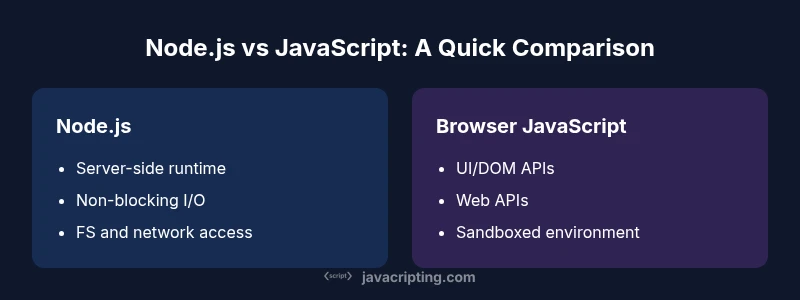
Node.js is a server-side JavaScript runtime; JavaScript is the language that runs in browsers. The choice depends on scope: server-side APIs and tooling vs client-facing features. This quick comparison sets expectations and points to a detailed chart for nuanced decisions.
Understanding the Core Difference\n\nNode.js and JavaScript occupy different roles in the modern web. JavaScript is the universal language of the web, running in browsers to create interactive experiences. Node.js, by contrast, is a server-side runtime that lets JavaScript execute outside the browser, enabling servers, tooling, and automation. This distinction matters for project scoping, team skill sets, and deployment strategies. According to JavaScripting, the core difference is not the syntax but the runtime and API surface you can rely on. In practice, when you see code that uses browser APIs like document or window, you’re looking at client-side JavaScript. When you see modules that handle filesystem access, network sockets, or process management, you’re in the Node.js world. Understanding this split helps you evaluate where to start a project and how to structure code for reuse across environments.
Node.js: The Backend Runtime\n\nNode.js is built on the V8 JavaScript engine and libuv, a cross-platform event-driven I/O library. Its non-blocking, asynchronous I/O model makes it well suited for I/O-bound workloads such as APIs, microservices, and real-time data processing. Node ships with a substantial core API (fs, http, crypto, path) and a thriving ecosystem via npm. Developers often use CommonJS modules by default, though ES modules are increasingly common. The sheer breadth of packages—from authentication to database clients—encourages rapid prototyping and iteration. However, Node’s strength in the server sphere also creates a separate environment with its own security considerations and deployment patterns. Readiness to manage servers, processes, and dependencies becomes part of the developer workflow.
JavaScript in the Browser: The Client-Side Story\n\nBrowser JavaScript focuses on user interfaces and on-page behavior. It has direct access to the DOM, the browser’s storage facilities, and Web APIs for networking (fetch), cryptography, graphics (Canvas/WebGL), and user input. The browser sandbox imposes security restrictions that prevent filesystem access or raw network sockets, which keeps users safe but also constrains what the code can do without server support. Modern JavaScript in the browser supports modules (ESM), asynchronous programming (Promise, async/await), and a vibrant ecosystem of UI frameworks, state management libraries, and tooling. The browser environment is highly heterogeneous across devices, which makes testing and performance tuning essential for UX stability.
Execution Model: Event Loop, Concurrency, and Async\n\nBoth environments share the same language and a similar async core, but their execution models differ in scope. The event loop in Node.js handles I/O without blocking the event thread, enabling scalable backends under load. In the browser, the event loop drives UI responsiveness; long-running work should be offloaded to Web Workers to avoid freezing the UI. Promises and async/await unify asynchronous code across environments, but the surrounding APIs shape how you structure concurrency. In Node.js, you often rely on non-blocking I/O with callbacks wrapped as promises. In browsers, you coordinate network calls, user interactions, and rendering to preserve a smooth experience.
APIs and Tooling: What You Can Use in Each Context\n\nNode.js exposes filesystem access, child processes, networking, and OS-level utilities. It’s ideal for building REST APIs, CLI tools, and microservices. The npm ecosystem accelerates development with libraries for databases, authentication, and deployment. Browser JavaScript relies on Web APIs: DOM manipulation, fetch for HTTP, Web Storage, IndexedDB, WebSockets, and WebCrypto. Bundlers, transpilers, and linting tools help manage cross-environment code. Cross-environment tooling like Babel or TypeScript is common to share logic while respecting runtime constraints. The decision to use Node.js or browser APIs often hinges on where the code must execute and which APIs it must access.
Performance Considerations: When Speed Matters\n\nPerformance is context-specific. Node.js shines in handling high-throughput I/O, concurrent requests, and real-time data streams, especially when combined with clustering or worker threads. Browser performance hinges on rendering efficiency, script execution time, and network latency to deliver assets. For CPU-intensive tasks, both environments may require offloading work to workers or services. Practical optimizations include minimizing synchronous calls, using streaming parsers, caching results, and selecting appropriate data structures. Monitoring tools and profiling help you identify bottlenecks unique to each environment.
Ecosystem and Learning Curve: Guidance for Teams\n\nThe Node.js ecosystem is vast, with a large portion of server-side tooling and back-end libraries. JavaScripting analysis shows broad adoption across startups and enterprise projects, driven by the desire to use a single language on the backend. For front-end work, browser-based JavaScript remains essential, with a strong emphasis on UI frameworks and type-safe tooling.Teams starting fresh should learn core language features (async/await, closures, modules) and then specialize in the environment that best matches their target projects. Cross-training between client and server roles can be powerful, but avoid trying to force a single API surface to cover all capabilities. Code sharing is valuable, but API boundaries must reflect runtime realities.
Security and Best Practices Across Environments\n\nSecurity practices diverge by environment. Node.js requires careful handling of filesystem, network access, and process permissions, along with dependency management and supply-chain security. Browser JavaScript emphasizes protecting against XSS, CSRF, and insecure data storage, while relying on the browser’s same-origin policies and Content Security Policy. A shared strategy is to adopt strict input validation, principle of least privilege, and automated security testing. Keep dependencies up to date, use environment-specific configurations, and implement robust error handling and logging in both domains.
Common Scenarios: Frontend, Backend, and Full-Stack\n\nFront-end development centers on UI interactivity and user experience, using client-side JavaScript and frameworks like React or Vue. Backend development leverages Node.js for APIs, data processing, and integration services. Full-stack projects combine both worlds, often within monorepos or orchestrated microservices. In many teams, the most effective approach is to define clear interfaces between client code and back-end services, share validation and data models where possible, and adopt a cohesive testing strategy across environments.
Practical Decision Framework: A Step-by-Step Checklist\n\n- Define the project scope: UI-heavy vs API-centric vs hybrid.\n- List required APIs: filesystem access, database drivers, HTTP endpoints, or UI APIs.\n- Consider deployment: browser-only deliverables vs server-hosted services.\n- Evaluate team strengths: browser-centric, Node.js back-end, or both.\n- Choose tooling: bundlers for web assets; npm for server-side packages; TypeScript for safer code across environments.\n- Plan for shared code where practical but respect runtime boundaries.\n- Set performance targets and monitoring plans for both sides of the stack.
Summary of Key Tradeoffs and Decisions\n\nChoosing between Node.js and browser JavaScript is less about which language and more about where code runs and which APIs it must access. Node.js unlocks server-side capabilities and a rich package ecosystem, while browser JavaScript powers interactive UI and client-side logic. The most successful projects often blend both environments with careful boundaries, shared data models, and clear deployment strategies.
Glossary of Key Terms\n\n- Node.js: A server-side JavaScript runtime built on V8.\n- ES Modules: A standard module system supported in modern browsers and Node.js with configuration.\n- CommonJS: A module format historically used by Node.js.\n- Web APIs: Browser-provided interfaces for DOM, storage, networking, and more.
Comparison
| Feature | Node.js | JavaScript (Browser) |
|---|---|---|
| Runtime environment | Server-side runtime (outside browser) | Client-side in browser |
| Primary use | APIs, back-end services, CLI tools | UI logic, interactive pages, front-end apps |
| Module system | CommonJS/ESM in Node.js | ESM in modern browsers (with bundling as needed) |
| Asynchronous I/O | Non-blocking I/O via libuv/event loop | Async APIs via Web APIs and event loop |
| APIs access | fs, net, child_process, os | DOM, Fetch, Web Storage, IndexedDB, Web Crypto |
| Typical deployment | Server environments, cloud runtimes | Client devices and browsers |
| Performance focus | I/O-bound backends, streaming, real-time APIs | Rendering speed, smooth UX, and network performance |
| Learning curve | Backend concepts, servers, deployment pipelines | UI patterns, browser APIs, tooling |
| Best for | Back-end services, APIs, CLI tools | Front-end apps, UI-rich experiences |
Benefits
- Promotes a unified language across client and server for full-stack teams
- Access to a huge npm ecosystem and rapid prototyping
- Non-blocking I/O in Node.js enables scalable backends
- Browser-based JavaScript enables rich UIs without plugin dependencies
The Bad
- Browser JavaScript is sandboxed and lacks filesystem/OS access
- Node.js is not a browser, so it can't render UI directly and may require tooling
- Learning curve when moving between browser APIs and Node.js APIs
Node.js dominates server-side workloads; JavaScript in the browser governs UI. For most modern apps, use Node.js for the backend and browser JavaScript for the frontend, aiming for a cohesive, full-stack strategy.
The JavaScripting team recommends pairing Node.js for server tasks with client-side JavaScript for UI, ensuring clear API boundaries and effective collaboration between backend and frontend teams.
Questions & Answers
What is the primary difference between Node.js and JavaScript?
Node.js is a server-side runtime for JavaScript, while JavaScript is the language that runs in browsers. The runtime determines available APIs and deployment targets.
Node.js runs on the server; browser JavaScript runs in the client.
Can I run Node.js in the browser?
No. Node.js relies on server-side APIs and the host OS, which browsers restrict. Use browser JavaScript for UI tasks and services that run in the browser.
Node.js can’t run in a browser.
Which is better for a full-stack project?
Use both: browser JavaScript for UI and Node.js for backend APIs. Share data models and validation where appropriate, but design interfaces to respect each environment.
Use both sides together for a full-stack app.
What about ES modules and CommonJS in Node.js?
Node.js supports both CommonJS and ES modules. ES modules are standard in the browser; choose based on project needs and tooling.
Node supports both module formats.
Does browser compatibility affect differences?
Yes. Browsers vary in feature support, while Node.js has a stable server-facing API surface. Use transpilation and polyfills to smooth gaps.
Browser differences matter, Node.js API is more uniform.
How should I decide between Node.js and browser JavaScript?
Assess where code runs, which APIs you need access to, and whether you need server-side processing or client-side UX. Use a framework that supports both where possible.
Think about where the code runs and what APIs you need.
What to Remember
- Clarify where code runs before starting a project
- Use Node.js for server-side logic and tooling
- Rely on browser JavaScript for UI/UX and client features
- Adopt shared data models but respect environment APIs
- Leverage async/await to manage concurrency across environments