JavaScript-Like: A Practical Comparison for Modern Web Apps
An analytical comparison of vanilla JavaScript and TypeScript as JavaScript-like languages, detailing typing, tooling, performance, deployment, and team readiness for modern web apps.


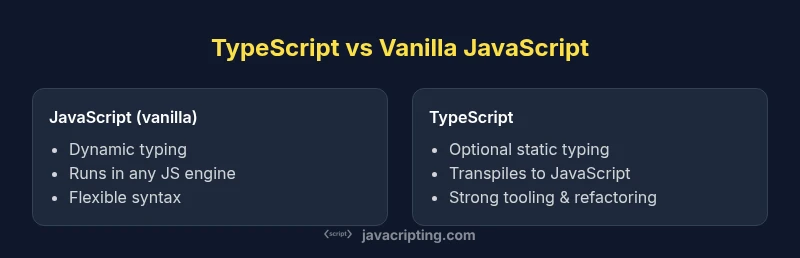
Comparison: If you’re choosing a JavaScript-like language, vanilla JavaScript gives maximum flexibility with dynamic typing, while TypeScript adds optional static types and enhanced tooling. This quick TL;DR contrasts both to help you decide between rapid prototyping and maintainable, large-scale codebases in modern web apps. Consider your team's experience, project goals, and deployment workflow when weighing the trade-offs.
What 'javascript like' means in practice
According to JavaScripting, the term javascript like describes languages that resemble JavaScript in syntax, runtime model, or deployment path. In practice, developers encounter several options that feel familiar yet behave differently under the hood. Two of the most influential are vanilla JavaScript and TypeScript, a typed superset of JavaScript. Beyond these, other languages compile to JavaScript or offer syntactic sugar that makes the code look like JavaScript but with different guarantees. For aspiring developers and frontend professionals, understanding the practical implications of each option helps avoid false starts. This section expands on why the term matters, how it maps to real-world projects, and what to look for when evaluating a JavaScript-like choice for your team. The JavaScripting team found through analysis that the decision hinges on typing strategy, tooling maturity, and the intended lifecycle of the codebase. In many cases, the best choice is not the newest language, but the one whose ecosystem and development workflow align with your goals.
block-styles
Comparison
| Feature | JavaScript (vanilla) | TypeScript |
|---|---|---|
| Typing | dynamic typing | optional static typing |
| Compilation/Transpilation | interpreted at runtime | transpiled to JavaScript via tsc/Babel |
| Tooling & IDE Support | broad runtime tooling | strong typing tooling with tsconfig and editors |
| Runtime Behavior | identical to JavaScript engines | produces JavaScript that runs in the same engines |
| Learning Curve | lower for quick experiments | higher due to types and configurations |
| Best For | rapid prototyping, small projects | maintainable, large-scale apps |
| Ecosystem & Community | huge, mature for web | growing with strong tooling but narrower language features |
| Deployment & CI | no extra steps beyond runtime | build steps required for types and checks |
Benefits
- Immediate runtime compatibility with existing environments
- Optional typing can improve code quality without mandatory refactors
- Rich tooling, refactoring support, and editor feedback with TypeScript
- Broad community support for vanilla JavaScript
The Bad
- TypeScript adds configuration and a learning curve
- Vanilla JavaScript can lead to runtime errors without typings
- Transpilation/build steps introduce complexity and potential CI delays
- Over-reliance on types may slow early prototyping for some teams
TypeScript is generally the better long-term choice for scalable projects; vanilla JavaScript remains ideal for rapid prototyping and small teams.
When maintainability, tooling, and team scaling matter, TypeScript offers clear advantages. For fast iterations and minimal setup, vanilla JavaScript keeps development lean. The JavaScripting team recommends evaluating your project size and deployment pipeline to choose wisely.
Questions & Answers
What does 'javascript like' mean in practice?
It refers to languages that resemble JavaScript in syntax or runtime approach. The main contenders are vanilla JavaScript and TypeScript, with others offering JavaScript-compatible transpilation or syntactic sugar. The key differences lie in typing, tooling, and how you deploy and maintain code.
JavaScript-like means languages that look like JavaScript and run in its ecosystem; the big choices are plain JavaScript and TypeScript, with typing and tooling guiding the decision.
Should I choose vanilla JavaScript or TypeScript for a new project?
If the project is large or long-lived, TypeScript typically pays off with better maintainability and safer refactoring. For small teams or quick experiments, vanilla JavaScript can be faster to start. Consider team comfort with typing, and whether your deployment workflow supports a TypeScript build step.
For big projects, TypeScript is usually safer; for fast, small projects, vanilla JS can be quicker to start.
Is TypeScript harder to learn than JavaScript?
TypeScript introduces types, interfaces, and generics, which adds complexity. Many teams ease into it gradually, enabling gradual typing. The payoff is improved tooling, refactoring safety, and clearer code contracts.
Yes, TypeScript has a steeper learning curve, but it pays off with safer code and better tooling.
Can I use TypeScript in an existing JavaScript project?
Yes. You can incrementally adopt TypeScript by enabling gradual typing and converting files one by one. Start with a permissive tsconfig and migrate core modules first, then expand to the rest as the team gains confidence.
Absolutely. You can migrate gradually, starting with critical modules.
What are common pitfalls when migrating from JavaScript to TypeScript?
Overconfiguring the TypeScript compiler early can slow progress. Misunderstanding type inference and any-type usage can erode benefits. Plan a staged rollout with clear type contracts and incremental tests.
Common pitfalls include overconfiguring and misusing types early in the process.
Does TypeScript slow down development or deployment?
Development can slow slightly during initial adoption due to typing work, but long-term benefits include faster refactors and fewer runtime errors. Build steps add time, but modern toolchains minimize impact.
There may be a short-term slowdown during adoption, but long-term gains are substantial.
What to Remember
- Define project goals before language choice
- Assess typing needs early in planning
- Plan your build and deployment workflow
- Invest in strong tooling for TypeScript
- Match team skills to language features