Difference Between TypeScript and JavaScript: An Analytical Comparison
Explore the difference between TypeScript and JavaScript, covering typing, tooling, learning curves, and practical scenarios for scalable apps and rapid prototyping.


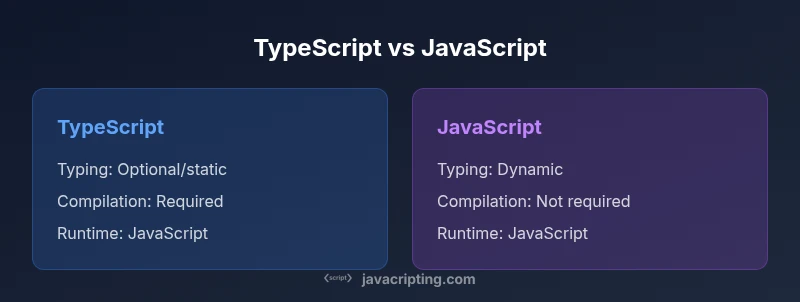
Difference between TypeScript and JavaScript hinges on typing and tooling. TypeScript adds optional static typing, interfaces, and generics on top of JavaScript, compiling to plain JS for execution. JavaScript remains dynamic and flexible, running directly in browsers and Node without a compile step. This quick answer frames the core distinction and its practical implications for developers.
What TypeScript Adds to JavaScript
According to JavaScripting, the difference between TypeScript and JavaScript is not that one language is fundamentally different, but that TypeScript adds a layer of static typing and developer-friendly tooling on top of JavaScript. This combination helps catch errors during development, improve code readability, and enable smarter editor features like autocompletion and refactoring suggestions. For teams, this means more predictable behavior in large codebases while preserving the runtime compatibility of plain JavaScript. The rest of this article compares the two approaches across key dimensions such as typing, tooling, and project suitability.
Core Typing Features: Types, Interfaces, and Generics
TypeScript introduces explicit types, interfaces, type aliases, and generics that allow developers to express intent at the language level. In practice, you can declare variables as string or number, define object shapes with interfaces, and write functions that are generic over a range of types. This explicitness reduces a class of runtime errors and makes large codebases easier to navigate. The same TypeScript source compiles down to valid JavaScript, so there is no runtime difference in environments that understand JavaScript. Importantly, types are erased during compilation, so the emitted code remains compatible with plain JS.
Type Inference and Optional Typing
TypeScript supports type inference, which means you often get the benefits of typing without writing everything explicitly. You can annotate only where necessary, while the compiler fills in the rest. Optional typing lets teams adopt TS incrementally, starting with a few files or modules and expanding over time. This pragmatism makes it possible to introduce stronger typing without a full rewrite. But care is needed: incomplete typings or third-party libraries without good type definitions can reintroduce the very bugs you intended to prevent.
Tooling and Compilation: How TypeScript Shapes Your Build
One practical difference between TypeScript and JavaScript is the build step. TypeScript code must be compiled to JavaScript before it can run in browsers or Node. This compilation enables early error detection, rich editor integrations, and scalable refactoring. In modern workflows, you’ll typically see a tsconfig.json, linters that understand types, and bundlers that tree-shake and optimize. The JavaScript that results from the compiler is platform-compatible, so you don’t have to worry about runtime support. JavaScripting research notes that the quality of type declarations influences long-term maintenance more than most other factors.
The Runtime Reality: TypeScript in the Browser and Node
At runtime, TypeScript is just JavaScript. The type information is not present in the emitted code, so performance and memory footprints align with equivalent JavaScript. This separation means you can ship TypeScript code to users, provided your build pipeline compiles it first. For server-side Node projects, TypeScript can reduce runtime surprises by catching misuses of APIs early in the development cycle. The language choice does not alter the underlying APIs of the platform; you simply gain a safer development experience during the compile phase.
Learning Curve and Developer Experience
For beginners, JavaScript’s dynamic typing can feel familiar and forgiving, which lowers the barrier to entry. TypeScript introduces new concepts—static types, interfaces, and generics—that require a mental model shift. However, editors with powerful type-aware features can substantially accelerate learning, especially when you practice writing types that model real-world data. As teams grow, the long-term productivity gains from better tooling often outweigh the upfront effort required to learn the type system.
Migration Strategies: Gradual Adoption and Best Practices
Many teams migrate gradually rather than rewriting existing codebases. Start by enabling TypeScript in new modules or pages, then gradually annotate existing code and replace JS files with TS equivalents. Some projects use declaration files (.d.ts) to describe the shape of untyped libraries, while others ship JS + TS in parallel and choose how aggressively to enforce types. Establish guidelines for naming conventions, typing strategies, and how to handle third-party libraries to avoid silent type mismatches.
Practical Scenarios: When to Pick TS vs JavaScript
Small prototyping projects often benefit from JavaScript’s speed and simplicity, while enterprise-grade apps tend to gain from TypeScript’s predictability. If you work with a large frontend framework (React, Angular, Vue), TS often improves maintainability, reduces bugs, and speeds onboarding of new developers. For teams with strong tooling needs or strict code-quality requirements, TypeScript integrates well with CI pipelines and code review processes. In short, context matters: consider project size, team skill, and maintenance expectations when choosing.
Common Myths and Misconceptions
Some developers believe TypeScript is slower to run or that it replaces JavaScript. In reality, TypeScript does not affect runtime performance; it only changes the development experience and build process. Others fear TS imposes an unmanageable amount of boilerplate. In practice, you can start with minimal types and gradually increase coverage as the project matures. Finally, the belief that TS is required for all new projects is overstated—the best choice depends on goals and constraints.
Quick-Start Guide: Using TypeScript with Existing JS Projects
Create a tsconfig.json and install the TypeScript compiler in your project. Begin by renaming one or two files to .ts and add basic type annotations where helpful. Configure your bundler (Webpack, Vite, or esbuild) to handle TypeScript, then gradually enable stricter checks. Use DefinitelyTyped for library typings and consider ambient declarations for libraries without types. Over time, your codebase will reach a balance between safety and ergonomics.
Ecosystem, Standards, and Future Outlook
TypeScript has matured into a stable tool with broad adoption in modern front-end ecosystems and back-end stacks. The language continues to evolve, guided by real-world usage and community feedback. For the broader JavaScript ecosystem, TypeScript complements the language rather than replacing it, preserving the flexibility of JavaScript while offering a path to stronger correctness guarantees. JavaScripting analysis notes that successful teams align their TS strategies with business goals, balancing speed of delivery with long-term maintainability.
Authoritative Sources
- TypeScript official docs: https://www.typescriptlang.org/docs/
- MDN Web Docs on JavaScript: https://developer.mozilla.org/en-US/docs/Web/JavaScript
- ECMA-262 JavaScript standard: https://www.ecma-international.org/publications/standards/ecma-262/
Comparison
| Feature | TypeScript | JavaScript |
|---|---|---|
| Typing system | Static typing with gradual typing and interfaces | Dynamic typing with optional typing via JSDoc |
| Compilation step | Requires TypeScript compiler (tsc) or Babel with TS preset | No compilation required; runs directly in environments that support JavaScript |
| Learning curve | Steeper due to types, generics, and TS-specific syntax | Gentler for beginners due to dynamic typing |
| Tooling maturity | Excellent type-aware tooling and editor support | Strong tooling, but type awareness varies by library typings |
| Runtime behavior | Type information is erased; emitted code is plain JS | Behaves as standard JavaScript at runtime |
| Ecosystem and typings | Rich typings ecosystem, DefinitelyTyped, strong IDE support | Vast JS ecosystem; typings are community-maintained |
| Migration effort | Can adopt gradually with TS files and declaration files | Typically easier to start, with progressive enhancements |
| Best for | Large-scale apps needing maintainability and safety | Small to medium projects prioritizing speed and simplicity |
Benefits
- Improved developer experience with autocompletion and type safety
- Early error detection reduces runtime bugs
- Better maintainability for large codebases
- Growing ecosystem and strong community support
- Gradual adoption is possible without rewriting existing code
The Bad
- Initial setup and learning curve
- Adds a build step and potential compilation delays
- Typing for loosely typed libraries can require extra work
- Can introduce boilerplate for complex type definitions
TypeScript is generally the better choice for scalable, long-term projects; JavaScript remains the best option for small scripts and rapid prototyping.
If you aim for maintainability, collaboration at scale, and strong tooling, TypeScript delivers. For fast iteration and minimal setup, JavaScript excels. The right choice depends on project size, team skills, and maintenance goals.
Questions & Answers
Is TypeScript a superset of JavaScript?
Yes. TypeScript is a superset of JavaScript that adds static typing and advanced features. Existing JavaScript code generally runs under the TypeScript compiler, and you can gradually introduce types without rewriting everything at once. TypeScript compiles to plain JavaScript, ensuring runtime compatibility.
Yes. TypeScript builds on JavaScript by adding types and features, then compiles down to JavaScript to run everywhere JavaScript runs.
Do I need a build step to use TypeScript?
Yes. TypeScript must be compiled to JavaScript before execution. This usually happens as part of your project’s build pipeline, along with bundling and linting. The build step enables type checking and can improve reliability before code reaches production.
Yes, you’ll compile TS to JS as part of your build, which gives you type checks and safer code before it runs.
Can I use TypeScript with existing JavaScript code?
Absolutely. You can start by converting new modules to TypeScript and gradually annotate existing JS. Many teams use .d.ts declaration files to describe untyped libraries, enabling a smoother mixed codebase during migration.
Yes, you can mix TS and JS and migrate modules gradually.
Is TypeScript slower at runtime?
No. TypeScript does not affect runtime performance; the emitted JavaScript runs with the same performance characteristics as hand-written JS. The difference is in the compile-time checks and potential optimizations from your build process.
TypeScript doesn’t slow down runtime performance; the impact is in development and build time.
What are common migration strategies?
Start by introducing TypeScript to new code or modules, then gradually annotate existing files. Use declaration files for untyped libraries and establish clear typing guidelines to reduce friction. A phased approach helps teams learn without disrupting delivery.
Begin with new code, gradually move existing files, and declare typings where needed.
Should beginners learn TypeScript first?
It depends on goals. Beginners can start with JavaScript to learn fundamentals, then add TypeScript for typing benefits. For those aiming at modern frontend roles, learning TypeScript early can accelerate collaboration and future maintenance.
Start with JavaScript to learn basics, then add TypeScript for typing benefits as you grow.
What to Remember
- Adopt TypeScript for large apps to improve maintainability
- Expect a build step and a learning curve with TS
- Mix TS and JS in gradual migrations when possible
- Rely on strong tooling and typings for long-term benefits