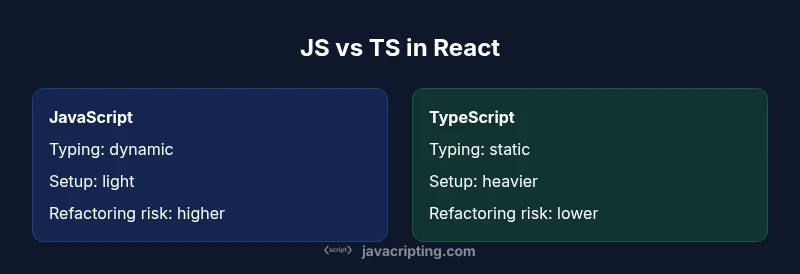
JavaScript vs TypeScript for React: A Practical Comparison
A practical comparison of JavaScript vs TypeScript for React apps, covering when to choose each, how they affect tooling, maintainability, and team collaboration.


Both JavaScript and TypeScript work with React, but TypeScript usually offers safer, more maintainable code in larger projects. JavaScript keeps iteration fast for small apps and prototypes. The best choice often depends on team size, project scope, and long-term maintenance goals. See our detailed comparison for nuance and best-practice guidance.
The core question: javascript vs typescript for react
When you search javascript vs typescript for react, you're weighing how to balance speed of iteration with long-term safety in a React project. The decision isn't only about syntax; it's about how your codebase will scale, how easily teams will onboard, and how confidently you can refactor APIs as they evolve. According to JavaScripting, the most useful way to frame the choice is to map danger spots (runtime bugs, flaky refactors) against benefits (stronger contracts, better tooling). This first block sets the stage by outlining the practical tradeoffs and how they manifest in daily work: component props, state management patterns, and integration with libraries. The React ecosystem rewards clarity and predictable behavior, and TypeScript provides a discipline that often translates into fewer surprises during maintenance. The phrase javascript vs typescript for react captures this tension, and this article will unpack it with concrete examples, real-world patterns, and actionable guidance for aspiring developers and professionals alike.
How TypeScript changes React development
TypeScript introduces static typing and an expressive type system that can model React components, props, state, and hooks with precision. In practice, you gain safer refactors, clearer contracts between modules, and better IDE feedback through autocomplete, inline documentation, and compile-time checks. As you grow a component library or maintain a large set of UI primitives, TypeScript lets you specify prop shapes, default values, and invariants that would be error-prone to enforce with plain JavaScript. The payoff is visible when you refactor components that are consumed across many places, because type errors surface during development rather than at runtime. For teams, this means a shared vocabulary for APIs and predictable integration behavior, which reduces onboarding time for new developers and lowers the cognitive load of maintaining a complex React codebase.
How JavaScript keeps React development nimble
JavaScript emphasizes flexibility and speed, which can be a powerful combination for React projects—especially for prototypes, small apps, or solo work. Without a compilation step required by TS, you can ship code faster, iterate on ideas quickly, and avoid the overhead of defining types for every surface. Modern tooling and Babel transformations close the gap, enabling modern syntax, JSX, and asynchronous patterns with minimal ceremony. For many solo developers or small teams, this agility is a powerful discriminator: fewer barriers to experimentation, and a shorter feedback loop between idea and user. However, the lack of enforced contracts means refactoring and scaling can become more brittle as the app grows.
When to choose TypeScript for React
Choosing TypeScript tends to be advantageous when: 1) your project has multiple developers, 2) you expose well-defined public APIs across components, 3) you anticipate ongoing maintenance and refactoring, or 4) you rely on a strong type ecosystem with library typings. TS shines in large codebases where long-term readability and safety matter more than initial velocity. Teams often begin with JavaScript for speed, then incrementally adopt TS by converting a subset of files or modules, and gradually expanding typing coverage. If your React project includes complex state machines, high-order component patterns, or extensive prop contracts, TypeScript becomes a natural ally.
When JavaScript might suffice for React
There are scenarios where plain JavaScript makes sense: 1) rapid prototypes or MVPs with a short lifespan, 2) small personal projects with a tiny team, 3) learning phases where the focus is on React concepts rather than type systems, or 4) environments where TypeScript support in tooling is limited. In such cases, you can still leverage React effectively, keeping your codebase light and approachable. The key is to set clear milestones for eventual typing adoption as the project matures, ensuring a smooth path forward rather than a sudden, disruptive rewrite.
Tooling, errors, and debugging in JS vs TS
Tooling plays a crucial role in the JavaScript vs TypeScript decision. TypeScript provides compile-time error checking, interfaces, and richer editor integrations that help catch mistakes early and guide refactors safely. JavaScript offers robust, mature tooling as well, with strong runtime debugging, excellent browser devtools, and a broad ecosystem. The main difference is the timing of error detection: TS uncovers type errors before you run the code, while JS often reveals bugs at runtime. For React developers, this translates into more stable dashboards and fewer surprises when you scale components, especially when props, state, and event handlers interact across modules.
Ecosystem, library typings, and compatibility
Ecosystem compatibility is a practical consideration in this decision. In TypeScript-enabled projects, most popular React libraries ship their own types or have community typings via DefinitelyTyped, which generally stay up-to-date with major releases. This reduces friction when integrating UI libraries, routing, form handling, and data-fetching utilities. In some cases, typings can lag behind library updates or require workaround typings, but the overall trend is toward richer, more reliable type information across the ecosystem. Conversely, pure JavaScript ecosystems can be faster to bootstrap but offer less safety against API drift and runtime errors over time.
Migration paths: moving from JS to TS in a React project
A practical migration plan starts small. Identify stable, self-contained modules and begin typing those components and utilities first. Use allowJs and gradually introduce tsx or ts files, then configure tsconfig paths and baseUrl for seamless imports. Adopt strict compiler options gradually (noImplicitAny, strict) to increase safety without stifling development speed. Establish typing conventions for props, events, and state, and create a minimal React component library with typed props to demonstrate benefits. Document decisions, so teams understand how to extend types as the codebase grows.
Practical setup tips: tsconfig, patterns, and React hooks typing
A solid React + TypeScript setup involves a thoughtful tsconfig, concise typings for components, and clear patterns for common hooks. Start with a tsconfig.json that enables jsx: react-jsx, isolatedModules, and noEmit: true during development. Define a shared Props interface for common components and use React.FC or explicit function components with typed props. For hooks, type state and dispatch carefully and avoid overly generic any types. Consider using utility types like Partial, Pick, and Omit to build flexible, well-typed APIs. Finally, integrate linting rules for types and props shapes to maintain consistency across the codebase.
Performance implications and build considerations
In practice, TypeScript adds a build step and type-checking overhead, but the actual runtime performance of a React app remains unaffected—the TypeScript code is transpiled to JavaScript before deployment. Build times can be optimized with incremental type-checking, faster compilers, and careful project structure. The key trade-off is between upfront developer time spent typing and the long-term payoffs of safer refactors, clearer APIs, and easier onboarding. With modern tooling, TypeScript projects scale well without imposing an excessive runtime cost.
Case studies and decision framework
To ground the discussion, consider two hypothetical teams. Team A maintains a small dashboard with a handful of reusable components and tight deadlines; they start with JavaScript to move quickly and adopt typing gradually as the UI grows. Team B operates a large design system used by multiple products; they require strict contracts, clear API definitions, and strong maintainability, so they adopt TypeScript early and enforce typing across all components. The decision framework combines project size, maintenance expectations, and team readiness with the practical realities of tooling, library typings, and the long-term benefits of safer code.
Conclusion: actionable takeaway for your project
For React projects, TypeScript generally delivers longer-term benefits in safety, maintainability, and collaboration, especially as codebases scale. JavaScript remains attractive for quick iterations and prototyping. The optimal path often blends both: start with JavaScript for speed, gradually introduce TypeScript in areas that benefit most from typing, and establish clear guidelines so the entire team can grow together.
Comparison
| Feature | JavaScript in React | TypeScript in React |
|---|---|---|
| Language type system | Dynamic typing; no compile-time type checks | Static typing with gradual typing and interfaces |
| Learning curve | Lower entry: just JavaScript fundamentals | Higher initial investment: typings and TS concepts |
| Tooling and IDE support | Mature tooling; strong runtime debugging | Richer, type-aware tooling; better auto-complete |
| Safety and refactoring | Fewer safety nets; refactors riskier | Stronger refactoring guarantees with types |
| Library typings and ecosystem | Many libs have typings; good ecosystem | Most libraries ship or rely on typings; occasional gaps |
| Runtime behavior | Same runtime, transpiled code | Same runtime, transpiled code |
| Team collaboration | Works well with small teams; flexibility | Clarifies API design; improves onboarding |
Benefits
- Stronger type safety reduces runtime bugs
- Clearer API contracts improve maintainability
- Enhanced IDE support speeds development
- Potential for gradual adoption in teams
- Better refactoring confidence in large codebases
The Bad
- Initial learning curve and setup overhead
- Possible slower compile/build times
- Occasional typings gaps or mismatch with libraries
- More boilerplate for complex types in some cases
TypeScript generally wins for React in the long run
TypeScript improves maintainability and refactoring safety, especially for larger apps and teams.
Questions & Answers
Should I learn TypeScript before starting a React project?
Not necessarily. You can start with JavaScript and add TypeScript gradually as you gain confidence. For teams, starting with JS and layering TS later is a common path.
You can start with JavaScript and add TypeScript gradually as your project grows.
Can I mix JavaScript and TypeScript in the same React project?
Yes. You can mix .js/.jsx and .ts/.tsx files in the same project. Configure tsconfig appropriately and migrate files gradually.
Yes, you can mix JS and TS files as you migrate.
Does TypeScript slow down development?
There is some initial typing overhead, but long-term tooling and safer refactors can speed development and reduce bugs.
There is initial overhead, but long-term benefits pay off.
Is TypeScript required for React in production?
No. React works with plain JavaScript; TypeScript is optional and opt-in based on team needs and project goals.
Not required; React works with plain JavaScript.
How do I configure tsconfig for a React project?
Start with jsx: react-jsx, target and module appropriate for your environment, and include/exclude patterns. Gradually enable strict mode for safer typing.
Set up tsconfig with JSX support and gradually enable strict typing.
What about Next.js or Create React App with TypeScript?
Modern tooling provides first-class TypeScript support; many templates and starters ship with TS ready to use, easing initial setup.
Yes—Next.js and CRA support TypeScript out of the box.
What to Remember
- Assess project size and maintenance goals
- Consider gradual TS adoption to balance speed and safety
- Rely on library typings and tooling to maximize benefits
- Plan for onboarding and consistent typing standards
- Expect near-zero runtime performance impact from TS