PHP vs JavaScript: A Practical Web Dev Comparison
An objective, in-depth comparison of PHP and JavaScript for modern web development. Explore use cases, design philosophies, ecosystems, and practical guidance to choose the right language for server-side rendering, client-side interactivity, and full-stack workflows.


When choosing between PHP and JavaScript, there is no one-size-fits-all answer. PHP shines in server-side rendering, templating, and mature CMS ecosystems, while JavaScript dominates client-side interactivity and supports robust full-stack patterns with Node.js. For many web apps, a PHP backend paired with a modern JavaScript frontend offers the most pragmatic architecture. This comparison explains how to weigh architecture, ecosystem maturity, and team skills to decide confidently.
Context: why php vs javascript matters in modern web development
The decision between php vs javascript is not about choosing a single tool for all tasks; it’s about aligning language capabilities with architectural goals. For traditional, server-rendered sites, PHP has long provided a reliable, battle-tested path from routing to templating. JavaScript, by contrast, began as a client-side language but has grown into a versatile platform that extends from the browser to servers with Node.js. According to JavaScripting, the most practical approach for many teams is to treat PHP as the sturdy server-side backbone and to pair it with a contemporary JavaScript frontend for a responsive, engaging user experience. This article walks through the core differences, pragmatic use cases, and how to assemble a stack that matches your project’s needs. In the context of web development, this php vs javascript comparison aims to help you decide architecture, team structure, and deployment practices without getting lost in hype.
Core Philosophies: server-side rendering vs client-side interactivity
PHP embodies a classic server-first mindset: server templates generate HTML, data access and business logic run on the server, and the browser renders what the server sends. JavaScript embodies flexibility: it powers client-side interactivity, asynchronous data fetching, and increasingly, server-side capabilities via Node.js. The php vs javascript debate often centers on where rendering occurs and how much of the user experience is driven by the client. JavaScripting analysis emphasizes that modern web apps frequently blend both worlds: PHP for stable server-side rendering and validation, with JavaScript handling dynamic UI, state management, and rich interactions. Teams should ask: where does the critical decision-making happen, and how do you maintain a cohesive development experience across layers?
Use Cases and Architectural Patterns: when to favor each path
PHP remains a strong choice for CMS-driven sites, e-commerce platforms, and scenarios where rapid server-side templating is valuable. Frameworks like Laravel and Symfony provide structured patterns, security defaults, and mature ecosystems that accelerate development. JavaScript shines in single-page applications (SPAs), real-time features, and where a unified language across the stack reduces context switching. The php vs javascript lens helps teams design architectures that minimize latency, improve maintainability, and align with existing skills. A typical pattern is PHP handling server-side rendering and API endpoints, while JavaScript powers the client interface and progressive enhancement. When data must flow quickly between client and server, REST or GraphQL APIs become the glue in both worlds.
Language Design and Typing: dynamic by design, with modern safety nets
PHP is dynamically typed but has introduced typing declarations and strict mode options in recent versions, which helps enforce contracts at the boundaries of your code. JavaScript is famously dynamic, with optional type systems via TypeScript or Flow that developers increasingly adopt to gain compile-time checks without sacrificing JavaScript’s flexibility. The php vs javascript decision here often comes down to whether your team benefits from stronger type guarantees, or prefers rapid iteration with looser typing. In practice, many teams adopt PHP for server logic and data integrity, while using TypeScript on the frontend to catch errors before they reach users. This hybrid approach can offer both speed and safety.
Runtime Environments and Performance Considerations: where and how code runs
PHP executes on the server, producing HTML or data responses that the browser consumes. JavaScript runs in the browser, enabling dynamic UI and client-side logic; with Node.js, JavaScript can also run on the server, enabling a full-stack JavaScript approach. Performance is less about the language in isolation and more about architecture, caching, database access, and how well you optimize IO and network latencies. In practice, the php vs javascript comparison frequently highlights that server-side performance hinges on the server stack, configuration, and code quality, while client-side performance hinges on bundle size, rendering strategies, and efficient DOM manipulation. A balanced architecture often uses PHP for robust server functions and JS for interactive experiences.
Ecosystem, Frameworks, and Tooling: maturity vs momentum
PHP’s ecosystem includes robust frameworks (Laravel, Symfony), extensive CMS options (WordPress, Drupal), and proven hosting configurations. JavaScript’s ecosystem spans frontend frameworks (React, Vue, Angular), backend runtimes (Node.js, Deno), and modern tooling (ESM, bundlers, linting). The php vs javascript decision benefits from evaluating ecosystem maturity in your domain: if you need rapid CMS-driven pages, PHP + WordPress can be unbeatable; if you’re building a highly interactive UI or a real-time app, a JS-heavy stack with modern tooling tends to scale well. The choice should align with your deployment model, team expertise, and long-term maintenance plan.
Hiring, Career Considerations: market demand and skill overlap
Career decisions in a php vs javascript context often hinge on the project profile and local job markets. PHP developers are highly valued for CMS maintenance, e-commerce sites, and legacy systems that require reliable server-side rendering. JavaScript skills open doors to frontend roles, full-stack opportunities, and modern architectures that use Node.js for server tasks. For teams, investing in PHP for back-end stability while up-skilling to JavaScript frontend work can yield a versatile, future‑proof capability. Organizations often benefit from bilingual teams that understand how data flows from server to client and how APIs unify the stack.
Interoperability and Modern Trends: APIs, microservices, and beyond
Interoperability is central to the php vs javascript conversation. Modern apps rely on clear API contracts, microservices, and decoupled frontends. PHP-based services can expose RESTful endpoints or GraphQL, while JavaScript facilitates seamless client-side interaction and real-time features via WebSockets. The ongoing trend is to separate concerns: keep server-side rendering robust with PHP, and empower the frontend with JavaScript-driven experiences. This separation supports teams that want to evolve parts of the stack independently, adopt new frontend frameworks, and experiment with architectures like server-rendered frontend (SRF) or API-driven SPAs.
Pragmatic Guidance: how to decide in practice
Start by mapping requirements: content management needs, SEO considerations, performance targets, and team skillsets. If your project hinges on CMS-based content, PHP-backed solutions with strong templates may win early, especially with WordPress or Laravel-based sites. For highly interactive interfaces, SPAs, or real-time applications, JavaScript (on the client or server) often delivers faster time-to-interaction and richer UX. Consider a hybrid approach: PHP handles server-side tasks and data delivery, while JavaScript powers the UI and client-side logic. A pragmatic plan might be to prototype with PHP for server routing and a JS framework for UI, then evaluate performance and maintenance needs before committing to a long-term stack.
Migration Scenarios and Pragmatic Paths: evolving an existing stack
If you already have a PHP backend and want to introduce modern frontends, start by building REST or GraphQL APIs to serve data to a JS frontend. Conversely, if you’re moving from a JS-heavy stack to PHP, emphasize solid API boundaries and server-side rendering where appropriate. The goal is to minimize disruption while maximizing maintainability. In many organizations, teams adopt a polyglot approach: keep PHP for stable server tasks, introduce TypeScript on the frontend for safety, and leverage modern JS tooling to streamline development and CI/CD processes.
Comparison
| Feature | PHP | JavaScript |
|---|---|---|
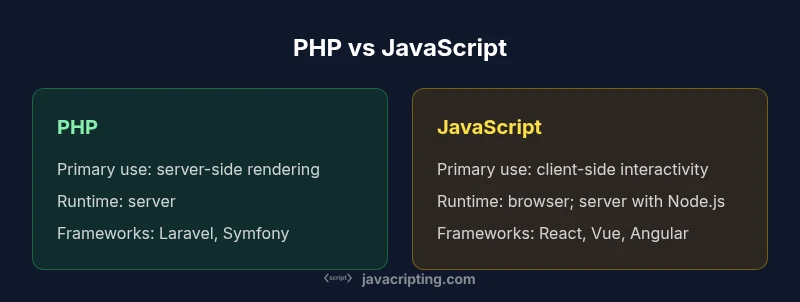
| Primary use | Server-side rendering and templating | Client-side interactivity; can also run server-side with Node.js |
| Runtime environment | Server (Apache/Nginx with PHP interpreter) | Browser (client); server via Node.js or serverless environments |
| Typing system | Dynamic typing with optional type hints and strict modes | Dynamic typing; TypeScript adds optional static typing |
| Frameworks / ecosystems | Laravel, Symfony, WordPress, Drupal | React, Vue, Angular, Svelte; Express, Next.js, NestJS |
| Hosting and deployment | Mature hosting support; straightforward deployment on shared/VPS | Broad hosting options; modern tooling for CI/CD |
| Best for | CMS-driven sites, traditional server-rendered apps, rapid backend prototyping | Interactive UIs, SPAs, real-time apps, unified full-stack with Node.js |
Benefits
- Mature server-side rendering capabilities and templates
- Extensive hosting options and battle-tested deployment patterns
- Large ecosystem of CMS, plugins, and enterprise-grade frameworks
- Clear separation of concerns when pairing with modern frontends
The Bad
- PHP’s historic inconsistencies can hinder large, multi-team projects
- JavaScript’s quirks and browser variability can complicate debugging
- Relying on a single language for full-stack (only JS) may require broader tooling investments
A pragmatic hybrid approach often wins: use PHP for reliable server-side rendering and CMS integration, and JavaScript for modern, interactive frontends or full-stack patterns with Node.js.
PHP remains a strong backbone for server tasks and CMS ecosystems. JavaScript drives UI richness and modern full-stack capabilities, making a combined PHP+JS stack a versatile, scalable choice for many teams.
Questions & Answers
Can PHP run on the client or in the browser?
No. PHP executes on the server and generates responses that the browser renders. JavaScript runs in the client and can run on the server with Node.js if desired.
PHP runs on the server; JavaScript handles client-side behavior, with Node.js enabling server-side JS if needed.
Is PHP dead or obsolete?
No. PHP remains widely used for server-side rendering, CMS platforms, and many legacy systems. Its ecosystem continues to evolve with modern features and frameworks.
PHP isn’t dead; it’s still widely used for server tasks and CMSs.
Which language is easier for beginners?
This depends on goals. PHP offers a straightforward path for server-rendered apps and CMSs, while JavaScript enables immediate frontend experimentation. Both have large learning communities and ample tutorials.
Both are beginner-friendly in different ways—PHP for server tasks, JavaScript for frontend basics.
Can you use PHP and JavaScript together in a project?
Yes. A common pattern is PHP handling server-side rendering and data APIs, while JavaScript powers the client UI and API-driven interactions.
Yes, you can use PHP on the backend and JavaScript on the frontend.
What about performance differences?
Performance depends on architecture, not language alone. Server-side PHP performance relies on server resources and code quality; JavaScript performance hinges on client rendering and efficient APIs. Proper caching and efficient data access are key.
Performance depends on your setup and how you architect the stack, not just the language.
What should a beginner learn first?
If your goal is web UIs, start with JavaScript fundamentals and modern frontend tooling; if you’re focused on server-rendered sites or CMSs, begin with PHP and a framework like Laravel.
Choose based on whether you want frontend interactivity (JavaScript) or server-side rendering (PHP).
What to Remember
- Assess the project architecture before picking a language
- Leverage PHP for server-side reliability and CMS strength
- Use JavaScript to power client-side interactivity and modern full-stack flows
- Consider a paired stack to maximize maintainability
- Invest in type safety on the frontend with TypeScript