Why JavaScript is Better: A Practical Comparison Guide
An analytical, side-by-side examination of why JavaScript remains the practical default for web development, weighing ubiquity, ecosystem, tooling, and team dynamics against TypeScript's typing and structure.


JavaScript is often the better default for client-side web development because it runs everywhere, has a vast ecosystem, and enables rapid iteration without a build bottleneck. TypeScript brings static typing, but JavaScript’s ubiquity, simple tooling, and broad talent pool often win for speed, learning, and maintaining momentum across teams in practice.
why is javascript better: Core differences between JavaScript and TypeScript
When teams weigh whether to use plain JavaScript or TypeScript, they often ask a fundamental question: why is javascript better? The short answer is: for rapid client-side development, ubiquity, and a gentle learning curve, vanilla JavaScript remains the most practical starting point. However, TypeScript can add strict typing and better tooling for large-scale projects. This section dissects the core differences that matter for decision-making, focusing on the practical implications for developers, teams, and product goals. In particular, 'why is javascript better' is often answered by considering runtime availability, ecosystem maturity, and the ease of getting up and running without a build pipeline. JavaScript code runs in every modern browser and in Node.js, which means you can ship features quickly without waiting on a compiler or configuration. This is the first-hand reason why many projects choose JavaScript as their default language, especially when speed of iteration and a broad talent pool are priorities.
Core language traits and their practical impact
A practical lens on language design shows how JavaScript’s core traits translate to real-world outcomes. Dynamic typing offers flexibility for quick experimentation, while prototypal inheritance enables elegant composition patterns. Functions are first-class citizens, which makes callbacks, higher-order utilities, and functional patterns natural and accessible. For teams focused on delivering user-facing features rapidly, these traits reduce friction during initial iterations. In contrast, TypeScript introduces static typing on top of JavaScript, which improves predictability and refactor safety in the long run. The trade-off is a slightly steeper onboarding curve and an extra build step. Teams should weigh whether the short-term speed of JS aligns with their longer-term maintenance goals.
Ecosystem breadth and runtime ubiquity
JavaScript’s ecosystem is arguably the most important factor in its practicality. Every major browser implements a JS engine, and Node.js extends the same language to the server. This universality means you can prototype, test, and deploy features without learning a new runtime. The ecosystem spans frameworks, libraries, tooling, and educational resources that cover almost any problem domain—UI, data processing, automation, and scripting. TypeScript sits atop this ecosystem by compiling to JavaScript, which means you still depend on the JavaScript runtime, but you must manage types and the compile step as part of your workflow. For teams prioritizing broad access to talent and rapid on-ramp, JavaScript’s ecosystem advantage is hard to beat.
Learning curve and team dynamics
For newcomers, JavaScript’s learning curve is gentler because you can start coding with minimal setup. The mental model is more approachable, and you can begin shipping features quickly while you learn best practices. TypeScript, while powerful for large codebases, requires understanding types, generics, and the compilation step. On teams with mixed experience, JavaScript allows faster onboarding for juniors, while TypeScript can be phased in gradually through incremental adoption (e.g., adding types to new modules first). The net effect is that JavaScript supports speed and inclusivity in early stages, while TypeScript supports discipline and scale over time.
Comparison
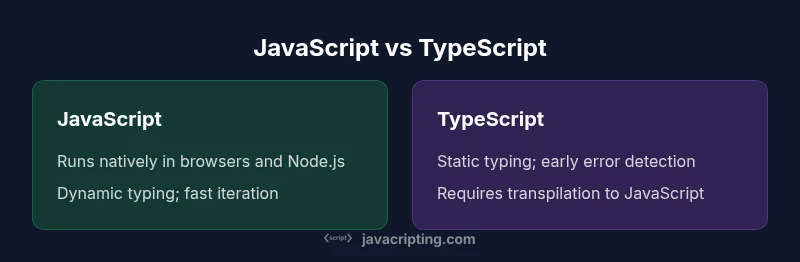
| Feature | JavaScript | TypeScript |
|---|---|---|
| Typing | Dynamic typing; flexible | Static typing; explicit |
| Build/Transpilation | Runs natively in modern engines | Requires transpilation to JavaScript |
| Learning curve | Lower barrier to entry | Steeper initial learning but clearer long-term safety |
| Runtime compatibility | Direct browser and Node.js support | Targeted JavaScript output with broader tooling |
| Tooling maturity | Extensive tooling ecosystem, quality varies | Rich tooling for types/refactoring (TS) |
| Project suitability | Rapid prototyping, client-heavy apps | Large-scale apps with strict types |
Benefits
- Broad runtime support across all major browsers and environments
- Rapid development with minimal upfront setup
- Huge ecosystem and community resources (packages, tutorials)
- Seamless sharing of code between frontend and Node.js backends
- Strong fit for rapid prototyping and MVPs
The Bad
- Lacks built-in static types by default, increasing runtime risk
- Tooling can be inconsistent across ecosystems, raising integration overhead
- Legacy quirks and loose typing require discipline to avoid bugs
JavaScript is the pragmatic default for web development, while TypeScript provides valuable safety for larger codebases.
JavaScript excels in speed of iteration and broad compatibility. TypeScript adds structure, but at the cost of a build step and a steeper learning curve. For most teams, start with JavaScript and introduce TypeScript where scale and data integrity demand it.
Questions & Answers
What are the key differences between JavaScript and TypeScript?
JavaScript is dynamically typed and runs directly in browsers and Node.js. TypeScript adds static typing and compile-time checks, then outputs JavaScript for execution. The main trade-offs are speed of iteration versus safety and maintainability in large codebases.
JavaScript is dynamic and quick to start; TypeScript brings types and safety, but you need a build step.
Can JavaScript be used outside the browser?
Yes. JavaScript runs on Node.js and other environments, allowing server-side development, scripting, and automation. This expands its use beyond client-side interactivity.
Yes, you can use JavaScript on servers with Node.js.
Is JavaScript slower than compiled languages?
Modern JavaScript engines optimize performance, and for most web tasks the difference is negligible. Language design and algorithm efficiency matter more than whether the language is compiled or interpreted at runtime.
Performance depends on the code; engines are fast, and good patterns matter more than the language itself.
Should beginners start with JavaScript?
Yes. JavaScript provides a gentle entry point to programming concepts and web development. After building fundamentals, learners can add TypeScript for larger projects.
Yes—start with JavaScript to learn the basics, then consider TypeScript as you scale.
Is TypeScript worth learning?
TypeScript is valuable for larger teams or projects with complex data models. It improves maintainability and refactoring confidence, but adds a learning curve and build requirements.
TypeScript helps with scale, especially in bigger teams, but isn’t always needed at the start.
What to Remember
- Start with JavaScript to learn core browser APIs
- Use TypeScript where project size or data schemas justify it
- Prefer consistent tooling and patterns for maintainability
- Evaluate language choice by delivery speed and defect rates, not just features
- Adopt a mixed stack: JavaScript core with TypeScript in critical modules